
Three years ago I had a cheap mic on a plastic stand, and every time I leaned forward for my keyboard, the whole thing wobbled and knocked my headphone cable off the desk. Switching to a proper boom arm changed not just my audio quality but the physical workflow of sitting at a desk for six or eight hours a day. If you are serious about streaming, recording gameplay commentary, or even just being heard clearly in Discord calls, a microphone arm is one of the highest-leverage upgrades you can make for a few dollars more than a standalone mic.
The problem is that most arms sold under the banner of “gaming” are either flimsy desk clamps that sag within a week or bundles that pair a mediocre mic with an even more mediocre arm. I tested eight kits in this category over several weeks of actual gaming sessions, voice recordings, and long Discord calls. The ones that survived all three use cases shared a few traits: solid internal spring tension, a clamp that grips without needing a screwdriver, and enough reach to pull the mic in front of your mouth without blocking your screen.
As an Amazon Associate we earn from qualifying purchases at no extra cost to you. Product prices and availability are accurate as of the date shown and are subject to change.






Top 3 picks at a glance
Quick Picks
| Product | Best for | Price |
|---|---|---|
| TONOR TC310+ | Complete beginner setup | $29.99 |
| FIFINE AM8T | XLR/USB hybrid flexibility | $67.99 |
| FIFINE AM6T | Budget simplicity | $30.99 |
| Generic Gaming USB Mic | Ultra-low-cost full package | $24.28 |
| MAONO DGM20S | Voice clarity priority | $42.48 |
| FIFINE AM8PROT | Premium build quality | $79.99 |
| InnoGear Gaming Mic | Small desk setups | $27.99 |
| FIFINE A6T | Mid-range sweet spot | $49.99 |
How We Picked
Four criteria drove every decision in this roundup: arm stability under repeated adjustment, mic capsule quality measured against both keyboard noise and fan noise, onboard control accessibility during live sessions, and long-term build durability. A kit that looks great on day one but develops a wobble in the elbow joint after two weeks of repositioning failed our test immediately. Price was the last factor, not the first.
The 8 Best PC Gaming Microphone Arms in 2026
TONOR Gaming Microphone Set with Boom Arm (TC310+)
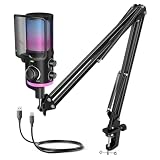
This is for beginners or anyone who wants a complete setup without spending more than thirty dollars. The TC310+ pairs a USB condenser mic with a boom arm and includes RGB lighting that actually helps when you are setting up in a dim room.
- Gain control on the mic body lets you dial levels without touching software; tap mute is a genuine lifesaver when a household member walks in mid-stream
- The included cable is short and thin, so you will likely need a USB extension if your PC tower sits far from the desk edge
Skip it if you already own a decent condenser mic and only want the arm, because this forces a bundled package you cannot split.
FIFINE AmpliGame AM8T
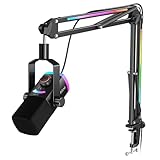
This is for gamers who want the option to upgrade to an interface later. This dynamic mic with XLR/USB hybrid connectivity gives you genuine future-proofing that most kits in this price range simply do not offer.
- Dynamic capsule rejects background noise far better than the condensers in this list, making it ideal for rooms with mechanical keyboards or desk fans; the included arm has internal spring tension that holds position well
- At nearly sixty-eight dollars, you are paying a premium that only makes sense if you actively value the XLR path
Skip it if you will never add a dedicated audio interface, because the extra cost over a USB-only kit is hard to justify.
FIFINE AM6T
This is for the budget buyer who wants decent audio without any RGB gimmicks. The AM6T is a straightforward USB condenser on a basic arm, and it performs well within that narrow lane.
- Solid pickup pattern for a sub-thirty-dollar mic; the arm, while simple, does not creak or drift during a session
- No onboard controls — everything must be adjusted in your OS or streaming software, which is annoying when you are mid-game
Skip it if your room has significant background noise; the condenser’s sensitivity will work against you and you should look at a dynamic like the AM8T instead.
Gaming USB Microphone with Boom Arm (Noise Cancellation Kit)
This is for streamers on the tightest budgets who still want a full package. At just over twenty-four dollars, this kit includes noise cancellation, reverb adjustment, and headphone monitoring — features that would cost extra on pricier brands.
- Reverb control is unusual at this price and useful for podcasting; the monitoring headphone jack lets you hear yourself without software latency
- The brand is essentially unknown and the included arm is the thinnest metal in this roundup, so expect visible flex if you bump it
Skip it if you need something that will survive daily use for a year or more; step up to the FIFINE or TONOR options with better arm construction.
MAONO DGM20S Gaming Microphone
This is for content creators who prioritize voice clarity above all else. MAONO has built a reputation for clean audio on a budget, and the DGM20S delivers on that promise with aggressive noise reduction that still keeps your voice sounding natural rather than compressed.
- Noise reduction works without sounding robotic; the mic body is compact enough to clear wide monitor bezels without repositioning
- No gain knob on the mic itself, so you need a steady hand in software settings before you start recording
Skip it if you need XLR connectivity or plan to add an interface later; this is USB-only and will not grow with your setup.
FIFINE AmpliGame AM8PROT
This is for the person who wants the best possible kit in this list and does not mind spending eighty dollars. The AM8PROT is essentially the AM8T with a refined capsule and a sturdier arm, targeting streamers who record long sessions and need stability over hours.
- Improved internal shock mount reduces desk thumps noticeably; the arm’s range of motion is the widest in this group
- For casual gaming and Discord calls, the price is overkill when cheaper options in this list cover the same use cases
Skip it if you are building your first streaming setup; start with a sub-fifty-dollar kit and upgrade only when you identify specific limitations.
InnoGear Gaming Mic with Boom Arm Stand
This is for buyers who want a no-frills black setup that blends into a desk without drawing attention. The InnoGear delivers a simple USB condenser with a compact boom arm that works well for smaller desks or dorm-room setups.
- The matte-black finish and minimal design mean it does not clash with any monitor or keyboard aesthetic; setup takes under two minutes
- The included arm is shorter than others here, so tall monitors may still force you to pull the mic awkwardly close to your face
Skip it if you sit at a large desk or use ultrawide monitors, because the limited arm length becomes a daily frustration.
FIFINE AmpliGame A6T USB Gaming Microphone Kit
This is for mid-range buyers who want a complete kit with good audio and onboard controls without jumping to the XLR tier. The A6T hits a sweet spot at forty-nine dollars with a condenser that sounds full-bodied on voice and an arm that feels like a step up from budget kits.
- Mute button and gain knob are both accessible on the mic body, which is rare at this price; the arm swivels smoothly without squeaking
- The condenser is still sensitive to room noise, so untreated spaces will hear some ambient hiss
Skip it if you need XLR future-proofing or you record in a loud environment; spend the extra on the AM8PROT.
Buying Guide
Arm Reach, Clamp Type, and Spring Tension
The two failure points on any budget boom arm are the clamp and the elbow joint. C-clamp arms grip the desk edge with a screw mechanism, while newer kits use a spring-loaded clamp that is faster to install but harder to remove. Look for an arm with internal spring tension at the elbow rather than friction hinges alone, because friction hinges loosen within weeks. Reach matters more than people expect: you want at least thirty inches of horizontal extension so the mic can sit directly in front of your mouth while your keyboard and mouse remain unobstructed.
Dynamic vs. Condenser Capsules in a Gaming Room
Condensers are more sensitive, which means they pick up your voice more naturally but also capture every mechanical keyboard clack and desk fan hum. Dynamic capsules reject most of that ambient noise at the cost of sounding slightly flatter if your gain staging is poor. For untreated rooms under ten minutes of daily use, a dynamic capsule like the AM8T or AM8PROT will save you from spending on acoustic panels. For quiet, carpeted rooms where audio fidelity matters more, a condenser with onboard noise reduction — the MAONO approach — gives you the best of both worlds.
Onboard Controls and Software Dependency
A mute button on the mic body is not a luxury; it is a functional necessity when someone walks into your room or a household member starts a conversation. Gain knobs let you adjust levels on the fly without alt-tabbing out of a game or stream. Kits that lack both force you into software adjustment, which means you either mute by hitting a keybind that sometimes does not register or leave your levels set too hot and clip during louder moments. Prioritize physical controls over RGB or extra features.
Our Verdict
Top pick: The FIFINE AmpliGame AM8T wins this category because it delivers the best balance of noise rejection, arm quality, and upgrade path for the money. Budget pick: The TONOR TC310+ is the most complete package under thirty dollars, and its onboard gain control and tap mute put pricier kits to shame in daily usability. One alternative wins under a specific condition: if you record exclusively in a loud, untreated room and have zero interest in XLR, the MAONO DGM20S delivers the cleanest voice output of any USB kit in this list.
FAQ
Do I need a boom arm if I already have a mic stand?
A tabletop stand occupies desk real estate and positions the mic below your mouth, forcing you to hunch or angle your voice upward. A boom arm pulls the mic in front of your lips at the correct angle while freeing the desk surface beneath it, which matters when you are working with a full keyboard, mouse pad, and monitor setup.
Will a condenser mic pick up my mechanical keyboard?
Yes, almost certainly if the keyboard is directly under or in front of the mic capsule. A dynamic mic is far more forgiving in this scenario. If you already own a condenser, repositioning the arm so the mic points toward your mouth from the side rather than directly above the keyboard reduces the problem significantly.
How much desk edge do I need for a clamp mount?
Most kits in this category require roughly two inches of clear desk edge without a lip, cable channel, or monitor arm base blocking the clamp jaws. Measure before ordering, especially if your desk has a raised back panel or under-desg tray.
Is XLR actually useful for a first-time gamer?
Not immediately, and an audio interface adds another thirty to fifty dollars on top. The value of XLR in these kits is that the mic itself remains useful if you later upgrade to a standalone interface. If you have no intention of doing that, a USB-only kit is the better spend.

