Nobody searches for a cheap Nintendo Switch because they want the cheapest object with a Nintendo logo on it. They want a console that boots, holds a charge, plays the eShop and cartridge library, and does not drain the games budget before the first purchase. That makes the real decision a three-way trade: which hardware family (standard Switch, OLED Model, or Switch Lite), which condition (a listing marked Renewed or one with no such label), and what actually ships in the box (Joy-Con attached, or console only). Keep one rule in mind throughout: the lowest sticker on a listing is not the lowest cost of ownership once missing accessories, storage cards, and return shipping are counted.
This guide is written for parents buying a second console for the kids, students who want one system for the dorm, and adults returning to Nintendo after years away. It compares five distinct listings using only what the titles state, so you will see model names, renewed labels, storage size and controller wording rather than invented performance numbers. Listing prices move daily, so the guide ranks by fit and risk instead of quoting figures. Use it in 2026 to narrow the field, then compare current totals yourself.
Our Top Picks
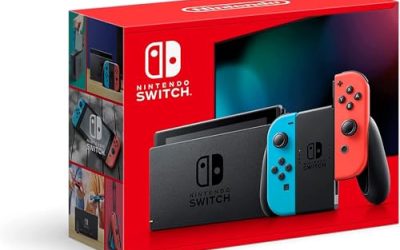
 Nintendo Switch with Neon Blue and Neon Red8.27 x 3.98 x 10.2 inches3.18 poundsCD-ROMCheck on Amazon
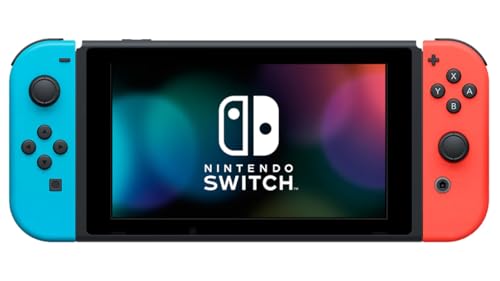
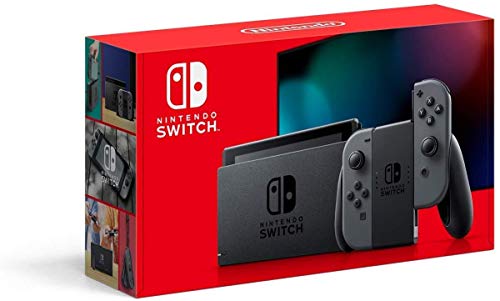


Top 3 picks at a glance

Quick Picks
As an Amazon Associate we earn from qualifying purchases at no extra cost to you.


| Product | Best for | Key spec taken from the product title |
|---|---|---|
| Switch, Neon Joy-Con (Renewed) | Families who want TV and handheld play | Handheld, tabletop and TV play modes |
| Switch OLED Model, White Joy-Con (Renewed) | Handheld players wanting the newer model | OLED Model with white Joy-Con |
| Switch, Neon Blue and Neon Red Joy-Con | Buyers avoiding the renewed label | Handheld gaming console, no Renewed tag in title |
| Switch Lite, Turquoise HDH-001 (Renewed) | Solo, portable-only players | Hand-held console, model HDH-001 |
| Switch 32GB, Black HAC-001, console only (Renewed) | Buyers who already own accessories | 32GB, console only, model HAC-001 |
How to Choose
Pick the hardware family before the listing
Three families appear in this price-conscious corner of the market. The standard Switch is the all-rounder: the first listing below states handheld, tabletop and TV modes in its title. The OLED Model is the newer revision and carries that name in the title. The Switch Lite is described as hand-held, which is the key limitation: if a household wants to play on a television or share one console between several people, a handheld-only unit is the wrong tool no matter how tempting the listing looks.
Storage and screens deserve a quick sanity check as well. A 32GB title is fine for a physical-cartridge library but tight for digital purchases, so players who buy from the eShop should plan on a memory card. Handheld-first players should weigh the display type named in the title, while TV-first players can safely ignore it.
Read the condition wording literally
Three of the five picks carry a Renewed tag, which means the unit was previously owned and refurbished by a seller. One listing has no such tag in its title, and the title does not say it is new either, so treat it as unconfirmed and read the full listing before buying. Look for a stated return window, a warranty period from the seller, and whether Joy-Con wear (stick drift is a common complaint on any used controller) is covered. A lower-cost console with no return path is rarely a bargain. Photos should show the actual unit, not a stock render, and the seller should describe cosmetic grade in plain words such as light scratches or clean screen.
Count what is in the box
A title reading console only means exactly that: the pieces needed to play on a TV or charge the unit may be absent. A listing that names Joy-Con colors suggests controllers are included, but confirm whether a dock, power adapter and HDMI cable ship with it. Buying missing pieces separately can erase the savings that made the console attractive. Use a simple checklist: console, two Joy-Con (standard and OLED), dock, charger, HDMI cable, straps. If any item is missing, price the replacement before you decide the listing is a deal, because official chargers and docks are not free and unofficial ones add their own risk.
Ignore cosmetic noise, watch the model code
Color choices change nothing about gameplay, and neither does a game bundle sticker in a photo. Model codes do matter. Titles here include HAC-001 for the standard console and HDH-001 for the Lite, and one carries the longer HAC-001(-01) style code on a related listing. Revisions can differ in details such as battery behavior, so buyers who care about runtime should look up what a given code means before paying. Budget listings cut corners mostly in documentation, not hardware: vague condition notes, missing accessories, and no warranty terms. Ask one question of every listing: if the console arrives faulty, how quickly can I send it back and who pays the shipping?
The 5 Best Options
Nintendo Switch with Neon Joy-Con (Renewed)
This is the most balanced entry for a first or second household console. The title lists handheld, tabletop and TV play modes, so one device covers couch, kitchen table and travel. The neon blue and red Joy-Con pair is the classic configuration families recognize on sight.
- Strength: all three play modes are named in the title, so it suits mixed households.
- Strength: neon Joy-Con wording implies controllers are part of the listing.
- Trade-off: Renewed means prior ownership, so the return policy matters more than the color.
Skip it if you need the newer OLED panel or want a guaranteed brand-new box. It also suits gift buyers who want a recognizable setup that works the moment a child opens it, with no extra shopping for controllers.
Nintendo Switch OLED Model with White Joy-Con (Renewed)
For buyers who will mostly play in handheld mode, the OLED Model is the version named in this listing, and the white Joy-Con pairing matches the standard retail look. It is the only OLED option among the five, which makes it the natural upgrade choice if the budget stretches a little.
- Strength: OLED Model branding in the title points to the newer hardware revision.
- Strength: white Joy-Con wording suggests a complete controller set.
- Trade-off: a Renewed OLED can still cost more than other renewed units, so compare totals.
Skip it if the cheapest possible entry matters more than the display. Players who mainly dock the console to a television gain less from the screen upgrade and may prefer the standard model.
Nintendo Switch with Neon Blue and Neon Red Joy-Con
This listing describes a handheld gaming console and does not carry a Renewed tag, which some shoppers read as a cleaner choice. The title does not say new, however, so it deserves a careful look at seller details and condition notes before purchase.
- Strength: no Renewed label in the title may appeal to buyers wary of refurbished gear.
- Strength: standard Switch with the familiar neon controllers.
- Trade-off: unconfirmed condition means you must verify it elsewhere in the listing.
Skip it if you want the lowest-risk, clearly labeled condition, or if the total ends up above the renewed alternatives. Read the seller notes closely, because the title alone leaves several questions open.
Nintendo Switch Lite, Turquoise (Renewed)
The Lite is the portable-only member of the family, labeled hand-held in the title with model code HDH-001. It fits a single player who games on the bus, in bed, or on trips and never plugs into a television.
- Strength: purpose-built hand-held design with a single-piece body.
- Strength: clear model code makes accessory and case shopping simple.
- Trade-off: the title offers no TV mode, so it is a poor shared family console.
Skip it if you want detachable controllers, couch co-op, or any TV output. Siblings who want to play together will quickly outgrow it.
Nintendo Switch 32GB Black, Console Only (Renewed)
This is the stripped-down option: a 32GB black console, model HAC-001, marked console only. It targets people who already own a dock, charger and Joy-Con, such as someone replacing a broken unit or building a second setup.
- Strength: console-only listing avoids paying for duplicate accessories.
- Strength: 32GB and model code are stated plainly in the title.
- Trade-off: 32GB fills quickly with downloads, so a microSD card may be needed.
Skip it if you are starting from nothing, because the missing pieces add cost and hassle. It is best seen as a replacement or second-unit purchase rather than a first console.
Which One Fits Your Situation
A first console for the whole family
Go with the Switch with Neon Joy-Con (Renewed). Its title is the only one naming handheld, tabletop and TV modes, which matters when siblings share the system. Add a second pair of controllers later if multiplayer nights become routine.
A commuter who plays alone
The Switch Lite in turquoise fits best. The hand-held design suits solo sessions, and skipping TV output keeps the shopping list short. A protective case and a memory card are the only extras most solo players will need.
Someone who already owns accessories
The 32GB console-only Switch makes sense because duplicate docks and Joy-Con would be wasted spend. Confirm the unit works with your existing dock.
A buyer who wants a sharper handheld screen
Choose the OLED Model with white Joy-Con (Renewed). It is the only OLED listing in the group, and handheld players benefit most from that upgrade.
Common Mistakes
- Treating cheap as the only filter and ignoring return windows, warranty length, and seller reputation, then discovering the unit has no condition notes at all.
- Buying a console-only listing and discovering the dock, charger or Joy-Con are not included.
- Choosing a Switch Lite for a household that wants TV play or multiplayer with detachable controllers.
- Assuming a listing without the Renewed tag is brand new when the title never says so.
- Forgetting storage: a 32GB console fills fast, and a microSD card adds to the real total.
Specs and Terms Explained
Renewed, refurbished, and used
Renewed generally means a seller has inspected and cleaned the unit and offers some form of guarantee, whereas plain used units carry no such promise. The difference is the return policy, so read it before the console itself.
Model families and their limits
The standard Switch and OLED Model can be played on a TV and can detach their controllers. The Lite cannot do either. A low entry cost on the Lite is attractive for a single player, but it quietly removes the TV and two-player options.
Internal storage
The original-model console in these listings carries 32GB, which fills quickly with downloaded titles. A memory card is a near-certain extra, so treat it as part of the total outlay.
Account linking
A previously owned console may still be tied to a former user. A properly reset unit should start the setup screens as new.
What to Check the Day It Arrives
- Power it on and confirm the setup process begins from the first screen.
- Insert a cartridge or load a download to confirm games run, then try the dock if included.
- Move both sticks in the system settings and watch for unexpected movement.
- Press every button and the touch screen across its whole surface.
- Charge for a normal session and see whether the battery behaves sensibly in handheld mode.
- Keep the packaging until you are sure about all of the above.
Who Should Skip These
Anyone who wants a full manufacturer warranty and a factory-sealed box should avoid renewed hardware. Buyers who plan years of heavy handheld play may also prefer a fresh unit because battery wear is hard to judge from a listing. And if your wish list is mostly newer-generation releases, check that those games actually run on the older hardware in these listings.
Setup and Care Tips
- Run all available system updates as soon as the console is online, since renewed units often ship with older software.
- Add a protective case and a screen protector, because a bargain console is only a bargain if it lasts.
- Avoid leaving it on a charger overnight constantly; battery wear is a known issue with older units.
- Keep the dock vents clear of cloth and dust so the console does not overheat during TV play.
- Store spare Joy-Con in a dry place and clean the sticks with a dry cloth rather than liquid.
One more point on value: a renewed console that lacks its dock or charger is not really the cheaper option once you replace the missing parts, so compare what each listing includes rather than the headline alone.
Related guides
- What Is The Best Budget Most Responsive Gaming Mouse Wired
- Low Latency Gaming Headphones Usb-C 2.4 Ghz Wireless
- Low Latency Gaming Headphones Usb-C Dongle 2.4 Ghz
Frequently Asked Questions
Is a Renewed Switch a safe way to save money?
It can be, provided the seller offers a clear return window and warranty. Renewed means previously owned and refurbished, so condition varies. Read the policy before the specs, and keep the order confirmation until you have played for a few weeks so any early fault can be reported quickly.
Should I buy the Lite to spend less?
Only if you will play alone and never need a television. The title calls it hand-held, so it cannot replace a standard Switch for family couch play.
What does console only mean?
It means the listing sells the console body without guaranteed extras. Verify whether a dock, charger, HDMI cable and Joy-Con are included, or budget to replace them. A missing dock is the most common surprise, since the console cannot output to a television without it.
Do model codes like HAC-001 matter?
They help you identify the hardware generation and match accessories. If two listings show different revision codes, look up what the difference means before choosing, especially for battery life. When in doubt, ask the seller to confirm the revision code in writing before you pay.