MOBA players live and die by repeatable inputs. Between last-hitting, kiting, item activations, and ability combos, a single teamfight can ask your hand for dozens of precise actions in a few seconds. The question behind “best MOBA gaming mouse” is whether you want extra thumb buttons to take pressure off the keyboard, or a lean shape that simply tracks cleanly and clicks fast. That choice changes everything about which model fits.
This guide is for players who already know they want a mouse built around MOBA or MMO play, whether that means a button-heavy side grid or a shape suited to long ranked sessions. Eight listings are compared below based on the specs in their product titles, so you can narrow the field before deciding in 2026 which trade-offs matter to your grip, your hero pool, and your desk.
Our Top Picks
 Corsair Scimitar RGB Elite Wired MMO MOBA PC1 Count (Pack of 1)6.89 x 4.49 x 0.1 inches0.3 poundsCheck on Amazon
 Razer Naga V2 HyperSpeed Wireless MMO Gaming MouseNaga V2 HyperSpeed (Mouse)4.71 x 2.96 x 1.71 inches0.2 poundsCheck on Amazon



Top 3 picks at a glance
Quick Picks
As an Amazon Associate we earn from qualifying purchases at no extra cost to you.







| Product | Best for | Key spec from title |
|---|---|---|
| Corsair Scimitar RGB Elite | Wired play with a sliding button panel | 17 programmable buttons, 18,000 DPI |
| Redragon M908 | Budget wired macro setups | 12400 DPI, remapping keys |
| Redragon M811 PRO | Cable-free play with remappable keys | Wireless, 26K DPI |
| Razer Naga V3 Pro | Maximum customization | 23 buttons, 3 swappable side plates |
| ASUS ROG Spatha X | Right-handed MOBA/MMO hybrid use | 12 buttons, 168g, up to 67Hr |
| Razer Naga V2 HyperSpeed | Longest listed battery life | 400 Hr battery, 19 buttons |
| Redragon Wireless MMO | Rechargeable side-button grid | 16 macro buttons, 70Hrs |
| Corsair IRONCLAW Wireless SE | Larger hands | 26,000 DPI, 10 buttons |
How to Choose
Decide how many buttons you will actually bind
A twelve-button side grid sounds useful until you realize most MOBAs rely on six item slots, four abilities, and a few summoner or camera keys. Count what you need under your thumb: ten to twelve buttons covers items and spells for most players, while 17 to 23 only pays off if you also play MMOs or use heavy macros. More buttons also mean more chance of accidental presses, so try the layout against your thumb length before committing.
Match the shape to your grip
Palm grip players generally want a taller body with a thumb rest, and the listings that mention ergonomic design or larger hands point in that direction. Claw and fingertip grippers do better with lighter shapes. The only weight in these titles is 168g for the ROG Spatha X, which sits on the heavier side for a wireless mouse, so lighter-handed players should weigh that against the button count.
Wired, wireless, and battery claims
Wired models remove charging from the equation entirely. Wireless models list battery life ranging from 67 hours to 400 hours, but those figures come from the listings and depend on lighting and polling settings, so treat them as ceilings. A dual-mode design that also runs on a cable is a safe fallback for tournament nights when you cannot risk a dead battery mid-game.
DPI numbers versus what matters
Headline DPI figures from 12,400 to 30,000 are mostly marketing; MOBA players typically run 800 to 3,200 DPI. Ignore the maximum and look at the sensor type, the switch brand (Omron appears on the Scimitar), and whether the software lets you store profiles on the mouse. Budget models often cut corners on sensor quality, software polish, and side-button feel, and those are the things your thumb notices every match.
The 8 Best Options
Corsair Scimitar RGB Elite
This wired model is built around a 17-button layout with an adjustable key slider, which lets you shift the side panel toward or away from your thumb. That single feature matters because thumb length varies a lot, and a fixed grid is either too far or too close for many hands. It is for players who want a deep button grid and prefer to skip battery management entirely.
- Strength: the adjustable key slider tailors thumb reach to your hand size.
- Strength: Omron switches and iCUE software support are named in the title, so profile storage is part of the package.
- Trade-off: it is wired only, so cable drag and desk clutter come with it.
Skip it if you want a light, cable-free mouse or find a dense side grid distracting.
Redragon M908
The M908 is a wired MMO-style mouse with a 12400 DPI ceiling and remappable keys, aimed at buyers who want macro capability without a premium outlay. The title highlights lag-free connection, keybinding, and an ergonomic shape, which together describe a practical first mouse for anyone moving from a basic two-button office model into dedicated MOBA play.
- Strength: remapping and macro keybinding are listed up front, so items and spells can move to the thumb.
- Strength: an ergonomic shape is named, which helps during long matches.
- Trade-off: wired only, and the DPI ceiling is lower than most wireless rivals here.
Skip it if you expect brand-level software polish or want wireless freedom.
Redragon M811 PRO
A wireless option with a 26K DPI ceiling and customizable macro keybinds. The title frames it around FPS play, but remappable keys translate directly to item and ability binds in a MOBA, and the cable-free connection frees up mousepad space for wide, sweeping hero movement and camera panning without anything tugging at your hand.
- Strength: cable-free connection with a high listed DPI figure.
- Strength: custom macro keybinds are supported through remapping keys.
- Trade-off: it is marketed to FPS players, so the button layout may feel less MOBA-focused than a side-grid design.
Skip it if you want the largest possible side-button grid.
Razer Naga V3 Pro
The most configurable listing here: 23 programmable buttons and three swappable side plates, so you can change the thumb layout for MOBA, MMO, or other genres. A HyperScroll tilt wheel adds yet more inputs. It is for players who switch between games and want one premium mouse to adapt to each, rather than buying a new device whenever their main title changes.
- Strength: swappable plates let the thumb area match the game you play.
- Strength: the tilt wheel and 23 buttons leave room for macros and camera controls.
- Trade-off: premium tier cost and a complex layout that takes time to learn.
Skip it if you only play one MOBA and want something simple.
ASUS ROG Spatha X
This right-handed, dual-mode mouse (wired or 2.4GHz) pairs 12 programmable buttons with a 19K DPI sensor and up to 67 hours of listed battery. The title explicitly names an MMO/MOBA design, and twelve buttons line up well with the item-and-spell count of most MOBAs, making it a focused choice for buyers who do not need an enormous macro grid.
- Strength: dual-mode connection gives you a wired fallback when the battery runs low.
- Strength: 12 buttons match the item-and-spell count of most MOBAs.
- Trade-off: 168g is noticeable for anyone used to lightweight mice.
Skip it if you are left-handed or prefer a featherweight shape.
Razer Naga V2 HyperSpeed
Its headline claim is a 400 hour battery, paired with 19 programmable buttons, HyperScroll technology, and a 30K optical sensor. That combination suits players who dislike charging and want a large button count without managing a cable. A battery that lasts weeks means the mouse is rarely the thing that fails before a scheduled match or scrim begins.
- Strength: the longest battery figure in this group by a wide margin.
- Strength: 19 buttons give room for items, spells, and macros.
- Trade-off: the 400 hour number is a listing claim and will shrink with heavy lighting use.
Skip it if you want a compact body or fewer buttons.
Redragon Wireless MMO
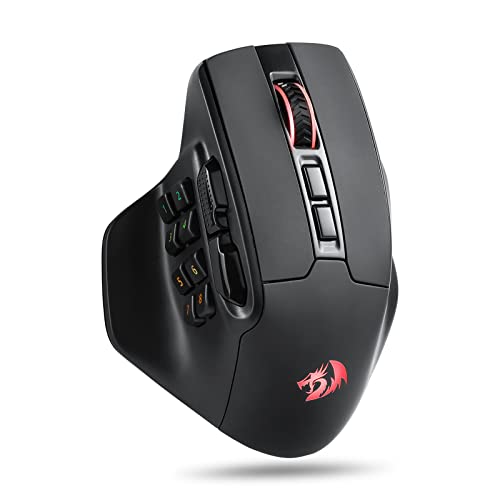
A rechargeable wireless mouse with 16 macro buttons, 12 of them on the side, a 16,000 DPI ceiling, and 70 hours listed. It targets buyers who want a big side grid at a mid-range cost. The twelve-key panel can hold every item slot and summoner spell with room left for camera or chat shortcuts, which appeals to players who like everything within thumb reach.
- Strength: a 12-button side panel covers every item slot with room to spare.
- Strength: rechargeable with a long listed runtime of 70 hours.
- Trade-off: a crowded side grid raises the risk of misclicks until muscle memory forms.
Skip it if you prefer a minimal button layout.
Corsair IRONCLAW Wireless SE
The IRONCLAW is the pick for larger hands, with an ergonomic design, 26,000 DPI, and 10 programmable buttons. The title names MOBA, FPS, and MMO use, which signals a versatile all-rounder rather than a specialist. Players with bigger palms often find standard mice cramped, and a body shaped for larger hands can reduce fatigue over a long ranked evening.
- Strength: the shape is aimed at bigger palms and a relaxed grip.
- Strength: it is wireless with a modest, manageable button count.
- Trade-off: only 10 buttons, fewer than the Naga-style models.
Skip it if you have small hands or want a large macro grid.
Which One Fits Your Situation
You main a hero with many active items
The Razer Naga V3 Pro and Corsair Scimitar RGB Elite offer the deepest button counts in the group, giving you a dedicated key for every active item and spell without leaving the mouse.
You want to spend as little as possible
The Redragon M908 is the entry-tier wired choice, with remapping and macros included. Move to the Redragon Wireless MMO if you want cable-free play at a still-moderate cost.
You play in long sessions and hate charging
The Razer Naga V2 HyperSpeed, with its 400 hour listing, is the most convenient to leave alone. The ROG Spatha X is the safer pick if you want a wired fallback built in.
You have large hands
Go with the Corsair IRONCLAW Wireless SE, which is the one listing explicitly built around bigger hands and still keeps a manageable button count. Its broader MOBA, FPS, and MMO positioning also means it will not feel wasted if you branch out to shooters later.
Common Mistakes
- Choosing the highest DPI figure instead of the layout that suits your thumb.
- Buying 17 or 23 buttons and never binding more than six.
- Ignoring weight, then discovering a 168g mouse tires your wrist during long ranked sets.
- Trusting battery hours as guaranteed rather than a ceiling that drops with lighting.
- Skipping the software check, since profile storage and macro tools decide how useful extra buttons really are.
Related guides
- What Is The Best Budget Most Responsive Gaming Mouse Wired
- Low Latency Gaming Headphones Usb-C 2.4 Ghz Wireless
- Low Latency Gaming Headphones Usb-C Dongle 2.4 Ghz
Frequently Asked Questions
Do I need an MMO mouse for MOBA games?
No. A standard mouse with two side buttons works well for most players. A side grid helps mainly if you want items and summoner spells on your thumb instead of the keyboard.
Is wireless fast enough for ranked play?
Modern wireless mice, especially 2.4GHz models, are widely used in competitive play. A dual-mode mouse like the ROG Spatha X gives a wired backup if you want extra peace of mind. Keep the receiver close to the mouse, ideally on a short extension, to avoid interference from other wireless gear on the desk.
What DPI should I use?
Most MOBA players settle between 800 and 3,200 DPI. The maximum listed figure matters far less than a stable sensor and comfortable in-game sensitivity. Pick a value that lets you cross the screen with a relaxed wrist movement, then keep it consistent across games.
Are swappable side plates worth it?
They help if you switch between genres or your hand size is unusual. If you stick to one layout, a fixed grid is simpler and cheaper. Remember that every extra moving part is another thing to learn, so many players settle on one plate and never change it.