Picture the wall behind your desk in the dark: a bright monitor, black wall, and a harsh contrast that tires your eyes by the third hour. The cure is a strip of controlled light, and this guide splits six kits into three jobs: room accents (Nanoleaf, Govee, GUPUP), screen backlighting (Maylit, HAMLITE) and one plain white strip that suits cabinets more than gaming rooms. The best strip depends on length, control and whether you want colors that change along the strip.
Our Top Picks
 Maylit 8.2 Ft RGB TV LED Backlight for8.2FT for 40''-60'' TV7.87 x 4.17 x 0.67 inches0.2 poundsCheck on Amazon

Top 3 picks at a glance
Quick comparison
As an Amazon Associate we earn from qualifying purchases at no extra cost to you.


Titles describe length, color type and control method. Anything not named there, such as lumen output, is left for you to confirm on the listing.
| Model | Key point from title | Price tier | Best for |
|---|---|---|---|
| Nanoleaf Essentials Matter Lightstrip | 16.4 ft RGBW, 300 color zones, music sync, screen mirror, Matter | Premium | Smart-home gaming rooms |
| Govee 16.4ft RGBIC LED Strip | 16.4 ft RGBIC, multiple colors on one line, Bluetooth app | Mid-range | Desk or wall effects |
| GUPUP 100 FT LED Strip | 100 ft RGB, Bluetooth app, music sync | Budget | Large rooms and ceiling runs |
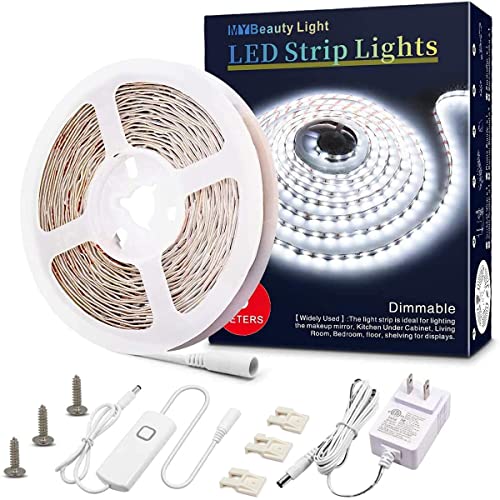
| MY BEAUTY LIGHT White LED Strip | 16.4 ft white, dimmable, 12V, kitchen and mirror wording | Budget | Cabinets, not RGB scenes |
| Maylit 8.2 Ft RGB TV Backlight | 8.2 ft RGB, 40 to 60 inch TVs, USB powered, remote | Budget | Bias lighting on mid-size TVs |
| HAMLITE TV LED Lights | 21 ft, 85 to 95 inch TVs, USB powered, easy-bending | Mid-range | Very large TV ambient light |
Kit-by-kit notes
Nanoleaf Essentials Matter Lightstrip
The only kit here whose title promises Matter support, plus Apple and Google Home, voice control, music sync and screen mirror for gaming rooms. It lists 16.4 ft, RGBW and 300 color zones; the zone wording is unusual for an RGBW strip, so confirm the real zone behavior on the listing. It targets people who want the strip to join an existing smart home.
Pros
- Matter and Apple/Google Home named in title
- Screen mirror and music sync listed
Cons
- Zone claim is unclear for an RGBW strip
- Screen mirroring likely needs extra setup
Who it’s for: Smart-home owners who want lights to follow their screen.
Govee 16.4ft RGBIC LED Strip Lights
A familiar RGBIC strip: the title says DIY multiple colors on one line, color changing, and Bluetooth app control. At 16.4 ft it reaches around a desk and up a wall, or around a TV up to roughly 72 inches, per our length chart. The title does not mention remote, music sync or Matter, so check the listing.
Pros
- RGBIC gives several colors at once
- App control named in the title
Cons
- Bluetooth range is limited to one room
- No Matter or voice wording in the title
Who it’s for: Players who want gradient effects without a smart-home setup.
GUPUP LED Lights Strip 100 FT
The title lists 100 ft, RGB, Bluetooth app control, color changing and music sync, with a Spanish phrase and party-decor wording that suggests a general home product, not a gaming one. The length is its selling point. A single color at a time is likely for plain RGB, so confirm effects on the listing. Its sheer length also means it usually ships in several rolls or sections, so check how they connect.
Pros
- Length covers an entire room perimeter
- Music sync and app control in the title
Cons
- Plain RGB, not RGBIC, per the title
- Long runs need power-supply checks
Who it’s for: Anyone wrapping a large basement or bedroom.
MY BEAUTY LIGHT White LED Strip Lights
This is a white, dimmable 12V strip for kitchen cabinets, mirrors and bedrooms. Nothing in the title mentions RGB, app control or gaming, so it is the weakest fit for this keyword. It can still work as a clean task light under a shelf or behind a desk if you want white light only. Dimmable white also avoids the color-fringing some players dislike near a monitor.
Pros
- Dimmable white light, 16.4 ft
- Simple, flexible 12V design
Cons
- No color changing or smart control
- Not aimed at gaming-room scenes
Who it’s for: People who want plain white accent light, not RGB effects.
Maylit 8.2 Ft RGB TV LED Backlight
A TV-specific kit for 40 to 60 inch sets with remote control and USB power for bias lighting, meant to cast a soft glow on the wall behind the screen rather than light the room. At 8.2 ft it traces three sides of a TV up to roughly 53 inches by our estimate, so a 55 or 60 inch screen may leave a gap. Use it behind a mid-size TV or large monitor.
Pros
- Built for TV bias lighting, USB powered
- Remote control included per title
Cons
- Short for the top of its stated TV range
- No app or music sync wording
Who it’s for: TV gamers on 40 to 50 inch sets.
HAMLITE LED Lights for TV 85-95 Inches
A 21 ft USB-powered kit for very large screens, with an easy-bending design for corners. By our estimate it reaches all four sides of an 85 inch TV and nearly all of a 95 inch. The title says nothing about RGB, app control or music sync, so check the listing for color options.
Pros
- Length fits very large TVs
- Bendable design for corners
Cons
- Control method not in the title
- Only useful with very large screens
Who it’s for: Owners of 85 inch and larger TVs.
Plan your length before you buy
The most common regret with strips is length, so measure first. A 16:9 TV works out to the sizes below, and the strip needed to trace its edges is an estimate that adds nothing for corners, connectors or slack, so add 5 to 10 percent.
| TV size | Approx. width x height | Three sides (top and two sides) | All four sides |
|---|---|---|---|
| 40 inch | 34.9 x 19.6 in | 6.2 ft | 9.1 ft |
| 55 inch | 47.9 x 27.0 in | 8.5 ft | 12.5 ft |
| 65 inch | 56.7 x 31.9 in | 10.0 ft | 14.8 ft |
| 85 inch | 74.1 x 41.7 in | 13.1 ft | 19.3 ft |
| 95 inch | 82.8 x 46.6 in | 14.7 ft | 21.6 ft |
Read against the listings: the 8.2 ft Maylit strip covers three sides of a TV up to roughly 53 inches, so on a 55 to 60 inch screen it will fall slightly short unless you leave a gap. A 16.4 ft strip (Nanoleaf, Govee, MY BEAUTY LIGHT) wraps all four sides of a TV up to about 72 inches. The 21 ft HAMLITE covers all four sides of an 85 inch and nearly all of a 95 inch. For a room, a 12 by 14 ft space has a 52 ft perimeter, so the 100 ft GUPUP spool could run the ceiling line twice, or the room plus a desk edge, with spare for corners.
How we picked these
The list comes from listing titles, published specifications, manufacturer documentation and buyer reviews, not from lab work. We checked each title for length, control method, color mode and TV-size wording, then grouped kits by job. Nobody on the team used or measured these units. Brightness, adhesive quality and cutting rules are rarely in titles, so those points say to check the listing. Price tiers are relative within the set, with no dollar figures.
What separates a good gaming-room strip from a bad one
Color modes: RGB, RGBW and RGBIC
Plain RGB strips change the whole strip to one color at a time. RGBW adds a white channel, which gives cleaner whites than mixing red, green and blue. RGBIC splits the strip into segments, which allows rainbow and gradient effects. If your room uses a lot of RGB gear, the strip is one more color source; our guide to RGB RAM for gaming PCs shows how the same sync question applies inside the case.
Control, music sync and screen mirroring
App control over Bluetooth is common and works within one room. Wi-Fi and Matter-style control, which the Nanoleaf title mentions along with Apple and Google Home, lets you run scenes by voice or on a schedule. Music sync usually relies on a phone or strip microphone. Screen mirroring, listed on the Nanoleaf, normally needs a separate camera or PC app, so read the setup requirements.
Power, brightness and adhesive
USB-powered strips like the two TV kits draw from a port on the TV or a phone charger, so check that the port stays powered when the screen is off if you want the light to stay on. Mains-powered strips can drive longer runs and brighter output. The adhesive on all of them ages in heat and dust: clean the surface with isopropyl alcohol, press firmly and give it a day before hanging weight.
Safety and setup basics
Low-voltage strips run cool, but the power adapter and any controller box do get warm, so leave them in open air instead of wrapping them in cable ties or stuffing them behind a couch. Keep connectors out of reach of pets, and do not coil unused strip tightly while powered, because heat builds in the loop. Use only the adapter supplied or one with matching voltage and amperage; mismatched adapters can dim long runs or overheat. If the strip flickers, check the connector seating before blaming the strip.
Where to place a strip near screens
Run bias lighting behind the display so the glow hits the wall, not your eyes. This is especially useful behind a fast monitor; see our 240Hz gaming monitors comparison if you are still choosing a screen.
Common mistakes with gaming-room LED strips
- Buying by total length alone. A 100 ft spool is useful only if your power supply and controller support that length.
- Using a white strip as a gaming accent. A single-color white strip suits cabinets and mirrors, not scene effects.
- Cutting before reading the cut marks. A cut in the wrong place can disable the segment.
- Pointing a bright strip at the screen. It adds glare and washes out dark scenes.
- Ignoring the sticky surface. Textured walls, fresh paint and dusty shelves all weaken adhesive; clean and dry the spot first, or mount on trim.
- Overloading one outlet. Keep long runs on a power adapter rated for the strip, and avoid daisy-chaining extra adapters.
Bottom line
For a room with smart-home control and screen-sync ambitions, start with the Nanoleaf Matter strip. For color effects on a tighter budget, the Govee RGBIC and the long GUPUP spool cover most walls. Choose Maylit or HAMLITE only when the TV is the target, matching the strip length to your screen using the chart above. The white MY BEAUTY LIGHT kit is the odd one out for gaming. Whatever you pick, plan the power outlet and cable route before peeling any adhesive, and keep a spare connector on hand for the corner you inevitably re-route.
Related guides
- What Is The Best Budget Most Responsive Gaming Mouse Wired
- Low Latency Gaming Headphones Usb-C 2.4 Ghz Wireless
- Low Latency Gaming Headphones Usb-C Dongle 2.4 Ghz
Frequently asked questions
What is the difference between RGB and RGBIC strips?
A standard RGB strip shows one color along its whole length at a time. RGBIC strips have separate control chips, so the same strip can show several colors at once, such as a gradient or chasing effect. Among these listings, the Govee title says multiple colors on one line, while the Nanoleaf lists color zones. Check the listing for details.
How long should a TV backlight strip be?
Work from the screen size. A 55 inch 16:9 TV is roughly 48 by 27 inches, so tracing all four edges needs about 12.5 feet, and three sides about 8.5 feet. Add a little for corners and slack. Longer sets like the 21 ft listing target 85 to 95 inch screens.
Will LED strips damage my wall paint?
Adhesive backing can pull paint off, especially cheap or textured paint, and removing strips quickly makes it worse. Test a small hidden spot first, warm the adhesive gently with a hair dryer on low when removing it, and consider mounting on a wood trim or shelf edge. Check the listing for adhesive and cutting details.
Can I cut these strips to length?
Many strips have marked cut points, but the titles here do not say which ones do. Cutting a strip with built-in control chips, or a battery or USB-powered TV set, can break the circuit if you cut in the wrong place. Check the listing and instructions before cutting, and keep the cut ends away from moisture.
Do LED strips help with eye strain while gaming?
Soft bias lighting behind a monitor or TV can reduce the contrast between a bright screen and a dark wall, which some players find more comfortable at night. It will not fix long sessions without breaks, and the evidence is anecdotal. Keep the strip dimmer than the screen and avoid pointing it at your eyes.