The most common reason a monitor arm, keyboard tray, or cable tray ends up back in its box is simple: it did not fit. Five minutes with a tape measure before you order prevents almost all of it. This guide covers exactly which desk dimensions to record and why each one decides whether an accessory works, so your next upgrade fits the first time.
As an Amazon Associate we earn from qualifying purchases at no extra cost to you.


Our Top Picks
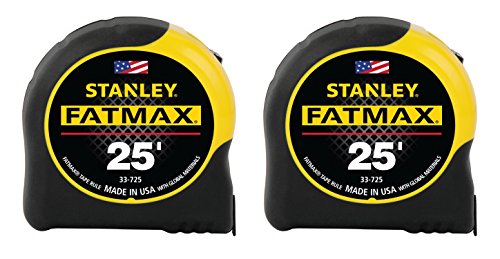 Stanley FMHT74038A FatMax 25 Foot Tape Measure 2PK7.6 m5.13 x 3.38 x 3.63 inches1.2 poundsCheck on Amazon


Top 3 picks at a glance
The measurements that matter
Edge thickness
Clamp-mounted gear, monitor arms, mic booms, headphone hangers, and clamp power strips all grip the desk edge and list a jaw range like 0.4-2.4 inches. Measure your desktop thickness at the exact edge where the clamp will sit, because some desks taper or have a raised lip.
Clear depth behind the edge
A clamp also needs unobstructed space behind the front edge. Measure from the edge back to the first obstruction, a drawer, apron, or crossbar. Monitor arms usually need 2-3 inches of clear depth; if a drawer sits right under the lip, the clamp has nowhere to go.
A quick measurement checklist
| Dimension | Why you need it | Typical use |
|---|---|---|
| Edge thickness | Clamp jaw fit | Arms, trays, strips |
| Clear depth behind edge | Clamp clearance | Monitor / mic arms |
| Surface width & depth | Footprint fit | Mats, risers, stands |
| Under-desk height to floor | Knee & tray clearance | Keyboard trays, PC mounts |
| Desktop-to-eye height | Monitor lift needed | Risers, arms |
Surface and underside space
Width and depth for flat gear
Desk mats, monitor risers, and speaker stands need surface room. Measure your usable width and depth, subtracting anything permanently in the way, so a full-desk mat or a wide riser does not overhang or crowd your monitors.
Under-desk clearance
For a keyboard tray or an under-desk PC mount, measure from the floor to the underside of the desk and note where your knees sit. You want the tray or PC holder to leave at least 24-25 inches of leg clearance, and to not collide with the desk’s own frame.
FAQ
What desk measurements do monitor arms need?
Two: the edge thickness (to match the clamp jaw, often 0.4-3.4 inches) and the clear depth behind the edge (2-3 inches with no drawer or crossbar in the way). Also confirm the top is solid enough to bear the load, since thin hollow tops can flex.
How do I measure for a desk mat or riser?
Record your usable surface width and depth, then subtract the space taken by monitor stands or anything fixed. Buy a mat or riser that fits within those numbers with a small margin, so it lies flat without curling up against a wall or monitor base.
Tools and technique
A basic tape measure covers most of this, but a cheap set of calipers makes edge-thickness readings precise, which matters when a clamp’s minimum sits close to your desk’s number. Measure twice at different points along the edge, because desks are not always perfectly uniform, and write the numbers down rather than trusting memory when you are comparing product specs later.
Photograph the underside and the back edge while you measure. A photo of the desk frame, any crossbars, and where the apron sits helps you sanity-check clearance against product images when you shop. It is far easier to compare a listing’s clamp diagram to a picture of your actual desk than to reconstruct it from memory after the fact.
Account for what is already there
Subtract space taken by existing gear. If a monitor stand’s base occupies the back six inches, your effective depth for a riser or mat shrinks by that much. Note the footprint of anything permanent, speakers, a dock, a lamp base, so a new accessory fits alongside them instead of forcing a rearrange you did not plan for.
Bottom line
Before buying, record five numbers: edge thickness, clear depth behind the edge, surface width and depth, under-desk height to the floor, and desktop-to-eye height. Match each to the accessory’s spec and you eliminate almost every fit problem, from a clamp that will not close to a mat that overhangs the edge. Five minutes of measuring saves a return trip every time.
Related guides
- Best Cheap Tablets for Kids: Eight Listings Sorted by Age, Controls and Storage: 7 Compared (2026)
- Best Ultrawide Gaming Monitors: Six Screens Sized Against Real Desks: 6 Compared (2026)
- Best Game Room Neon Lights: Ten Signs and Icon Lamps Compared: 10 Compared (2026)
- 10 Best 75% Hot-Swappable Mechanical Keyboards (October 2026)
More from Amazon
Programs that pair well with the guide above. Offers and eligibility are set by Amazon and may change.
Free shipping on eligible items, Prime Video and more. Eligible new members can start with a free trial.
Start a Prime free trialAd-free music streaming. Eligible new subscribers can start with a free trial.
Try Music Unlimited freeA Prime membership for ages 18-24 with a trial period. Eligibility is set by Amazon.
See Prime for Young AdultsAudiobooks and podcasts to listen to on the go. Eligible new members can start with a free trial.
Try Audible freeAs an Amazon Associate we earn from qualifying purchases.