
Top 3 picks at a glance
The Short Answer
For a standard 6 outlet power strip, you need a cable tray that is at least 12 to 16 inches long, 4 to 6 inches wide, and 3 to 6 inches deep. This size gives you enough room to hold the strip itself plus the extra length and bulk of plugged-in adapters, without cramming cords against each other.
Most 6 outlet power strips measure between 10 and 12 inches long, 1.5 to 2.5 inches wide, and 1 to 1.5 inches tall. A tray that matches the strip exactly will not work once you plug anything in. Oversized wall warts, right-angle plugs, and coiled excess cord all need an extra 2 to 4 inches of clearance on each end to stay cool and stay organized.
As an Amazon Associate we earn from qualifying purchases at no extra cost to you. Product prices and availability are accurate as of the date shown and are subject to change.


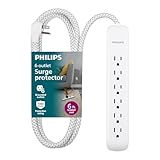

If you want a no-guess option that fits nearly every residential 6 outlet strip in 2026, choose a tray around 16 inches long x 6 inches wide x 6 inches deep. That footprint holds heavy-duty metal strips, surge protectors with USB ports, and braided-cord models with room left for cable slack.
Standard Sizes
Cable trays are not sized by outlet count, they are sized by interior length, width, and height. Use the interior dimensions of the tray, not the exterior, when you compare to your power strip. Below are the common tray sizes you will see when shopping for under-desk and wall-mounted organization, with conversions for both inches and centimeters.
| Tray Size Category | Interior Dimensions (Inches) | Interior Dimensions (cm) | Best For | Typical Weight Capacity |
|---|---|---|---|---|
| Compact / Small | 10 – 12 L x 3 – 4 W x 2.5 – 3.5 H | 25.4 – 30.5 L x 7.6 – 10.2 W x 6.4 – 8.9 H | Slim 6 outlet strips with flat plugs and no USB bricks | 5 – 8 lbs |
| Standard / Medium | 14 – 16 L x 4 – 5 W x 3.5 – 4.5 H | 35.6 – 40.6 L x 10.2 – 12.7 W x 8.9 – 11.4 H | Most 6 outlet surge protectors and power strips | 8 – 15 lbs |
| Large / Deep | 16 – 17 L x 6 – 6.5 W x 5.5 – 6 H | 40.6 – 43.2 L x 15.2 – 16.5 W x 14.0 – 15.2 H | Heavy-duty metal strips, strips with large adapters, excess cord storage | 15 – 22 lbs |
| Extra Long | 20 – 24 L x 4 – 6 W x 4 – 6 H | 50.8 – 61.0 L x 10.2 – 15.2 W x 10.2 – 15.2 H | 6 outlet strip plus router, charger blocks, or multiple cords | 15 – 25 lbs |
For reference, here is how common 6 outlet power strips compare:
- Heavy-duty metal power strip with switch (6FT cord, 15A/1875W): Typically 11 to 12 inches long x 2 to 2.2 inches wide x 1.3 to 1.5 inches tall. Housing is steel, so plan for higher weight (around 1.2 to 1.8 lbs before plugging anything in) and allow ventilation on all sides. Retail price typically ranges from $18 to $25.
- Surge protector with 6 outlets and 3 USB ports (6FT cord, white plastic housing): Typically 10 to 11 inches long x 2.4 to 3 inches wide x 1.1 to 1.3 inches tall. The wider body and USB section needs a tray at least 4 inches wide. Retail price typically ranges from $11 to $16.
- Braided extension cord surge protector with flat plug (6FT cord): Typically 10.5 to 11.5 inches long x 2 to 2.5 inches wide x 1 to 1.2 inches tall. The flat plug saves depth inside the tray but the braided cord is stiffer and needs a wider radius bend. Retail price typically ranges from $9 to $15.
A practical rule is to add 3 to 4 inches to the length of your strip and 2 to 3 inches to its width to find your ideal tray interior. For example, an 11-inch strip needs a 14 to 15-inch tray for comfortable fit, and a 2.5-inch-wide strip needs a 4.5 to 5.5-inch-wide tray once plugs extend outward.
Depth matters more than most buyers expect. A 2.5-inch-deep tray will hide the strip but not the plugs. A 4 to 6-inch-deep tray will fully conceal standard plugs and let you loop 1 to 2 feet of extra cord underneath without the tray looking overstuffed.
How to Measure Your Space
Measure twice before you buy, especially for under-desk clamp-on trays where desk frame, legs, and crossbars get in the way. Use a tape measure and measure in inches, then convert if needed.
- Measure the power strip itself. Measure length from end to end, including any mounting holes or switch housing. Measure width at the widest point and height including the switch. Write down all three numbers. Do not rely on the product listing alone, as listed dimensions often round down.
- Measure with plugs inserted. Plug in the largest adapter or charger you plan to use and measure how far it sticks out from the side of the strip. Most bulky adapters add 1.5 to 2.5 inches of width. If you use right-angle plugs, they add height instead. Add that to your width or height requirement.
- Account for cord slack. Pull out the length of cord you want to hide. A 6-foot cord typically leaves 2 to 4 feet of slack on or under a desk. Coil it loosely to about 4 to 5 inches in diameter and measure the coil. Your tray needs enough depth to hold that coil without pinching. A tight coil under 3 inches in diameter can trap heat and stress the cord.
- Measure the mounting area. For under-desk trays, measure the clear span between desk legs or support beams. Leave at least 1 inch of clearance on each side of the tray for clamps and airflow. For clamp-on steel trays, confirm your desktop thickness is within the clamp range, which is commonly 0.4 to 1.6 inches for most models.
- Check weight and load path. Add the strip (1 to 2 lbs) plus adapters (0.2 to 0.5 lbs each) plus coiled cord (0.5 to 1 lb). A loaded 6 outlet setup usually totals 3 to 6 lbs. Choose a tray rated for at least double that for a safety margin, and prefer steel over plastic if you are close to the limit.
- Check heat and spacing needs. If your strip is rated 15A/1875W and will run near capacity with heaters, computers, or tools, do not use a solid enclosed tray. Choose an open mesh or ventilated steel tray and leave cords loosely arranged, not tightly bundled.
By Room or Use Case
Home Office and Standing Desk
This is the most common place for a 6 outlet strip and the place where sizing errors show fastest. Under-desk trays here need to hold the strip plus laptop chargers, monitor power bricks, and USB cables. A large deep tray around 16 inches long x 6 inches wide x 6 inches deep, such as a no-drill clamp-on steel organizer commonly priced from $12 to $20, is the best all-around fit. It hides the strip completely, supports 10 to 20 lbs, and keeps cords off the floor for sit-stand movement. If your desk has a center crossbar, measure the divided space and consider two compact 12-inch trays instead of one 16-inch tray.
Living Room and Entertainment Center
Behind a TV stand, space is wide but shallow. You need a low-profile tray that fits between the wall and furniture without pushing the stand outward. Look for a standard medium tray that is 14 to 16 inches long but only 3.5 to 4.5 inches deep and 4 to 5 inches wide. Mount it to the back of the stand or to the wall just above the baseboard. Leave the front side open or mesh so remotes and streaming device IR signals are not blocked and heat from power bricks can escape. Allow an extra 2 inches behind the tray for the flat plug to turn without kinking the braided cord.
Workshop, Garage, and Utility Area
Heavy-duty metal 6 outlet strips are common here, and they run higher loads. Do not downsize the tray. Use a ventilated steel tray at least 16 inches long x 6 inches wide x 5 to 6 inches deep, mounted with screws rather than clamps for vibration resistance. Steel trays handle 15 to 22 lbs and resist heat better than plastic. Keep the strip oriented so the switch stays accessible above the tray rim, and do not coil excess cord tightly inside a closed tray in a garage where ambient temperatures can be high. A shallow open tray with cord clips along the edge is safer than a deep closed basket if you run tools near their 15A limit.
Bedroom and Small Spaces
On a nightstand or behind a headboard, a compact tray is often enough because you are only hiding a phone charger, lamp cord, and the strip. A 12-inch long x 4-inch wide x 3.5-inch deep tray fits most 10 to 11-inch surge protectors with USB ports and keeps the setup quiet and dust-free. Choose white plastic or powder-coated steel to match trim, and use a tray with a lid or fabric cover if the tray will be visible. If you use large USB-C power bricks for laptops in the bedroom, move up to a 14-inch tray so the brick does not force the lid open.
Common Sizing Mistakes
1. Buying a tray that matches the strip exactly. A 11-inch strip in an 11-inch tray leaves no room for cord entry and exit. Plugs will bend at sharp angles and the cord jacket will wear at the edge. Always add at least 3 inches of length.
2. Ignoring plug height and adapter bulk. Standard outlets spaced 1.4 to 1.6 inches apart will fit regular plugs, but a single bulky adapter can cover two outlets and add 2 inches of height. If you use adapters, measure the tallest one and choose a tray that is at least 1 inch deeper than that height.
3. Forgetting about cord thickness and bend radius. Heavy-duty 14 AWG cords and braided jackets do not fold flat like lamp cord. They need a 2 to 3-inch bend radius. A tray that is only 3 inches wide will kink these cords where they enter the tray. Choose 4.5 inches or wider for heavy-duty cords.
4. Overloading a small tray by weight. A compact plastic tray rated for 5 to 8 lbs will sag if you load it with a steel strip, three bricks, and coiled cord. If your total load is over 6 lbs, move to a steel mesh tray rated for 15 lbs or more and use screw mounting or wide clamp pads.
5. Choosing a closed tray for high-wattage use. Power strips rated 15A/1875W generate heat under load. A solid plastic basket traps heat. Use ventilated mesh or slotted steel in any location where the strip will carry more than 1000 watts continuously, and never cover the tray with fabric while in use.
6. Not checking desk thickness for clamp-on models. Many clamp-on trays, including common 16 x 6 x 6 inch models, only clamp desks between 0.4 and 1.6 inches thick. A 2-inch butcher block or a desktop with an apron will not work with those clamps. Measure your top thickness at the mounting point before ordering.
FAQ
Will a 12 inch cable tray fit a 6 outlet power strip?
Sometimes, but often it is too small. A 12-inch tray fits a 10 to 10.5-inch strip if you have no bulky adapters and minimal slack. For most 11 to 12-inch strips, especially heavy-duty metal housings with a switch on the end, a 12-inch tray leaves no room for plugs and cord bends. If your strip is 11 inches or longer, choose a 14 to 16-inch tray instead.
How deep should the tray be to hide plugs completely?
For complete concealment, choose a tray that is 4.5 to 6 inches deep. Standard plugs add about 1.5 inches above the strip face, and right-angle or adapter plugs can add 2 to 2.5 inches. A 3 to 3.5-inch-deep tray will hide the strip body but the plug heads will still protrude. A 6-inch-deep steel organizer tray will hide everything including a coiled 2-foot loop of cord.
Do I need a surge protector size or a different tray?
No, the tray size is the same. A 6 outlet surge protector and a 6 outlet power strip have almost identical footprints, typically within 0.5 inches of each other. The difference is width: surge protectors with USB ports or braided cords are often 0.5 to 1 inch wider. If your surge protector has USB ports, add an extra inch of tray width compared to what you would buy for a basic strip.
Is steel or plastic better for a 6 outlet setup?
Steel mesh is better for most 6 outlet setups that run computers, monitors, or workshop tools. Steel supports more weight (15 to 25 lbs versus 5 to 10 lbs for plastic), ventilates better for strips rated to 1875 watts, and resists sagging from coiled cord weight. Plastic is fine for light bedroom or living room use where the total load stays under 5 lbs and the strip never runs near full capacity. Whichever you choose, keep total load under 75 percent of the tray’s rated capacity and keep cords loosely arranged for airflow.
