
Working from a small home office, a kitchen island, or a studio apartment desk means every square inch counts, especially when you juggle two laptops. Maybe you have a MacBook Air for personal use and a Dell or HP for work, or you run a MacBook Pro closed in clamshell mode alongside a secondary Windows machine. Laying both flat eats up valuable desk depth, blocks airflow, and leaves cables tangled. A vertical stand solves that clutter by storing both devices upright, side-by-side, freeing up the center of your desk for a monitor, keyboard, and actual work.
A good dual vertical stand does more than save space. It needs to hold different thicknesses securely without wobbling, protect your laptops from scratches, and keep vents clear so neither machine overheats when docked. In 2026, with more households running true dual-laptop setups for hybrid work, we focused on stability, slot adjustability, footprint, and everyday ease of use to find stands that work for real desks, not just product photos.
As an Amazon Associate we earn from qualifying purchases at no extra cost to you. Product prices and availability are accurate as of the date shown and are subject to change.


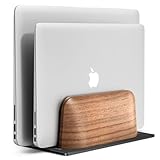


Top 3 picks at a glance
Quick Picks
| Product | Best for | Price |
|---|---|---|
| OMOTON Dual Vertical Desk Laptop Stand Holder, Fits MacBook Air/Pro, Silver | Best Overall for MacBook Users | $23.99 |
| Psitek Aluminum Dual Vertical Laptop Stand Dock Holder, Supports 2 Devices, Adjustable Slot Width 15-36mm, Space-Saving Upright Storage for MacBook and Laptops | Best Adjustable Fit | $21.99 |
| Guganas Vertical Laptop Stand for Dual Monitor Setup, Adjustable Height & Width Laptop Holder, Open-Screen Laptop Secondary Display Stand, Improved Cooling Design, Space-Saving Desk Organizer, Black | Best for Open-Screen Dual Monitor Use | $19.99 |
| Vaydeer Vertical Laptop Stand for Desk,Dual Slots Plastic Laptop Holder with Space Saving 4-in-1 Design,Adjustable Laptop Organizer Storage Supports for MacBook,Mac,HP,Dell,Microsoft Surface,Lenovo | Best Budget Plastic Option | $14.59 |
| UPERGO Vertical Laptop Stand, Dual Slot Wood Holder for Desk | Best Wood Design | $39.99 |
| UGREEN 2-Slot Vertical Laptop Stand Holder Desk Compatible with MacBook Pro Air Laptop Stand Desktop Adjustable, Lenovo Ideapad, Surface Book, HP Notebook, Dell Chromebook Up to 17.3 Inch, Space Gray | Best for Large 17.3-Inch Laptops | $31.99 |
| Vaydeer Vertical Laptop Stand for Desk, Dual Slots Plastic Laptop Holder Organizer with Space Saving 4-in-1 Design, Adjustable Laptop Stand Storage Supports MacBook, Chromebook, Surface, Dell (White) | Best Low-Profile White Option | $14.99 |
| OMOTON Dual Vertical Desk Laptop Stand Holder, Fits MacBook Air/Pro, Black | Best Premium Aluminum Alternative | $32.99 |
How We Picked
We evaluated each stand for the realities of a dual-laptop desk, not just single-device storage. Stability came first. A dual stand must keep two laptops upright without tipping when you remove one, so we prioritized wide, weighted bases and non-slip pads over tall, narrow designs. Next was slot compatibility. Laptops range from ultra-thin MacBook Airs to thicker gaming and business notebooks, so adjustable slot width and padded dividers matter more than a fixed cradle.
We also weighed materials and daily usability. Aluminum offers durability and heat resistance, plastic keeps weight and cost down, and wood brings furniture-grade aesthetics. We favored designs that allow easy one-handed docking, keep bottom vents and ports accessible, and have a small footprint that actually saves space on 40 to 60-inch desks. Finally, we compared price to function, ensuring every pick from the $14.59 entry-level to the $39.99 wood option earns its place without relying on exaggerated claims.
The 8 Best Picks
1. OMOTON Dual Vertical Desk Laptop Stand Holder, Fits MacBook Air/Pro, Silver — $23.99
This silver aluminum stand is the safe, all-around choice for a MacBook-centric dual setup. It is built for users who dock one or two MacBook Air or Pro models in clamshell mode and want a sturdy, minimalist holder that blends with Apple hardware and stays put on a desk. The anodized aluminum construction feels solid, resists fingerprints, and the dual slots keep both devices separated and upright without crowding. It is ideal for a clean, closed-lid workstation with an external monitor and keyboard.
- Pro: Durable aluminum build with stable base for daily docking and undocking
- Pro: Clean silver finish matches MacBook Air and Pro aesthetics
- Con: Slot width is less flexible for thicker Windows laptops or laptops with cases
When to skip: If you regularly swap in a thick 15-inch or 17-inch work laptop or keep bulky protective cases on, choose a more adjustable model.
2. Psitek Aluminum Dual Vertical Laptop Stand Dock Holder, Supports 2 Devices, Adjustable Slot Width 15-36mm, Space-Saving Upright Storage for MacBook and Laptops — $21.99
The Psitek is for anyone mixing devices, like a thin MacBook and a thicker Dell or HP. Its standout feature is the adjustable slot width from 15mm to 36mm, which you can dial in with a screw adjustment to grip each laptop snugly without pressure on the lid. That range covers ultrabooks and more substantial notebooks in one stand. The aluminum dock stays bottom-heavy for stability, and the upright storage cuts desk footprint significantly compared to laying laptops flat.
- Pro: Highly adjustable 15-36mm slots accommodate both slim and thick laptops
- Pro: Aluminum construction balances stability and space-saving design at $21.99
- Con: Manual adjustment takes a moment to set correctly for each device
When to skip: If you want a grab-and-go stand with no setup at all, a fixed-slot design will be faster.
3. Guganas Vertical Laptop Stand for Dual Monitor Setup, Adjustable Height & Width Laptop Holder, Open-Screen Laptop Secondary Display Stand, Improved Cooling Design, Space-Saving Desk Organizer, Black — $19.99
Guganas is designed for dual-monitor users who keep one laptop open as a secondary display. Unlike typical closed-lid cradles, this black stand offers adjustable height and width to support an open-screen position while still holding a second laptop vertically. The improved cooling design elevates the base and leaves airflow paths open, which helps when a machine runs for hours as an extended display. It is a smart pick for programmers, traders, or students who want two screens without buying a separate monitor.
- Pro: Adjustable height and width support open-screen secondary display use
- Pro: Cooling-focused elevation helps maintain airflow during long sessions
- Con: Larger adjustment mechanism takes up slightly more desk depth
When to skip: If you only use laptops closed in clamshell mode, a simpler dual-slot stand will be more compact.
4. Vaydeer Vertical Laptop Stand for Desk,Dual Slots Plastic Laptop Holder with Space Saving 4-in-1 Design,Adjustable Laptop Organizer Storage Supports for MacBook,Mac,HP,Dell,Microsoft Surface,Lenovo — $14.59
At $14.59, this Vaydeer plastic model is the budget-friendly organizer for families, dorms, or shared workspaces with mixed brands. The 4-in-1 design lets you adjust each of the dual slots to fit different devices, from MacBook and Surface to HP, Dell, and Lenovo, making it more versatile than fixed aluminum cradles. Plastic keeps it lightweight and easy to move, while the dual-slot layout still clears significant desk space. It is best for light to moderate daily use where cost and flexibility matter most.
- Pro: Very affordable with adjustable slots for wide brand compatibility
- Pro: Lightweight 4-in-1 plastic build is easy to reposition and store
- Con: Less heft and rigidity than aluminum or wood when docking one-handed
When to skip: If you need maximum stability for heavy 16-inch laptops or want a premium desk aesthetic, consider aluminum or wood.
5. UPERGO Vertical Laptop Stand, Dual Slot Wood Holder for Desk — $39.99
The UPERGO wood holder is for design-minded users who want their desk gear to look like furniture. Priced at $39.99, it is the most expensive pick in this roundup, but the dual-slot wood construction offers a warm, stable platform that stands out from aluminum and plastic. Wood naturally dampens vibration and provides a wide, flat base that resists tipping. It is ideal for a home office, studio, or executive desk where the stand remains visible and style is part of the decision.
- Pro: Distinctive wood aesthetic elevates home office decor
- Pro: Solid, broad base provides stable dual-slot storage
- Con: Highest price in the group and heavier to move than plastic options
When to skip: If you prioritize ultra-portability or need precise slot-width tuning for very thin and very thick laptops together, a metal adjustable stand is more practical.
6. UGREEN 2-Slot Vertical Laptop Stand Holder Desk Compatible with MacBook Pro Air Laptop Stand Desktop Adjustable, Lenovo Ideapad, Surface Book, HP Notebook, Dell Chromebook Up to 17.3 Inch, Space Gray — $31.99
UGREEN is built for large-device setups. Rated for laptops up to 17.3 inches, it handles full-size notebooks that many compact stands struggle to balance, including Lenovo Ideapad, Surface Book, HP Notebook, and Dell Chromebook models alongside MacBook Pro and Air. The adjustable dual slots let you secure two different sizes at once, and the space gray aluminum finish is durable and professional. If your second machine is a desktop-replacement laptop, this is the most reassuring fit in the lineup.
- Pro: Supports up to 17.3-inch laptops, ideal for large work notebooks
- Pro: Adjustable slots and wide compatibility across major brands
- Con: Larger footprint than compact plastic stands to support bigger devices
When to skip: If both your laptops are 13-inch ultrabooks, you can save money and space with a smaller cradle.
7. Vaydeer Vertical Laptop Stand for Desk, Dual Slots Plastic Laptop Holder Organizer with Space Saving 4-in-1 Design, Adjustable Laptop Stand Storage Supports MacBook, Chromebook, Surface, Dell (White) — $14.99
This white Vaydeer variant offers the same flexible 4-in-1 adjustable system as its sibling but in a bright, low-profile finish. For $14.99 it is a great match for white desks, minimalist setups, or rooms where a black or silver stand would stand out too much. The dual slots adjust to hold MacBook, Chromebook, Surface, and Dell devices securely, and the plastic organizer keeps cables and desk edges tidy. It is perfect for students or hybrid workers who want an affordable, space-saving stand that blends into a light-colored workspace.
- Pro: White finish blends seamlessly with light desks and modern decor
- Pro: Adjustable dual slots cover a wide range of laptop brands and thicknesses
- Con: Plastic build can flex slightly with heavier laptops
When to skip: If your desk is dark-toned or you prefer the weight and feel of aluminum, choose a metal alternative.
8. OMOTON Dual Vertical Desk Laptop Stand Holder, Fits MacBook Air/Pro, Black — $32.99
The black OMOTON is the premium counterpart to the silver version, offering the same dual vertical desk design but in a stealthier finish at $32.99. It suits users who want a cohesive black desk setup with a monitor, keyboard, and MacBook Air or Pro docked in clamshell mode. The aluminum holder keeps both laptops upright and protected with padded slots, while the heavier base adds confidence when docking one device at a time. It is a strong choice if you liked the silver OMOTON but need a colorway that matches darker peripherals.
- Pro: Sturdy aluminum construction with elegant matte black finish
- Pro: Dual slots keep two MacBooks organized without extra desk clutter
- Con: Priced higher than the silver OMOTON with similar functionality
When to skip: If you are budget-focused or need broader adjustability for non-MacBook thicknesses, a lower-priced adjustable stand makes more sense.
Buying Guide
Stability and Slot Fit
For a dual setup, base weight and slot design determine whether a stand is actually usable. Look for a wide base with silicone pads that prevents sliding and tipping when one slot is empty. Adjustable slot width, like the 15-36mm range on the Psitek, is valuable if your two laptops differ in thickness by more than a few millimeters or if you use snap-on cases. Fixed slots work fine for two similar MacBooks but can leave a thinner device loose or pinch a thicker one. Test that you can insert and remove each laptop with one hand without the stand lifting.
Materials, Cooling, and Desk Space
Material affects weight, durability, and heat. Aluminum dissipates heat and resists wear, plastic is light and affordable but less rigid, and wood offers furniture-like stability and looks. Regardless of material, ensure the stand does not block bottom vents or ports and leaves a small air gap beneath the laptop. Measure your available desk depth. Most dual stands need about 5 to 7 inches of depth and 8 to 10 inches of width, which is still far less than laying two 14-inch laptops flat, which can consume over 400 square inches combined.
How to Match the Stand to Your Setup
Choose based on how you work. If both laptops stay closed and connected to an external monitor, a simple dual-slot aluminum cradle is cleanest. If you use one laptop open as a second screen, prioritize a model with adjustable height and width and an elevated cooling design like the Guganas. For mixed-brand households on a budget, the $14.59 to $14.99 Vaydeer plastic holders cover the most devices for the least money. For large 17.3-inch notebooks, confirm the stand is explicitly rated for that size, as the UGREEN is, to avoid balance issues.
Our Verdict
For most dual-laptop desks, the OMOTON in Silver at $23.99 hits the best balance of build, stability, and price for MacBook users, while the Psitek at $21.99 is the most versatile if your two machines differ in thickness thanks to its 15-36mm adjustable slots. Budget shoppers will be well served by either Vaydeer plastic model under $15, and users running a large 17.3-inch workhorse should step up to the UGREEN at $31.99. If aesthetics drive your choice, the UPERGO wood stand at $39.99 and the OMOTON in Black at $32.99 deliver a more refined look without sacrificing function.
FAQ
Can I use a vertical stand with laptops in cases?
Yes, but case thickness matters. Snap-on hard shells add 1 to 3mm per side, which can make a fixed slot too tight or too loose. If you keep cases on both laptops, choose a stand with adjustable slot width so you can fine-tune the grip. Always use the silicone pads to prevent case scratches and test the fit before fully docking.
Will a vertical stand damage my laptop hinge or screen?
No, when used correctly. Vertical storage puts no more stress on the hinge than closing the lid normally. The key is to lower the laptop straight down into a padded slot rather than sliding it in at an angle. Avoid overtightening adjustable slots, which can put pressure on the lid, and keep the stand on a flat, stable surface.
Do I need the same brand or size for both slots?
You do not. Most dual stands are designed for mixed setups, such as a 13-inch MacBook Air alongside a 15-inch Windows laptop. The main constraint is thickness, not screen size. Check the maximum supported size, for example up to 17.3 inches for larger stands, and ensure each slot can be adjusted or padded to hold your specific combination securely.
Does vertical docking affect cooling?
Vertical docking can actually improve cooling compared to stacking laptops or laying them on soft surfaces, because it exposes more surface area and keeps vents unobstructed. For best results, leave a small gap around vents, avoid covering keyboard areas on models that vent through the hinge, and consider a stand with an elevated or open base design if you run either laptop for extended hours.
