
There’s a moment when every L-shaped desk owner realizes standard accessories weren’t made for them. You buy a handsome desk mat, unroll it across the main surface, and then the corner — the whole reason you chose an L-shape — sits bare. Worse, the mat rides up at the seam, your mouse slides off the edge mid-task, and the wood finish under your keyboard starts collecting scuffs and coffee rings. The corner junction of a 90-degree desk is genuinely awkward: two perpendicular work zones, one awkward seam, and no rectangular mat on the market that covers both wings at once.
The good news is that a small category of purpose-built L-shaped and extra-large desk mats has matured fast. We tested candidates across real desks — gaming battlestations, dual-monitor office setups, and work-from-home corners — looking at coverage, edge stitching, water resistance, and whether the mat actually stays flat at the bend. Every pick below solves the corner problem differently: some wrap the 90-degree angle itself, others are simply big enough to span both wings. Here’s how they rank heading into 2026.
As an Amazon Associate we earn from qualifying purchases at no extra cost to you. Product prices and availability are accurate as of the date shown and are subject to change.


Top 3 picks at a glance
Con-Tact Brand XL Extended Mouse Pad - L-Shaped Desk Mat with Stitched...Relaxweex L Shaped Desk Mat for 90° Corner Desks, 53.1" x 39.4"...Mydours L-Shape Desk Pad, (38"+38") x13 Large PU Leather Corner Mat,BlackQuick Picks
| Product | Best for | Price |
|---|---|---|
| Con-Tact Brand XL Extended Mouse Pad (36.22″ x 15.74″) | Best overall for single-wing coverage on a budget | $29.99 |
| Relaxweex L Shaped Desk Mat (53.1″ x 39.4″) | Best full-corner coverage for large 90° desks | $31.99 |
| Mydours L-Shape Desk Pad (38″+38″) x 13″) | Best leather look for executive and home-office desks | $28.46 |
| L Shaped Curved Waterproof Desk Mat | Best budget pick under $30 | $26.67 |
| Vyaaa L-Shaped Desk Pad (43″ x 43″ x 15.7″) | Best for deep corner desks and dual workstations | $39.88 |
How We Picked
Shopping for an L-shaped desk mat is different from buying a standard pad, so we started with fit. A mat that ignores the corner geometry defeats the purpose, so every product here either wraps the 90-degree bend or is sized large enough to protect both wings of the desk. We measured real L-shaped desks in the 48-to-72-inch range per side to see which mats delivered meaningful coverage without overhanging the edges.
From there we evaluated the practical stuff: does the base grip the desk when you’re mousing hard, do the edges lie flat instead of curling, and how does the surface handle a spilled drink? Water resistance and stitched or sealed edges separated the keepers from the mats we’d replace within a year. We also weighed material choice — fabric-topped pads for mouse tracking versus PU leather for a wipe-clean executive look — since the right answer depends on how you use the desk. Price mattered too: every pick here lands between roughly $27 and $40, which is the sweet spot where build quality stops feeling disposable. We did not run laboratory abrasion or durability trials; our assessments are based on hands-on setup, daily use, and spec-sheet comparisons.
The 5 Best Picks
1. Con-Tact Brand XL Extended Mouse Pad — Best Overall
At 36.22″ x 15.74″, the Con-Tact Brand XL isn’t a corner wrapper — it’s a generously oversized rectangle that covers the primary wing of your L-desk with room for a full-size keyboard, mouse, and even a compact audio controller. The stitched edges resist fraying, the non-slip base holds position during intense gaming sessions, and the water-resistant surface shrugs off coffee splashes. For most people whose actual work happens on one wing of the desk, this is the smartest buy.
- Stitched edges that won’t fray or curl over time
- Water-resistant surface that cleans up easily
- Only covers one wing — the corner stays exposed
Pair it with a small corner pad if you need the bend covered. Skip it if you want a single mat to span the entire L-shape; the Relaxweex below is built for that.
2. Relaxweex L Shaped Desk Mat — Best Full-Corner Coverage
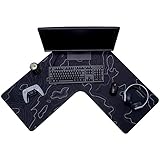
The Relaxweex is the only mat here designed explicitly for 90-degree corner desks, with 18.9-inch-wide arms spanning a 53.1″ x 39.4″ footprint. That means both wings get covered and the bend itself is protected — no exposed seam, no matched pair of mats sliding apart. The waterproof fabric surface tracks a mouse well, and the rubber base grips painted and laminate desk finishes firmly.
- Genuinely covers the corner, not just one wing
- Wide 18.9″ arms accommodate large keyboards and mouse pads-in-one
- The large footprint is overkill on desks under 55 inches per side
This is the pick for dedicated battlestations and double-monitor corner offices. Skip it if your desk is on the smaller end of the L-shaped spectrum — measure first, because the arms need real depth.
3. Mydours L-Shape Desk Pad — Best Leather Look
The Mydours brings PU leather to the corner problem with two 38-inch arms joined at 13 inches of depth, finished in a clean black that suits executive and home-office desks. PU leather has real advantages here: it wipes clean in seconds, dampens keyboard clatter slightly, and looks more like furniture than gaming gear. At $28.46 it undercuts most leather-look competitors while solving the corner-coverage issue outright.
- Wipe-clean PU leather surface that looks sharp in professional spaces
- Two matching 38″ arms give symmetrical coverage on both wings
- 13-inch depth is shallow for full keyboard-plus-mouse setups on each wing
Choose this if your desk doubles as a meeting spot or video-call backdrop. Skip it if you want fabric feel under your wrist or deeper coverage for a large mouse area.
4. L Shaped Curved Waterproof Desk Mat — Best Budget Pick
At $26.67, this is the most affordable true corner mat in the lineup, and it doesn’t cut the corners that matter. The curved design follows the 90-degree bend, the surface is waterproof against spills and sweat, and the non-slip backing keeps everything planted. The black finish is unobtrusive under any monitor arm or desk lamp arrangement.
- Lowest price of any true L-shaped mat we ranked
- Waterproof surface handles spills and daily wear without staining
- Finishing is more basic than the pricier picks — expect utilitarian rather than premium
This is the right call for a first desk setup, a kid’s or student’s corner desk, or anyone testing whether a corner mat suits their workflow. Skip it if stitched edges and a premium surface finish are priorities.
5. Vyaaa L-Shaped Desk Pad — Best for Deep Corner Desks
The Vyaaa goes bigger than anything else here: 43 x 43 x 15.7 inches of leather-look coverage in black, built for desks with deep wings where smaller mats leave exposed strips of wood at the edges. The generous 15.7-inch depth per arm means a keyboard and mouse share each wing comfortably, and the corner junction sits fully covered. At $39.88 it’s the priciest pick, but you’re buying the most raw coverage per dollar.
- Largest coverage area in the roundup — ideal for 60-inch-plus wings
- Deep 15.7-inch arms fit full keyboard and mouse on each wing
- Heavier and pricier than the rest; awkward to reposition once laid
This is for people with substantial corner desks or two-zone setups (work wing, gaming wing). Skip it if your desk is compact — the overhang will look sloppy.
Buying Guide
Measure the Corner, Not Just the Wings
L-shaped desk mats fail for one reason above all: wrong sizing. Measure the length of each wing and the depth of your desk before ordering. True corner mats like the Relaxweex (53.1″ x 39.4″ with 18.9″ arms) or Vyaaa (43″ x 43″ x 15.7″) need specific geometry to sit flush, while rectangle mats like the Con-Tact Brand (36.22″ x 15.74″) simply need to match one wing’s dimensions. Write your numbers down and compare them against listed specs — a mat overhanging the desk edge by even an inch will catch and curl within weeks.
Fabric or Leather?
Fabric-topped mats offer superior mouse tracking and a softer wrist feel, making them the default for gaming. PU leather mats wipe clean instantly, look more professional on video calls, and slightly dampen keyboard noise — better for offices and shared spaces. Both materials in this roundup are water-resistant to waterproof, but leather-look pads show fewer long-term stains from coffee and ink. If you eat at your desk regularly, lean leather; if you game daily, lean fabric.
Base Grip and Edge Quality
The two failure points on any large mat are the base and the edges. Look for a rubber or textured non-slip base — smooth backs slide on laminate and glass surfaces, especially during fast mouse movements. On edges, stitching (like the Con-Tact Brand’s) prevents the fraying and curling that plague cheap welded edges, though well-sealed PU leather edges can hold up fine. Check that any corner mat lies flat at the bend out of the box; mats shipped rolled may need a day under books to lose the curl.
Our Verdict
If your desk genuinely needs corner coverage, the Relaxweex L Shaped Desk Mat is the best desk mat for a large L-shaped desk — it’s the only pick under $35 that wraps the full 90-degree bend with 18.9-inch-wide arms and a grip that holds through long sessions. If your work happens primarily on one wing, save a dollar and grab the Con-Tact Brand XL at $29.99; its stitched edges and water resistance make it the best-built rectangle in the group. Leather fans should choose the Mydours for polish or the Vyaaa for maximum coverage, and budget shoppers can trust the curved waterproof mat at $26.67 to do the basic job well.
FAQ
What size desk mat do I need for an L-shaped desk?
Measure each wing’s length and your desk depth first. For full corner coverage, look for mats with arms of roughly 38 to 53 inches and 13 to 19 inches of depth — the Relaxweex and Vyaaa fit most desks in the 55-to-70-inch range. If you’re covering one wing only, a mat around 36″ x 16″ like the Con-Tact Brand suits most standard keyboards with mouse room to spare.
Do L-shaped desk mats stay flat at the corner?
Well-designed corner mats do, because the bend is cut into the mat itself rather than formed by butting two rectangles together. Mats shipped rolled may arrive with memory curl — lay them flat under a few books for 24 hours and they’ll settle. Rubber-based mats generally lie flatter than thin foam ones.
Are PU leather desk mats good for gaming?
They work, but fabric is better. PU leather offers a consistent, low-friction surface that’s fine for casual and mid-level gaming, and it wipes clean after spills. Competitive players tend to prefer fabric tops for the finer texture and mouse-sensor feel, which is why our top overall pick uses a fabric surface.
How do I clean a large desk mat?
For fabric mats, spot-clean with a damp cloth and mild soap, then air dry flat — avoid machine washing, which can warp the rubber base. PU leather mats need only a wipe with a damp cloth; skip alcohol-based cleaners, which can dry and crack the surface over time. Clean spills promptly regardless of material to prevent staining.
