
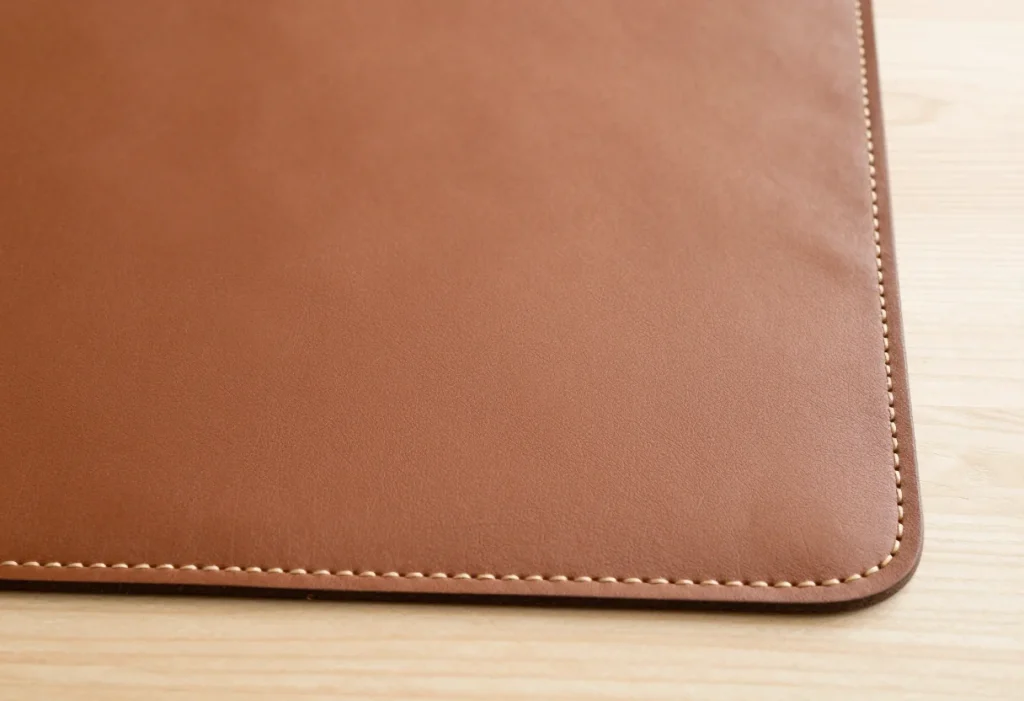
Most people buy a desk mat the way they buy a poster: they pick a size and a pattern they like, click, done. Then three months later the edges fray, the top layer peels away from the rubber base, the corners curl up, and the whole thing looks worse than the bare desk it was supposed to protect. The single biggest difference between a desk mat that lasts two years and one that lasts two months is stitching quality — specifically how the edge is bound, what thread is used, and how the stitched border interacts with the surface material.
The mistake buyers make is treating “stitched edges” as a checkbox. Almost every mat over $8 now claims stitched edges. What matters is whether that stitching is actually doing a job. On a cheap fabric mat, an overlocked edge prevents the cloth from separating from the rubber base. On a PU leather mat, edge binding hides the cut seam and stops the synthetic cover from peeling. When the stitching is thin, loosely tensioned, or sewn with polyester thread that abrades against your wrist rest, it fails first — and once an edge lets go, the rest follows quickly.
As an Amazon Associate we earn from qualifying purchases at no extra cost to you.


This guide walks through what actually matters, with the numbers you need before you check out.
Our Top Picks


Top 3 picks at a glance
Decide These 3 Things First
1. What is the mat for? A mouse pad that happens to sit under a keyboard has very different demands from a full writing surface. If you move your mouse constantly — gaming, design work — edge height and surface texture matter more than looks. If the mat is mostly decorative desk protection, water resistance and edge finish matter more.
2. Fabric or leather-style surface? Woven fabric mats (the $8–$15 gaming-mousepad style) are soft, washable, and mouse-friendly. PU leather mats (typically $25–$40 for large sizes) wipe clean, look more formal, and resist spills better, but rely heavily on edge stitching to keep their cover bonded. Neither is better across the board; pick based on how you use your desk.
3. How much desk do you want covered? Edge stitching runs the entire perimeter, so bigger mats mean more stitching to fail. If you’re choosing between a 31.5″ x 15.7″ mat and a 55″ x 24″ one, know that the larger mat will see more edge contact from chair arms, sleeves, and cleaning. Stitch quality matters proportionally more as size goes up.
Size: Get the Perimeter Right Before Anything Else
Measure your desk, then subtract 2–3 inches on each side so the mat doesn’t overhang. Common sizes and what they fit:
- 31.5″ x 15.7″ (about 80 x 40 cm) — fits a keyboard plus mouse comfortably; good for desks 47″ wide and under. Around 0.6 lb, easy to reposition.
- 35.4″ x 15.7″ — the sweet spot for most single-monitor setups.
- 39″ x 18″ to 47″ x 24″ — covers keyboard, mouse, and a notebook or tablet.
- 55″ x 24″ — full-desk coverage for 60″+ desks; expect the mat to weigh 2.5–4 lb, which is why a non-slip base matters more at this size.
Thickness typically runs 0.08″–0.16″ (2–4 mm). Below 2 mm, edges are harder to stitch cleanly and the mat can feel flimsy; above 4 mm, you’re paying for padding most people don’t need. For stitched-edge durability, 3 mm is the practical sweet spot.
Material: The Surface Determines How Stitching Holds Up
Fabric mats. Look for a woven or knitted cloth top laminated to natural rubber (not just foam). The stitching on a fabric mat is usually an overlock or border stitch in matching polyester thread. What to check in listings and photos: stitch density, described or visible as roughly 8–12 stitches per inch on well-made mats. Sparse stitching — visibly long stitches, more like 4–6 per inch — is the first thing to let go where your wrist rest rubs.
PU leather mats. A quality PU mat has a stitched border that encases the edge, often with a contrasting or matching thread sewn at 2–3 mm from the edge. Press gently on the edge of the mat in person or in video reviews: if the cover separates from the backing at the seam, the adhesive and stitching combo is weak. Good PU is around 0.04″–0.06″ thick over a 2–3 mm rubber base, weighing 2–3 lb in a 55″ x 24″ size.
Thread material. Polyester thread resists UV, moisture, and abrasion better than cotton or cheap nylon. Listings rarely name the thread, but “reinforced stitched edges” plus a warranty is a reasonable proxy. Mats advertising embroidered or double-stitched borders generally outlast single-pass stitching by a wide margin in everyday use.
Construction: How to Judge Stitching From a Product Listing
You can’t run your finger over the seam before buying, so look for these signals:
- Edge style. A folded and stitched border (the edge is wrapped and sewn flat) beats a raw overlock on leather-style mats. On fabric mats, a flatlock or zigzag overlock that lies flush is fine.
- Stitch line placement. Stitching placed 1.5–3 mm from the edge holds better than stitching right at the edge, where the fabric can pull through.
- Lay-flat behavior. A mat that ships rolled and stays curled at the corners has stitching tension that fights the material. Quality mats relax flat within 24 hours of unrolling; persistent corner curl usually means the thread was tensioned too tight.
- Base bonding. Check that the rubber base is vulcanized or firmly bonded, not loosely glued. Stitching can’t save a mat whose layers delaminate in the middle.
- Seamed corners. Corners are where stitching fails first. Diagonal reinforcement or mitered corners are a plus; photos that avoid showing corners closely are a small red flag on their own.
Comfort and Performance: Stitching You Can Actually Feel
Edge stitching isn’t invisible — you’ll feel it. A raised or bulky border can create a pressure point under your wrist during long sessions. Look for “flat stitched edges” or “low-profile stitching” if you rest your wrists at the mat’s edge. Ideally the stitch line sits within 1 mm of the surface height.
For mouse tracking, surface smoothness matters more than edge work: a fine-knit cloth (around 0.12″–0.16″ total thickness) gives consistent tracking for both optical and laser sensors. Waterproof coatings are common — a PU-coated fabric or full PU leather top handles coffee spills, but note that heavy coatings can slightly reduce the softness of the cloth feel.
Non-slip performance comes from the base: natural rubber grips better than silicone or textured foam, especially on laminate and glass desks. On mats in the 55″ x 24″ class, a rubber base is close to mandatory — lighter bases slide every time you lean on the desk.
Price Tiers: What Each Budget Buys You
Budget ($8–$15). Fabric mats like the large gaming mousepads in the $8–$12 range offer stitched edges and waterproof coatings at very low cost. Expect single-pass stitching, a basic rubber or foam base, and a lifespan of roughly 12–24 months with daily use. Excellent value if you don’t mind replacing them.
Mid ($15–$30). Printed and decorative mats — think the 31.5″ x 15.7″ stained-glass style designs — occupy this range. You get better print quality, denser stitching, and rubber bases. This is where stitched edges start actually holding up to wrist rests and daily cleaning.
Premium ($30–$50+). Large PU leather mats like a 55″ x 24″ desk pad around $36 include folded stitched borders, waterproof wipeable surfaces, and full-desk coverage. You’re paying for materials and edge construction, not performance — a fabric mat tracks a mouse just as well.
Warranty and Seller Support
Fabric mats in the budget tier rarely carry more than a 30-day return window, which is fine — defects show up early if they show up at all. PU leather mats should ideally come with a 12-month warranty covering peeling, delamination, and stitching failure, since those are the specific failure modes of the material. Before buying, check that the seller actually responds to claims; a warranty with no support channel is decorative. Keep the packaging until you’ve inspected the stitching under good light — loose threads or a skip-stitched corner are return-worthy on day one.
Delivery and Setup: What to Expect
Most desk mats ship rolled in a tube or folded flat. Rolled mats can have memory curls; lay the mat under a few books for 12–24 hours to flatten it, or use gentle warmth from a hairdryer on low while pressing the corners flat. Don’t iron PU leather. There’s no assembly beyond unrolling — if a listing mentions strong chemical odor on arrival, air the mat out for 24–48 hours; quality PU should off-gas minimal smell. Weight is rarely an issue except at full-desk sizes, where a 55″ x 24″ mat may run 3–4 lb and ships in a box rather than an envelope.
Spec Checklist
| Spec | Budget ($8–$15) | Mid ($15–$30) | Premium ($30–$50+) |
|---|---|---|---|
| Size options | 31.5″ x 15.7″ and larger XL/XXL | 31.5″ x 15.7″ to 39″ x 18″ | Up to 55″ x 24″ full-desk |
| Surface material | Coated woven fabric | Fabric or entry PU leather | PU leather (0.04″–0.06″ cover) |
| Edge construction | Single-pass overlock stitch | Denser border stitch, flat profile | Folded and stitched bound edge |
| Thickness | 2–3 mm | 3 mm | 3–4 mm |
| Base | Rubber or foam, partial grip | Natural rubber, good grip | Full natural rubber, strong grip |
| Water resistance | Coated top, wipes clean | Waterproof coating | Fully waterproof PU surface |
| Weight (typical) | 0.5–1 lb | 0.7–1.5 lb | 2.5–4 lb at full size |
| Warranty | 30-day returns | 30–90 days | 12 months typical |
| Expected lifespan | 12–24 months | 2–3 years | 3–5+ years |
Red Flags
- “Stitched edges” with no close-up photos. If the listing won’t show the seam, there’s usually a reason.
- Loose or fraying threads visible in product photos — this is the factory sample; your unit will be the same or worse.
- Persistent corner curl mentioned in multiple reviews. It won’t flatten out; it’s a stitching-tension problem.
- Cover peeling at the border on PU mats within the first few months — a recurring complaint means the adhesive and stitch combo is failing at scale.
- Stitching that sits proud of the surface by more than about 1 mm, which creates a wrist pressure ridge.
- Foam-only bases on mats over 35″ wide — they slide and the edges take the stress.
- No returns or warranty contact at all, regardless of price.
FAQ
Do stitched edges really matter on a desk mat?
Yes — they’re the difference between a mat that frays and one that doesn’t. The stitch binds the surface material to the base and stops the edge from peeling or unraveling. On PU leather mats especially, an unstitched or poorly stitched edge will start peeling within months of daily use.
How can I check stitching quality before buying online?
Zoom into listing photos at the corners and along one long edge. You want even stitch spacing (roughly 8–12 stitches per inch), a stitch line set back 1.5–3 mm from the edge, and no visible thread loops or frays. Then read recent reviews specifically for the words “fraying,” “peeling,” or “curling.”
Why is my desk mat’s edge fraying even though it’s stitched?
Usually one of three reasons: the stitching is too sparse, the thread sits exactly at the edge where fabric can pull through, or your wrist rest constantly abrades that spot. Moving your wrist rest inward, or choosing a mat with a folded flat border, solves the recurring-fray problem.
Can I repair a fraying edge myself?
Temporarily, yes. A dab of clear fabric glue or a few hand stitches with polyester thread will stop a fray from spreading. But if the edge started failing within the first year, the construction is weak everywhere — treat the repair as a stopgap and budget for a better-constructed replacement, especially since quality large mats start around $11.
Bottom line: check the edges first, the material second, and the print last. A mat with dense, flat, well-set-back stitching will outlast two or three cheaper mats that looked identical in the thumbnail — and by the time you’re shopping again in 2026, you’ll know exactly what to look for.
Related guides
- Best Ultrawide Gaming Monitors: Six Screens Sized Against Real Desks: 6 Compared (2026)
- Best Game Room Neon Lights: Ten Signs and Icon Lamps Compared: 10 Compared (2026)
- 10 Best 75% Hot-Swappable Mechanical Keyboards (October 2026)
- Best Mini-LED Monitor: Five Listings From a Renewed KTC to a 5K LG, Compared by Pixels and Ports (2026)









