Our Short List of 3

- Best for: Beginners who play fast shooters and want smooth motion with a built-in speaker.
- 23.8-inch Full HD (1920 x 1080) IPS panel
- 165Hz refresh rate (supports 144Hz)
- 1ms response time
- AMD FreeSync Premium
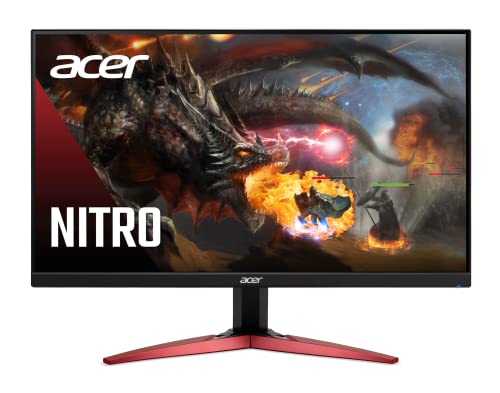
- Best for: Small desks where a PC and a console share one compact screen.
- 23.8-inch Full HD (1920 x 1080) VA panel
- 165Hz refresh rate
- 1ms (VRB) response time
- AMD FreeSync Premium technology

- Best for: Players who want the fastest refresh rate here and a stand they can adjust to eye level.
- 24-inch Full HD gaming monitor
- 180Hz refresh rate
- 1ms response time (MPRT)
- AMD FreeSync
All 5 Picks at a Glance
| Product | Specs | Action |
|---|---|---|
| ASUS TUF Gaming VG249Q1A |
| Check price on Amazon |
| Acer Nitro KG241Y Sbiip |
| Check price on Amazon |
| Samsung Odyssey G3 G30D |
| Check price on Amazon |
 LG UltraGear 24GN600-B |
| Check price on Amazon |
 MSI Optix G272 |
| Check price on Amazon |
A good first gaming monitor is a 24-inch Full HD screen with a 144Hz or higher refresh rate, an IPS or VA panel, and adaptive sync support, because that combination makes motion look smooth and keeps setup simple. You do not need a huge screen, a 4K panel, or a long list of extra features to enjoy your first games. Start with a model that connects easily to your PC or console and lets you change the refresh rate in a couple of clicks.
This guide is for first-time buyers, students setting up a first desk, and casual players moving from a laptop screen or a television to a dedicated gaming display. Every monitor below was picked from its Amazon listing title and listed specifications, with an emphasis on screen size, refresh rate, panel type, and the ports you will actually use.
Top 3 picks at a glance
Quick Picks
As an Amazon Associate we earn from qualifying purchases
| Product | Best for | Key spec from title |
|---|---|---|
| ASUS TUF Gaming VG249Q1A | Fast-paced shooters on a first PC | 23.8-inch Full HD IPS, 165Hz, 1ms |
| Acer Nitro KG241Y Sbiip | A compact desk with a console and a PC | 23.8-inch Full HD VA, 165Hz, 1ms (VRB) |
| Samsung Odyssey G3 G30D | Long evening sessions with adjustable ergonomics | 24-inch Full HD, 180Hz, 1ms |
| LG UltraGear 24GN600-B | Clear colours for games and everyday use | 24-inch Full HD IPS, 144Hz, 1ms (GtG) |
| MSI Optix G272 | A bigger picture on a first big-screen setup | 27-inch Full HD IPS, 144Hz, 1ms |
How to Choose
Pick the right size for your desk
Screen size decides how far you sit and how much desk space you give up, so measure before you fall for a bigger panel. A 24-inch monitor fits most desks, keeps text readable at arm’s length, and pairs well with a keyboard, a mouse, and a pair of speakers. A 27-inch screen feels more immersive, but Full HD stretched across 27 inches looks softer up close, so you need a little more distance. Check the width of your desk, the depth from the wall to the edge, and whether the stand leaves room for anything else. A monitor that crowds out your keyboard will annoy you every day.
Understand refresh rate and response time
Refresh rate tells you how many times per second the screen draws a new image, and a higher number makes fast movement look smoother. A 144Hz panel redraws the picture far more often than a standard 60Hz office screen, which helps in shooters, racing games, and any scene with quick camera turns. Response time measures how fast a pixel changes colour, and a 1ms figure means less blur behind moving objects. Both numbers work together, so look for a monitor that lists both. Remember to enable the higher refresh rate in your display settings after you plug it in, because many screens start at a lower default.
Choose a panel type that matches your games
IPS panels show wide viewing angles and steady colours when you lean back or share the screen with a friend, which suits story games, strategy titles, and everyday browsing. VA panels usually show deeper dark scenes, which flatters horror games and night-time driving, though colours can shift a little when viewed from a sharp angle. Neither type is wrong for a beginner, and the difference matters less than size and refresh rate on a first purchase. If you play mostly bright, colourful games and watch videos on the same screen, an IPS panel is a safe starting point. If dark, moody games are your thing, a VA panel earns its place.
Check ports, sync, and the stand
Ports decide what you can plug in without adapters, so look at the back of the monitor before you buy. A DisplayPort input and at least one HDMI input cover a gaming PC and a console side by side, and two HDMI ports make switching between devices easier. Adaptive sync, sold as FreeSync on these models, matches the monitor to your graphics card so the picture does not tear during busy scenes. Finally, look at the stand: height adjustment and tilt help you set the screen at eye level, while a VESA mount lets you swap in an arm later. A monitor that only tilts can still work, but you may need a riser to get the height right.
The 5 Best Options
ASUS TUF Gaming VG249Q1A
- Best for: Beginners who play fast shooters and want smooth motion with a built-in speaker.
- 23.8-inch Full HD (1920 x 1080) IPS panel
- 165Hz refresh rate (supports 144Hz)
- 1ms response time
- AMD FreeSync Premium
Beginners who play fast shooters and want smooth motion with a built-in speaker.
The 165Hz mode may need to be switched on in your display settings, so check the refresh rate after setup instead of assuming it is active.
The ASUS TUF Gaming VG249Q1A is a strong first pick because it pairs a bright IPS panel with a 165Hz refresh rate, so games look smooth and colours stay consistent from different angles. Its built-in speaker is handy when you have not bought separate speakers yet, and the Shadow Boost feature lifts detail out of dark corners in tense scenes. The stand and the VESA mount give you two ways to place it, and the DisplayPort and HDMI inputs cover a PC and a console. For a beginner who wants one monitor that handles shooters, homework, and streaming without fuss, this is a dependable starting point.
Watch out for: The 165Hz mode may need to be switched on in your display settings, so check the refresh rate after setup instead of assuming it is active.
Acer Nitro KG241Y Sbiip
- Best for: Small desks where a PC and a console share one compact screen.
- 23.8-inch Full HD (1920 x 1080) VA panel
- 165Hz refresh rate
- 1ms (VRB) response time
- AMD FreeSync Premium technology
Small desks where a PC and a console share one compact screen.
VA panels can shift colour a little at sharp side angles, so sit facing the screen head-on for the most consistent picture.
The Acer Nitro KG241Y Sbiip suits a small desk because its slim ZeroFrame design keeps the footprint tight while the 23.8-inch VA screen still feels roomy in games. The 165Hz refresh rate and 1ms VRB response time keep fast scenes readable, and the VA panel gives dark games a deeper, moodier look. With one DisplayPort and two HDMI ports, you can leave a PC and a console plugged in at the same time and switch with the input button. It is a practical choice for a bedroom or dorm setup where space is limited and every cable matters.
Watch out for: VA panels can shift colour a little at sharp side angles, so sit facing the screen head-on for the most consistent picture.
Samsung Odyssey G3 G30D
- Best for: Players who want the fastest refresh rate here and a stand they can adjust to eye level.
- 24-inch Full HD gaming monitor
- 180Hz refresh rate
- 1ms response time (MPRT)
- AMD FreeSync
Players who want the fastest refresh rate here and a stand they can adjust to eye level.
The gaming extras live in the on-screen menu, so take a few minutes to learn the controls before your first session.
The Samsung Odyssey G3 G30D stands out with a 180Hz refresh rate, the fastest in this group, which makes movement in racing and shooter games feel fluid. Its adjustable stand lets you raise, tilt, and angle the screen until it sits at eye level, a comfort win during long sessions. Gaming extras like Black Equalizer and Virtual Aim Point sit in the on-screen menu, ready when you want them, out of the way when you do not. Eye Saver Mode and Flicker-Free help during late-night play. If you want the quickest panel here and a stand that adapts to your chair, this is the one to look at.
Watch out for: The gaming extras live in the on-screen menu, so take a few minutes to learn the controls before your first session.
LG UltraGear 24GN600-B
- Best for: Beginners who want accurate colour for games, videos, and schoolwork on one screen.
- 24-inch Full HD (1920 x 1080) IPS display
- 144Hz refresh rate
- 1ms (GtG) response time
- AMD FreeSync Premium
Beginners who want accurate colour for games, videos, and schoolwork on one screen.
The stand adjusts by tilt only, so plan for a riser or a monitor arm if you need the screen higher.
The LG UltraGear 24GN600-B is the calm, colour-first option in this group, built around a 24-inch IPS display with HDR10 support and a nearly borderless frame on three sides. The 144Hz refresh rate and 1ms GtG response time are more than enough for a first gaming setup, and the picture stays vivid whether you are gaming, watching videos, or working through assignments. Its clean design blends into a desk without shouting about itself, and FreeSync Premium keeps the picture tear-free. For a beginner who wants one screen for games, study, and streaming, this monitor covers all three without complication.
Watch out for: The stand adjusts by tilt only, so plan for a riser or a monitor arm if you need the screen higher.
MSI Optix G272
- Best for: Larger desks where a bigger 27-inch picture makes games feel more immersive.
- 27-inch gaming monitor
- 1920 x 1080 (FHD) resolution
- IPS panel
- 1ms response time
Larger desks where a bigger 27-inch picture makes games feel more immersive.
Full HD spread over 27 inches looks softer up close than on a 24-inch panel, so sit a little farther back.
The MSI Optix G272 is the big-screen pick of this group, giving you a 27-inch IPS panel for a wider view of open worlds and busy multiplayer maps. The 144Hz refresh rate and 1ms response time keep motion smooth, while FreeSync support prevents tearing when the action gets hectic. Colours hold up well from different angles, which helps when a friend watches from the side of the desk. HDMI and DisplayPort inputs cover the usual PC and console hookups, and the tilt stand lets you angle the screen. If your desk has room and you want the most immersive first monitor, this one delivers it.
Watch out for: Full HD spread over 27 inches looks softer up close than on a 24-inch panel, so sit a little farther back.
Which One Fits Your Situation
Your desk is small and shared with a console
Pick the Acer Nitro KG241Y Sbiip, because its slim frame saves space and its two HDMI ports plus DisplayPort let a PC and a console stay connected at once. The 165Hz VA panel handles fast games well, and the compact 23.8-inch size leaves room for a keyboard, a controller, and a notebook. You switch inputs with one button instead of crawling behind the desk to swap cables.
You play shooters and want the smoothest motion
Pick the Samsung Odyssey G3 G30D, because its 180Hz refresh rate is the quickest in this group and its 1ms response time keeps fast turns readable. The adjustable stand helps you line the screen up with your eyes, which matters during long matches. Turn on the higher refresh rate in settings and the difference from a standard screen is obvious within minutes.
You want one screen for games, study, and streaming
Pick the LG UltraGear 24GN600-B, because its IPS panel and HDR10 support keep colours lively across games, videos, and documents alike. The 144Hz refresh rate is plenty for casual play, and the slim borders look tidy on a desk that doubles as a workspace. It is the easiest of these five to live with all day.
You want the biggest picture your desk can hold
Pick the MSI Optix G272, because its 27-inch IPS screen makes open-world games and multiplayer maps feel larger and more absorbing. The 144Hz refresh rate and FreeSync support keep the experience smooth, and the wide viewing angles suit a shared desk. Just give yourself a little extra distance from the screen so the Full HD image stays sharp.
Common Mistakes
- Buying a 27-inch Full HD monitor for a shallow desk, then sitting too close and noticing soft text.
- Forgetting to raise the refresh rate in display settings, so a 144Hz or 165Hz monitor runs at a lower default.
- Choosing a monitor with only one HDMI port, then unplugging cables every time you switch between a PC and a console.
- Ignoring the stand and ending up with a screen that sits too low, which strains your neck during long sessions.
- Picking a screen for one game only, instead of one that also works for homework, videos, and everyday browsing.
Frequently Asked Questions
What size monitor should a beginner get?
A 24-inch monitor is the safest starting point because it fits most desks, keeps Full HD text sharp at arm’s length, and works well with a keyboard and mouse in front of it. A 27-inch screen feels more immersive, but it needs a deeper desk so you can sit far enough back. Measure your desk depth first, then choose the size that leaves room for everything else.
Is 144Hz enough for a first gaming monitor?
Yes, 144Hz is plenty for a first gaming monitor because it makes movement look far smoother than a standard 60Hz screen, and most first PCs and consoles can drive it in popular games. Higher rates like 165Hz or 180Hz add a little extra fluidity, but the jump from 60Hz to 144Hz is the one you will notice most. Spend the difference on a better chair or headset instead.
Do I need FreeSync on a beginner monitor?
FreeSync helps by matching the monitor to your graphics card, which stops the picture tearing when frame rates jump around. Every monitor in this guide supports it, so you do not need to hunt for it separately. Just connect with DisplayPort or HDMI, switch it on in the monitor menu if needed, and the picture stays smooth during busy scenes.
Can I use a gaming monitor for school and work too?
Yes, a gaming monitor works well for school and work because its sharp Full HD panel, wide viewing angles, and high refresh rate make reading, scrolling, and video calls feel smooth. The IPS models in this guide are especially good for documents and videos. Set the brightness to a comfortable level, raise the screen to eye height, and one monitor can cover your whole day.
Related guides
More from Amazon
Programs that pair well with the guide above. Offers and eligibility are set by Amazon and may change.
Free shipping on eligible items, Prime Video and more. Eligible new members can start with a free trial.
Start a Prime free trialAd-free music streaming. Eligible new subscribers can start with a free trial.
Try Music Unlimited freeA Prime membership for ages 18-24 with a trial period. Eligibility is set by Amazon.
See Prime for Young AdultsAudiobooks and podcasts to listen to on the go. Eligible new members can start with a free trial.
Try Audible freeAs an Amazon Associate we earn from qualifying purchases.