Our Short List of 3
All 5 Picks at a Glance
| Product | Specs | Action |
|---|---|---|
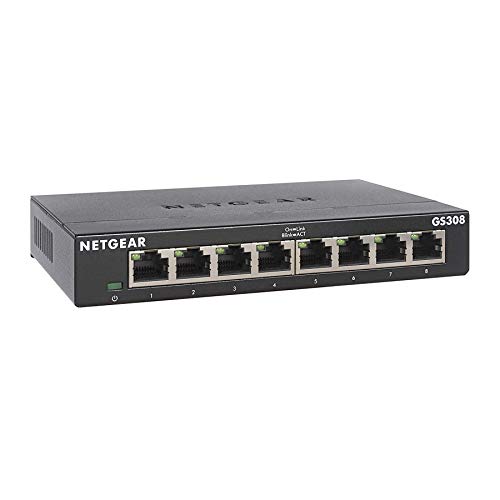 NETGEAR GS308 8-Port Gigabit Ethernet Unmanaged Switch | Check price on Amazon | |
 TP-Link TL-SG108 8-Port Gigabit Desktop Switch | Check price on Amazon | |
 TP-Link TL-SG108E 8-Port Gigabit Easy Smart Managed Switch | Check price on Amazon | |
 NETGEAR GS316 16-Port Gigabit Ethernet Unmanaged Switch | Check price on Amazon | |
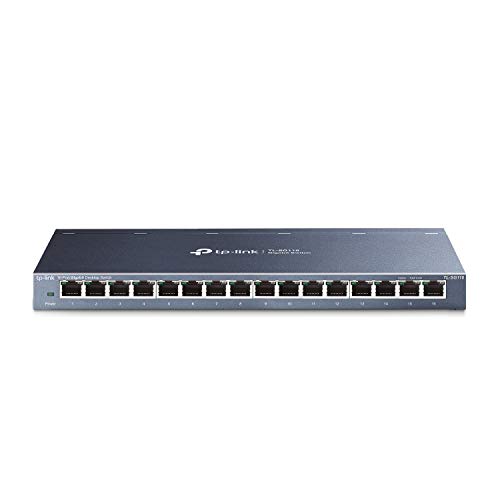 TP-Link TL-SG116 16-Port Gigabit Desktop Switch | Check price on Amazon |
Transmit buffers are small blocks of packet memory inside a network switch that hold data frames for a brief moment when more traffic arrives than a port can send out at once. They matter because without enough buffer memory, a switch drops packets during short traffic bursts, and dropped packets force retransmissions that add delay and jitter to gaming, voice calls, and video streams. A switch with a larger transmit buffer absorbs those bursts instead of discarding frames, so the network stays smooth when several devices talk at once.
Our Top Picks
- NETGEAR 8-Port Gigabit Ethernet Unmanaged Network Switch8 Port6.22 x 4.02 x 1.02 inches0.86 poundsCheck on Amazon
- NETGEAR 16-Port Gigabit Ethernet Unmanaged Network Switch16 Port11.3 x 4 x 1.3 inches2.93 poundsCheck on Amazon
Top 3 picks at a glance
What Transmit Buffers Do Inside a Switch
Every network switch moves frames between its ports with a store-and-forward design. When a frame arrives on one port, the switch reads the destination address, checks its MAC address table, and forwards the frame out of the correct port. The real problem appears when several ports send traffic toward the same destination port at the same moment. A single gigabit port can only send one gigabit per second, so when two or more gigabit ports push a burst toward one port, the extra frames have to wait somewhere. The transmit buffer is that waiting room.
Think of a transmit buffer as a short queue at the exit of each port. Frames enter the queue in the order they arrive, and the port sends them out one by one at line speed. If the queue has room, nothing is lost, and the only cost is a tiny amount of extra delay while a frame waits its turn. If the queue fills up completely, the switch has nowhere to put the next frame, so it drops it. The sending device eventually notices the missing frame and sends it again, which adds delay and can cause stutter in a game or a frozen frame in a video call.
Buffer memory is shared across the ports of a switch in most desktop and small office models. The manufacturer lists one total buffer figure, such as 192 KB or 4.1 Mb, and the switch hardware divides that memory between the ports that are busy at any moment. A port that is idle needs no buffer at all, so a busy port can borrow memory that other ports are not using. This sharing is why a switch with a modest total buffer can still handle a home network well, as long as only one or two ports burst at the same time.
One detail that confuses many buyers is the unit used to describe buffer size. TP-Link quotes buffer memory in megabits, written as Mb, while NETGEAR quotes it in kilobytes or megabytes, written as KB or MB. A buffer of 1.5 Mb holds roughly 190 KB of data, because eight bits make one byte, and a buffer of 4.1 MB holds far more than a buffer of 4.1 Mb. Convert the figures to the same unit before you compare brands. Switching capacity, forwarding rate, and the MAC address table matter as well, so the best choice is a switch where all of these figures are balanced for the network it will serve.
Why Buffer Size Matters for Gaming and Streaming
Gaming traffic is bursty by nature. A game client sends small packets in sudden flurries, especially when a match begins, when a player enters a busy area, or when the game downloads an update in the background. Voice chat adds another stream of small, time-sensitive packets, and a video stream adds large frames at a steady pace. When these flows meet at one port, for example the port connected to a gaming PC that is playing, talking, and streaming at the same time, the switch needs buffer room to absorb the peaks.
A buffer that is too small shows up as micro-stutter. The game runs well most of the time, then hitches for a fraction of a second when a burst of packets is dropped and retransmitted, and ping spikes appear at the same moments. These symptoms are easy to blame on the internet connection, but they can happen entirely inside the home network, between the gaming PC and the router, if the switch in the middle drops frames. A larger buffer gives the switch room to hold the burst and send it out in order.
Streaming has the same need in a different shape. A 4K video stream sends large frames at a high but steady rate, and a smart TV or streaming box is sensitive to any gap in the flow. When a second device begins a large download while the stream is running, the switch has to interleave the two flows. Buffer memory lets it hold the download frames briefly while the video frames go first. Without that cushion, the video player pauses to refill its own buffer.
Home networks have grown more demanding. A typical gaming household now connects a PC, one or two consoles, a smart TV, a phone, and a laptop to the same switch, and several of them are active at once. An eight-port switch with a small buffer can handle two or three quiet devices, but it begins dropping frames when four or five devices burst together. A sixteen-port switch with a larger buffer fits a busy household better, because it has both the port count and the memory to absorb overlapping bursts. A very large buffer can also hold frames for too long and add latency of its own, so the practical goal is a buffer large enough to absorb short bursts without dropping frames.
How to Choose a Switch for Buffer Performance
Match the buffer to the number of active devices. A desk setup with a PC and a console needs only a small buffer, because only two ports burst at once. A living room network with a console, a smart TV, a streaming box, and a laptop needs more room, and a home office with a work PC, a network drive, and video calls needs more still. Count the devices that will be active at the same time, not just the devices that are plugged in, and choose a buffer that covers the busiest hour of the day.
Check whether the manufacturer states the buffer size at all. Many low-cost switches hide this figure, which usually means the buffer is small. The switches in this guide all publish their buffer memory in the official specification sheet, so you can compare them directly. If a switch you are considering does not list a buffer figure, treat that as a warning sign.
Decide between unmanaged and managed. An unmanaged switch needs no setup and works the moment you plug it in, which suits a gaming desk or a living room. A managed switch adds VLANs, quality of service, and port controls, which let you give gaming and voice traffic priority over downloads. Managed models need a little configuration, but they are the better choice when you want to shape traffic instead of only absorbing it.
Look at switching capacity and port count together. An eight-port gigabit switch needs 16 Gbps of switching capacity to move full-speed traffic on every port at once, and a sixteen-port gigabit switch needs 32 Gbps. All five switches below meet that bar, so none of them becomes a bottleneck on its own. Jumbo frames move large frames in fewer pieces, and flow control lets a switch tell a sender to pause briefly instead of dropping frames. All five switches below use fanless designs, so they make no noise in a bedroom or a living room, and a metal case helps each one shed heat.
Best Switches With Generous Transmit Buffers
The five switches below all publish their packet buffer memory in the official specification sheet, and all five are network switches only. Each pick states its buffer size in the unit the manufacturer uses, so check the unit before you compare two models.
NETGEAR GS308 8-Port Gigabit Ethernet Unmanaged Switch
NETGEAR GS308 8-Port Gigabit Ethernet Unmanaged Switch
The NETGEAR GS308 is the simplest switch in this guide, and that is its strength. It has eight gigabit ports, a 16 Gbps switching capacity, and a 192 KB packet buffer on the current GS308v3 hardware, enough memory for a desk setup where a PC and a console burst at the same time. The fanless metal case runs silent, the switch mounts on a desk or a wall, and jumbo frame support up to 9,216 bytes helps large file transfers.
This switch is for a gamer or a home worker who wants a quiet, plug-and-play switch for a small setup and does not need VLANs or traffic controls. Its limitation is the buffer itself: 192 KB is the smallest figure in this guide, so it is not the right choice for a household where five or six devices burst at once. It also has no management interface, so you cannot prioritize traffic or isolate devices. Older GS308 hardware listed a smaller 128 KB buffer, so the 192 KB figure applies to the current v3 hardware.
TP-Link TL-SG108 8-Port Gigabit Desktop Switch
TP-Link TL-SG108 8-Port Gigabit Desktop Switch
The TP-Link TL-SG108 pairs eight gigabit ports with a 1.5 Mb packet buffer, which holds roughly 190 KB of data, putting it in the same class as the GS308 while adding a few useful features. Its 16 Gbps switching capacity and 11.9 Mpps forwarding rate move full-speed traffic on all eight ports, and IGMP snooping helps multicast traffic such as IPTV reach only the devices that asked for it. The fanless metal case is silent, and the switch supports desktop or wall mounting.
This switch is for a home network that needs a little more traffic handling than the simplest unmanaged switch, without stepping up to a managed model. Its limitation is that it is still unmanaged, so it cannot prioritize gaming traffic over a download or separate devices into VLANs. Its buffer is also modest, so a busy household should look at one of the sixteen-port picks below instead.
TP-Link TL-SG108E 8-Port Gigabit Easy Smart Managed Switch
TP-Link TL-SG108E 8-Port Gigabit Easy Smart Managed Switch
The TP-Link TL-SG108E takes the same eight gigabit ports and 1.5 Mb packet buffer as the TL-SG108 and adds a web management interface. That interface unlocks VLAN support, quality of service, IGMP snooping, port mirroring, and link aggregation, which let you give gaming and voice traffic priority over background downloads. The fanless metal case keeps the switch silent on a desk.
This switch is for a gamer who wants control over traffic without buying a full managed switch. Quality of service is the key feature here: when a download and a game compete for the same port, the switch can send the game packets first. Its limitation is the same 1.5 Mb buffer as the unmanaged model, so it improves how traffic is ordered rather than how much burst it can absorb. It also needs a little setup through the web interface.
NETGEAR GS316 16-Port Gigabit Ethernet Unmanaged Switch
NETGEAR GS316 16-Port Gigabit Ethernet Unmanaged Switch
The NETGEAR GS316 is the sixteen-port step up in the same family as the GS308, and its buffer grows with its port count. The current GS316v3 hardware lists a 4.1 MB packet buffer, far more memory than the eight-port models, alongside a 32 Gbps switching capacity that moves full-speed traffic on all sixteen ports at once. The fanless metal case stays silent, and the switch mounts on a desk or a wall. The 8K MAC address table covers a large home network.
This switch is for a busy household or a small office where many devices are active at the same time. Sixteen ports leave room for a PC, consoles, a smart TV, a network drive, and a printer, and the large buffer absorbs their overlapping bursts. Its limitation is that it is unmanaged, so it cannot prioritize traffic or isolate devices. An older GS316 hardware revision listed a smaller buffer figure, so the 4.1 MB figure applies to the current v3 hardware.
TP-Link TL-SG116 16-Port Gigabit Desktop Switch
TP-Link TL-SG116 16-Port Gigabit Desktop Switch
The TP-Link TL-SG116 pairs sixteen gigabit ports with a 4.1 Mb packet buffer, a 32 Gbps switching capacity, and a 23.8 Mpps forwarding rate. The buffer carries the same 4.1 figure as the GS316, but TP-Link quotes it in megabits, so in bytes it holds about half a megabyte, still far more than the eight-port models. IGMP snooping helps multicast traffic, the fanless metal case runs silent, and the switch supports desktop or wall mounting.
This switch is for a home network that needs sixteen ports and a solid buffer without paying for management features. It is a good fit for a gaming household with several consoles, a PC, and a smart TV all wired into one switch. Its limitation is that it is unmanaged, so it cannot prioritize traffic, and its buffer is smaller in byte terms than the GS316, so a network with very heavy bursts should favor the NETGEAR model.
Comparison Table
| Switch | Ports | Packet Buffer | Switching Capacity | Management | Best For |
|---|---|---|---|---|---|
| NETGEAR GS308 | 8 x Gigabit | 192 KB | 16 Gbps | Unmanaged | Quiet desk setup |
| TP-Link TL-SG108 | 8 x Gigabit | 1.5 Mb | 16 Gbps | Unmanaged | Small home network |
| TP-Link TL-SG108E | 8 x Gigabit | 1.5 Mb | 16 Gbps | Easy Smart | Traffic priority on 8 ports |
| NETGEAR GS316 | 16 x Gigabit | 4.1 MB | 32 Gbps | Unmanaged | Busy household, 16 ports |
| TP-Link TL-SG116 | 16 x Gigabit | 4.1 Mb | 32 Gbps | Unmanaged | Gaming household, 16 ports |
Buffer figures use the unit each manufacturer publishes. TP-Link quotes megabits, NETGEAR quotes kilobytes or megabytes, so convert to the same unit before you compare models directly.
Frequently Asked Questions
What is a transmit buffer in a network switch?
A transmit buffer is a small block of packet memory inside a switch that holds frames briefly when more traffic arrives than a port can send out at once. It acts as a queue at the exit of each port, so short traffic bursts are delayed by a fraction of a second instead of being dropped. Without buffer memory, every burst that exceeds a port’s speed would cause packet loss.
How much transmit buffer do I need for gaming?
A small setup with a PC and a console works well with a buffer of 192 KB or 1.5 Mb, because only two ports burst at once. A household with four or five active devices needs more room, and a buffer of 4.1 MB or 4.1 Mb gives the switch enough memory to absorb overlapping bursts without dropping frames. The exact need depends on how many devices are active at the same time.
Does a bigger transmit buffer always mean a better switch?
No. A larger buffer absorbs bigger bursts, but a buffer that is far too large can hold frames for too long and add latency of its own, a problem known as bufferbloat. Switching capacity, forwarding rate, and the MAC address table matter as well. The best switch has a buffer large enough for its busiest hour, with balanced figures across the rest of the specification sheet.
Are transmit buffers and jumbo frames the same thing?
No. A transmit buffer is memory that holds frames while they wait for a port. A jumbo frame is a single large frame that carries more data than a standard frame. Jumbo frames reduce overhead for large transfers, and buffer memory helps the switch handle bursts of any frame size. The two features solve different problems.
Do I need a managed switch to benefit from a large transmit buffer?
No. An unmanaged switch with a large buffer absorbs bursts on its own, with no setup at all. A managed switch adds quality of service and VLANs, which let you decide which traffic goes first when the buffer fills up. Management improves how traffic is ordered, while buffer memory improves how much burst the switch can absorb.
Conclusion
Transmit buffers are the quiet part of a network switch that decides whether a traffic burst becomes a stutter or passes unnoticed. A small buffer suits a desk with two active devices, while a larger buffer suits a household where a PC, consoles, and a smart TV all burst at the same time. The five switches above cover that range, from the compact NETGEAR GS308 with its 192 KB buffer to the sixteen-port NETGEAR GS316 with its 4.1 MB buffer. Match the buffer to the busiest hour of your network, convert the units before you compare brands, and choose a managed model only if you want to prioritize traffic too.
Disclosure: As an Amazon Associate, we may earn from qualifying purchases.
Related guides
More from Amazon
Programs that pair well with the guide above. Offers and eligibility are set by Amazon and may change.
Free shipping on eligible items, Prime Video and more. Eligible new members can start with a free trial.
Start a Prime free trialAd-free music streaming. Eligible new subscribers can start with a free trial.
Try Music Unlimited freeA Prime membership for ages 18-24 with a trial period. Eligibility is set by Amazon.
See Prime for Young AdultsAudiobooks and podcasts to listen to on the go. Eligible new members can start with a free trial.
Try Audible freeAs an Amazon Associate we earn from qualifying purchases.