A PC case is the one part of a build that never shows up in a frame-rate chart, yet it decides how hot every other part runs and how miserable the assembly process feels. Spend too little and you get a steel box with one choked intake, sharp edges and nowhere to hide cables; spend more than the budget allows and the graphics card or processor pays for it. The real decision is where the line sits between a case that simply holds parts and a case that actively helps them breathe.
This guide is for first-time builders, students putting together a dorm rig, and anyone upgrading an old tower without replacing the whole system. Every case below was picked from its Amazon listing title and specifications, with an emphasis on airflow, usable clearance for real graphics cards and coolers, and build quality that holds up at a modest outlay.
Quick Picks
As an Amazon Associate we earn from qualifying purchases.
| Product | Best for | Key spec from title |
|---|---|---|
| Cooler Master MasterBox Q300L | Compact Micro-ATX builds on a tight budget | Magnetic dust filter, transparent acrylic side panel |
| Thermaltake Versa H18 Tempered Glass | Showing off a first gaming build | 4mm tempered glass side panel, mesh front with blue LED strip |
| Montech AIR 100 ARGB Black | Cooling and lighting included out of the box | Four pre-installed 120mm ARGB fans, fine mesh front panel |
How to Choose
Airflow Comes Before Looks
A budget case earns its place on a desk by moving air, not by glowing. Mesh or perforated front panels let intake fans pull cool air straight to the graphics card and processor, while a solid glass or plastic front forces air through narrow side vents and traps heat behind it. Count the included fans: a case that ships with one rear exhaust fan still needs at least one front intake added, and that fan is part of the real cost. When two cases look equally good, pick the one with the more open front and clearer path from intake to exhaust, because a hot graphics card throttles long before a pretty panel impresses anyone.
Match the Case to the Motherboard
Cases are built around motherboard sizes, and buying the wrong combination wastes money in both directions. A Micro-ATX board fits in a mid-tower, but it rattles around in a cavernous full tower and leaves empty space that collects dust; a full ATX board simply will not fit in a Micro-ATX case. Check the listing for supported form factors before anything else, then confirm the graphics card clearance against the card you own or plan to buy. Long triple-fan cards need roughly 320mm or more of clearance, while compact dual-fan cards fit almost anywhere, so the case choice should follow the graphics card rather than the other way around.
Check Cooler and Radiator Clearance
Tower air coolers and liquid cooling radiators are the parts most often caught out by a small case. A tall air cooler needs a stated CPU cooler clearance taller than the cooler itself, usually around 155mm or more for common mid-size towers, and a front-mounted radiator needs both the length and the thickness accounted for. Drive cages and power supply shrouds can also eat into the space a radiator needs. Read the clearance figures on the listing, measure the parts you already own, and leave a small margin rather than trusting that a tight fit will work out during assembly.
Count the Extras the Price Hides
The cheapest sticker on the shelf is rarely the cheapest finished build. A case with no included fans needs two or three bought separately, a case with a single USB port on top forces awkward cable routing for headsets and drives, and a case with no dust filters means cleaning the inside every few weeks instead of every few months. Tempered glass looks better than acrylic and resists scratches, but it is heavier and needs care when the panel comes off. Add up the fans, the filters and the front-panel connections a case includes, then judge the whole package instead of the headline figure alone.
The 3 Best Options
Cooler Master MasterBox Q300L
The MasterBox Q300L is a classic starting point for a Micro-ATX build that stays small without turning into an oven. Its perforated panels let air move through the whole chassis, the magnetic dust filters lift off for cleaning, and the I/O panel can be moved to different sides of the case, which helps when the tower sits on the left of a desk. One 120mm fan comes pre-installed at the rear, so plan on adding at least one front intake fan. For a compact first build with a modest graphics card, it covers the essentials without extras a budget rig will never use.
Specs
- Motherboard support: Micro-ATX and Mini-ITX
- Case type: Mini-Tower with perforated airflow design
- Side panel: Transparent acrylic
- Dust filters: Magnetic design
- Pre-installed fan: 1 x 120mm
- CPU cooler clearance: Up to 159mm
- Graphics card clearance: Up to 360mm
- Power supply clearance: Up to 160mm
- Radiator support: Up to 240mm
- Front I/O: 2 x USB 3.0 ports
- Dimensions: 387 x 230 x 381mm
- Model number: MCB-Q300L-KANN-S00
Best for: First-time builders putting a Micro-ATX gaming rig together in a small space.
Watch out for: The acrylic side panel scratches more easily than tempered glass, and the single included fan means budgeting for at least one extra intake fan.
Thermaltake Versa H18 Tempered Glass

The Versa H18 pairs a compact Micro-ATX frame with a full tempered glass side panel, so a first build gets seen instead of hidden behind steel. A mesh front with a built-in blue LED strip feeds cool air to the intake, a full-length power supply cover hides the cables and the drive cage, and the chassis supports liquid cooling radiators up to 280mm at the front, generous for a case of this size. Hidden 2.5-inch and 3.5-inch bays keep storage out of the airflow path. It suits a builder who wants the glass-panel look and real cooling headroom in a footprint small enough for a crowded desk.
Specs
- Motherboard support: Micro-ATX
- Side panel: 4mm tempered glass
- Front panel: Mesh with built-in blue LED strip
- Power supply cover: Full length
- Radiator support: Up to 280mm at the front, 120mm at the rear
- Pre-installed fan: 1 x 120mm rear exhaust fan
- Front I/O: 1 x USB 3.0, 2 x USB 2.0, 1 x HD Audio
- Drive bays: 2 x hidden 2.5-inch, 2 x hidden 3.5-inch
- Model number: CA-1J4-00S1WN-01
Best for: Builders who want a tempered glass showcase case with mesh airflow in a compact Micro-ATX size.
Watch out for: Only one fan is included, so at least one front intake fan is needed for balanced airflow, and the glass panel adds weight compared with an acrylic window.
Montech AIR 100 ARGB Black
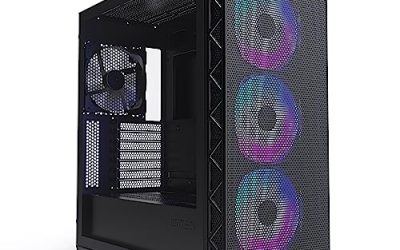
The AIR 100 ARGB is the pick for anyone who wants cooling and lighting sorted before the build even starts. Four 120mm ARGB fans come pre-installed and wired to an included lighting controller, so nothing extra is needed for airflow or glow, and the super fine mesh front panel doubles as a dust filter while letting air through. A swivel tempered glass side panel opens without tools, making part swaps far less fiddly than unscrewing a panel. With room for graphics cards up to 330mm and tower coolers up to 161mm, it fits the mid-range hardware that usually ends up in a budget gaming build.
Specs
- Motherboard support: Micro-ATX and Mini-ITX
- Pre-installed fans: 4 x 120mm ARGB fans with lighting controller
- Front panel: Super fine mesh
- Side panel: Swivel tempered glass
- Graphics card clearance: Up to 330mm
- CPU cooler clearance: Up to 161mm
- Power supply clearance: Up to 160mm
- Radiator support: Up to 280mm at the front
- Front I/O: 2 x USB 3.0, 1 x USB 2.0, HD Audio
- Expansion slots: 4
- Drive bays: 2 x 2.5-inch, 2 x 3.5-inch
- Dimensions: 405 x 210 x 425mm
Best for: Builders who want four fans, ARGB lighting and a mesh front included with the case rather than bought separately.
Watch out for: Full-size ATX motherboards do not fit this Micro-ATX chassis, so confirm the board size before ordering.
Which One Fits Your Situation
Building Your First PC in a Small Room
The MasterBox Q300L fits this situation best. Its compact mini-tower frame takes up little desk space, the perforated panels keep a modest build cool, and the movable I/O panel adapts to desks where the tower has to sit on an awkward side. Add one front intake fan and the airflow is sorted without spending on features a first build will not use.
Showing Off the Build Through Glass
The Versa H18 Tempered Glass is the natural choice here. The 4mm tempered glass panel puts the components on display, the mesh front with its blue LED strip gives the case a finished look, and the full-length power supply cover keeps cables out of sight. It is a compact case, so it suits a desk setup where the tower itself is part of the room.
Wanting Cooling and Lighting Without Extra Shopping
The Montech AIR 100 ARGB Black wins this scenario outright. Four ARGB fans and a lighting controller are already installed, so there is no separate fan order and no guesswork about matching fan sizes or connectors. The mesh front and swivel glass panel round out a case that is ready to build in as soon as the box opens.
Upgrading an Old Tower on a Tight Budget
The MasterBox Q300L again makes the most sense for a straight swap. Its Micro-ATX support covers the boards found in most older budget systems, the 360mm graphics card clearance accepts long cards, and the magnetic dust filters make the upgrade feel like a genuine improvement rather than a lateral move into another plain box.
Common Mistakes
- Buying a case before checking motherboard size, then discovering a full ATX board will not fit a Micro-ATX chassis.
- Choosing a solid-front case for its looks and then wondering why the graphics card runs hot under load.
- Forgetting that a case with a single included fan still needs intake fans, and treating the fan cost as an afterthought.
- Measuring the graphics card length but not the cooler height, radiator thickness, or power supply length.
- Removing a tempered glass panel on a hard floor without a soft surface underneath, and chipping the corner on the first build day.
Frequently Asked Questions
Do budget PC cases cool well enough for gaming?
Yes, provided the front panel is mesh or perforated and the case has at least one intake and one exhaust fan. Airflow depends far more on open panels and fan placement than on the badge, and all three cases here use mesh or perforated fronts. Avoid a solid glass front when cooling matters more than looks.
Will a long graphics card fit in a budget case?
It depends on the case, so always compare the card length with the clearance figure on the listing. The cases in this guide accept cards up to 330mm or 360mm, which covers most dual-fan and many triple-fan models. Measure the card you own rather than guessing, and remember that a front radiator reduces the space available.
Is tempered glass better than acrylic on a cheap case?
Tempered glass resists scratches and looks clearer over time, while acrylic is lighter and will not shatter if dropped. For a case that stays in one place, tempered glass is the better long-term choice; for a case that moves to LAN events or between rooms, acrylic is the more forgiving option.
How many fans does a budget build actually need?
Two fans are the practical minimum: one intake at the front and one exhaust at the rear. Three fans, with two intakes and one exhaust, give more even cooling and let each fan run slower and quieter. Cases that include several fans out of the box, like the Montech here, remove that extra purchase entirely.
Related guides
More from Amazon
Programs that pair well with the guide above. Offers and eligibility are set by Amazon and may change.
Free shipping on eligible items, Prime Video and more. Eligible new members can start with a free trial.
Start a Prime free trialAd-free music streaming. Eligible new subscribers can start with a free trial.
Try Music Unlimited freeA Prime membership for ages 18-24 with a trial period. Eligibility is set by Amazon.
See Prime for Young AdultsAudiobooks and podcasts to listen to on the go. Eligible new members can start with a free trial.
Try Audible freeAs an Amazon Associate we earn from qualifying purchases.