
As an Amazon Associate we earn from qualifying purchases at no extra cost to you.


Nothing kills a tidy nightstand faster than a phone that spent eight hours on its charging pad and wakes up at 12%. When a wireless charger stops working through a mat, desk pad, or fabric surface, the culprit is almost always distance, material, or alignment — and the fix is usually a five-minute job. But done badly, troubleshooting can cost you real money: people routinely buy a new charger when a $0 repositioning would have worked, or worse, they stack metal objects on top of the charging coil, which generates heat, drains efficiency, and can permanently damage the battery in a phone that costs $800 or more. This guide walks you through diagnosing and fixing the problem in order of likelihood, so you solve the cheap, common causes first.
Our Top Picks
What You Need
| Item | Why | Optional? |
|---|---|---|
| Your phone and charging pad | The devices under test — nothing fancy needed to start | No |
| USB power adapter (18W or higher) | Many “broken” wireless chargers are actually underpowered wall bricks; a charger rated below 10W can’t push meaningful power through any barrier | No |
| Microfiber cloth | Removes dust, crumbs, and oils from the pad surface and phone back that block the magnetic field | No |
| Felt gauge or ruler | Measures mat thickness; most Qi chargers tolerate roughly 2–5 mm of material, and knowing your number saves guesswork | Yes, a credit card (about 0.76 mm) works as a rough reference |
| Washi tape or masking tape | Marks the sweet-spot position on the mat once you find alignment, so it’s repeatable every night | Yes |
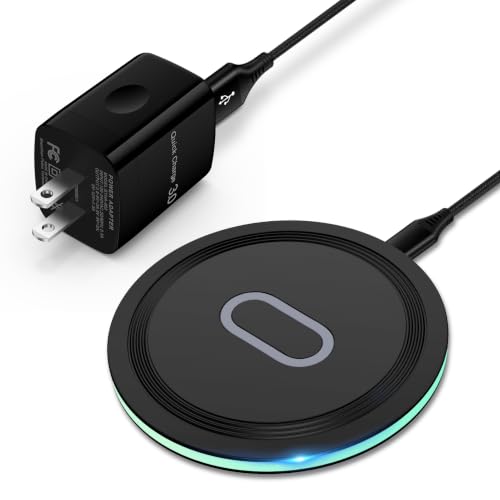
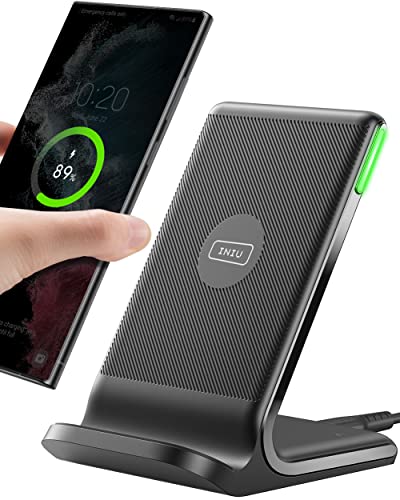
| Replacement charger | If testing proves the pad itself has failed, budget models run around $15 for units like the Samsung Fast Charging Pad for Galaxy S26/S25 Ultra or the INIU 15W fast wireless charging station with LED indicator | Yes, only if diagnosis confirms hardware failure |
Step-by-Step
Step 1: Test With Nothing in Between (2 minutes)
Place the phone directly on the bare charging pad with no mat, cloth, or desk pad in between. Watch for the charging indicator. If it charges, the pad and phone are fine — the mat is the problem, and you can skip to Step 4. If it doesn’t charge even on bare contact, continue to Step 2.
Step 2: Confirm the Power Supply (3 minutes)
Swap the wall adapter for one rated at least 18W (many phones negotiate 15W wireless output, and the adapter needs headroom above that). Also check the cable: USB-A to USB-C cables vary wildly in quality, and a worn cable can deliver power but not enough of it. Plug the charger into a different outlet while you’re at it. A pad receiving inadequate power often lights up but refuses to actually transfer a charge through any material.
Step 3: Check for Foreign Objects and Case Interference (3 minutes)
Run your fingers across the pad’s charging surface. Credit cards, hotel key cards, pop sockets, metal plates from magnetic car mounts, and even coins slipped inside a phone case will block charging or trigger overheating protections. Remove thick cases — anything over about 3 mm of combined case-plus-mat material usually defeats a standard Qi pad. Then retry the bare-contact test from Step 1.
Step 4: Reduce Mat Thickness or Cut Through (10–15 minutes)
Measure the material between pad and phone. Under roughly 3 mm of fabric, leather, or felt, most modern chargers still work. Between 3 and 5 mm is hit-or-miss and depends heavily on the charger’s output — a 15W unit like the INIU station has more penetration headroom than an older 5W pad. Above 5 mm, you’re generally out of luck. Your options:
- Move the pad on top of the mat and accept the look — the simplest fix.
- Cut a charging window in the mat slightly larger than the pad’s coil (typically a 40–60 mm circle), so the pad sits flush beneath with fabric only on its sides.
- Swap to a thinner mat in the charging zone — a 1–2 mm leather or felt patch glued over the pad’s location.
Step 5: Nail the Alignment (2 minutes, then one retry)
Wireless charging works through electromagnetic induction between two coils, and the coils need to overlap. Center isn’t always center: some phones have their coil offset from the case’s visual middle. Slowly slide the phone in a small grid pattern across the pad while watching for the charge chime. Once you find it, mark that spot on the mat’s underside with tape. Good news for 2026-era phones: newer models have wider coil tolerances than handsets from a few years ago, so alignment is more forgiving — but only if the pad itself is centered under the mark.
Step 6: Reset and Update (5 minutes)
If the phone charges on bare contact but fails through even thin fabric, restart the phone — a stuck fast-charge negotiation can cause this. On Android, also check Settings for any battery or charging optimization toggles that throttle wireless input. On iPhone, toggling Airplane Mode during the test eliminates background interference.
Step 7: Rule Out Pad Failure (5 minutes)
Test a different phone on the same pad, or the same phone on a different pad. If your pad fails both tests after Steps 2 and 3, it has likely failed internally — coils and driver circuits do die, especially on pads that run warm. At this point, replace rather than repair: the internal electronics aren’t serviceable, and pads in the around $15 range (such as the Samsung pad for Galaxy S26/S25 Ultra or the INIU 15W station) cost less than a repair visit would.
Mistakes to Avoid
- Buying a new charger first. Roughly the majority of “broken through a mat” cases are alignment or thickness issues, not dead hardware. Diagnose before you spend.
- Stacking multiple mats or pads. Doubling the barrier doesn’t double penetration — it stacks losses and heat.
- Ignoring heat. If the pad or the phone back is uncomfortably warm (above roughly 100°F / 38°C), charging through a mat is trapping heat against the battery. Heat is the number one accelerator of lithium-ion battery aging.
- Using a 5W old phone brick. An underpowered adapter makes a working setup look broken because the pad can’t sustain a charge through any resistance.
- Leaving metal in the sandwich. Keys, cards, or magnetic mount plates between pad and phone can trigger foreign-object detection — or, on pads without that safety feature, generate genuine hazard-level heat.
- Assuming all Qi chargers are equal. A 5W pad has minimal tolerance for barriers; a 15W pad gives you real margin. If you’re replacing anyway, buy the higher wattage.
How Often
Check your charging setup every one to two months as part of general nightstand maintenance: wipe the pad and phone back with a dry microfiber cloth, confirm the tape-marked alignment spot still triggers charging, and feel for unusual warmth during a normal overnight charge. Re-verify the full setup whenever you change phone cases, replace the mat, or move furniture — a slightly shifted pad is the most common reason a previously working setup “randomly” stops. If you use the charger as a daily driver, expect consumer-grade pads to last two to four years before coil or circuit degradation becomes noticeable.
When to Call a Pro or Replace
Call a professional (or your phone’s manufacturer support) if the phone refuses to charge wirelessly on multiple known-good pads with bare contact — that points to the phone’s charging coil or back glass, a repair typically running $80–$150 out of warranty. Replace the pad if it fails the swap test in Step 7, if its casing is cracked or swollen, or if it smells of burnt electronics; a replacement at the around $15 price point costs less than diagnosing it. There’s no scenario where opening a wireless charging pad’s sealed housing is worthwhile — the internals are potting-glued and not designed for repair.
FAQ
How thick can a mat be and still let a wireless charger work?
Most Qi-certified chargers maintain a reliable charge through 2–3 mm of fabric, leather, or felt. Some 15W models push through up to 5 mm, but efficiency drops and heat rises as thickness grows. Above 5 mm, treat it as not feasible and plan to surface-mount the pad or cut an opening.
Can wireless charging work through a wooden desk?
Yes, if the wood is thin — roughly 10–15 mm is the practical ceiling for long-range chargers specifically built for embedment, but standard consumer pads generally top out around 5 mm of total distance. A standard $15–$25 pad under a solid oak desktop will not work; you need a charger marketed for in-furniture installation.
Why does my phone charge on the pad but stop overnight?
Usually heat. Charging through a mat traps warmth, and once the phone crosses its thermal threshold, it pauses charging until it cools — sometimes for hours. Reduce the barrier thickness, remove thick cases overnight, or move the pad into open air.
Is a 15W charger worth it over a cheaper 10W or 5W pad?
For barrier charging specifically, yes. Higher wattage gives the charger headroom to push a usable charge through fabric where a 5W pad gives up entirely. Both categories are inexpensive — capable 15W pads like the INIU station and Samsung’s Galaxy-compatible pad sell around $15 — so there’s little reason to compromise.
Related guides
- Best Ultrawide Gaming Monitors: Six Screens Sized Against Real Desks: 6 Compared (2026)
- Best Game Room Neon Lights: Ten Signs and Icon Lamps Compared: 10 Compared (2026)
- 10 Best 75% Hot-Swappable Mechanical Keyboards (October 2026)
- Best Mini-LED Monitor: Five Listings From a Renewed KTC to a 5K LG, Compared by Pixels and Ports (2026)









