
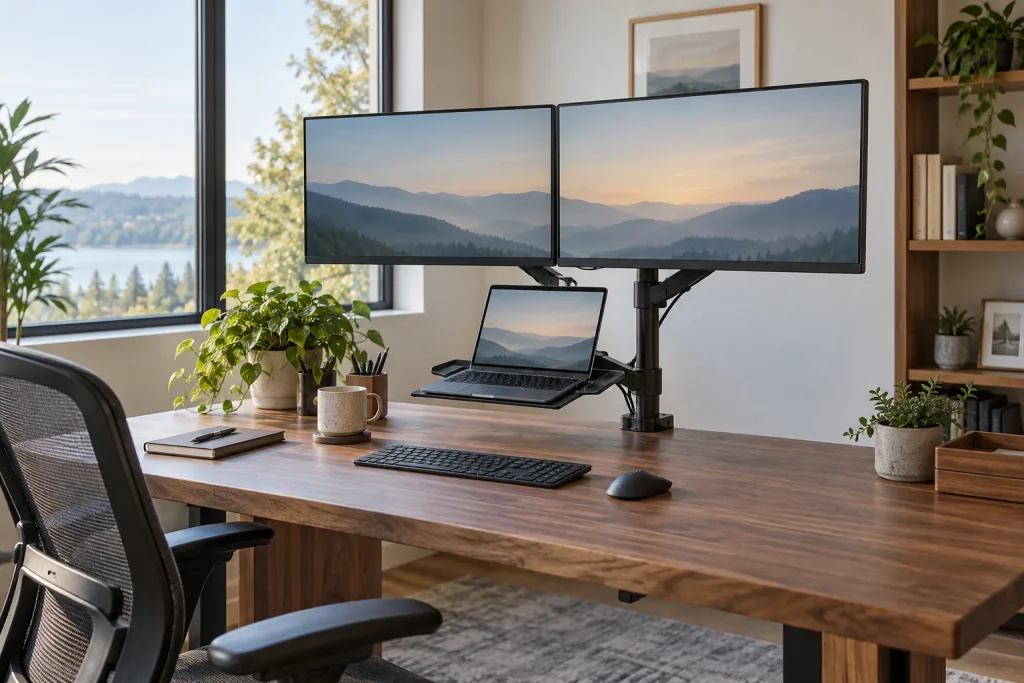
Modern remote work setups demand maximum screen real estate without turning your desk into a cluttered zone of tangled cables and mismatched hardware. Navigating two displays alongside a primary work laptop frequently leads to severe neck strain, poor posture, and lost surface area. Investing in the best dual monitor stand with integrated laptop holder immediately elevates your displays to ergonomic eye level while unifying your tech devices into a streamlined, high-efficiency workstation.
As home office design trends evolve into 2026, choosing a desk mount or tabletop riser requires balancing weight capacity, screen size compatibility, and spatial layout. Whether you prefer dynamic gas spring arms clamped to your desktop edge or furniture-style wooden risers with integrated storage drawers, optimizing your display footprint significantly improves daily focus. Below, we have compared and ranked the top eight stands across budget, mid-range and premium tiers.
As an Amazon Associate we earn from qualifying purchases at no extra cost to you.




Our Top Picks


Top 3 picks at a glance
Quick Picks
| Product | Best For | Price tier |
|---|---|---|
| IMtKotW Dual Monitor Stand and Laptop Mount | Best Overall Value | Mid-range |
| WALI Dual Monitor and Laptop Stand | Best Heavy-Duty Pole Mount | Mid-range |
| WESTREE Monitor Stand Riser with Drawers | Best Wooden Riser with Storage | Budget |
| VIVO Tall Adjustable Stand (STAND-V012J) | Best Tall Standing Desk Mount | Mid-range |
| Simple Houseware Desk Dual Monitor Stand Riser | Best Budget Metal Riser | Budget |
| MOUNTUP Dual Monitor and Laptop Mount | Best Gas Spring Articulating Arms | Mid-range |
| Spacrea Dual Monitor Stand Riser | Best Ultra-Compact Budget Option | Budget |
| HUANUO Dual Monitor and Laptop Mount | Best Premium Heavy-Duty Articulation | Premium |
How We Compared
To evaluate these mounts and risers, we evaluated critical architectural features including weight support ranges, screen size limits, adjustability, and overall desktop footprint. We examined both desktop-clamping articulated mounts and standalone surface risers to accommodate varied home office layouts. Fixed mechanical integrity, ease of installation, cable management efficiency, and value across price tiers were primary criteria. Hard specs such as maximum monitor dimensions (ranging from 13 to 32 inches) and laptop tray tolerances (supporting up to 17-inch notebooks) were checked against each listing to confirm compatibility.
The 8 Best Picks
IMtKotW Dual Monitor Stand and Laptop Mount
Targeting professionals who split attention between a large main screen and a secondary notebook, the IMtKotW Dual Monitor Stand and Laptop Mount balances functional stability with clean desktop presentation. Designed to support monitors up to 32 inches alongside laptops up to 15 inches, this mid-range clamp-based mount clears precious surface real estate while maintaining clean cable management channels along the support structure.
- Pro: Handles large primary displays up to 32 inches securely.
- Pro: Solid build quality for a mid-range mount.
- Con: Laptop tray capacity is capped at 15-inch notebooks.
Skip this model if your primary work computer is a larger 17-inch mobile workstation that requires a wider tray base.
WALI Dual Monitor and Laptop Stand
If you operate heavy hardware and require rigid height placement, the WALI Dual Monitor and Laptop Stand delivers dependable steel performance. It easily supports dual screens or a single 27-inch display alongside a massive 17-inch notebook. Its center-pole mounting system utilizes robust collar clamps that eliminate arm bounce during heavy typing sessions.
- Pro: Supports larger 17-inch laptops without tray overhang.
- Pro: Heavy-gauge steel construction ensures wobble-free stability.
- Con: Height adjustments require manual hex-key collar repositioning.
Skip this option if you need quick, touch-adjusted height changes throughout your workday.
WESTREE Monitor Stand Riser with Adjustable Laptop Stand Riser
For home offices where clamping hardware is impractical, the WESTREE Monitor Stand Riser brings warm wood aesthetics and structured storage to your desk. This steel-frame desktop organizer holds two monitors elevated on top while providing a dedicated adjustable laptop stand riser and two sliding storage drawers for office supplies.
- Pro: Built-in storage drawers organize desktop accessories efficiently.
- Pro: Requires zero installation, mounting clamps, or desk drilling.
- Con: Fixed footprint consumes dedicated physical depth on your desktop.
Skip this unit if you require full-motion tilt, swivel, or portrait-to-landscape rotation for your displays.
VIVO Tall Adjustable Stand (STAND-V012J)
Engineered for sit-stand workstations, the VIVO STAND-V012J features an extra-tall center pole designed to raise screens higher than standard desk mounts. It accommodates 13 to 27-inch LCD screens alongside notebooks up to 17 inches. Its full articulation allows smooth tilt and swivel adjustments to minimize glare and neck fatigue.
- Pro: Extended pole height is ideal for standing desk transitions.
- Pro: Securely fits wide 17-inch laptop chassis.
- Con: Requires a sturdy desk lip capable of supporting C-clamp tension.
Skip this pick if you have a thin glass-topped desk that cannot tolerate heavy point-load clamping.
Simple Houseware Desk Dual Monitor Stand Riser
Budget-focused buyers needing quick organization will appreciate the Simple Houseware Desk Dual Monitor Stand Riser. This simple steel frame elevates two screens or a monitor-and-laptop setup to eye level. The lower sliding drawer and open side compartments store notebooks, paper, and pens neatly out of view.
- Pro: Budget-friendly price with a built-in drawer.
- Pro: Zero setup hassle; ready to place directly onto any flat surface.
- Con: Lacks screen angle, tilt, or individual height adjustment mechanisms.
Skip this model if your ergonomic setup demands independent screen articulation or VESA hardware attachment.
MOUNTUP Dual Monitor and Laptop Mount
Built for maximum motion, the MOUNTUP 3-in-1 Desk Mount uses calibrated gas spring arms for effortless fluid adjustments. It supports two monitors up to 27 inches or a single screen plus a 10 to 17-inch laptop. Each arm handles between 4.4 to 17.6 lbs, letting you reconfigure display angles on the fly.
- Pro: Smooth gas spring tension handles 4.4 to 17.6 lbs per arm effortlessly.
- Pro: Versatile 3-in-1 setup accommodates notebooks from 10 to 17 inches.
- Con: Initial setup requires careful counterbalance tension adjustment per arm.
Skip if your main setup relies on heavy 32-inch ultrawide monitors that exceed the 27-inch limit.
Spacrea Dual Monitor Stand Riser
The Spacrea Dual Monitor Stand Riser offers basic organizational benefits at a minimal cost. This budget metal mesh riser elevates dual displays or a screen-and-laptop combo while providing a center pull-out drawer and two side-mounted pen holders. It provides clean surface storage while lifting displays to a comfortable viewing height.
- Pro: Highly affordable entry point.
- Pro: Integrated pen holders and drawer maximize compact desk space.
- Con: Mesh frame lacks dynamic mechanical movement or arm extension.
Skip this option if you need robust articulating arms, integrated cable routing channels, or high weight limits.
HUANUO Dual Monitor and Laptop Mount
Representing top-tier engineering, the premium HUANUO Dual Monitor and Laptop Mount delivers uncompromising flexibility for heavy equipment setups. Built to support massive displays up to 32 inches and laptops up to 17 inches, its premium gas spring arms feature full tilt, swivel, and 360-degree rotation attached via standard VESA 75/100 mm brackets.
- Pro: Exceptional weight support for 32” screens and 17” laptops.
- Pro: Full-motion gas spring arms with VESA 75/100 mm bracket compatibility.
- Con: Highest price tier in this roundup.
Skip this unit if you prefer a basic wooden or metal surface riser that requires no assembly.
MOUNT PRO Dual Monitor and Laptop Mount for Max 27″ Monitors and 17″ Laptop
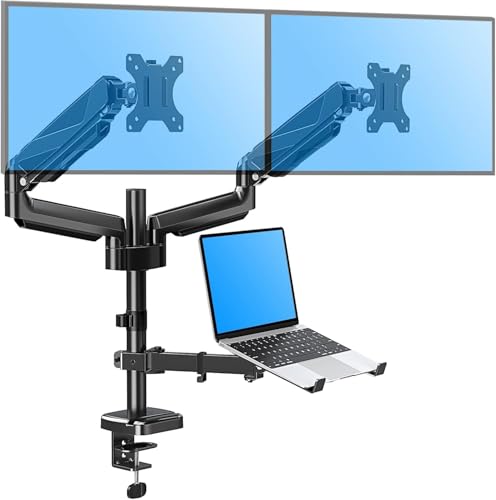
The MOUNT PRO 3-in-1 mount is a strong alternative to the MOUNTUP pick for buyers who want gas spring movement but carry slightly heavier hardware. It clamps to the desk edge and holds two flat or curved monitors from 13 to 27 inches, plus a laptop between 10 and 17 inches on a center tray. The listing rates each arm for monitors from 4.4 to 19.8 lbs, and the laptop tray is rated to the same 19.8 lb ceiling, which is generous for a mid-range mount and leaves room for thick gaming laptops or mobile workstations.
Monitors attach with standard VESA 75×75 mm or 100×100 mm plates, so most office and gaming displays in the 24 to 27-inch class will fit without adapters. The tray itself is fairly compact at roughly 8.9 by 9.45 inches, with side clips that hold larger notebooks in place even though the chassis hangs past the tray edges. That design keeps the laptop from sliding when you tilt the platform toward your face, but it does mean very wide 17-inch machines look slightly overhung.
Who it suits: remote workers and gamers who run two 27-inch screens and a laptop in clamshell or open mode, and who want to push screens out of the way without tools. The gas spring arms let you raise, lower and swing each display by hand once the tension is set.
- Strength: Higher per-arm rating (up to 19.8 lbs) than the MOUNTUP and VIVO articulating options in this list.
- Strength: Laptop tray carries heavy 17-inch notebooks, not just ultrabooks.
- Drawback: Capped at 27-inch screens, so 32-inch owners should look at the HUANUO or FlexiSpot picks instead.
- Drawback: The listing does not publish arm reach or clamp range, so measure your desk lip carefully before ordering.
Compared with the existing picks, the MOUNT PRO sits between the MOUNTUP (similar footprint, lighter arm rating) and the HUANUO 32-inch mount (bigger screens, premium tier). If your monitors are 27 inches or smaller and on the heavier side, it is one of the better-value gas spring choices here.
VIVO Laptop and Dual 17 to 32 inch Monitor Pneumatic Arm Mount (STAND-V003KL)

VIVO’s STAND-V003KL is the pneumatic sibling of the tall STAND-V012J already ranked above, and it is aimed at people who have moved up to 32-inch or curved monitors. Instead of fixed arms, each display rides on a gas spring arm with about 11.5 inches of smooth vertical travel, and both arms can also slide along the center pole for a wider overall range. VIVO rates each arm for monitors between 2.2 and 19.8 lbs and 17 to 32 inches, flat or curved, with VESA 75 or 100 mm patterns.
The laptop tray measures about 12 by 11 inches and its side arms expand from roughly 9.5 to 16.5 inches, which fits notebooks from 10 to 15.6 inches. The tray is rated around 9.9 lbs, so it is better matched to ultrabooks and mainstream laptops than heavy 17-inch gaming rigs. Movement specs are full: about 35 degrees of tilt each way, 180 degrees of swivel and 360-degree rotation for portrait use. A heavy-duty C-clamp handles desks up to 3 inches thick, a grommet base is included, and cable covers run along the arms. VIVO backs it with a 3-year warranty.
Who it suits: sit-stand desk users and gamers with two large or curved displays who want quick height changes and still need a place for a 13 to 15.6-inch work laptop.
- Strength: Supports 32-inch and curved monitors with true gas spring height adjustment.
- Strength: Thick 3-inch clamp range suits butcher-block and solid-wood desktops.
- Drawback: Laptop tray tops out at 15.6 inches, smaller than the WALI, VIVO V012J and HUANUO trays.
- Drawback: Very light monitors under 2.2 lbs will not hold position on the springs.
Next to the HUANUO 32-inch pick, the VIVO V003KL offers a similar screen range in a slightly lower price tier, trading away 17-inch laptop support for smoother pneumatic arms. Choose it if your monitors matter more than the size of your notebook.
HUANUO Dual Monitor Stand with Laptop Desk Mount, Freestanding Glass Base

Every articulating mount in the original lineup needs a clamp or a grommet hole. This HUANUO stand solves that problem for glass desks, desks with a front crossbar, and rental furniture you do not want to mark. It stands on an oversized tempered glass base, about 11.8 by 16.5 inches, with five anti-slip pads underneath, and it carries two monitors from 13 to 32 inches plus a laptop tray for notebooks up to 17 inches.
HUANUO lists each monitor arm at up to 22 lbs and the laptop tray at up to 19.8 lbs, which is unusually high for a freestanding design. Monitors use VESA 75×75 or 100×100 mm plates, and the arms articulate and rotate with up to 45 degrees of tilt. The steel construction and wide base keep the center of gravity low, but freestanding stands are always more sensitive to extreme setups than clamped ones, so keep both arms roughly balanced and avoid swinging a heavy monitor far forward over the desk edge.
Who it suits: anyone with a glass top, a thin floating desk, a desk pushed tight against a wall, or a frame that blocks clamp access, and who still wants articulating arms rather than a flat riser.
- Strength: No drilling or clamping; safe for glass and delicate surfaces.
- Strength: High listed capacity: 32-inch screens and a 17-inch laptop at once.
- Drawback: The glass base occupies real desk depth, unlike edge-clamped arms.
- Drawback: Height range is more limited than tall-pole mounts such as the VIVO V012J.
It bridges the gap between the WESTREE, Simple Houseware and Spacrea risers (no installation, but no articulation) and the clamp mounts (full movement, but desk requirements). For glass desk owners, it is the most flexible option in this guide, landing in the mid-range tier.
FlexiSpot Laptop Mount, Dual Monitor Arm with Laptop Tray (32″ / 17.3″)

FlexiSpot is best known for standing desks, so it makes sense that its dual monitor arm with laptop tray is built around a sit-stand workflow. The mount handles two monitors up to 32 inches and up to 19.84 lbs per arm, with gas spring height adjustment, tilt, swivel and rotation. The tray in the middle fits laptops and tablets from 10.1 to 17.3 inches and has venting holes to help a working laptop shed heat while it sits elevated.
Listed movement includes a tilt range from roughly minus 85 to plus 15 degrees and up to about 19.7 inches of extended reach, so you can pull a screen close for detail work or push it back when you switch to the laptop. Mounting options include a C-clamp or a grommet base. This version comes in white, which pairs neatly with white standing desk frames and light-colored setups that the mostly black lineup above does not match well.
Who it suits: standing desk owners, creators with a 17-inch laptop, and anyone building a white or light-themed desk setup who wants matching hardware.
- Strength: Combines 32-inch monitor support with a tray that takes 17.3-inch laptops, a rare pairing in the mid-range tier.
- Strength: Vented tray helps with heat when the laptop runs open.
- Drawback: Newer listing with fewer published details on clamp range and warranty than VIVO or HUANUO.
- Drawback: Gas spring arms need correct tension tuning for each monitor.
Against the MOUNTUP gas spring pick, the FlexiSpot adds 32-inch support and slightly larger laptop compatibility at a similar mid-range tier. Against the HUANUO 32-inch mount, it brings a vented tray and a white finish.
VIVO Dual Monitor + Laptop Mount, Triple Screen Viewing (STAND-V013L)

The VIVO STAND-V013L takes a different approach from the pole mounts above: its arms are long articulating segments with a stacking design, giving a total arm span of about 55 inches. That reach lets you spread two monitors and a laptop side by side in a true triple-screen layout instead of stacking the laptop below the displays. It supports monitors from 13 to 27 inches at up to 15.4 lbs each, using VESA 75 or 100 mm patterns, and laptops from 10 to 15.6 inches on a 12 by 11-inch tray.
Movement covers about minus 45 to plus 90 degrees of tilt, 180 degrees of swivel and full 360-degree rotation. The clamp fits desktops roughly 0.4 to 3.2 inches thick, and a grommet option handles 0.4 to 1.6 inches. Construction mixes aluminum, steel and plastic, and VIVO includes a 3-year warranty.
Who it suits: traders, editors and coders who want three screens at one eye line on a wide desk, and gamers who keep a laptop running chat or streaming tools beside two monitors.
- Strength: Wide 55-inch span creates a flat triple-screen layout.
- Strength: Generous clamp range and 3-year warranty.
- Drawback: Articulating arms are not gas spring, so height changes are slower than the MOUNTUP or VIVO V003KL.
- Drawback: Laptop tray limited to 15.6-inch notebooks; monitors limited to 27 inches.
Compared with the VIVO V012J tall stand already in this list, the V013L trades standing-height reach for horizontal spread. Pick it when desk width, not height, is the main constraint. It sits in the mid-range tier.
Buying Guide
Mounting Style: Clamps vs. Desktop Risers
Selecting the best dual monitor stand with integrated laptop holder depends heavily on your physical desk construction. C-clamp and grommet mounts (like those from HUANUO, MOUNTUP, VIVO, WALI, and IMtKotW) attach to the edge of your desk, freeing up virtually all desktop real estate underneath. However, they require a sturdy solid wood or thick composite surface. Tabletop risers (such as WESTREE, Simple Houseware, and Spacrea) rest directly on your desk surface without installation, making them ideal for delicate glass tops, hollow-core furniture, or shallow-lipped desks.
Weight Capacity and Screen Size Ratings
Exceeding manufacturer weight specifications causes arm sagging and display instability. If you use a 32-inch primary monitor, choose models rated explicitly for larger screens, such as the IMtKotW or HUANUO mounts. For laptop trays, verify whether your notebook chassis measures within 15 inches or requires a expanded 17-inch platform like those offered on the WALI, VIVO, MOUNTUP, or HUANUO stands. Dynamic gas spring arms (MOUNTUP’s 4.4–17.6 lbs range) require minimum and maximum weight thresholds to counterbalance correctly.
Ergonomics and Cable Management
Achieving a proper posture requires placing the top third of your monitor screen at direct eye level, with your laptop screen elevated to match. Full-motion articulated arms allow precise tilt, swivel, and depth adjustments to block ambient window glare. Look for built-in cable management clips along the arms or hollow frame risers to route power cords and HDMI cables out of sight.
Laptop Tray Size, Venting and Weight Rating
The laptop tray is the part buyers most often overlook, and it is where many 3-in-1 stands fall short. Three numbers matter. First, the supported screen size range: trays listed for 10 to 15.6 inches (VIVO V003KL and V013L, IMtKotW at 15 inches) will hold a 16-inch laptop awkwardly at best. Second, the tray weight rating: a thin ultrabook weighs around 3 lbs, but a 17-inch gaming laptop can pass 6 to 7 lbs, and trays rated near 10 lbs leave less margin once you add a docking cable pulling on one side. The MOUNT PRO and HUANUO glass-base trays, both rated to 19.8 lbs, are the safest bets for heavy machines. Third, ventilation: solid trays trap heat under laptops that run open, while perforated trays like the FlexiSpot design allow air to reach bottom intake vents.
Also check the clip style. Side arms that expand around the chassis keep laptops secure at steep tilt angles, while a simple lip at the bottom edge is fine for flat use but lets the laptop shift when tilted. If you run your laptop closed in clamshell mode, a vertical laptop stand next to the mount may be a better option than a tray at all.
Desk Thickness, Grommet Holes and Freestanding Bases
Before you buy any clamp-style mount, measure three things: desktop thickness, the depth of the overhang (the lip between the edge and any frame rail underneath), and the distance from the desk to the wall. Most clamps in this guide handle desktops from roughly 0.4 inches up to about 3 inches, but a steel frame rail set close to the edge can block the clamp plate even on a thin desk. Grommet mounts need either an existing cable hole or permission to drill one. If you cannot clamp or drill, choose a freestanding design such as the HUANUO glass-base stand or one of the riser options.
Standing desks add one more factor: the mount moves with the desk, so cable slack matters. Leave enough loose cable at the back of the mount for the desk’s full travel, and confirm the combined weight of two monitors, a laptop and the mount stays within your desk frame’s lifting capacity.
Monitor Size, Weight and Curved Screens
Screen size ratings are a guide, not a guarantee. A 27-inch monitor can weigh anywhere from about 8 to 15 lbs depending on the panel and stand-free weight, and curved 32-inch models are often deeper and heavier still. Always look up the monitor’s weight without its stand and compare it to the per-arm range. For gas spring arms, the minimum matters too: a monitor lighter than the lower limit will drift upward. Curved screens also need clearance between arms so the two displays do not collide when angled inward, which is why longer-reach mounts like the VIVO V003KL and FlexiSpot handle curved pairs more comfortably than compact pole mounts.
Comparison of the Additional Picks
| Model | Monitor Range | Laptop Tray | Mounting | Arm Type | Price Tier |
|---|---|---|---|---|---|
| MOUNT PRO Dual Monitor and Laptop Mount | 13-27″, 4.4-19.8 lbs per arm | 10-17″, up to 19.8 lbs | Desk clamp | Gas spring | Mid-range |
| VIVO STAND-V003KL | 17-32″, 2.2-19.8 lbs per arm | 10-15.6″, about 9.9 lbs | C-clamp up to 3″ or grommet | Gas spring | Mid-range to premium |
| HUANUO Glass Base Stand | 13-32″, up to 22 lbs per arm | Up to 17″, up to 19.8 lbs | Freestanding glass base | Articulating | Mid-range |
| FlexiSpot Dual Arm with Laptop Tray | Up to 32″, up to 19.84 lbs per arm | 10.1-17.3″, vented | C-clamp or grommet | Gas spring | Mid-range |
| VIVO STAND-V013L | 13-27″, up to 15.4 lbs per arm | 10-15.6″ | C-clamp 0.4-3.2″ or grommet | Articulating, 55″ span | Mid-range |
Setup Tips for a Dual Monitor and Laptop Mount
- Plan the layout first. Decide whether the laptop sits below the monitors (stacked), between them, or beside them (triple-wide). Stacked layouts save width; side-by-side layouts keep all three screens at one eye line.
- Mount the base near the center of your seating position. Off-center clamps force one arm to stretch farther, which reduces stability and makes the heavier side sag.
- Attach VESA plates to the monitors before lifting. Lay each monitor face-down on a soft towel, screw on the plate, then hang it on the arm. Quick-release plates make this a one-person job.
- Tune gas spring tension with the monitor attached. If the screen drifts up, reduce tension; if it sinks, increase it. Make small turns and test after each one.
- Set heights in order. Place the main monitor so its top edge sits at or slightly below eye level, then align the second monitor to match, and finally raise the laptop tray so its screen is as close as possible to the same plane.
- Route cables last. Run power and video cables through the arm channels, leave a loose loop at each joint so arms can move freely, and bundle the rest down the pole.
- Recheck bolts after a week. Clamp hardware and arm joints can settle slightly as the desk surface compresses; a quick retighten keeps everything from wobbling.
Matching a Stand to Your Setup
With thirteen options across risers, pole mounts and gas spring arms, it helps to start from your desk and devices rather than from the product list.
- Glass, thin or framed desk: skip clamps entirely. The HUANUO glass-base stand gives articulating arms without touching the desk edge, while the WESTREE, Simple Houseware and Spacrea risers are the simplest no-install choices if you do not need screen movement.
- Two 32-inch or curved monitors: look at the HUANUO 32-inch mount, VIVO V003KL or FlexiSpot. All three are rated for 32-inch screens; the FlexiSpot and HUANUO also take 17-inch laptops.
- Heavy 17-inch gaming laptop: prioritize tray weight over tray size. The MOUNT PRO and HUANUO glass-base trays carry up to 19.8 lbs, and the WALI, VIVO V012J and MOUNTUP trays also accept 17-inch notebooks.
- Standing desk: choose gas spring arms (MOUNTUP, MOUNT PRO, VIVO V003KL, FlexiSpot) or the extra-tall VIVO V012J pole so you can fine-tune height after every desk change.
- Wide desk, three screens at eye level: the VIVO V013L’s long articulating arms spread monitors and laptop side by side instead of stacking them.
- Tight budget: a metal riser like the Spacrea or Simple Houseware lifts screens to a better height for the least money; step up to the IMtKotW or WALI when you want real arms.
Whatever you choose, confirm three specs against your own hardware before ordering: the monitor weight without its stand, the laptop’s weight and screen size, and your desk’s thickness and edge clearance. Those three numbers rule out most mismatches before they happen.
Our Verdict
For most home office configurations, the IMtKotW Dual Monitor Stand and Laptop Mount offers the best overall value, with support for a primary monitor up to 32 inches, a tray for laptops up to 15 inches and a clean clamp-based footprint. If you want fluid gas spring adjustments and a tray that takes 10 to 17-inch laptops, the MOUNTUP Dual Monitor and Laptop Mount is the best articulating choice, while the premium HUANUO Mount pairs full-motion 32-inch screen support with 17-inch laptop compatibility. If you prefer a non-clamping riser with built-in storage drawers, the WESTREE Monitor Stand Riser is our top surface choice.
FAQ
How do I know if my monitor is VESA compatible?
Check the back of your monitor for four threaded screw holes arranged in a square pattern. Standard VESA hole patterns are spaced either 75×75 mm or 100×100 mm apart. Mounts like the HUANUO stand feature universal brackets that accommodate both standard dimensions.
Can I install a clamp-style mount on a glass desk?
No, clamping heavy articulating arms onto a glass desktop creates concentrated point pressure that can shatter the surface. For glass desks, opt for standalone surface risers like the WESTREE, Simple Houseware, or Spacrea models.
What is the correct ergonomic height for dual monitors and laptops?
Your screens should be positioned roughly an arm’s length away, with the upper edge of the monitor display aligned with your natural eye line. Your integrated laptop tray should elevate your secondary screen to match this height, preventing down-angle neck strain.
What is the advantage of gas spring arms over fixed pole mounts?
Gas spring arms utilize internal mechanical counter-tension, allowing you to push, pull, raise, or tilt your monitors using effortless hand pressure. Fixed pole mounts require manual bolt or collar adjustments using hex tools to alter screen heights.
Can I use a dual monitor and laptop mount with a standing desk?
Yes. Clamp and grommet mounts move with the desktop, so your screens stay at the same position relative to your eyes as the desk rises. Leave enough cable slack for full travel and keep the total weight within the desk frame’s lifting rating. Tall-pole and gas spring models such as the VIVO V012J, VIVO V003KL and FlexiSpot make it easier to fine-tune height between sitting and standing.
Is a laptop tray safe for a laptop that runs all day?
Generally, yes, as long as air can reach the laptop’s intake vents. Perforated or vented trays are best for laptops running open under load. If your laptop pulls air from the bottom and the tray is solid, raise the rear slightly or run the machine in clamshell mode with an external keyboard and mouse.
Do I need the same size monitors on both arms?
No, but matching sizes and weights makes alignment easier. With mixed screens, adjust each arm’s height so the top edges line up, and set gas spring tension separately for each monitor. Make sure the lighter monitor still meets the arm’s minimum weight rating.
What if my monitor has no VESA holes?
Some slim and budget monitors lack VESA mounting points. You can use a clamp-on VESA adapter bracket made for non-VESA monitors, but check that the adapter’s size range fits your screen and that the combined weight stays within the arm’s rating. Otherwise, a riser-style stand is the simpler choice.
Clamp mount or freestanding base: which is more stable?
A properly tightened clamp on a solid desk is the most stable option because it anchors the pole to the desktop. Freestanding bases rely on weight and footprint, so they are more sensitive to heavy monitors extended far forward. A freestanding stand like the HUANUO glass-base model is still the right pick when clamping is not possible.
Related guides
- Best Ultrawide Gaming Monitors: Six Screens Sized Against Real Desks: 6 Compared (2026)
- Best Game Room Neon Lights: Ten Signs and Icon Lamps Compared: 10 Compared (2026)
- 10 Best 75% Hot-Swappable Mechanical Keyboards (October 2026)
- Best Mini-LED Monitor: Five Listings From a Renewed KTC to a 5K LG, Compared by Pixels and Ports (2026)









