
A gaming desk collects clutter fast: charging cables, a spare controller, dongles, batteries, a phone, and the odd USB stick. A good desk organizer tray corrals all of it into one spot so your surface stays clear for actually playing and working. The best tray for you depends on what you store and how much desk real estate you can spare. Here is how to choose without buying a tray that just becomes more clutter.
Our Top Picks


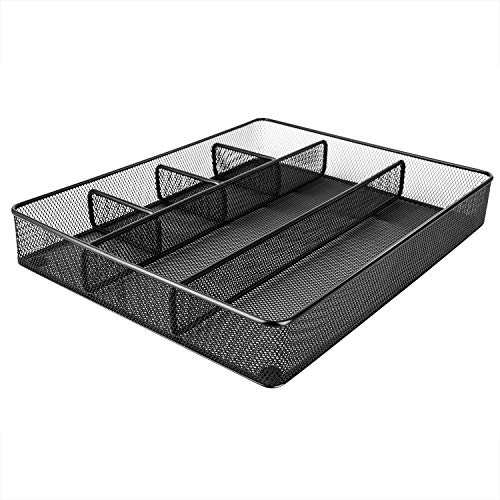


Top 3 picks at a glance
Types of organizer trays
Compartment trays
A divided tray with two to six sections keeps small items sorted: one bay for cables, one for a controller, one for pens and dongles. Look for at least one deep compartment (around 3-4 inches) for taller items and a shallow one for flat gear like keys and cards.
As an Amazon Associate we earn from qualifying purchases at no extra cost to you.




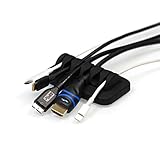

Cable-management trays
These add slots or clips along one edge so charging cables stay threaded and ready instead of sliding to the floor. Some include a weighted or grippy base so a cable does not drag the whole tray off the desk when you pull your phone free.
Desktop and drawer trays to pair with a cable tray
The picks above pair a compartment tray, a mesh desk caddy, and a weighted cable holder with several under-desk cable management trays that hide power strips and charger bricks. They still leave drawers, pocket items, and the space under the monitor uncovered. The six options below cover that side of the problem: compartment trays for drawers and desktops, catchall valet trays for your phone and earbuds, a monitor riser with a built-in drawer, and stick-on drawers that add hidden storage under the desk surface. Combining one cable tray with one or two of these usually clears a desk completely.
Marbrasse Expandable Mesh Drawer Organizer (10 Compartments)

Who it’s for: anyone with a desk drawer full of loose cables, dongles, batteries, and USB drives that needs sorting into clear zones.
This Marbrasse tray is a black powder-coated metal mesh organizer with two sliding sections, so it expands to fit drawers from about 9 inches up to about 17 inches long. It comes with removable dividers that create up to ten compartments, and non-skid feet keep it from sliding when you open the drawer. Fully expanded, it measures about 17 x 12 x 2.4 inches.
Key specs: metal mesh with powder coat, expandable from about 9 to 17 inches, removable dividers for up to 10 compartments, non-skid feet, about 2.4 inches tall.
Strengths: The expanding design means it fits most desk drawers without guessing at dimensions. Mesh lets you see what is in each bay and does not trap dust. The dividers make it easy to give each item its own slot, which is what keeps a drawer tidy over time.
Drawbacks: The 2.4-inch depth is too shallow for a spare controller or a large charger brick. Mesh can let very small items like microSD cards slip through gaps or sit awkwardly, so add a small box for those.
How it compares: It works alongside the under-desk cable trays above rather than replacing them: the cable tray hides power, while this sorts the small gear. It is a budget-friendly choice that looks clean on a black or dark desk setup.
Simple Houseware Drawer Organizer Tray (9 Compartments)
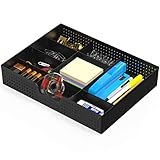
Who it’s for: people who want a simple plastic tray for the desktop or a drawer to hold pens, earbuds, cables, and dongles, with layouts they can change.
This low-profile tray measures about 12 x 9 x 2 inches and uses two fixed cross walls plus six removable dividers to create up to nine compartments. It is made of plastic, wipes clean easily, and works equally well inside a drawer or sitting at the back of the desk. It is sold in several colors and a clear version.
Key specs: about 12 x 9 x 2 inches, polypropylene plastic, 6 removable dividers for up to 9 compartments, available in black, clear, and other colors.
Strengths: It is inexpensive, light, and easy to rearrange. Solid plastic bottoms hold tiny items such as SD cards and adapters that would slip through mesh. A compact footprint fits the back corner of most gaming desks.
Drawbacks: Light plastic can slide on a smooth desk; add small rubber pads if you plan to keep it on the desktop. The 2-inch walls are low, so taller items will not stand up in it.
How it compares: It is smaller and more flexible than the Marbrasse mesh tray, which suits a desktop better. If you only need one tray for the surface, this is the easy budget pick.
SITHON PU Leather Valet Tray

Who it’s for: anyone who wants a neat drop zone for a phone, earbuds case, keys, and wallet so they stop drifting into the mouse area.
A valet tray, sometimes called a catchall, is a shallow open tray designed for everyday-carry items. This SITHON version is made from PU leather, measures about 7.8 x 7.8 x 1.9 inches, and uses a snap-button design so the walls hold their shape. The soft lining keeps phones and watches from scratching, and it stops items from clattering when you drop them in during a match.
Key specs: about 7.8 x 7.8 x 1.9 inches, PU leather, snap-button construction, soft interior.
Strengths: It quietly solves the most common clutter source on a desk: the stuff from your pockets. The leather look softens a desk full of black plastic, and the small footprint fits beside a monitor stand.
Drawbacks: It has no dividers, so small items mix together. PU leather is not as durable as genuine leather and can show wear at the corners over time.
How it compares: It complements a compartment tray rather than replacing it. If your clutter is mostly pocket items rather than cables, this is the simplest fix.
Nordik Vegan Leather Valet Tray (Medium)
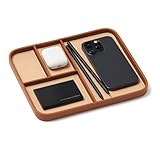
Who it’s for: people who want a catchall with built-in sections, so the phone, earbuds, keys, and watch each have a defined spot.
Nordik’s medium tray measures about 9.5 x 7.9 x 1 inch and divides into four compartments. Despite the product name, it is made from vegan (faux) leather, with a two-tone finish and a range of colors from black to green and blue. The low walls make items easy to grab without lifting, which suits a desk where you reach for your phone between rounds.
Key specs: about 9.5 x 7.9 x 1 inch, vegan leather, four compartments, multiple color options.
Strengths: Four sections keep everyday items from piling into one heap. The color choices make it easy to match a themed setup, and the flat profile slips under a monitor overhang.
Drawbacks: The 1-inch walls are low, so tall items such as a tall power bank or a bundle of cables will not stay put. It is purely a surface tray with no cable routing.
How it compares: It is a more organized version of the SITHON tray. Pick the Nordik if you like each item in its own place, and the SITHON if you prefer one open dish.
OPNICE Dual Monitor Stand Riser with Drawer and Pen Holders

Who it’s for: gamers with two monitors, or a monitor plus laptop, who want to lift the screens and gain storage in the space underneath.
This OPNICE riser combines a long shelf with a pull-out drawer and two pen-holder cups. The shelf extends up to about 39 inches wide, which suits two monitors side by side, and lifts them by about 3.8 inches. The drawer holds small items out of sight, and the space beneath the shelf fits a keyboard when you are not using it. It is built from steel and plastic.
Key specs: extends up to about 39 inches wide, about 3.8-inch rise, pull-out drawer, two pen holders, steel and plastic construction.
Strengths: It solves two problems at once by raising monitors closer to eye level and adding storage without using any extra desk area. Tucking the keyboard under the shelf clears space for a large mouse pad when you need it.
Drawbacks: It only works if your monitors sit on their own stands; it does not help with monitor arms. Check that the stand bases fit the shelf depth and that the 3.8-inch lift puts your screens at the right height.
How it compares: It is the monitor-shelf tray from the sizing table above, done at full desk width. If desk surface is your tightest constraint, this adds the most storage per inch.
Bostitch Konnect Under Desk Drawer (2-Pack)

Who it’s for: anyone whose desk has no drawers and who wants hidden storage for small gear without drilling.
These slide-out drawers stick to the underside of the desk with a self-adhesive backing, so no tools are needed. Each drawer measures roughly 9 x 5.6 x 1.9 inches, and the pack includes two drawers plus four dividers to split them into sections. They are made from ABS plastic, and Bostitch lists a three-year warranty.
Key specs: 2 drawers, each about 9 x 5.6 x 1.9 inches, self-adhesive mounting, 4 dividers included, ABS plastic.
Strengths: They add storage where there was none and keep the desktop completely clear. Mounting takes a minute, and the drawers are out of sight when closed. Good for spare dongles, batteries, a USB drive, and earbuds.
Drawbacks: Adhesive mounts are only as good as the desk surface; textured, dusty, or flexible undersides weaken the bond. No load rating is published, so keep contents light. Make sure the drawer does not collide with your knees, chair arms, or an under-desk cable tray.
How it compares: It is the drawer-style option from the sizing table above. Pair one of these on the side of the desk with an under-desk cable tray running along the back for a fully hidden setup.
Sizing and material
| Tray type | Footprint | Best for | Price tier |
|---|---|---|---|
| Compact caddy | ~6 x 4 in | Cables + dongles | Budget |
| Multi-compartment | ~10 x 6 in | Controller + small gear | Budget |
| Monitor-shelf tray | Under-monitor | Saves desk space | Budget to mid-range |
| Drawer-style | Adhesive under desk | Hidden storage | Budget |
More tray types worth knowing
The two types above cover the basics. Editorial roundups of desk organizers also include a few other formats that suit specific gaming and work setups.
Valet and catchall trays
Shallow, open trays for pocket items: phone, keys, wallet, earbuds, watch. They are usually leather, faux leather, wood, or felt. Their job is to give everyday-carry items a landing spot so they stay out of your mouse zone. Some include dividers; some add a built-in wireless charging pad so the phone charges while it sits there.
Drawer trays
Flat, divided trays designed to sit inside a desk drawer. Fixed-size plastic trays are cheap and easy; expandable mesh or bamboo trays adjust to the drawer length. If your desk has a drawer, a drawer tray is the single most effective way to stop it becoming a junk pit.
Monitor risers with storage
A shelf that lifts your monitor and adds a drawer, slots, or cubbies underneath. They make use of dead space under the screen and raise the display closer to eye level at the same time. They suit desks where monitors sit on their own stands rather than arms.
Under-desk stick-on drawers
Slide-out drawers that attach under the desktop with adhesive or screws. They add hidden storage to desks that have none. Check knee clearance before mounting.
Letter and stacking trays
Tiered trays for paper, notebooks, and flat items. They are less common on gaming desks but useful in a shared work and play setup for keeping documents, controllers, or a tablet in a vertical stack instead of spread across the surface.
How to choose the right tray
Start by finding your biggest clutter source rather than buying several organizers at once. Then match the tray to it.
- Mostly cables and chargers: An under-desk cable tray for power strips and bricks, plus a few cable clips on the desk edge for the cables you actually plug in.
- Mostly pocket items: A valet tray near your dominant hand, outside the mouse sweep.
- Mostly small tech: A compartment tray with at least one deep bay and a few shallow ones, either on the desk or in a drawer.
- No space on the surface: A monitor riser with a drawer or stick-on under-desk drawers.
- Controller and headset: A deeper tray or a dedicated stand, since most organizer trays are too shallow for a controller to sit securely.
Size and depth
Measure the spot before you buy. On a typical gaming desk, the back corners and the space under the monitor are the most useful. Compartment depth matters as much as footprint: around 2 inches is enough for cables, dongles, and pens, while a phone standing upright or a controller needs 3 to 4 inches.
Material
Plastic is cheap and easy to clean. Metal mesh is sturdy and shows what is inside. Leather and faux leather are soft and quiet, so dropped items do not clatter. Wood and bamboo look warm and suit natural-tone desks. Whatever you pick, a non-slip base keeps the tray in place when you pull a cable out.
Comparison of the added picks
| Model | Type | Approximate size | Compartments | Best for | Price tier |
|---|---|---|---|---|---|
| Marbrasse expandable mesh | Drawer tray | Expands to about 17 x 12 x 2.4 in | Up to 10 | Sorting a messy drawer | Budget |
| Simple Houseware tray | Desktop or drawer tray | About 12 x 9 x 2 in | Up to 9 | Small tech on the desk | Budget |
| SITHON valet tray | Catchall | About 7.8 x 7.8 x 1.9 in | 1 | Phone, keys, earbuds | Budget |
| Nordik valet tray | Catchall | About 9.5 x 7.9 x 1 in | 4 | Organized pocket items | Budget to mid-range |
| OPNICE dual riser | Monitor riser with drawer | Extends to about 39 in wide | Drawer plus 2 cups | Dual-monitor desks | Mid-range |
| Bostitch Konnect drawers | Under-desk drawers | About 9 x 5.6 x 1.9 in each | Dividers included | Hidden storage | Budget |
Placement strategy
Keep it within reach but out of the way
The best spot is usually the back corner of the desk or under the monitor, where the tray is easy to reach but not in your mouse space. If desk room is tight, an under-desk adhesive drawer or an under-monitor shelf tray adds storage without eating any surface at all.
Material and grip
Felt-lined or rubber-based trays stop small items from sliding and keep the tray itself from scratching your desk or sliding when you grab a cable. Wood and metal trays look premium but add a felt pad underneath to protect the surface.
Plan your desk in zones
Organizer trays work best when each one serves a clear zone of the desk. Thinking in zones also stops you from buying a tray that fits nowhere.
- Action zone: The area in front of you where the keyboard and mouse live. Keep it empty apart from input devices and a desk mat. No trays here.
- Reach zone: The area you can reach without leaning, usually the back corners and the space beside the monitor. This is where a valet tray or small compartment tray belongs, on the side opposite your mouse hand.
- Display zone: The area under and behind the monitors. A monitor riser with a drawer or a slim tray under the screen uses this dead space well.
- Hidden zone: Under the desk and inside drawers. Cable trays, stick-on drawers, and drawer trays hold power, spare cables, and occasional gear here.
Assign every regular item to one of these zones before buying anything. If the reach zone is already crowded with a speaker, a microphone arm base, or a headset stand, a monitor riser or under-desk drawer will help more than another surface tray.
Storing gaming gear that does not fit a tray
Standard organizer trays are built for pens, cables, and phones. Gaming gear is bulkier, so plan for it separately.
Controllers
Most compartment trays are too shallow for a controller to sit securely. A charging dock or a simple controller stand keeps pads upright and charged. If you prefer a tray, look for a bay at least 3 to 4 inches deep and wide enough for the grips.
Headsets
A headset left on the desk takes more room than almost anything else. A clamp-on headset hook under the desk edge or a stand on the reach zone keeps it off the surface. Some under-desk cable trays and hammock clamps include hooks that double as headset holders.
Handheld consoles and tablets
A handheld PC or tablet is best stored upright in a slotted stand or a deep tray with a soft lining, so the screen does not get scratched by keys or cables. Keep its charger cable clipped to the desk edge so it is ready to plug in.
Wireless dongles and adapters
Spare USB receivers, adapters, and memory cards are easy to lose. Give them a small dedicated compartment, ideally in a solid-bottom tray so they cannot slip through mesh. A labeled compartment saves the frantic search when a mouse receiver goes missing.
Cable management beyond the tray
An organizer tray handles the stored items; a few small accessories handle the cables that stay connected.
- Adhesive cable clips: Stick a row along the back edge of the desk to hold charging cables in place, so the connector never slips to the floor.
- Reusable hook-and-loop ties: Bundle spare cable length neatly, and undo easily when you rearrange the setup.
- Cable sleeves and spines: Gather the cables running from desk to floor into one tidy column, especially on standing desks where cables need to move.
- Desk grommets: If your desk has a cable hole, route monitor and PC cables through it and down into the under-desk tray.
- Cable labels: Small flag labels near each plug make it easy to identify which charger or device you are unplugging from the power strip.
Quick buying checklist
- Clutter source: You have identified whether your main problem is cables, pocket items, small tech, or a lack of surface space.
- Measured spot: You know the exact footprint and depth available in the reach zone, under the monitor, inside the drawer, or under the desk.
- Depth: At least one compartment is deep enough for your tallest regular item.
- Base: The tray has a non-slip or felt base so it stays put and does not scratch the desk.
- Mounting: For under-desk items, the clamp range fits your desk thickness, or the surface is smooth and clean enough for adhesive.
- Style: The material and color match the rest of the setup, so the tray looks like part of the desk rather than an afterthought.
FAQ
What should I put in a desk organizer tray?
The everyday small stuff that otherwise migrates across your desk: charging cables, a phone, earbuds, a spare controller, dongles, batteries, pens, and USB drives. Reserve one deep compartment for the tallest item so the tray does not tip, and keep bulky boxes elsewhere.
How do I keep cables from tangling in the tray?
Use a tray with edge slots or add a couple of small cable clips so each charging cable has a home. Coiling loose cables with a reusable velcro tie before dropping them in also stops the spaghetti effect and makes the right cable easy to grab.
How many organizers does a gaming desk actually need?
Usually two or three: one under-desk cable tray for power, one surface tray or valet tray for everyday items, and optionally a drawer tray or stick-on drawer for occasional gear. More than that tends to become clutter itself. Start with the single biggest problem and add only if something still has no home.
Will a cable tray under the desk make my setup look cleaner on camera?
Yes. Lifting the power strip and charger bricks off the floor removes the most visible tangle, especially on a desk with an open front or a glass top. Route cables from the tray up a desk leg or through a grommet so nothing hangs loose behind the monitor.
Is a mesh, plastic, or leather tray better?
It depends on what you store. Mesh is sturdy and easy to see into, but tiny items can slip through. Plastic holds small parts well and cleans easily. Leather and faux leather are soft and quiet for phones and watches. Many desks end up with a mix, such as a plastic or mesh tray for tech and a leather catchall for pocket items.
Do stick-on under-desk drawers damage the desk?
Strong adhesive can pull off laminate or paint when removed, especially after a long time. Clean the surface first with isopropyl alcohol, and if you want to avoid marks, choose a model that also offers screw mounting, or test removal in a hidden spot. Keep loads light, since adhesive mounts are not designed for heavy items.
Can I put a wireless charger in my desk tray?
Yes. Some valet trays include a built-in wireless charging pad, or you can place a slim charging pad in a larger tray. Keep metal objects such as keys and coins off the pad, since they can heat up, and route the charging cable through the tray’s edge or a cable clip.
What is the difference between a valet tray and a compartment tray?
A valet tray is a shallow, open dish for pocket items such as a phone, keys, wallet, and earbuds, often in leather or wood. A compartment tray is divided into several bays for smaller desk items like cables, dongles, pens, and batteries. Many desks benefit from one of each.
Where should an organizer tray go on a gaming desk?
Place it in the back corner on the side opposite your mouse hand, or under the monitor if there is room. That keeps it within reach but out of the path of fast mouse movements. Larger storage belongs under the desk or in a drawer.
Building a system, not just adding a tray
A tray works best as part of a small routine. Give every regular item a home, cables in the slotted edge, phone in the deep bay, dongles in a shallow one, and put things back as you finish. Without assigned spots, even a nice tray becomes a pile in a box. The goal is that your eyes and hand know exactly where each thing lives, so the desk resets itself in seconds.
Consider how often you touch each item. Daily-grab things like the phone and a charging cable belong in the most reachable front compartment, while occasional items, a spare dongle, batteries, can go in a deeper or under-desk drawer. Splitting storage by frequency keeps the visible tray minimal and the clutter you rarely need tucked out of sight.
Matching the desk aesthetic
Trays come in felt, wood, metal, and silicone. Felt and wood soften a warm wood desk and dampen the clink of dropped items; metal and silicone suit a cooler, modern setup and wipe clean easily. Whatever the material, a non-slip base is the practical must-have so grabbing a cable does not drag the whole tray toward the edge.
Installing an under-desk cable tray
Because several of the main picks in this guide are under-desk cable trays, it is worth knowing how to fit one well. A tray that is mounted in the wrong place or overloaded will sag, rattle, or get in the way of your knees.
- Choose the length. Measure the back edge of the desk between the legs or frame. A tray around two-thirds of the desk width is usually enough to hold a power strip plus a few charger bricks. On a long desk, two shorter trays can work better than one long one.
- Pick the mounting method. Clamp-on trays avoid drilling and suit rented homes and glass or thin desktops, as long as the edge thickness fits the clamp range. Screw-mounted trays are more rigid and better for heavy loads. Check whether a standing desk’s crossbar or motor housing blocks the spot you want.
- Position it toward the back. Mount the tray close to the rear edge so it stays clear of your knees and chair arms. On a standing desk, make sure it does not hit the wall or a windowsill when the desk rises.
- Load the power strip first. Place the power strip in the tray, then the charger bricks, then coil spare cable length. Leave a little slack so the cables can move with a standing desk.
- Route one cable to the wall. Ideally, only the power strip’s cord should run from the tray to the wall outlet. Use a cable sleeve or spine down a leg for a cleaner look.
- Bring cables up neatly. Run monitor, PC, and charging cables up through a grommet or over the back edge with adhesive cable clips, so nothing hangs in view.
Mesh, solid, or fabric trays
Metal mesh trays let heat from charger bricks and power strips escape and are easy to zip-tie cables to. Solid trays hide everything but can trap heat, so avoid packing them with chargers that run warm. Fabric trays are quiet and light but sag under heavy loads. For gaming PCs with several bricks, a sturdy mesh tray is usually the safest choice.
Organizing a gaming desk step by step
Trays work best as part of a short, repeatable process. This routine takes about an hour the first time and a minute or two a day after that.
- Clear everything off. Take everything off the desk and out of the drawers. Wipe the surface.
- Sort by frequency. Group items into daily (phone, headset, a charging cable), weekly (spare controller, wireless dongles), and rarely (spare cables, old adapters). Anything you have not used in months can go into a box elsewhere or be recycled.
- Handle power first. Mount the under-desk cable tray, move the power strip into it, and route cables before placing anything on the surface.
- Place daily items within reach. Put a valet tray or compartment tray in the back corner on your non-mouse side, so it never collides with your mouse sweep.
- Store weekly items nearby but hidden. Use a drawer tray, stick-on drawer, or monitor riser drawer for things you need now and then.
- Label if it helps. Small labels on drawer compartments, or color-coded cable ties, make it obvious where things go back.
- Reset daily. At the end of a session, spend a minute returning items to their spots. The system only works if every item has one home.
Cleaning and upkeep
Trays gather dust, especially open mesh and felt-lined ones. Every couple of weeks, empty surface trays and wipe them with a slightly damp cloth. Vacuum or shake out fabric and felt linings. For under-desk cable trays, check every few months that clamps and screws are tight, that nothing is pressing hard on cable insulation, and that charger bricks are not buried under coiled cables where they can overheat.
Common organizing mistakes
- Buying organizers before decluttering. Trays filled with cables you never use simply hide the problem. Sort and discard first, then buy storage for what is left.
- Putting a tray in the mouse sweep. Anything within the arc of your mouse arm will get knocked during a fast flick. Keep trays on the opposite side or behind the monitor.
- Choosing compartments that are too small. If the phone does not fit its bay easily, it will end up on the desk again. Size each compartment for the item, with a little room to spare.
- Overloading adhesive mounts. Stick-on drawers and hooks are for light items. Heavy chargers or a full drawer of metal parts can pull them loose over time.
- Burying charger bricks. Packing power bricks under coiled cables in a solid tray can trap heat. Leave space around them, or use a mesh tray that lets air move.
- Skipping the reset. Even the best tray system drifts back into clutter without a short end-of-day tidy. Make it part of shutting down the PC.
Scaling the system to your desk size
On a compact desk under about 40 inches wide, surface space is precious, so lean on hidden storage: one under-desk cable tray, one stick-on drawer, and a single small valet tray in the corner. On a mid-size desk, add a compartment tray in the reach zone. On a large L-shaped or dual-monitor desk, a monitor riser with a drawer turns the space under the screens into storage, and the return side of an L-desk makes a natural home for a deeper tray with controllers and a headset stand. The bigger the desk, the more tempting it is to spread out, so keep the action zone strictly clear no matter how much room you have.
Bottom line
Match the tray to your clutter: a compact caddy for cables and dongles, a multi-compartment tray if you also stash a controller, or an under-monitor or under-desk tray when surface space is precious. Favor a grippy, felt-lined base with at least one deep bay and edge cable slots, and even a budget tray keeps your desk clear instead of collecting a slow drift of gear.
Related guides
- Best Ultrawide Gaming Monitors: Six Screens Sized Against Real Desks: 6 Compared (2026)
- Best Game Room Neon Lights: Ten Signs and Icon Lamps Compared: 10 Compared (2026)
- 10 Best 75% Hot-Swappable Mechanical Keyboards (October 2026)
- Best Mini-LED Monitor: Five Listings From a Renewed KTC to a 5K LG, Compared by Pixels and Ports (2026)









