
Reaching under the desk to plug something in gets old fast, and a floor power strip becomes a dust trap tangled in cables. A desk-clamp or desk-edge power strip mounts your outlets and USB ports at hand level on the desktop, so charging a phone, controller, or headset is a one-second reach. This guide covers what to look for so you get one that is safe, convenient, and future-proof.
Our Top Picks
 Jgstkcity Desk Clamp Power Strip USB C5 Outlets & 6 USB Ports - 40W11.5 x 1.9 x 0 InchesCheck on Amazon


Top 3 picks at a glance
Mounting styles
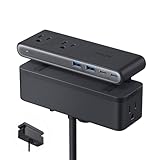
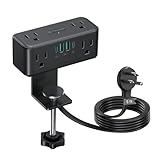
Clamp-mount strips
These grip the desk edge with a screw clamp, hovering the outlet block just above or below the surface. They need no adhesive and move with you, but confirm the clamp range fits your desktop, typically 0.6-2 inches.
As an Amazon Associate we earn from qualifying purchases at no extra cost to you.




Adhesive and grommet strips
Adhesive strips stick under the front lip for a hidden look; grommet-mount units drop into a cable hole with the ports flush on top. Both are cleaner than a clamp but harder to reposition later.
More desk-clamp and desk-mount power strips worth a look
The eight picks above cover the most popular clamp strips, but they lean heavily on one layout: a single slim bar of outlets with a row of 20W USB-C ports. Depending on your desk, you may want something different, such as far more outlets for a streaming setup, a stronger single USB-C port for a tablet, a strip you can mount at any angle, or a flush grommet that disappears into the desktop. The six options below fill those gaps. Each one is described from its published specifications, so double-check clamp range and cord length against your own desk before you order.
NYYTGE Desk Clamp Power Strip with Nightlight (40W, 6 ft)

The NYYTGE strip is a close cousin to the four-port USB-C models in our main list, with one twist: a built-in nightlight on the strip body that you control from a touch panel with low, medium, and high levels. That sounds like a gimmick until you have fumbled for a charging cable in a dark room at 1 a.m. after a late gaming session. A soft glow at the desk edge lets you find the right port without switching on the main light and waking anyone else up.
On paper it carries five spaced AC outlets, four 20W USB-C PD ports, and two USB-A ports, all on a 6 ft cord with a flat plug. The clamp is sized for desk edges up to 1.69 inches thick, which covers most laminate and solid-wood gaming desks but rules out some thick butcher-block tops. The listing claims 1800J of surge suppression and a flame-retardant housing.
The important caveat is that the 40W figure is shared across all the USB ports. One phone will get the full 20W, but if you plug in four devices at once, each will charge more slowly. That is the same trade-off you get with the Acozvin and Jgstkcity 40W strips above, so it is not a reason to skip this one, just a reason not to expect four fast-charging phones at the same time. Some listing variants also describe the plug type inconsistently, so confirm that the unit you receive has a grounded three-prong plug before you rely on it for surge protection.
Best for: bedroom setups where the desk doubles as a nightstand, or anyone who charges a phone and controller at night. Skip it if: your desktop is thicker than about 1.7 inches.
Mifaso PD30W Desk Clamp Power Strip

Most budget clamp strips split their USB power into several 20W ports. Mifaso goes the other way, with a single stronger 30W USB-C PD port plus two USB-A ports and four AC outlets. If you mostly charge one device at a time, such as a tablet, a Nintendo Switch, a handheld gaming PC topping off between sessions, or a phone that supports faster charging, one 30W port can be more useful than four 20W ports that share a smaller total budget.
The published specs list a 1080J surge rating, a 5 ft cord, and a clamp that adjusts from roughly 0.5 to 1.96 inches. That wide range is a real advantage: very thin desks and floating shelf-style desks are exactly where many clamp strips fail, because their clamp cannot tighten enough to grip securely. The shorter 5 ft cord is the main drawback. If your wall outlet is behind a long desk or across a corner, measure first, because a strip that only just reaches the wall will tug at its own plug every time the desk moves.
Compared with the Anker Nano in our main list, Mifaso is a much simpler, cheaper unit with less USB-C power in total and fewer outlets. Compared with the TenTrend and TROND budget strips, it trades USB port count for a faster single USB-C port. Think of it as a sensible budget pick for a small desk with one main device to charge.
Best for: thin desks, compact setups, and people who charge one tablet or handheld at a time. Skip it if: you need more than four AC outlets or a long cord.
HOPOW Dual Layer Desk Clamp Power Strip (13 outlets, 10 ft)

A full gaming and streaming desk can eat outlets fast: two monitors, speakers, a subwoofer, a mic interface, a key light, a capture box, LED strips, and a charging pad. The HOPOW is built for that kind of desk. It stacks two strips on one clamp for a total of 13 AC outlets plus four USB ports, two of which are USB-C. The top strip detaches if you want to take it on a trip, and the bottom section can be removed and screwed to a wall or the underside of the desk.
The listing gives a 1700J surge rating, a 15A overload switch that trips above 1875W, and a 10 ft flat cord with a 45-degree angled plug, so it can reach a distant wall outlet without blocking the other socket on the wall plate. The clamp accepts tabletops up to about 2.75 inches thick, the widest range in this guide, which makes it one of the few clamp strips that fits thick solid-wood or butcher-block desks.
The trade-off is bulk. Two layers of outlets stick up further from the desk edge than a slim single bar, and they will be visible from the front of the desk unless you mount the strip at the back corner. The USB-C ports are standard 20W-class phone chargers, so the HOPOW is about outlet count, not laptop charging. Also remember that 13 outlets does not raise the total load limit. Everything plugged into it still shares one wall circuit, so keep the gaming PC on its own surge protector.
Best for: streamers and multi-monitor desks with lots of low-draw gear, and thick desktops. Skip it if: you want a low-profile strip that hides behind the monitors.
JXGUCAT Desk Clamp Power Strip 10 ft with PD 20W USB-C (White)

Almost every clamp strip on the market is black, which looks out of place on a white desk with white peripherals. This JXGUCAT model comes in white, and it is one of the few in this guide with a removable extension cord, so you can unplug the cord from the strip itself instead of threading the whole unit back through your cable tray when you rearrange the desk.
From the listing, you get four AC outlets, four USB ports including PD 20W USB-C, a 10 ft cord, and a clamp sized for tabletops up to about 1.8 inches. The long cord is useful for L-shaped desks and rooms where the nearest outlet is on the opposite wall, and the detachable cord means you can swap in a shorter one later for a tidier run.
Like other budget strips, it is aimed at phones, controllers, headsets, and desk lamps, not high-power gear. Four AC outlets is enough for a monitor, a lamp, speakers, and one charger brick, but a dual-monitor desk with a lot of peripherals will run out of sockets quickly. Compared with the TenTrend pick in our main list, which has a similar outlet and port count, the JXGUCAT mainly wins on color, cord length, and the removable cord.
Best for: white or light-colored desk setups and rooms where the outlet is far away. Skip it if: you need five or more AC outlets.
vipwell 360-Degree Mountable Surge Protector with USB-C

Not every desk has an edge you can clamp. Glass desks, desks with a thick front lip, metal-frame desks with a modesty panel, and desks pushed into a corner all make clamp strips awkward. The vipwell strip takes a different approach: it is designed to be screwed under the desk, onto a wall, or into a corner, in whatever orientation suits the space. That makes it a natural fit for the under-desk mounting style described earlier in this guide.
Published specs list a 1625W/13A rating, four USB ports split between two USB-A and two USB-C, and a 6 ft cord with a flat plug. Mounted under the front lip of the desk, the outlets stay within reach without taking up any desktop space or sitting in your line of sight, and the flat plug helps the desk sit close to the wall.
The downside of an under-desk mount is that you plug in by feel, which is fine for permanent devices like monitors and speakers but less convenient for a phone you charge several times a day. A good compromise is to route a short USB-C cable from one of the ports up to a cable clip on the desk surface, so the charging end always sits on top. Because it screws in, also check that your desk underside can take a screw without splitting, especially on particleboard.
Best for: glass desks, corner desks, and anyone who wants outlets completely out of sight. Skip it if: you want to move the strip often.
HEZI 100W USB-C Desktop Power Grommet

If your desk already has a cable grommet hole, or you are willing to cut one, a recessed power grommet is the cleanest-looking option in this guide. The HEZI unit is also the strongest USB-C charger here, with a single USB-C PD port rated up to 100W. That is enough to charge most laptops at full speed, which no 20W clamp strip can do. It also has USB-A ports and five AC outlets arranged on two sides of the unit, so some sockets sit on top and others sit below the desktop for permanent plugs.
The listing specifies a 4-inch mounting hole, a 1200J surge protector, an on/off switch, a 1500W rating, and a 6 ft cord with a flat angled plug. That hole size is the key thing to check. Many desks ship with smaller grommet holes, often around 2 to 3 inches, so you may need to enlarge the hole with a hole saw. Once installed, though, there is nothing hanging off the desk edge at all.
Compared with the Anker Nano, which is the best laptop-charging clamp strip in our main list, the HEZI offers more single-port USB-C power but needs permanent installation. It is the right choice if you run a work laptop on the same desk as your gaming PC and want one cable for laptop power, without a separate charger brick taking up an outlet.
Best for: desks with an existing large grommet hole and laptop users who want 100W charging. Skip it if: you rent, move often, or do not want to cut your desk.
Ports and power that matter
A good desk power hub mixes AC outlets with USB-A and USB-C. Prioritize at least one USB-C PD port rated 20W or higher so it can fast-charge a phone or even trickle a tablet, alongside a couple of 5V USB-A ports for accessories. Count your AC needs too, since a monitor, lamp, and charger brick can eat outlets quickly.
| Spec | Basic unit | Well-equipped unit |
|---|---|---|
| AC outlets | 2-3 | 4-6 |
| USB-A ports | 2 (5V/2.4A) | 3-4 (5V/2.4A) |
| USB-C PD | None or 18W | 20-65W PD |
| Surge protection | Sometimes | Yes, 600+ joules |
| Cord length | 4-5 ft | 6 ft |
| Price tier | Budget | Mid-range |
Clamp strip vs charging station vs power grommet
Three product types compete for the same job of bringing power up to desk level, and it helps to know which one actually fits your problem before comparing individual models.
A desk-clamp power strip is the most flexible. It gives you full AC outlets for monitors, lamps, and speakers plus USB ports for small devices, it installs in a minute with no tools, and it moves with you to the next desk. The downsides are that it is visible on the desk edge and its USB-C ports are usually phone-class, around 20W per port.
A USB-C desktop charging station, the brick-style GaN chargers with several USB-C ports, is the better tool if you only need to charge devices and your AC outlets are already handled elsewhere. Good ones deliver 65W to 100W or more from a single port, which is enough for laptops. They have no AC outlets, though, so they do not replace a power strip for monitors and lamps.
A recessed power grommet such as the HEZI unit above gives the cleanest look, because it sits flush in a hole in the desktop. It is the right choice for a desk you plan to keep for years, especially one that already has a grommet hole of the right size. It is the wrong choice for renters, temporary setups, and desks you might sell, because it means a permanent hole.
Many well-organized gaming desks actually combine two of these: a floor or under-desk surge protector for the PC and other high-draw equipment, plus a clamp strip or grommet at the desk surface for everything you touch every day.
Matching a strip to your setup
Single-monitor gaming desk
One monitor, a lamp, speakers, and a couple of chargers fit comfortably on a four- or five-outlet clamp strip with two USB-C ports. A budget model like the TenTrend, TROND, or Mifaso covers this well. Spend the savings on a separate surge protector for the PC.
Dual-monitor or streaming desk
Two or three monitors, a key light, an audio interface, a capture card, and RGB strips can easily need eight or more outlets. This is where the HOPOW 13-outlet strip or the CCCEI 9-outlet model in our main list earns its place. Pay attention to outlet spacing so that bulky adapters for lights and audio gear do not block neighbors.
Hybrid work and gaming desk
If a work laptop shares the desk with your gaming PC, prioritize a strong USB-C port. The Anker Nano with its 70W total and the HEZI grommet with its 100W port can both replace a laptop charger brick, which frees an outlet and cleans up the cable run to the laptop dock.
Small or glass desk
Compact desks favor slim strips with a small footprint, like the TROND compact model. Glass desks should avoid clamps entirely and use a screw-mount strip such as the vipwell unit on a nearby wall or shelf, or a floor strip with a short USB extension up to the desk.
USB-C wattage explained: per-port vs total
The most common disappointment with desk power strips comes from misreading the USB numbers. A listing that says “40W fast charging” and “four 20W USB-C ports” sounds like four phones charging at full speed. In practice, 40W is the budget shared by every USB port on the strip, so four devices at once will each get far less than 20W.
Here is how to read the specs properly:
- Per-port maximum is what one device can draw when it is the only thing plugged into the USB side. This is the figure that decides whether a phone fast-charges or a laptop charges at all.
- Total USB output is the ceiling for all USB ports combined. When several devices are connected, the strip divides this between them, and many strips drop every port to a lower shared rate the moment a second device is attached.
- USB Power Delivery (PD) is the USB-C fast-charging standard that phones, tablets, handheld consoles, and laptops use to negotiate higher voltages. A port without PD support may only offer slow 5V charging even if it is USB-C.
- USB-A ports on most desk strips deliver around 5V at 2.4A to 3A, roughly 12W to 15W, which is fine for controllers, mice, headsets, and earbuds.
As a rough guide, a phone fast-charges at 20W to 30W, a tablet or handheld gaming PC benefits from 30W to 45W, and a laptop wants 60W to 100W from a single port. Controllers, wireless headsets, and mice charge happily from any port, so put them on USB-A and save USB-C for devices that can use the extra power.
If a strip’s USB section is not strong enough for your laptop, that is not a dealbreaker. Plug the laptop’s own charger into an AC outlet on the strip and use the USB ports for everything else. The point is to know before you buy, so the strip does not end up as the slow charger you avoid.
Safety features to insist on
Surge rating
Look for a joule rating (600+ is a reasonable desktop minimum) and certification marks like UL or ETL. A clamp strip powering a gaming PC or monitor should not be a bare relocatable outlet with no surge protection.
Total load and heat
Check the strip’s combined wattage limit against what you plug in. A gaming PC that can pull 500-750W under load should go to a wall outlet or a heavy-duty surge protector, not a slim desk-clamp strip built for lamps, chargers, and peripherals.
How to choose: a quick selection checklist
With dozens of near-identical clamp strips on the market, the fastest way to narrow the field is to rule products out in order of what cannot be fixed after purchase. Work through these five checks and most of the list will disappear.
- Clamp range against your actual desk thickness. Measure the edge where you plan to mount the strip, including any lip or front rail. Clamp ranges in this guide run from about 1.6 inches on the tightest models to around 2.75 inches on the HOPOW. A clamp that is maxed out grips poorly, so leave a little margin.
- Cord length to the wall. Measure the route the cord will actually take, around the desk leg, through the cable tray, and down to the outlet, not the straight-line distance. Add a foot of slack so the cord never pulls on the plug when a standing desk rises.
- The USB-C job you need done. Phones charge happily from 20W. Tablets and handheld consoles benefit from 30W or more. Laptops need 60W to 100W from a single port. Look at the per-port rating and the shared total, not just the headline wattage.
- Outlet count and spacing. Count every device that needs AC power, then add two for future gear. Check how many outlets can actually take a bulky charger brick at the same time.
- Safety listing and surge rating. Prefer a strip with a UL or ETL listing and a stated joule rating. If the listing is vague about surge protection or certification, treat it as a relocatable outlet rather than a surge protector.
Comparison of the additional picks
Here is how the six extra options compare at a glance. Price tiers are relative within this category: budget strips are the cheapest clamp units, mid-range sits around the cost of a popular branded strip, and premium covers grommets and high-wattage chargers.
| Model | Mount type | AC outlets | USB-C | Cord | Best for | Price tier |
|---|---|---|---|---|---|---|
| NYYTGE with Nightlight | Clamp (to 1.69 in) | 5 | 4 x 20W (40W shared) | 6 ft | Night charging | Budget to mid-range |
| Mifaso PD30W | Clamp (0.5-1.96 in) | 4 | 1 x 30W | 5 ft | Thin desks, tablets | Budget |
| HOPOW Dual Layer | Clamp (to 2.75 in) | 13 | 2 ports, phone-class | 10 ft | Streaming desks, thick tops | Mid-range |
| JXGUCAT 10 ft White | Clamp (to 1.8 in) | 4 | PD 20W | 10 ft, removable | White setups | Budget |
| vipwell 360 Mountable | Screw mount, any angle | Multiple | 2 ports | 6 ft | Glass and corner desks | Budget |
| HEZI 100W Grommet | 4-inch grommet hole | 5 | 1 x 100W | 6 ft | Laptop charging, clean look | Premium |
If you only remember one thing from the table, make it the USB-C column. It is the spec that separates a strip that merely relocates outlets from one that genuinely replaces the charger bricks on your desk.
FAQ
Can I power my gaming PC from a desk-clamp strip?
It is safer not to. Most clamp strips are rated for light loads, and a gaming rig’s peak draw can exceed their limit. Plug the PC into a wall socket or dedicated high-joule surge protector, and use the desk strip for the monitor, lamp, and charging.
Do desk power strips with USB-C fast charge laptops?
Only if the USB-C port lists a high PD wattage. A 20W port fast-charges phones but only trickles laptops; you need a 60-100W PD port to meaningfully charge a laptop, and few clamp strips go that high, so check the spec before relying on it.
Does a desk-clamp strip work on a standing desk?
Yes, and it is one of the best upgrades for a sit-stand desk, because the outlets travel with the desktop instead of staying on the floor. The key is the cord. When the desk rises, the distance to the wall outlet grows by two feet or more, so a strip with a 6 to 10 ft cord and a loose service loop is safer than a 5 ft strip pulled tight. Route the cord through the desk’s cable spine or tie it loosely to one leg so it lifts cleanly without snagging on the frame.
How many joules of surge protection do I need on a desk strip?
For a desk strip that powers monitors, speakers, lamps, and chargers, 1000J or more is a comfortable target, and many of the strips in this guide list between roughly 1000J and 1800J. More joules means the protective components can absorb more surge energy before wearing out. Keep in mind that surge components degrade with every event, so a strip that has lived through several storms may offer less protection than its label suggests. Replacing a desk strip every few years is cheap insurance for the gear plugged into it.
Can I daisy-chain a desk-clamp strip into another power strip?
You should not. Plugging one power strip into another, sometimes called daisy-chaining, is discouraged by electrical safety guidance and is not permitted by most product instructions. It stacks the load of both strips onto one wall outlet and can defeat the protection circuits. If you need more outlets, buy a single strip with enough sockets, such as the 13-outlet HOPOW, or run the desk strip and a separate floor surge protector from two different wall outlets.
Will a clamp damage my desk?
A properly tightened clamp with a rubber or foam pad leaves no mark on most wood, laminate, and MDF desks. Problems come from overtightening on soft surfaces or clamping onto a thin front lip that was never designed to bear load. Tighten until the strip does not shift when you push a plug in, then stop. On a glass desk, skip clamping altogether and choose an under-desk screw mount or a strip that sits on the floor with only a USB hub on the desk.
Is a desk-clamp strip safe to leave on overnight?
A listed, undamaged strip running well under its rated load is designed for continuous use, so leaving monitors on standby and a phone charging overnight is normal. Avoid leaving heaters or other high-draw appliances plugged in unattended, keep papers and fabric from covering the strip, and switch it off at the master switch if you will be away for several days.
What does ETL or UL listed mean on a power strip?
Both marks show that a sample of the product was evaluated by a nationally recognized testing laboratory against the relevant safety standard for power strips and surge protectors. Neither guarantees quality, but a strip without any recognized listing has given you no independent evidence that it handles heat, overload, and surges safely. For anything connected to expensive gear, a listed strip is the sensible baseline.
Do USB ports on a power strip use power when nothing is plugged in?
A small amount. The internal USB charger circuit draws standby power even with no device connected, typically a fraction of a watt. It is too little to matter on your bill, but a strip with a master switch or a switchable USB section lets you cut it entirely when you leave the desk for a while.
Placement and daily convenience
Mount the strip where your most-charged devices live, usually the dominant-hand side of the desk, so plugging in a phone or controller is a glance-free reach. Keep the AC outlets facing where your bricks and monitor cables come from, and orient the USB ports toward the front so charging cables do not stretch awkwardly across the surface.
Think about brick spacing too. Wall-wart chargers are fat and can cover an adjacent outlet, so a strip with widely spaced or angled outlets lets you actually use every socket. A model with at least one outlet gap sized for a large adapter is worth more in daily use than one that crams six sockets so tightly you can only fill half of them.
Switches and indicators
A master switch or per-outlet switches let you cut power to accessories you are not using, which trims standby draw and doubles as a quick way to reset a misbehaving device. A small power indicator light is handy, though on a desk you will look at nightly, choose one whose LED is dim or can be covered so it does not glow in a dark room.
Setup tips for a clean, safe desk power hub
A good strip can still end up as a tangle of cords if you install it in a rush. Ten minutes of planning gives you a desk where every plug has a home and nothing pulls loose when you move.
Plan a power budget before you plug in
Add up what will live on the strip. A typical 27-inch gaming monitor draws somewhere in the tens of watts, a desk lamp and a pair of powered speakers a little more, and phone and controller chargers only a few watts each while charging. That load is comfortable for any strip in this guide. What pushes a desk strip toward its limit is high-draw gear such as a gaming PC, a space heater, a large subwoofer, or a laser printer. Keep those on a wall outlet or a dedicated heavy-duty surge protector, and check the strip’s rated wattage, commonly in the 1500W to 1875W range, against everything else you plug in.
Mount for reach, route for tidiness
- Mount at the back corner for permanent gear. Monitors, speakers, and lamps rarely get unplugged, so their plugs can live at the back where they are hidden.
- Mount at the front side for daily charging. If you charge a phone, controller, and headset every day, a second small strip or a clamp unit near your dominant hand saves constant reaching.
- Run the main cord along a desk leg. Velcro straps or adhesive cable clips keep it off the floor and away from chair casters, which can cut through a cord over time.
- Leave a service loop. A few inches of slack at the strip end stops the cord from pulling the plug half out when you bump the desk or raise a standing frame.
Keep USB-C cables short
One reason a clamp strip feels so good to use is that your charging cables can be short. A 1 to 3 ft USB-C cable from a desk-edge port reaches a phone stand or controller dock without coiling across the desk. Short cables are also less likely to drape into your mouse area, which matters a lot for low-sensitivity players who sweep the mouse across a large pad.
Check it after a month
Clamps can loosen slightly as foam pads settle, and plugs can work their way partly out of sockets. After the first few weeks, re-tighten the clamp a quarter turn, push every plug fully home, and feel the strip after a long gaming session. Warm is normal under load; hot to the touch is a sign that it is overloaded or faulty and should be replaced.
When to replace a desk strip
Replace the strip if the protection indicator light goes out, if the housing is cracked or scorched, if plugs feel loose in the sockets, or after a nearby lightning strike or major power event. Surge protection is a consumable, not a lifetime feature, and a fresh strip is a small cost compared with a monitor or console.
Bottom line
A desk-clamp power strip with a mix of 4-6 AC outlets, a couple of USB-A ports, and at least one 20W+ USB-C PD port puts charging at your fingertips at a mid-range price. Insist on a surge rating and certification, keep your high-draw PC on a wall outlet, and you get a tidy, convenient hub that ends the under-desk fumbling for good.
Related guides
- Best Cheap Tablets for Kids: Eight Listings Sorted by Age, Controls and Storage: 8 Compared (2026)
- Best Ultrawide Gaming Monitors: Six Screens Sized Against Real Desks: 6 Compared (2026)
- Best Game Room Neon Lights: Ten Signs and Icon Lamps Compared: 10 Compared (2026)
- 10 Best 75% Hot-Swappable Mechanical Keyboards (October 2026)









