A PC case is the one component that stays visible long after the build is finished, sitting on the desk through every session. The real decision is not which box holds the parts, but which one earns its place in the room: a front panel that catches the eye without choking airflow, glass that shows the build instead of hiding it, and lighting that looks deliberate rather than accidental. A beautiful case that runs hot is a poor trade, so the cases below were judged on appearance first and cooling second, never the other way round.


This guide is for builders who want their PC to look as good as it performs, whether that means a quiet living-room machine, a bright white desk setup, or a showcase rig with a liquid-cooled processor. Every case here is a mid-tower ATX shell picked from the name and specifications shown on its Amazon listing, with the details that decide the look called out alongside the ones that decide the temperatures.
Our Top Picks
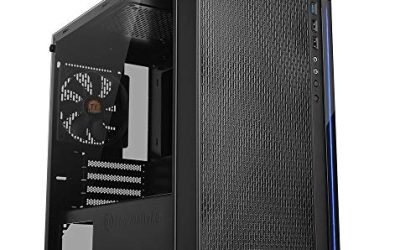
- CORSAIR 4000D AIRFLOW Tempered Glass Mid-Tower ATX Case4000 Series17.83 x 9.06 x 18.35 inches17.2 poundsCheck on Amazon
Top 3 picks at a glance

Quick Picks
As an Amazon Associate we earn from qualifying purchases.
| Product | Best for | Key spec from title |
|---|---|---|
| Corsair 4000D Airflow | A clean first build with a glass side | Tempered glass mid-tower ATX case |
| Fractal Design North | A living-room PC that looks like furniture | Charcoal black tempered glass dark case |
| NZXT H7 Flow 2024 RGB | A bright white build with lighting included | Mid-tower ATX airflow case with RGB fans |
| Lian Li O11 Dynamic EVO | A panoramic showcase for a custom loop | Dual-chamber tempered glass case |
| Phanteks XT Pro Ultra | A bold light show straight out of the box | Tempered glass case with four D-RGB fans |
How to Choose
Glass, Mesh, or a Mix of Both
The side panel decides what the finished build looks like, while the front panel decides how well it breathes, and they do not always agree. A full tempered glass front looks dramatic, yet it forces intake through narrow side vents, so fans spin faster and louder. Mesh fronts solve the airflow problem and still look sharp with a fine weave and tidy frame. The safest compromise is a mixed design: a tempered glass side for the view, a perforated or mesh front for intake, and a mesh top for exhaust. Before ordering, check the listing photos from the side, since a dark-tinted panel hides components unless the interior is lit.
Lighting That Looks Planned, Not Random
Lighting earns its keep only when every glowing part belongs to the same plan. Addressable RGB fans, strips, and coolers each need a matching header or controller, and mixing brands often means running two pieces of software that never agree on a colour. Check the listing for what ships in the box: a case with three or four ARGB fans already installed gives a finished look on day one, while a case with no fans leaves the buyer choosing each one. A single lighting ecosystem, one controller, and a restrained colour choice will always look better than a random mix of rainbow effects fighting across the glass.
Colour and Finish Beyond the First Week
A case colour that looks perfect in a product photo can become a chore after a month on a desk. White shells show dust and scuffs quickly, while black glass shows fingerprints every time the panel is touched. Wood slats, brushed metal, and matte finishes age more gracefully and hide marks better than gloss. Finish also decides how parts read through the glass: a white interior makes components stand out, a black interior recedes and lets lighting carry the scene, and a walnut front turns gaming hardware into furniture. Match the case to the graphics card and motherboard colours already planned, not the other way round.
Size, Clearance, and Desk Presence
A beautiful case still has to fit the parts and the room, so measure both first. Mid-tower shells suit most builds, but graphics cards keep getting longer and thicker, and a front radiator steals length the headline clearance assumes is free. Check graphics card length, CPU cooler height, and radiator positions separately, since a case can fit a large radiator at the front and only a small one up top. Footprint matters too: a wide dual-chamber case needs a deep desk, while a tall narrow tower fits a shelf but crowds a long card. A case that looks right on the desk and leaves room for the next upgrade beats one that only photographs well.
The 5 Best Options
Corsair 4000D Airflow Tempered Glass Mid-Tower ATX Case, Black
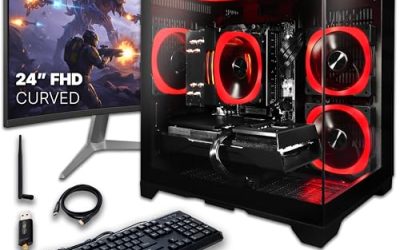
The 4000D Airflow is the understated pick for a first build that should look finished without shouting. Its perforated steel front has a fine triangular pattern that reads as texture rather than a grille, and the tempered glass side shows the build cleanly. A full-length power supply shroud hides cables and drive bays, so the visible chamber stays tidy even when the wiring behind the tray is not perfect. Two 120mm AirGuide fans ship in the box, front and rear, and the RapidRoute channel keeps the main cables on a single path behind the tray.
Specs
- Form factor: Mid tower
- Motherboard support: E-ATX, ATX, Micro-ATX, Mini-ITX
- Included fans: Two 120mm AirGuide fans
- Radiator support: Up to 360mm front, 280mm top
- Side panel: Tempered glass
- Front I/O: USB-C, USB-A, combined audio jack
- Max GPU length: 360mm
- CPU cooler clearance: Up to 170mm
- Dimensions: 453mm x 230mm x 466mm
Best for: First-time builders who want a clean, glass-sided mid tower with strong airflow and forgiving cable routing.
Watch out for: Only two fans are included, so a hot graphics card will want extra intake fans, and a front radiator reduces usable graphics card length.
ASIN: B08C7BGV3D
Fractal Design North Charcoal Black Tempered Glass Dark
The North is the case for a PC that has to share a room with people who do not care about gaming hardware. Genuine walnut slats run across the front, broken by fine mesh strips, and the dark tempered glass tints the interior so components read as shadows rather than clutter. In a living room or home office it looks like furniture that happens to contain a computer, which is exactly the point. Two 140mm Aspect PWM fans arrive at the front, the front panel carries a USB-C port, and seven bridgeless expansion slots keep the rear edge clean and open.
Specs
- Form factor: Mid tower
- Motherboard support: ATX, Micro-ATX, Mini-ITX
- Included fans: Two 140mm Aspect PWM fans
- Front panel: Genuine walnut wood slats with mesh
- Side panel: Dark tempered glass
- Front I/O: USB-C on the front panel
- Max GPU length: 355mm, or 300mm with a 360mm front radiator
- Expansion slots: Seven bridgeless slots
- Drive mounts: Two combined 3.5-inch and 2.5-inch mounts, two dedicated 2.5-inch mounts
Best for: A design-led build where the PC stays visible in a living room or office and should blend in, not stand out.
Watch out for: The dark glass hides unlit components, only two fans come in the box, and graphics card clearance shrinks sharply when a front radiator is fitted.
ASIN: B09V8HNWW9
NZXT H7 Flow 2024 RGB Mid-Tower ATX Airflow Case, White
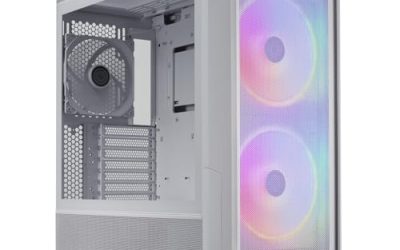
The H7 Flow RGB in white is the bright option for a desk setup in light colours. Perforated panels at the front, top, and power supply shroud give the case a pale, open look, while three 120mm RGB fans at the front provide intake and the glow behind the glass side. The white finish makes the interior feel larger and shows off pale components, cables, and a light graphics card far better than a black shell would. Radiator support reaches 360mm at the front and up top, so a flagship card and a liquid-cooled processor fit without a larger tower.
Specs
- Form factor: Mid tower
- Motherboard support: ATX, Micro-ATX, Mini-ITX, E-ATX
- Included fans: Three 120mm RGB fans
- Radiator support: Up to 360mm front and top
- Side panel: Tempered glass
- Front panels: Perforated front, top, and power supply shroud
- Front I/O: USB-C, two USB-A, combined audio jack
Best for: Builders planning a white desk setup who want RGB lighting and strong airflow without buying fans separately.
Watch out for: The white finish shows dust and scuffs more readily than black, the footprint is among the larger mid towers here, and pale parts inside matter because the glass shows everything.
ASIN: B0CV4RYKLF
Lian Li O11 Dynamic EVO Tempered Glass Dual-Chamber Case

The O11 Dynamic EVO is the showcase of this group, built for owners who want the hardware itself on display. Tempered glass covers the front and side with no corner pillar, so the motherboard, graphics card, and cooling loop are visible from two angles at once. A dual-chamber layout moves the power supply and cables behind the motherboard tray, leaving the main chamber open and uncluttered. The top, side, and bottom each accept a 360mm radiator, which suits a custom loop with separate radiators for the processor and the graphics card, and the case fits cards up to 400mm long.
Specs
- Form factor: Mid tower, dual chamber
- Motherboard support: E-ATX under 280mm wide, ATX, Micro-ATX, Mini-ITX
- Radiator support: Up to 3x 360mm radiators
- Fan support: Up to 10 fans, none included
- Panels: Tempered glass front and side
- Max GPU length: 400mm
- CPU cooler clearance: Up to 170mm
- Materials: 4mm aluminum, 4mm tempered glass, 1mm steel structure
- Dimensions: 465mm x 285mm x 459mm
Best for: Builders planning a panoramic showcase or a multi-radiator custom loop who want the interior fully visible.
Watch out for: No fans are included, so budget for every fan the build needs, and the wide dual-chamber body needs a deep desk or shelf.
ASIN: B09QMLS87T
Phanteks XT Pro Ultra Tempered Glass Mid-Tower Case

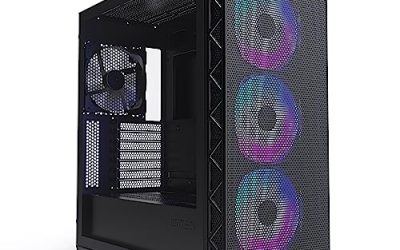
The XT Pro Ultra is the boldest-looking case here, and needs no extras. Four 140mm D-RGB fans come in the box, three at the front and one at the rear, so the case glows at first boot with intake and exhaust covered. Mesh at the front and top keeps air moving behind the light show, and the tempered glass side frames the four lit fans. Inside, graphics cards up to 415mm fit, one of the longest clearances here, and the top accepts a 360mm radiator for a liquid-cooled processor. Rear-connector motherboard support helps keep cables out of sight behind the tray.
Specs
- Form factor: Mid tower
- Motherboard support: E-ATX up to 280mm wide, ATX, Micro-ATX, Mini-ITX
- Included fans: Four M25-140 D-RGB fans
- Radiator support: Up to 360mm top, 240mm front, 120mm rear
- Fan support: Up to 10x 120mm or 6x 140mm fans
- Side panel: Tempered glass
- Max GPU length: 415mm
- CPU cooler clearance: Up to 184mm
- Dimensions: 450mm x 230mm x 500mm
Best for: Builders who want a bright ARGB build with all four fans included and no extra lighting purchase.
Watch out for: The front only accepts a radiator up to 240mm, so a 360mm radiator must go at the top, where tall memory can limit clearance, and the lighting needs a compatible ARGB header or controller.
ASIN: B0CT5V2XJK
Which One Fits Your Situation
A Living-Room PC That Should Not Look Like One
Pick the Fractal Design North. Walnut slats and dark glass let the machine sit beside a television without announcing itself, and two 140mm fans keep it quiet enough for shared space. Plan parts around its tighter interior and skip a thick front radiator if the graphics card is long, since clearance drops to 300mm with a 360mm radiator fitted.
A Bright White Desk Setup
Pick the NZXT H7 Flow 2024 RGB in white. Three RGB fans, a pale perforated shell, and a clear glass side give a light-coloured build the glow it needs, and 360mm radiator support at the front and top covers a powerful system. Choose pale components and cables to match, because the glass shows the whole interior, and expect to wipe dust from the white panels more often.
A Showcase Build With a Custom Loop in Mind
Pick the Lian Li O11 Dynamic EVO. Glass on two sides with no corner pillar shows the loop from the front and the side, the dual chamber hides the power supply and cables, and three 360mm radiator positions leave room for a loop that grows. Budget for fans separately, since none are included, and measure the desk first because the wide body needs real depth.
A First Build That Looks Finished on Day One
Pick the Corsair 4000D Airflow for a clean, understated result, with a perforated front, glass side, and tidy cable routing that forgives a first attempt. If the goal is colour and light instead of restraint, pick the Phanteks XT Pro Ultra, which ships with four D-RGB fans and needs nothing extra to look complete. Either way, add intake fans to the Corsair before running a hot graphics card hard.
Common Mistakes
- Choosing a solid glass front for the look, then finding intake air choked and fans running loud to compensate.
- Mixing RGB and ARGB parts from different brands with no shared controller, leaving lighting effects that never match.
- Picking a white case without checking that the graphics card, motherboard, and cables suit a pale interior.
- Measuring graphics card length but forgetting that a front radiator and its fans take space from the same measurement.
- Judging a case from studio renders alone, without checking whether the side glass is dark-tinted and hides unlit components.
Frequently Asked Questions
Do tempered glass cases run hotter than mesh cases?
They can, because glass blocks intake air while mesh lets it through. The difference is smallest when the glass is only on the side and the front is perforated or mesh, which is how the cases in this guide are built. A full glass front with only narrow side vents is the layout to avoid when temperatures matter.
Is RGB lighting worth it if the PC sits under a desk?
Usually not, since the lighting is hidden and the money buys fans or storage instead. Lighting pays off when the case sits on the desk where the glass side faces the room, which is the setup every RGB pick here assumes. A plain-fan version of the same layout cools exactly the same.
Will a white PC case show dust more than a black one?
Yes, white panels show dust, fingerprints, and scuffs more readily, especially around the front ports and the top panel. Black glass shows fingerprints too, while wood and matte finishes hide marks best. A quick wipe during normal cleaning keeps a white case looking new, so the extra upkeep is small but real.
Can a good-looking mid tower fit a 360mm radiator?
Yes, most of the cases here accept a 360mm radiator at the front or the top, and the O11 Dynamic EVO accepts three. Always check the position, not just the size, because a 360mm radiator may fit at the front and only a smaller one up top, and a front radiator shortens the space left for a long graphics card.
Related guides
More from Amazon
Programs that pair well with the guide above. Offers and eligibility are set by Amazon and may change.
Free shipping on eligible items, Prime Video and more. Eligible new members can start with a free trial.
Start a Prime free trialAd-free music streaming. Eligible new subscribers can start with a free trial.
Try Music Unlimited freeA Prime membership for ages 18-24 with a trial period. Eligibility is set by Amazon.
See Prime for Young AdultsAudiobooks and podcasts to listen to on the go. Eligible new members can start with a free trial.
Try Audible freeAs an Amazon Associate we earn from qualifying purchases.