A white case changes the whole look of a desk setup, and it also changes the decisions that follow. The finish shows dust and cable clutter more readily than a dark chassis, the interior colour affects how lighting reads through the glass, and a front panel that looks clean in photos can still choke intake air if it is solid rather than ventilated. Choosing well means weighing appearance against airflow, clearance and the parts already on the shelf, not simply picking the brightest box on the page.


This guide is for builders planning an all-white or white-accented system, whether the machine is a gaming rig, a workstation that sits in a living room, or a first build where the case will stay visible for years. Both cases below are white mid-tower models from the same Montech AIR 903 series, listed on Amazon with a mesh front, a tempered glass side panel and pre-installed fans, and each one is judged here on its own fan setup, clearance and intended use.
Quick Picks
As an Amazon Associate we earn from qualifying purchases.
| Product | Best for | Key spec from title |
|---|---|---|
| Montech AIR 903 MAX White | High-airflow gaming builds where lit fans stay on show | E-ATX mid tower with 3x 140mm ARGB PWM fans and 1x 140mm PWM fan |
| Montech AIR 903 BASE White | Understated white builds with plain fans and no addressable lighting | E-ATX mid tower with mesh front, tempered glass side panel and USB Type-C |
How to Choose
Airflow first, finish second
A white exterior photographs well, yet the front panel decides how cool the system runs. Mesh lets intake fans pull air straight through, while a solid glass front forces air around narrow side gaps and raises temperatures under sustained load. Both cases here use a mesh front, which suits long gaming sessions and warm rooms, but the lesson still applies when comparing them with other white models. Look at the panel itself before the colour: if the front is mostly open mesh, the case can breathe; if it is mostly glass or plastic, expect the fans to work harder for the same result, and plan the fan layout around that restriction from the start.
Size, motherboard support and clearance
Mid-tower sounds roomy until a long graphics card, a tall air cooler and a thick radiator all compete for the same space. Both picks support boards up to E-ATX alongside ATX, Micro-ATX and Mini-ITX, so a larger board is not a problem, and both leave room for graphics cards up to 400mm with CPU coolers up to 180mm. Radiators up to 360mm fit at the front or on top, which keeps liquid cooling an option later. Measure the longest component already owned, compare it with those ceilings, and leave a little slack for cables and connectors rather than planning to the exact millimetre. Leave slack for connectors too.
How white is white
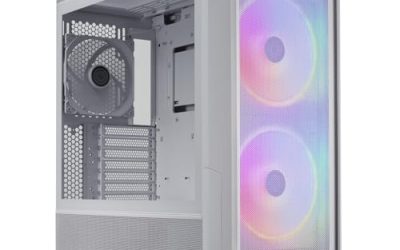
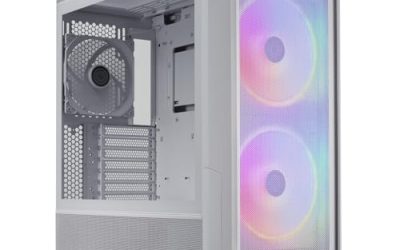
Not every white case is white all the way through. Some models pair a white shell with a dark interior, dark fan frames or a dark power supply shroud, which dulls the clean look once the glass goes on. The AIR 903 pair keeps the white theme consistent across the exterior, and the MAX version adds colour-matched fans, so the lighting reads as part of the build rather than a contrast against it. Before ordering, check the listing images for the inside of the case, the fan frames and the rear panel, and picture the finished build with the intended cooler and graphics card installed. White cables complete the effect; dark ones stand out inside a pale chassis.
Fans included, noise and cable routing
Counting the fans in the box matters more than it seems, because every missing fan is another part to buy and another cable to route. The MAX ships with four 140mm fans, three ARGB units at the front and one at the rear, while the BASE ships with three 140mm fans and no addressable lighting, which suits a quieter, plainer build. Larger 140mm fans move a useful volume of air at lower speeds than smaller ones, so both models have a reasonable starting point for noise. Check the routing channel behind the motherboard tray as well: a white build shows stray cables through the glass, so tidy routing is part of the look, not an afterthought. Plan cable routing early.
The 2 Best Options
Montech AIR 903 MAX White
The MAX is the pick for a builder who wants the white case to be the centrepiece rather than a neutral shell. Three 140mm ARGB fans sit behind the mesh front with a fourth 140mm fan at the rear, so airflow and lighting arrive together without extra parts to order. The tempered glass side panel keeps the interior visible, the E-ATX support leaves room for a larger board, and the front I/O includes USB Type-C alongside two USB 3.0 ports. It suits a gaming rig that runs long sessions in a warm room, where the mesh front and the larger fans can keep moving air.
Specs
- Case type: Mid Tower
- Colour: White
- Enclosure material: Metal, Tempered Glass
- Supported motherboards: E-ATX, ATX, Micro-ATX, Mini-ITX
- Fans: 3x 140mm ARGB PWM at the front, 1x 140mm PWM at the rear
- Front panel: Mesh
- Cooling method: Air
- Expansion slots: 7
- Internal bays: 4
- Front I/O: USB Type-C, 2x USB 3.0, mic and audio jacks
- Warranty: 1 year
Best for: High-airflow gaming builds where the white case and its lighting stay on show.
Watch out for: The white finish shows dust and fingerprints, so plan on wiping the panels more often than with a dark case.
Montech AIR 903 BASE White
The BASE shares the same white mid-tower chassis and mesh front as the MAX, but it drops the addressable lighting and one front fan, which makes it the quieter-looking choice of the pair. Three 140mm fans still come pre-installed, so a first build has airflow from the start, and the tempered glass panel keeps the interior visible without turning the desk into a light show. E-ATX boards fit, the front I/O still carries USB Type-C, and the plainer fan setup leaves more freedom to add lighting later only if the build actually needs it. The three-fan setup still covers intake and exhaust, so nothing essential is missing.
Specs
- Case type: Mid Tower
- Colour: White
- Enclosure material: Metal, Tempered Glass
- Supported motherboards: E-ATX, ATX, Micro-ATX, Mini-ITX
- Fans: 3x 140mm pre-installed
- Front panel: Mesh
- Cooling method: Air
- Front I/O: USB Type-C, 2x USB 3.0, mic and audio jacks
- Warranty: 1 year
Best for: First white builds and understated setups that need airflow without addressable lighting.
Watch out for: With only three fans and no ARGB hub, adding lit fans later means buying the fans and checking the controller situation first.
Which One Fits Your Situation
Your parts run hot and the machine games for hours
Pick the MAX. Four 140mm fans and a mesh front move a large volume of air before any extra parts are ordered, and the ARGB front fans suit a rig that sits in view. The E-ATX support and the room for long graphics cards also leave headroom for a hotter, larger build later, so the case does not become the first thing to replace. The glass panel shows the lighting well when the case sits on the desk.
You want a white build that stays calm on the desk
Pick the BASE. It keeps the white shell, mesh front and glass panel, but the plain fans and the absence of addressable lighting keep the desk understated. The same E-ATX support applies, so the choice is about presentation rather than compatibility, and a builder who later changes their mind can add lighting as a separate decision. The plain fans need no extra software. Dust still shows, so the same wiping habit applies.
You are building for the first time
Pick the BASE if the priority is a straightforward first build, since three pre-installed fans and a familiar mid-tower layout leave fewer parts to choose. Pick the MAX instead if the finished look matters as much as the build itself, because its four fans and lighting arrive ready to use. Either way, confirm the graphics card length and cooler height against the case limits before ordering anything else.
You plan a larger board or a future cooling upgrade
Pick either case for the board itself, since both support E-ATX, but lean towards the MAX when a liquid cooler is likely. Radiators up to 360mm fit at the front or on top, and the four-fan starting point leaves more flexibility for rearranging airflow around a radiator. The BASE still accepts the same radiator sizes, so it stays a sound choice when the upgrade is only a possibility rather than a plan. Also check radiator thickness before ordering.
Common Mistakes
- Buying on colour alone without checking whether the front panel is mesh or solid, then wondering why temperatures climb during long gaming sessions.
- Ordering a white case with a dark interior and dark fan frames, then finding the finished build looks grey and muted through the tempered glass.
- Forgetting to measure the graphics card and the CPU cooler against the case limits before ordering any other parts.
- Assuming every white case includes enough fans, then discovering the build needs extra fans and a controller that was never budgeted for.
- Routing cables loosely in a white interior, where every stray cable shows clearly through the tempered glass side panel.
Frequently Asked Questions
Do white PC cases run hotter than black ones?
No. The colour of the shell has little effect on temperatures; the front panel, the fans and the layout decide how cool the parts run. A white case with a mesh front and four 140mm fans can cool better than a dark case with a solid front. Judge any case by its ventilation and fan setup first, and treat the finish as a styling choice rather than a thermal one.
Will a white case show dust more than a dark one?
Yes, dust and fingerprints show more readily on a white finish, especially on the top panel and around the glass edges. That is a cleaning habit rather than a flaw: a quick wipe during routine dusting keeps the case looking new. Mesh front panels also collect dust, so cleaning the intake area regularly matters for both appearance and airflow. A soft cloth avoids scratches, and gentle wiping beats harsh cleaners.
Do I need extra fans with these cases?
Not for a typical build. The MAX arrives with four 140mm fans and the BASE with three, so both have intake and exhaust covered from the start. Extra fans only make sense when the parts run unusually hot or a radiator changes the airflow path. Before buying more, check the existing fan positions and the temperatures under load. If temperatures stay reasonable, spend the money elsewhere in the build.
Can a mid-tower white case fit a large graphics card?
Both cases here fit graphics cards up to 400mm, which covers most large consumer cards, and both support boards up to E-ATX. The limit to check is the specific card, since some triple-fan models run long and thick. Measure the card, leave room for power connectors at the end, and confirm the cooler height as well before ordering. Check depth as well as length.
Related guides
More from Amazon
Programs that pair well with the guide above. Offers and eligibility are set by Amazon and may change.
Free shipping on eligible items, Prime Video and more. Eligible new members can start with a free trial.
Start a Prime free trialAd-free music streaming. Eligible new subscribers can start with a free trial.
Try Music Unlimited freeA Prime membership for ages 18-24 with a trial period. Eligibility is set by Amazon.
See Prime for Young AdultsAudiobooks and podcasts to listen to on the go. Eligible new members can start with a free trial.
Try Audible freeAs an Amazon Associate we earn from qualifying purchases.