Gaming on a phone or tablet stops feeling like gaming the moment you are stuck tapping glass, so the real decision here is which mouse actually pairs with your mobile device and still behaves like proper gaming hardware once connected. A mouse built only for a desktop, with a receiver your phone cannot accept, is useless on the move. You need Bluetooth pairing, a shell small enough to travel, and a battery that survives the trip.
This guide is for phone and tablet players, handheld and cloud gaming fans who dock to a bigger screen, and laptop gamers who want one mouse covering every device they carry. Each pick below earned its place from the name and specifications on its Amazon listing, including stated Bluetooth or dual-mode connectivity, sensor, weight, controls, and battery figures, rather than from brand reputation alone.
Our Top Picks
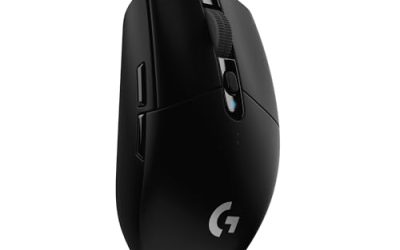
 Logitech G309 Lightspeed Wireless Gaming Mouse1.51 x 2.49 Inch1.51 x 2.49 x 0.1 inches0.2 poundsCheck on Amazon
 Razer Basilisk V3 X HyperSpeed Customizable Wireless GamingStandard5.12 x 2.96 x 1.67 inches0.2 poundsCheck on Amazon

Top 3 picks at a glance

Quick Picks
As an Amazon Associate we earn from qualifying purchases
| Product | Best for | Key spec from title |
|---|---|---|
| Razer Orochi V2 Mobile Wireless Gaming Mouse | The smallest, lightest travel pick | 5G Advanced 18K DPI Optical Sensor |
| Logitech G309 Lightspeed Wireless Gaming Mouse | Switching between receiver and Bluetooth play | HERO 25K Sensor |
| Corsair Katar Elite Wireless Gaming Mouse | Rechargeable power and a symmetric shell | Marksman 26K DPI Optical Sensor |
| Razer Basilisk V3 X HyperSpeed Wireless Gaming Mouse | Ergonomic comfort and the longest battery claims | 5G Advanced 18K Optical Sensor |
How to Choose
Start With Bluetooth and Multi-Device Pairing
For mobile gaming, the connection is the product. Your phone or tablet has no spare USB port waiting for a gaming receiver, so Bluetooth pairing is what makes a mouse usable at all, and every pick in this guide lists Bluetooth alongside a faster 2.4GHz mode. Use Bluetooth for phone, tablet, and casual sessions, then switch to the receiver when you dock at a laptop or desktop and want the lowest latency. Also check how pairing works: a mouse that stores its Bluetooth link and reconnects automatically saves real frustration compared with one that needs re-pairing whenever you change devices during a journey.
Pick a Size That Survives Being Carried
A travel mouse lives in jacket pockets, controller cases, and the front pouch of a backpack, so length and weight matter more here than at a desk. Compact shells around 108 to 118 millimetres long, like the models in this guide, slide into small spaces and suit claw or fingertip grips on cramped tray tables and café counters. Durability counts too: look for a solid shell without fragile protruding parts, a receiver that stores inside the body so it cannot snap or get lost, and a shape your hand can hold securely when there is no desk to rest your wrist on.
Compare Battery Claims by Connection Mode
Battery figures on gaming mouse listings are always quoted for the gentlest mode, and the gap between modes is large enough to change your choice. Bluetooth figures in this guide range from around 110 hours to a headline 950 hours, while the faster receiver modes run noticeably shorter on the same mouse. Decide which mode you will actually live in: a phone-first player spends most time on Bluetooth and can trust the big number, while someone gaming through a receiver on a laptop should plan around the smaller one. Also weigh replaceable AA cells, which you can swap anywhere, against rechargeable packs that need a cable.
Confirm Your Phone or Tablet Will Accept It
Compatibility is where mobile setups quietly fall apart, so check it before anything ships. Most modern Android phones and tablets accept Bluetooth mice and show a pointer, and iPads support Bluetooth pointing devices through their accessibility and pointer settings, but individual games vary: some mobile titles respond to mouse input, others ignore it or restrict it to menus. Confirm your device supports a Bluetooth mouse, check whether your main games accept pointer input, and remember that configuration software for DPI and buttons usually runs on a computer, so set the mouse up at home before you travel with it.
The 4 Best Options
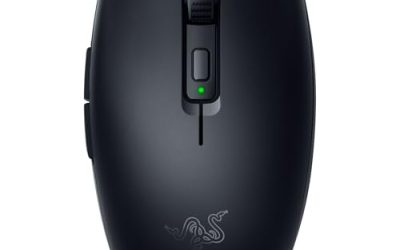
Razer Orochi V2 Mobile Wireless Gaming Mouse
This is the mouse that seems designed around the exact phrase mobile gaming, starting with its listing name. At under 60 grams before its battery goes in, it disappears into a pocket or controller case, yet it still carries a proper gaming sensor and two wireless modes. Choose it if you play on a phone or tablet over Bluetooth most of the time, want the receiver option for a laptop, and like the idea of feeding it a single AA or AAA cell instead of hunting for a charging cable mid-trip.
Specs
- Weight: Under 60g excluding battery
- Sensor: 5G Advanced 18K DPI optical sensor
- Connectivity: Razer HyperSpeed Wireless and Bluetooth, 2 wireless modes
- Battery life: Up to 950 hours on Bluetooth, up to 425 hours on HyperSpeed
- Switches: 2nd-gen Razer mechanical switches, rated to 60 million clicks
- Power: 1 AA or AAA battery in a hybrid slot
- Colour: White
- Memory: 1 onboard memory profile
Best for: Phone and tablet players who want the lightest, smallest genuine gaming mouse for travel.
Watch out for: It runs on a replaceable cell rather than a rechargeable pack, so carry a spare AA on long trips.
ASIN: B0916MW7CG
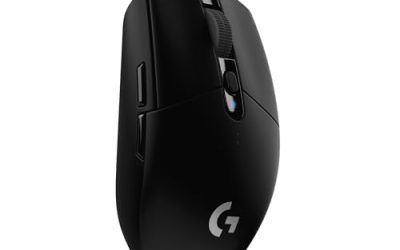
Logitech G309 Lightspeed Wireless Gaming Mouse
The G309 suits players who split their gaming between a phone or tablet and a full computer, because its listing leads with switching between LIGHTSPEED wireless and Bluetooth on the same mouse. That means one device for a Bluetooth session on a tablet and a low-latency receiver session on a PC later the same day. At 86 grams with its AA battery fitted it is still easy to carry, and the six programmable buttons cover the bindings most mobile and laptop titles need without crowding a compact shell.
Specs
- Sensor: HERO 25K sensor
- Switches: LIGHTFORCE hybrid switches
- Connectivity: LIGHTSPEED wireless and Bluetooth
- Weight: 86g with AA battery, 68g with POWERPLAY wireless charging system
- Battery life: 300+ hours on a single AA battery via LIGHTSPEED
- Controls: 6 programmable buttons
- Power: 1 AA battery, included
- Dimensions: 117.55 x 63.2 x 38.36 mm
- Compatibility: PC and Mac
Best for: Players moving daily between a tablet over Bluetooth and a PC or laptop over the receiver.
Watch out for: The 68-gram figure needs the separate POWERPLAY charging system, so expect 86 grams in normal travel use.
ASIN: B0C84ZD7L6
Corsair Katar Elite Wireless Gaming Mouse
Pick the Katar Elite if you want a rechargeable mouse that still travels well. Its compact symmetric shell and 69-gram weight fit claw and fingertip grips on small surfaces, while the connection switch on the body moves between Slipstream wireless through its receiver and Bluetooth for a phone or tablet. The sensor ceiling is the highest in this guide, which is more headroom than mobile titles need, but the useful part for travellers is simpler: strong tracking on hotel desks and café tables, plus a wired USB-C mode for playing while it charges.
Specs
- Weight: 69g
- Sensor: Corsair Marksman 26K DPI optical sensor, 650 IPS, 50G acceleration
- Connectivity: Slipstream Wireless 2.4GHz, Bluetooth, and USB-C wired
- Battery life: Up to 110 hours on Bluetooth, up to 60 hours on Slipstream
- Buttons: 6 programmable buttons
- Switches: QuickStrike primary buttons
- Dimensions: 115.8 x 64.2 x 37.8 mm
- Shape: Symmetric
Best for: Claw and fingertip players who want rechargeable power and a compact symmetric shell.
Watch out for: Battery life drops to the lower figure on the receiver mode, so Bluetooth is the setting that delivers the headline endurance.
ASIN: B0BGSGBB9F
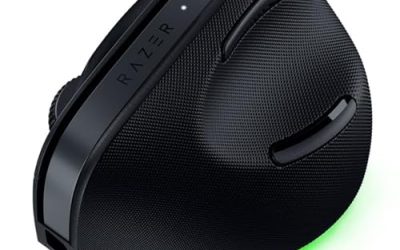
Razer Basilisk V3 X HyperSpeed Wireless Gaming Mouse
Not every mobile setup is a phone on a train. If your portable gaming means a tablet on a stand or a laptop at a kitchen table, this larger ergonomic option gives your hand a shaped, right-handed shell instead of a flat travel pebble. Its dual connectivity covers Bluetooth for the tablet and HyperSpeed wireless for the laptop, and the battery claims are the longest here alongside the Orochi, which suits players who charge or swap cells rarely. Nine programmable controls also help in slower, menu-heavy games played away from a keyboard.
Specs
- Sensor: 5G Advanced 18K optical sensor
- Switches: Mechanical switches Gen-2
- Connectivity: HyperSpeed Wireless and Bluetooth
- Controls: 9 programmable controls
- Battery life: 535 hour battery
- Lighting: Chroma RGB
- Colour: Classic Black
- Hand orientation: Right-handed
Best for: Tablet and laptop players who want an ergonomic shell and many controls in a portable setup.
Watch out for: The full-size ergonomic body takes more bag space than the compact picks above, so measure your carry case first.
ASIN: B0BXBC26X8
Which One Fits Your Situation
You Play on Your Phone or Tablet Every Day
Choose the Razer Orochi V2. Bluetooth is its natural habitat, the battery claim on that mode stretches to 950 hours, and the sub-60-gram shell fits the small bags phone gamers actually carry. Its single onboard profile keeps your settings in place when you move between devices, and a spare AA weighs almost nothing as backup power.
You Game on a Tablet at Home and a PC at a Desk
Choose the Logitech G309. Leave the LIGHTSPEED receiver in your computer, pair the Bluetooth side with your tablet, and one mouse covers both screens without re-pairing rituals. The 300-plus-hour AA battery life means it keeps working through weeks of mixed use, and the hybrid switches give clicks a crisp, mechanical feel in faster games.
You Travel for Work and Game in Hotels
Choose the Corsair Katar Elite Wireless. It recharges over USB-C like the rest of your travel kit, the Bluetooth mode handles tablet sessions on the bed or tray table, and the receiver mode covers laptop play at the hotel desk. At 69 grams in a compact symmetric shell, it packs flat and grips comfortably on unfamiliar surfaces.
You Want Comfort for Long Tablet Sessions
Choose the Razer Basilisk V3 X HyperSpeed. Tablet gaming propped on a stand often runs for hours, and the shaped ergonomic shell supports a relaxed grip better than the flatter travel mice here. Bluetooth pairing keeps the setup cable-free, nine controls suit strategy and role-playing titles, and the long battery claim means charging rarely interrupts a campaign.
Common Mistakes
- Buying a receiver-only gaming mouse for a phone that has no suitable port, then discovering it can never pair.
- Trusting the biggest battery number on the box without checking which connection mode it belongs to.
- Assuming every mobile game accepts mouse input, when some titles only respond to touch or a controller.
- Choosing a full-size desktop shell for travel and leaving it behind because it will not fit the bag.
- Forgetting that DPI and button settings are usually changed in computer software, not in a phone app.
Frequently Asked Questions
Can a gaming mouse connect to a phone without an adapter?
Yes, if the mouse offers Bluetooth, which every pick in this guide does. Pair it in the phone or tablet Bluetooth settings like any other accessory, and a pointer appears in supported systems and apps. Receiver-only mice are the problem models, because most phones have no full-size USB port for the dongle they depend on.
Is Bluetooth responsive enough for mobile gaming?
For the pace of most phone and tablet titles, yes. Bluetooth adds a little latency compared with a gaming receiver connection, which is why these mice also include a 2.4GHz mode for a laptop or docked setup. In slower and mid-paced mobile games the difference is hard to notice; in fast competitive play on a computer, switch modes.
Which of these mice is easiest to carry?
The Razer Orochi V2, by a clear margin. Its listing puts it under 60 grams before the battery, its shell is the smallest here, and the receiver stores inside the body under the top cover. It also runs on a single AA or AAA cell, so topping up power while travelling needs no cable or socket time.
Do I need a mousepad when gaming on the move?
Not always, but a surface still matters. Optical sensors track best on matte, non-reflective material, so a hotel desk or café table usually works, while glass and glossy finishes can cause skipping. A thin travel pad weighs very little, removes the guesswork, and gives every mouse in this guide a consistent surface wherever you stop to play.
Related guides
More from Amazon
Programs that pair well with the guide above. Offers and eligibility are set by Amazon and may change.
Free shipping on eligible items, Prime Video and more. Eligible new members can start with a free trial.
Start a Prime free trialAd-free music streaming. Eligible new subscribers can start with a free trial.
Try Music Unlimited freeA Prime membership for ages 18-24 with a trial period. Eligibility is set by Amazon.
See Prime for Young AdultsAudiobooks and podcasts to listen to on the go. Eligible new members can start with a free trial.
Try Audible freeAs an Amazon Associate we earn from qualifying purchases.