Shopping in this corner of the market means balancing three things that pull against each other: shaving grams off the shell, keeping a wireless link that never feels a step behind your hand, and staying inside a value-tier budget. Every model below gives something up to get the rest, so the real decision is which compromise fits the way you already play rather than which spec sheet looks longest.
The four picks cover distinct kinds of players: ranked shooter regulars who live on low sensitivity, laptop gamers who carry their setup between rooms or cities, smaller hands that claw a compact shell, and anyone who would rather swap a battery twice a year than think about charging cables. Each one earned its place from the weight, sensor, and battery figures printed on its own Amazon listing.
Our Top Picks
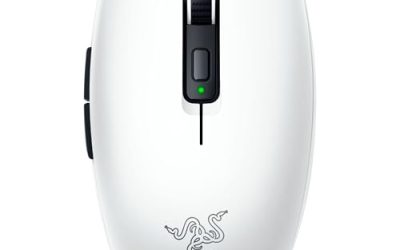
 Razer Orochi V2 Wireless Gaming Mouse4.26 x 1.52 inch (Pack of 1)4.26 x 1.52 x 2.47 inches0.13 poundsCheck on Amazon
Top 3 picks at a glance

Quick Picks
As an Amazon Associate we earn from qualifying purchases.
| Product | Best for | Key spec from title |
|---|---|---|
| Logitech G305 LIGHTSPEED | Months of play from one replaceable battery | HERO sensor, up to 12,000 DPI |
| Razer Orochi V2 | Travel setups and smaller hands | Under 60g with 2 wireless modes |
| SteelSeries Aerox 3 Wireless | Quick swipes plus spill resistance | 18,000 CPI TrueMove Air sensor |
| HyperX Pulsefire Haste 2 Wireless | High-speed tracking under a solid shell | 61g with 100 hour battery life |
How to Choose
Weight Is Only Half the Story
A headline gram figure tells you how a mouse starts moving, not how it stops. Balance matters just as much: a rear-heavy shell can feel sluggish during micro-corrections even when the total number looks impressive, while a centered design such as the 61-gram Pulsefire Haste 2 feels predictable through long arcs. Battery choice shifts that balance too, because a replaceable AA cell concentrates mass at the back. If you play on low sensitivity with wide arm sweeps, prioritize the lightest centered shell; wrist players covering short distances often prefer a touch more heft for control.
Pick Your Wireless Mode Deliberately
Two of the mice here pair a 2.4GHz dongle link with Bluetooth, and the two modes serve different jobs. The dongle connection is the one to game on: it polls fast and holds steady when routers, headsets, and phones crowd the same desk. Bluetooth stretches battery life dramatically and pairs straight to a laptop with no receiver to lose, which suits work sessions and casual play. The G305 takes the opposite route with a single LIGHTSPEED link and no Bluetooth at all, trading flexibility for simplicity. Decide which pattern matches your week before comparing anything else.
Decide How You Want to Feed It
Power strategy quietly shapes daily ownership. The G305 and Orochi V2 run on replaceable AA cells, so a dead mouse is revived in seconds with a fresh battery and never sits tethered to a cable mid-session. The Aerox 3 Wireless and Pulsefire Haste 2 carry internal rechargeable packs instead, which keeps weight distribution fixed and removes battery purchases, but a flat pack means plugging in or pausing. Neither approach wins outright. Choose the swap-and-go style if your desk lacks a spare port, or the rechargeable route if you already charge a headset and keyboard on rotation.
Match the Shell to Your Grip
Shell dimensions decide comfort faster than any sensor figure. Compact bodies like the Orochi V2 reward claw and fingertip grips and suit smaller hands, yet palm grippers with large hands will find their fingers spilling over the front. Perforated shells, as on the Aerox 3 Wireless, cut grams and vent heat but collect dust and can feel busy under the palm. Solid shells such as the Haste 2’s keep a cleaner surface and stiffer feel. Measure your current mouse, note where your fingers rest, and shortlist shapes that mirror that posture instead of chasing the lowest weight on the page.
The 4 Best Options
Logitech G305 LIGHTSPEED

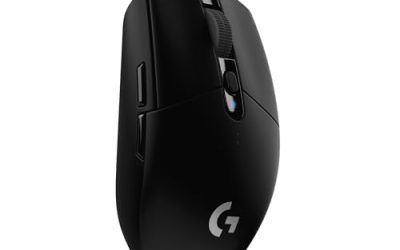
The G305 suits players who want a proven, no-fuss wireless mouse that disappears into a routine. Its symmetrical shell fits claw and fingertip grips comfortably, the HERO sensor tracks cleanly across the sensitivities most shooter players actually use, and the LIGHTSPEED link holds a 1ms report rate that keeps cursor movement feeling wired. At 99 grams it is the heaviest pick here, though the efficient shell still moves with little effort, and the receiver stores inside the body when you pack it into a laptop bag.
Specs
- Weight: 99 grams
- Sensor: HERO optical sensor, 200 to 12,000 DPI
- Tracking speed: 400 IPS
- Wireless: LIGHTSPEED with 1ms report rate
- Battery: Up to 250 hours on a single AA battery
- Buttons: 6 programmable buttons
- Memory: On-board memory, with built-in storage for the USB receiver
- Model number: 910-005280
Best for: Players who want months of gaming from one battery and a shape that suits almost any grip.
Watch out for: There is no Bluetooth and no rechargeable pack, so confirm you are happy swapping AA batteries and keeping the receiver in a USB port.
ASIN: B07CMS5Q6P
Razer Orochi V2
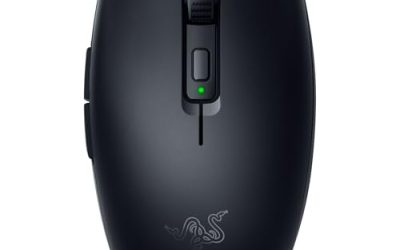
Built for movement, the Orochi V2 is the pick that treats your gaming mouse as carry-on equipment. The shell weighs under 60 grams before its battery goes in, the ambidextrous shape stays friendly to left-side button layouts for claw and fingertip grips, and the dual-mode radio lets you game over HyperSpeed at your desk, then flip to Bluetooth when the same laptop turns into a work machine. Few mice anywhere near this size offer that split personality, and its battery figures stretch far beyond the rechargeable crowd.
Specs
- Weight: Under 60 grams, excluding battery weight
- Sensor: Razer 5G Advanced optical sensor, 18,000 DPI
- Wireless: Razer HyperSpeed Wireless and Bluetooth, 2 wireless modes
- Battery: Up to 950 hours on Bluetooth and up to 425 hours on HyperSpeed, measured with a AA lithium battery
- Battery type: Works with a AA or AAA battery
- Switches: 2nd-gen Razer mechanical switches, rated for 60 million clicks
- Model number: RZ01-03730100-R3U1
Best for: Laptop gamers and smaller hands that want the lightest shell here plus genuine portability.
Watch out for: The quoted weight excludes the battery, and an AA cell adds noticeable mass at the rear, so check the balance with the battery type you plan to use.
ASIN: B0916N2LPZ
SteelSeries Aerox 3 Wireless
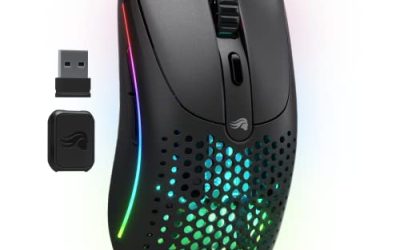
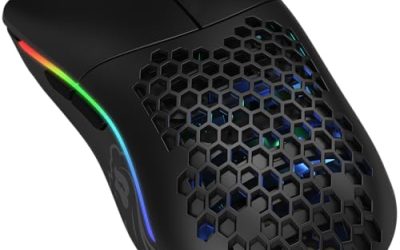
The Aerox 3 Wireless goes after players who flick hard and play around drinks, pets, and dusty desks. Its perforated shell brings the weight down to 66 grams while the AquaBarrier coating gives the internals an IP54 rating against water and dust, a rare bit of insurance in this category. Quantum 2.0 Wireless supplies the 2.4GHz link for matches, Bluetooth covers everything else, and the TrueMove Air sensor was built specifically for wireless tracking, so fast swipes stay composed instead of spinning out.
Specs
- Weight: 66 grams
- Sensor: TrueMove Air optical sensor, 18,000 CPI
- Tracking speed: 400 IPS, with 40G acceleration
- Wireless: Quantum 2.0 Wireless over 2.4GHz, plus Bluetooth 5.0
- Battery: Up to 200 hours of battery life
- Protection: AquaBarrier IP54 water and dust resistance
- Connectivity: USB-C
Best for: Fast, low-sensitivity players who want a perforated ultralight shell with protection against spills and dust.
Watch out for: The open shell lets in dust and crumbs over time and cannot be sealed, so check that you are comfortable cleaning it and keeping drinks at a distance anyway.
ASIN: B08KWKDRFF
HyperX Pulsefire Haste 2 Wireless

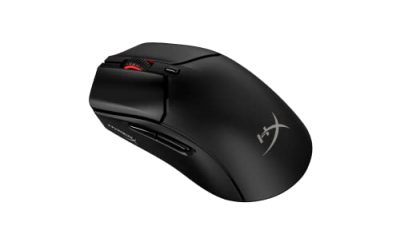
Players who dislike perforated shells but still want genuine ultralight pace should start here. The Haste 2 keeps a solid upper shell yet lands at 61 grams, and its HyperX 26K sensor tracks at speeds well beyond what the other picks claim, which suits high-sensitivity players who snap between targets. Battery life reaches up to 100 hours per charge, the switches carry a 100 million click rating, and a wired mode over the detachable cable keeps you playing while the pack refills.
Specs
- Weight: 61 grams
- Sensor: HyperX 26K sensor, up to 26,000 DPI
- Tracking speed: 650 IPS, with 50G acceleration
- Battery: Up to 100 hours, 370mAh Li-ion polymer battery
- Connection: 2.4GHz wireless, Bluetooth 5.0, and wired modes
- Polling rate: Up to 1000Hz
- Buttons: 6, with HyperX switches rated for 100 million clicks
Best for: Competitive players who want a solid-shell ultralight with the fastest tracking figures in this group.
Watch out for: Customizing buttons, DPI stages, and lighting runs through HyperX NGENUITY software, so check that you are fine installing it to unlock the full settings.
ASIN: B0BX52C4LN
Which One Fits Your Situation
You Play Ranked Shooters Every Night
Start with the Pulsefire Haste 2 Wireless. Its 650 IPS tracking ceiling and 1000Hz polling leave headroom for the fastest flicks, the solid 61-gram shell will not flex under a hard grip, and wired mode covers the evening your battery runs dry before a match. The Aerox 3 Wireless is the alternative if your aim style relies on huge, repeated swipes.
Your Gaming Happens on a Laptop, Often Away From Home
Take the Orochi V2. It slips into a sleeve pocket, pairs with your laptop over Bluetooth when the receiver is buried in a bag, and sips power slowly enough that a spare battery in the same pocket removes range anxiety entirely. The G305 also travels well thanks to its internal receiver storage, though it asks for a free port every time.
You Hate Thinking About Charging
Choose between the two battery-swapping designs. The G305 stretches a single AA across up to 250 hours of play, while the Orochi V2 stretches its cell far longer still, especially over Bluetooth. Either way, a two-second swap replaces the overnight cable ritual, and keeping one spare cell in a drawer means the mouse never dictates your schedule.
Your Hands Are Small and You Claw the Mouse
The Orochi V2 was shaped for exactly this. Its compact shell keeps the main clicks under your fingertips without forcing your palm onto the rear hump, and the sub-60-gram starting weight keeps fingertip corrections quick. The G305 is the fallback if you want a slightly taller profile, since its symmetrical body still suits a relaxed claw on smaller hands.
Common Mistakes
- Chasing the lowest gram count while ignoring balance, then fighting a rear-heavy mouse through every small correction.
- Gaming over Bluetooth because it was already paired, when the 2.4GHz dongle mode exists specifically for lower-latency play.
- Buying a perforated shell for a dusty desk or a pet-filled room without planning to clean the openings.
- Assuming a compact travel mouse will palm-grip comfortably in a large hand, without comparing shell length first.
- Comparing DPI ceilings as if they were accuracy scores, when tracking speed and sensor consistency matter more at real sensitivities.
Frequently Asked Questions
Is lighter always better for aiming?
No. A lighter shell reduces the effort needed to start and stop a flick, which helps low-sensitivity players, but some control comes from a little inertia. If your cursor overshoots targets after switching to an ultralight model, add a small amount of in-game sensitivity reduction before deciding the mouse itself is the problem.
Can I game properly over Bluetooth?
Bluetooth works acceptably for slower-paced games, strategy titles, and everyday use, and it stretches battery life enormously. For shooters and anything reaction-based, switch to the 2.4GHz dongle mode on the Orochi V2, Aerox 3 Wireless, or Pulsefire Haste 2, since that link polls faster and holds a steadier connection under load.
How long will these mice run before I need to act?
The spread is wide. The G305 claims up to 250 hours from one AA battery, the Orochi V2 reaches up to 950 hours over Bluetooth, the Aerox 3 Wireless quotes up to 200 hours, and the rechargeable Pulsefire Haste 2 manages up to 100 hours per charge. Real results shrink with higher polling and sensitivity settings.
Do I need the brand software to use these mice?
Each mouse works the moment its receiver connects, with sensible default sensitivity stages. Software only becomes necessary when you want to remap buttons, store custom DPI steps, or adjust lighting and power behavior. Installing it once, saving your settings to the mouse where on-board memory is offered, and removing it afterward is a perfectly workable approach.
Related guides
More from Amazon
Programs that pair well with the guide above. Offers and eligibility are set by Amazon and may change.
Free shipping on eligible items, Prime Video and more. Eligible new members can start with a free trial.
Start a Prime free trialAd-free music streaming. Eligible new subscribers can start with a free trial.
Try Music Unlimited freeA Prime membership for ages 18-24 with a trial period. Eligibility is set by Amazon.
See Prime for Young AdultsAudiobooks and podcasts to listen to on the go. Eligible new members can start with a free trial.
Try Audible freeAs an Amazon Associate we earn from qualifying purchases.