Gaming from the couch removes the desk, and that single change drives every other decision. Your keyboard has to sit on your lap or a cushion, the pointer has to work without a flat surface rolling away from you, and the wireless link has to cross a living room instead of a desktop. The real choice is how the pointer is built into the setup: a generous touchpad with proper click buttons suits most couch play, while pad size, key feel and battery routine separate a comfortable nightly setup from one that frustrates within a week.
This guide is for PC gamers who play on a living-room TV, streamers who mix games with browsing and chat, and anyone replacing a remote with real keys for a TV-connected computer. Every product below is a single listing that pairs a keyboard with a built-in touchpad pointer, chosen from the names and specifications printed on its Amazon product page, so one purchase covers both halves of the couch setup.
Our Top Picks
 Logitech K400 Plus Wireless Touch TV Keyboard for13.95L x 5.5W x 0.93H inches13.95 x 5.5 x 0.93 inches0.86 poundsCheck on Amazon

Top 3 picks at a glance
Quick Picks
As an Amazon Associate we earn from qualifying purchases.
| Product | Best for | Key spec from title |
|---|---|---|
| Logitech K400 Plus Wireless Touch TV Keyboard | Living-room PC gaming on a big TV | Built-in Touchpad |
| Arteck 2.4G Wireless Touch TV Keyboard | A slim metal board that lives on the couch arm | Built-in Touchpad Mouse Solid Stainless |
| Rii K18 Plus Wireless Keyboard with Multi-Touch Trackpad | Backlit keys for dim evening sessions | Multi-Touch Big Size Trackpad |
| Rii K22S 2.4G Wireless and Bluetooth Touch TV Keyboard | Switching between a TV box and a laptop | 2.4G Wireless and Bluetooth, Built-in Touchpad |
How to Choose
Touchpad size and click style
The touchpad replaces your mouse, so its size and buttons decide how the whole setup feels minute to minute. A larger pad gives you room to cross a big TV screen in fewer swipes, and multi-touch support lets you scroll and zoom with gestures instead of hunting for on-screen bars. Physical click buttons below the pad matter for gaming, because they let you hold a click while steering the cursor, something tap-only pads handle awkwardly. Check where the buttons sit and whether the pad supports multi-point input before you commit, since this is the control surface your right hand will live on.
Wireless link and living-room range
A couch sits metres from the screen, so the connection has to hold across a room full of bodies, cushions and other wireless traffic. Most couch keyboards use a 2.4 GHz USB receiver, which pairs instantly, works before the operating system loads, and is the safer choice for a dedicated gaming PC. Bluetooth removes the receiver and suits TVs, tablets and laptops that pair directly, and dual-mode boards offer both. Compare the stated wireless range with your actual seating distance, and remember that a receiver plugged into the front of the PC, clear of the case, usually holds a steadier link than one buried behind it.
Battery style and charging routine
Couch keyboards live far from a charger, so battery routine shapes daily convenience more than almost any other spec. Boards running on replaceable AA or AAA cells can last many months and are revived in seconds with fresh batteries from a drawer. Rechargeable models with a built-in lithium battery avoid battery swaps but need a cable session now and then, and some sleep aggressively to stretch their charge, which can add a wake-up tap before the first input lands. Decide which habit fits your room: a spare set of cells in the coffee table, or a charging cable kept beside the couch.
Layout, backlight and media keys
A couch keyboard does double duty, steering games one hour and streaming apps the next, so layout details earn their keep. Media control keys for volume, play and pause save you reaching for a remote between matches. A backlight matters if your sessions run after dark, when unlit legends disappear under TV glow. Compact layouts without a number pad sit more comfortably on a lap and leave the touchpad within easy reach, while a full-size board suits players who also type chat messages or work from the same seat. Match the layout to everything the board will do, not just the game.
The 4 Best Options
Logitech K400 Plus Wireless Touch TV Keyboard
The K400 Plus is the default answer for a TV-connected gaming PC, and its appeal is how completely it disappears into the routine. The built-in touchpad sits to the right of a compact key layout, media controls are close at hand, and the plug-and-play receiver means it works the moment it is plugged in, with no pairing menus to fight from across the room. Quiet keys keep late sessions neighbourly, and the long battery life from a pair of AAA cells means months pass between swaps. For players whose couch time mixes games, launchers and streaming searches, it covers every job with one board.
Specs
- Built-in touchpad with easy media control keys
- 2.4 GHz wireless connection via USB Unifying receiver
- Wireless range of 10 m
- Powered by 2 AAA batteries, plug-and-play setup
- Compatible with Windows, Android and ChromeOS
- HTPC keyboard for PC-connected TV, in Black
- Model 920-007119
Best for: A living-room gaming PC that also runs streaming and browsing from the same seat.
Watch out for: There is no backlight, so check your room lighting if most sessions happen in the dark.
ASIN: B014EUQOGK
Arteck 2.4G Wireless Touch TV Keyboard
The Arteck touch TV keyboard suits players who want the couch board to feel like a permanent piece of furniture rather than a gadget. Its solid stainless steel body gives the slim board a planted, flex-free feel on a lap or couch arm, and the full-size layout keeps typing comfortable when a game session turns into chat, searching or email. The built-in touchpad carries its own click buttons beneath the pad, which helps when a game asks you to hold a click while moving the cursor. Easy media control keys round out a board aimed squarely at TV-connected computers and home theatre PCs.
Specs
- 2.4G wireless connection with USB receiver
- Built-in touchpad mouse with click buttons below the pad
- Easy media control hotkeys
- Solid stainless steel body, ultra compact full-size layout
- Wireless range of 10 m
- For TV-connected computer, Smart TV and HTPC
- Model HW197
Best for: Players who want a sturdy, slim board that stays out on the couch full time.
Watch out for: The touchpad clicks rather than taps, so confirm that click style suits how you play.
ASIN: B07FSKZVRG
Rii K18 Plus Wireless Keyboard with Multi-Touch Trackpad
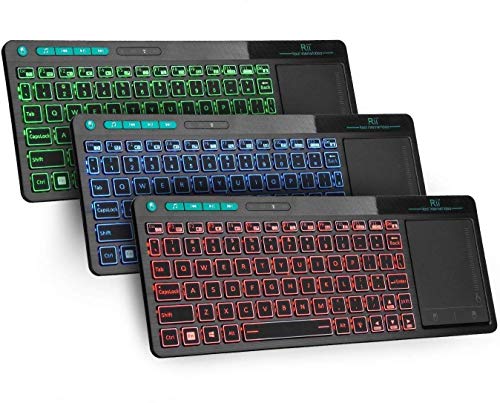
The K18 Plus answers the problem every unlit couch board creates at night: you cannot see the keys. Its backlight offers three LED colours, so legends stay readable under TV light, and the large multi-touch trackpad gives your thumb room to steer, scroll and pinch to zoom without a separate mouse. A rechargeable lithium battery replaces disposable cells, and the 2.4GHz link covers PCs, smart TVs and the small streaming boxes and single-board computers that often drive a living-room setup. It is the pick for players whose sessions start after dark and whose setup changes shape often.
Specs
- 2.4GHz wireless connection with USB receiver
- Built-in large-size multi-touch touchpad
- Backlight with 3 LED colours
- Rechargeable Li-ion battery
- Compatible with Android TV Box, PC, Smart TV and Xbox
- Also supports Raspberry Pi, HTPC, Windows and MacOS
- Model K18 Plus
Best for: Evening couch gaming and media control where the room stays dim.
Watch out for: The rechargeable battery needs a cable top-up routine, so keep a charging lead near the couch.
ASIN: B077VYRMC1
Rii K22S 2.4G Wireless and Bluetooth Touch TV Keyboard

The K22S is built for a couch that serves more than one screen. It connects over 2.4G wireless with a receiver or over Bluetooth, so the same board can drive a TV box one moment and pair with a laptop or tablet the next, without moving hardware between rooms. The stainless steel compact body keeps it light enough to pass around the sofa, scissor-switch keys give a crisp, quiet action for chat and search, and the built-in touchpad handles pointing for both devices. In White, it also suits brighter living rooms where a black board looks out of place.
Specs
- Dual-mode 2.4G wireless and Bluetooth 5.0 connection
- Built-in touchpad with multi-finger gesture and scroll support
- Easy media control keys
- Stainless steel compact body with scissor-switch keys
- Rechargeable battery
- Compatible with Windows, Android and Chrome OS
- For laptop and tablet use, in White
Best for: Households that share one couch keyboard between a TV setup and portable devices.
Watch out for: Check which connection mode each of your devices needs before relying on Bluetooth pairing alone.
ASIN: B0DSFBQ3B1
Which One Fits Your Situation
Your gaming PC lives under the TV
Choose the Logitech K400 Plus. A dedicated living-room PC rewards the receiver-based link, which works from the first boot screen onward, and the media keys plus touchpad cover launchers, browsers and streaming apps between games. Its compact shape stores easily beside the couch, and the long stretch between battery changes suits a setup you want to pick up and play without any preparation ritual before each session.
You play mostly after dark
Choose the Rii K18 Plus. Its three-colour backlight keeps key legends readable when the room lights are down, which is exactly when unlit boards become guesswork. The large multi-touch trackpad handles both game menus and streaming navigation, and the rechargeable battery fits a nightly routine where the board returns to the same cushion corner and can top up from a nearby cable while you watch something else.
One keyboard serves the whole room
Choose the Rii K22S. Dual-mode connection lets it stay paired to a TV box over Bluetooth while the receiver lives in a laptop, so switching screens does not mean re-pairing or carrying dongles between rooms. The compact stainless body travels well between seats, and the touchpad keeps pointing consistent across devices, which matters when several people share the same couch setup through the week.
You want a board that feels built to last
Choose the Arteck 2.4G Wireless Touch TV Keyboard. The stainless steel chassis shrugs off the knocks of couch life, from being sat on accidentally to sliding off a cushion, better than an all-plastic board. Its full-size layout and physical touchpad buttons suit longer sessions that mix gaming with real typing, and the slim profile still tucks down the side of the sofa when the room needs to look tidy.
Common Mistakes
- Buying a standalone wireless keyboard and mouse separately, then discovering the mouse has no surface to run on once you sit down.
- Choosing a compact board with a tiny touchpad, which forces constant swiping to cross a large TV screen.
- Ignoring the wake-up behaviour of power-saving models, then mistaking the first missed keystroke of a session for a fault.
- Placing the USB receiver behind a metal PC case or inside a cabinet, weakening the link across the room.
- Forgetting that a console may support keyboard input in menus but not inside every game, and blaming the keyboard for it.
Frequently Asked Questions
Can a touchpad keyboard replace a mouse for fast-paced games?
For menus, strategy titles, simulations and slower-paced games, a good touchpad handles pointing comfortably from the couch. Fast competitive shooters reward the speed and precision of a mouse on a surface, which a touchpad cannot match. Many couch players use the touchpad board for most of their library and keep expectations matched to the genre rather than the hardware.
How far from the PC can a couch keyboard sit?
The boards in this guide state a wireless range of around 10 metres, which covers most living rooms with distance to spare. Walls, metal cabinets and a receiver hidden behind the PC case shorten the practical range, so line of sight between the receiver and your seat matters more than the headline figure. A short USB extension lead can move a receiver into the open.
Is Bluetooth or a USB receiver better for couch gaming?
A USB receiver pairs instantly, works in boot menus and avoids pairing steps, which suits a fixed gaming PC. Bluetooth suits TVs, tablets and laptops, and frees a USB port. Dual-mode boards such as the Rii K22S offer both, which helps in rooms where one keyboard serves several screens. For a single dedicated setup, the receiver is usually the simpler and steadier choice.
Will one of these keyboards work with a games console?
Compatibility depends on the console and the game. The Rii K18 Plus lists Xbox among its supported devices, and keyboards generally work for text entry and supported titles on modern consoles, but many games restrict keyboard and mouse input by design. Check the specific console and the games you play before assuming a couch keyboard unlocks full control.
Related guides
More from Amazon
Programs that pair well with the guide above. Offers and eligibility are set by Amazon and may change.
Free shipping on eligible items, Prime Video and more. Eligible new members can start with a free trial.
Start a Prime free trialAd-free music streaming. Eligible new subscribers can start with a free trial.
Try Music Unlimited freeA Prime membership for ages 18-24 with a trial period. Eligibility is set by Amazon.
See Prime for Young AdultsAudiobooks and podcasts to listen to on the go. Eligible new members can start with a free trial.
Try Audible freeAs an Amazon Associate we earn from qualifying purchases.