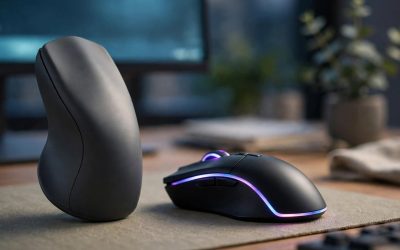
A gaming mouse slides across a pad and tracks with a sensor on its underside, while a trackball mouse stays in one spot and moves the cursor with a ball rolled by your thumb or fingers. For fast shooters, the gaming mouse is still the default choice: higher polling rates, lighter shells and arm-driven aim are hard to beat. But a trackball needs almost no desk space, keeps your arm still, and can hold its own in strategy, simulation and slower-paced games once you learn it.
This guide compares the two designs head to head — how each one aims, what the spec sheets actually tell you, and where each design gives something up. It finishes with five real products, three gaming mice and two trackballs, so you can shortlist the side that matches how you play.
As an Amazon Associate, we earn from qualifying purchases.
Our Top Picks
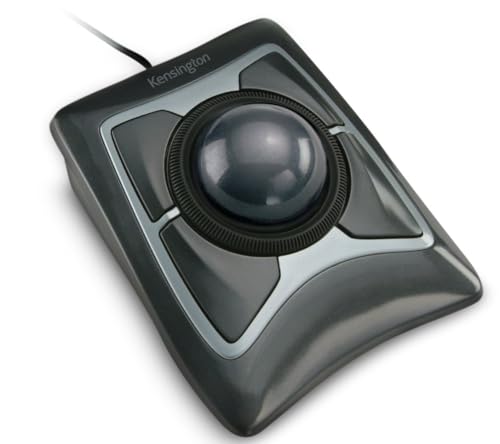 Kensington Expert Trackball Mouse5"W x 5-3/4"D x 2-1/2"H3.5 x 9.75 x 9.75 inches0.7 poundsCheck on Amazon
 Logitech Ergo M575S Wireless Bluetooth Trackball MouseOne Size4.13 x 3.94 x 5.28 inchesCheck on Amazon
 Razer Basilisk V3 Customizable RGB Wired Ergonomic GamingMouse2.96 x 5.12 x 1.67 inches0.2 poundsCheck on Amazon

Table of Contents
- Quick Verdict
- How Each Design Moves the Cursor
- Gaming Mouse vs Trackball at a Glance
- The Differences That Matter
- The Gaming Mouse Picks
- The Trackball Picks
- Who Should Choose Which
- FAQ
- Conclusion
- Product and ASIN Reference
Quick Verdict
Choose a gaming mouse if you play competitive shooters or any game built on fast flicks and tracking aim. Current gaming mice poll at 1,000 Hz or higher, weigh as little as 53 g, and use sensors rated far beyond what a human arm can outrun. Choose a trackball if your desk is small, your shoulder or wrist dislikes sweeping arm movements, or you mostly play strategy, management and turn-based games where cursor travel matters more than snap aim. Trackballs trade raw flick speed for a fixed footprint and finger-driven control, and they take longer to learn.
How Each Design Moves the Cursor
A gaming mouse reads the surface beneath it with an optical sensor. Move the mouse an inch and the cursor moves a matching distance, so your whole hand and forearm become part of the aiming system. Players pick a sensitivity, learn the muscle memory, and rely on large mouse pads to give the sensor room to travel. Modern gaming sensors report their position to the PC at least 1,000 times per second, and wired esports models now reach 8,000 Hz polling, so the cursor follows even very fast swipes with minimal delay.
A trackball inverts the arrangement. The device itself never moves. Instead, an exposed ball sits in a socket and spins under your fingers or thumb, and a sensor inside reads the ball’s rotation. A quick flick of the ball can send the cursor across an entire screen, then a fingertip slows it for the final adjustment. Because nothing slides, a trackball works on a crowded desk, a couch arm or even a laptop stand where a normal mouse would run out of room. The trade-off is that fine aim depends on finger control rather than arm movement, which feels foreign to anyone raised on a standard mouse.
There are two trackball layouts. Thumb trackballs, like the Logitech ERGO M575S below, place the ball under your thumb and keep conventional left and right buttons under your index and middle fingers. Finger trackballs, like the Kensington Expert Mouse, center a large ball that you roll with two or three fingertips, with buttons arranged around it. Finger models are usually ambidextrous; thumb models are shaped for one hand.
Gaming Mouse vs Trackball at a Glance
| Factor | Gaming mouse | Trackball mouse |
|---|---|---|
| Cursor movement | Whole device slides on a pad | Ball rolls in a fixed socket |
| Polling rate | 1,000 Hz typical, up to 8,000 Hz | Usually 125 Hz class |
| Sensor range | Up to 26,000 DPI or more | Roughly 400 to 2,000 DPI |
| Desk space needed | Large pad for low sensitivity | Only the device footprint |
| Aim style | Arm, wrist or fingertip movement | Thumb or fingertip ball control |
| Learning curve | Familiar to most players | Days to weeks of adjustment |
| Strongest genres | FPS, battle royale, fast action | Strategy, simulation, turn-based |
| Upkeep | Clean the sensor lens and feet | Pop out and clean the ball and supports |
The Differences That Matter
Aim and flick shots
Competitive aim is built on moving the mouse itself. A low-sensitivity player might sweep 40 cm to turn around in a shooter, and a gaming mouse rewards that with a sensor that stays accurate at high speeds. Trackballs can spin fast — a hard ball flick covers a screen quickly — but stopping the ball precisely on a small target takes practice, and rapid direction changes are harder because the ball has momentum. For ranked shooters, the gaming mouse is the safer tool. For slower games, the gap shrinks a lot.
Polling rate and responsiveness
Polling rate is how often the device reports to the PC. Mainstream gaming mice report 1,000 times per second, and the HyperX Pulsefire Haste 2 below reaches 8,000 Hz wired. Most trackballs report at office-class rates around 125 Hz, which is fine for desktop work and calm games but adds a small delay that fast-paced players can feel. If you split time between work and gaming, this is the spec that most separates the two designs.
Desk space and arm movement
A trackball’s footprint is the whole story: it sits still, so a narrow desk, a tray table or a media-center setup is no obstacle. A gaming mouse needs a pad sized to your sensitivity, and low-sensitivity play can demand a pad 45 cm wide or more. The flip side is movement strain. Gaming mice ask your shoulder and forearm to travel all session, while a trackball keeps the arm planted and only the fingers or thumb work. Players managing desk discomfort often look at trackballs for exactly this reason, though shape and posture matter as much as device type.
Precision at low speed and maintenance
Both designs can be precise at low speed, just differently. A gaming mouse makes micro-adjustments with small wrist or fingertip nudges, and its sensor reads the pad directly. A trackball makes them by slowing the ball with fingertip pressure, and a large finger ball like the Kensington’s gives very fine control once learned. Maintenance differs too: a gaming mouse needs its lens and glide feet kept clean, while a trackball ball should be popped out regularly so the socket and support points can be wiped — a dirty socket makes the ball feel gritty and inconsistent.
The Gaming Mouse Picks
HyperX Pulsefire Haste 2 (Wired) — budget lightweight pick
The Haste 2 is built for players who want the lightest possible wired mouse without paying premium-tier money. At 53 g with a sensor that polls up to 8,000 Hz, it covers the two specs FPS players ask about first, and the flexible HyperFlex 2 cable stays out of the way during swipes. It is a safe, symmetrical shape that suits claw and fingertip grips.
Specs:
- Sensor: HyperX 26K optical, up to 26,000 DPI
- Polling rate: up to 8,000 Hz
- Switches: HyperX mechanical, rated for 100 million clicks
- Buttons: 6
- Weight: 53 g
- Connection: wired USB with HyperFlex 2 cable
- Extras: PTFE feet, grip tape in the box, NGENUITY software
SteelSeries Rival 3 Wireless — budget wireless pick
The Rival 3 Wireless removes the cable while keeping a gaming-grade 1,000 Hz connection over its 2.4 GHz dongle, and it can fall back to Bluetooth for a laptop or second machine. Battery life is the headline: SteelSeries rates it beyond 400 hours, and it runs on one or two AA batteries, so you can shed a little weight by using a single cell. The TrueMove Air sensor is a step below the flagships here, but it tracks cleanly for everyday competitive play.
Specs:
- Sensor: TrueMove Air optical, up to 18,000 CPI
- Polling rate: 1,000 Hz over 2.4 GHz
- Connection: 2.4 GHz wireless and Bluetooth 5.0
- Battery: up to 400 hours (manufacturer figure), one or two AA batteries
- Switches: mechanical, rated for 60 million clicks
- Buttons: 6
- Weight: 106 g with two AA batteries
Razer Basilisk V3 — mid-range feature pick
The Basilisk V3 is the pick for players who want buttons and a better scroll wheel more than the lowest weight. Its HyperScroll wheel tilts for side inputs and switches between a notched tactile mode and a free-spinning mode, which is genuinely useful in games with long lists or weapon wheels. Eleven programmable buttons, a thumb rest and a sculpted right-handed shell make it the comfort option of the three, at a heavier 101 g.
Specs:
- Sensor: Razer Focus+ optical, up to 26,000 DPI
- Polling rate: 1,000 Hz
- Switches: Razer Optical Gen-2, rated for 70 million clicks
- Buttons: 11 programmable
- Scroll wheel: HyperScroll tilt wheel, tactile and free-spin modes
- Weight: 101 g without cable
- Connection: wired USB with Speedflex cable
- Lighting: Chroma RGB across 11 zones
The Trackball Picks
Logitech ERGO M575S — budget thumb trackball
The M575S is the easiest way to try a trackball. The thumb ball and conventional button layout feel familiar within an hour, the sculpted shell keeps your hand in a handshake-style position, and it connects by Bluetooth or the included Logi Bolt receiver. Tracking tops out at 2,000 DPI and the report rate is office-class, so it suits strategy games, builders and desktop play rather than ranked shooters. One AA battery is rated for up to 18 months, which makes it a fit-and-forget desk device.
Specs:
- Control: thumb-operated ball, right-handed sculpted shell
- Tracking: optical, 400 to 2,000 DPI
- Connection: Bluetooth Low Energy and Logi Bolt USB receiver
- Battery: 1 AA, up to 18 months (manufacturer figure)
- Buttons: 5
- Dimensions: 134 x 100 x 48 mm
- Weight: 145 g
Kensington Expert Mouse (K64325) — premium finger trackball
The Expert Mouse is the long-running reference design for finger trackballs. Its 55 mm ball is large enough to roll with two or three fingers for fine control, the Scroll Ring around the ball handles long pages and timelines without a wheel, and the symmetrical body works in either hand. It is wired only, which removes battery worries but ties it to a desk. KensingtonWorks software lets you assign the four buttons and adjust pointer behaviour. It ships with a detachable wrist rest.
Specs:
- Ball: 55 mm, finger-operated
- Tracking: DiamondEye optical
- Buttons: 4, plus Scroll Ring for scrolling
- Connection: wired USB
- Design: ambidextrous, symmetrical
- Extras: detachable wrist rest, KensingtonWorks software
Who Should Choose Which
Choose a gaming mouse if shooters and fast action games are your main rotation, if you already own a large mouse pad, or if you want the deepest software and hardware options at every tier. The Haste 2 covers competitive basics for the least commitment, the Rival 3 Wireless adds cable-free play, and the Basilisk V3 suits players who map lots of buttons.
Choose a trackball if your desk space is tight, if you play mostly strategy, simulation, management or turn-based games, or if keeping your arm still sounds better than sweeping it across a pad all evening. Start with the M575S if you want a gentle learning curve; choose the Expert Mouse if you want the large-ball finger control that long-time trackball users prefer. Many players end up with both: a trackball for the workday and desktop games, and a gaming mouse plugged in for shooters.
FAQ
Can you play FPS games with a trackball?
You can, and some players do, but expect a real adjustment period and a lower ceiling for flick-heavy aim. A trackball spins quickly across the screen, yet stopping precisely and chaining direction changes is harder than with a sliding mouse. Trackballs feel most at home in slower shooters, single-player games and every genre that does not demand snap aim.
How long does a trackball take to learn?
Basic desktop control usually feels workable within a few days. Game-level confidence takes longer — often a few weeks of regular play — because your fingers have to learn ball speed, spin and stopping distance the way your arm once learned mouse sensitivity. A thumb model like the M575S generally feels familiar faster than a large finger ball.
Is a trackball better for a small desk?
Yes, on space alone. A trackball never travels, so it needs only its own footprint and works on surfaces where a mouse would run out of room, such as a narrow desk or a laptop tray. A gaming mouse needs pad space matched to your sensitivity, and low-sensitivity shooter play needs the most room of all.
Do trackballs need much maintenance?
A little, and it matters. Skin oil and dust collect where the ball meets its supports, which makes rolling feel rough. The ball on both picks here pops out by hand so you can wipe the ball, socket and support points with a dry or slightly damp cloth. Do that every week or two and tracking stays smooth.
Conclusion
The gaming mouse remains the right default for speed: lighter shells, 1,000 Hz or faster polling and arm-based aim keep it ahead in competitive games. The trackball wins on footprint, stillness and finger control, and it is a legitimate gaming device for the many genres that do not hinge on flick shots. Pick the side that matches your games and your desk, and either shortlist above will serve you well.
Related guides
More from Amazon
Programs that pair well with the guide above. Offers and eligibility are set by Amazon and may change.
Free shipping on eligible items, Prime Video and more. Eligible new members can start with a free trial.
Start a Prime free trialAd-free music streaming. Eligible new subscribers can start with a free trial.
Try Music Unlimited freeA Prime membership for ages 18-24 with a trial period. Eligibility is set by Amazon.
See Prime for Young AdultsAudiobooks and podcasts to listen to on the go. Eligible new members can start with a free trial.
Try Audible freeAs an Amazon Associate we earn from qualifying purchases.