Every Xbox and PS5 player eventually hits the same annoyance: a controller that dies mid-session, or a desk tangled with the USB cable you keep meaning to plug in. There are two established fixes. A controller charging dock gives the gamepad a permanent parking spot that refills it between sessions, while a rechargeable battery pack replaces disposable AA cells inside the controller and tops up by cable, with a spare pack ready to swap in. Both approaches end the disposable-battery habit, but they suit different desks, budgets and play habits.
This guide compares docks and battery packs head to head on charging routine, rated runtime, desk footprint, compatibility and long-term upkeep, then profiles five products — three docks and two battery pack kits — that show what each side does best.
As an Amazon Associate, we earn from qualifying purchases.
Our Top Picks
 PowerA Solo Charging Stand for Xbox Series X|SXbox Wireless Controller size0.43 poundsCheck on Amazon
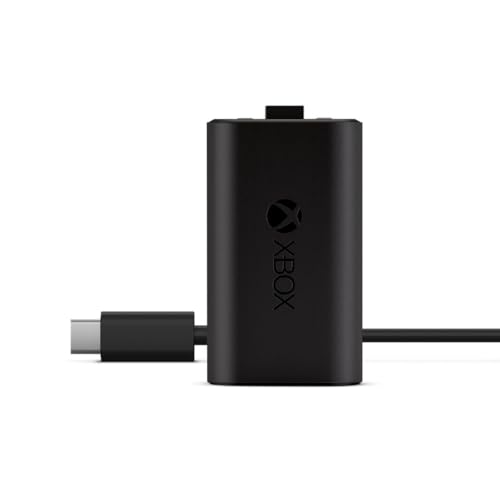
Table of Contents
- The short answer
- How a charging dock works
- How a rechargeable battery pack works
- Head to head: dock vs battery pack
- The docks
- The battery packs
- Which one should you choose?
- FAQ
- Conclusion
The short answer
Choose a charging dock if you play at the same desk most days and want the simplest possible routine: set the controller down when you finish, pick up a full one when you start. Choose a battery pack kit if you want the lowest-cost entry point, play in more than one room, or have no spare desk space — a charged spare pack swaps in within seconds and the whole system stores in a drawer. Many players end up with both, using a dock at the main setup and a spare pack for travel or a second controller.
How a charging dock works
A dock charges through electrical contacts rather than the controller’s USB port. On the PlayStation side, the DualSense has charging contacts on its underside, and a dock such as Sony’s official station uses a click-in design that lines those contacts up automatically. The controller’s battery is built in, so the dock needs nothing else — you drop the pad in and it charges at roughly the same speed as a cable plugged into the console.
Xbox controllers use removable batteries, so Xbox docks work differently. A dock kit includes rechargeable battery packs and replacement battery doors with charging contacts built in. You fit the pack and the special door once, then snap the controller down onto the dock after each session. Power comes from a USB port on better single stands or from a wall adapter on most dual stations, which keeps the console’s USB ports free. LED indicators show charging and full states, and the dock doubles as a display stand, which is a large part of the appeal for a tidy gaming desk.
How a rechargeable battery pack works
A battery pack kit skips the dock entirely. On Xbox controllers, the pack drops into the same compartment that holds AA cells, and a charge-through battery door lets you recharge it without removing it: plug a USB cable into the controller and keep playing while it charges, or connect the cable directly to the pack. Kits usually include two packs, so one can charge while the other is in use, and a mid-session swap takes seconds.
Capacity is the headline spec. The common licensed packs are rated at 1100 mAh, with manufacturers quoting up to 20 hours of gameplay per charge; Microsoft’s own first-party pack is quoted at up to 30 hours per charge. Charge times sit around three to four hours depending on the kit. Note that swappable packs are an Xbox-side option: the PS5 DualSense battery is sealed inside the controller, so PlayStation owners choose between a dock and a plain cable instead.
Head to head: dock vs battery pack
Charging routine and downtime
The dock wins on habit. There is no cable to find and nothing to remember beyond putting the controller back in its spot, so the pad is effectively always full. The weakness is a dead controller at the start of a session if you forgot to dock it — most docks cannot charge and be played through at the same time. A pack kit flips that around: you can plug in and keep playing while charging, and a charged spare removes downtime entirely, at the cost of a little more manual effort each time.
Runtime and charge time
Published figures are closer than marketing suggests. Licensed 1100 mAh packs from PowerA are rated for up to 20 hours per charge with a charge time of about three hours. Microsoft’s official pack stretches the rated runtime to up to 30 hours and fully charges in under four hours. Dock systems use similar cells — the packs bundled with Xbox docks are typically the same 1100 mAh class — so a dock does not buy extra runtime; it buys convenience. Razer’s stand is the speed outlier, rated to fully charge its included pack in under three hours.
Desk space and display
A dual dock is a permanent desk fixture roughly the width of two controllers, and it needs a power source nearby. For a dedicated gaming setup that is often a plus, since the controllers become part of the display. A pack kit adds nothing to the desk at all: the cable lives in a drawer and the spare pack next to it. Small desks, shared desks and living-room setups usually favor packs; battlestations favor docks.
Compatibility traps
This is where buyers get caught. Door-based Xbox systems — docks and packs alike — do not fit the Xbox Elite Wireless Controller Series 2, which has a built-in battery and charges by USB-C or its own dock; PowerA and Razer both exclude it. Xbox One and Series X|S controllers also use different battery door shapes, so check that a kit includes doors for your generation; the better kits include both. On PlayStation, docks are shaped for the standard DualSense, and the DualSense Edge’s different shell means Edge owners should confirm fit before relying on any dock.
Upkeep and long-term cost
Neither side uses disposable batteries, so running costs are about replacement cells. Pack kits make replacement trivial — a worn pack is a small, cheap part — and the same packs often work across a brand’s stands and stations. Dock contacts and doors also wear, but slowly; the bigger consideration is that a dock is a single-platform purchase, while spare packs travel between rooms and controllers. Budget-tier kits cover one controller, mid-range options add a second pack or a dual dock, and premium stands add faster charging, matched colors and metal or weighted construction.
The docks
Razer Universal Quick Charging Stand for Xbox — Premium
Razer’s stand is the premium expression of the dock idea: a single-controller stand that color-matches official Xbox controllers, with a magnetic contact system that keeps the pad seated. It is officially licensed, USB powered, and bundles the rechargeable battery plus battery covers for both Xbox Series X|S and Xbox One controllers, so it works out of the box. Razer rates a full charge at under three hours and builds in overcharge and short-circuit protection. It suits a one-controller desk where looks matter as much as charging.
Specs:
– Platform: Xbox Series X|S, Xbox One, Elite Series 1 (not Elite Series 2)
– Capacity: 1 controller
– Charging: Magnetic contacts, USB powered (USB-C to USB-A cable included)
– Charge time: Under 3 hours (manufacturer rating)
– Included: Stand, rechargeable battery, Series X|S and Xbox One battery covers, USB cable
– Protection: Overcharge and short-circuit protection
– Model: RC21-01750100-R3U1 (Carbon Black)
– Warranty: 2-year manufacturer warranty
PlayStation DualSense Charging Station — Mid-range
Sony’s official station is the reference PS5 dock. It charges two DualSense controllers at the same time through a click-in design, at the same speed as connecting them to the PS5 itself, and because it runs from its own AC adapter it leaves every console USB port free. There are no packs or doors to fit — the DualSense battery is built in and the dock talks to the contacts on the controller’s underside. For a two-controller PS5 household it is the simplest setup in this guide.
Specs:
– Platform: PlayStation 5 DualSense wireless controllers
– Capacity: 2 controllers
– Charging: Click-in contact charging, AC powered
– Charge speed: Same as charging via the PS5 console (manufacturer statement)
– Included: Charging station (controllers sold separately)
– Dimensions: 7.5 x 5 x 3 inches
– Weight: 360 grams
– Model: 3005837
PowerA Solo Charging Stand for Xbox — Budget
PowerA’s Solo stand is the budget way into docking. It charges one Xbox controller with a snap-down design and a color-change LED that shows charge status, and the box includes the 1100 mAh rechargeable battery and two battery doors — one for Series X|S, one for Xbox One — so nothing else is needed. The included pack is rated for up to 20 hours of gameplay per charge, and the stand runs from a 3.3 ft (1 m) USB cable. It is officially licensed and, like most door-based systems, excludes the Elite Series 2.
Specs:
– Platform: Xbox Series X|S and Xbox One (not Elite Series 2)
– Capacity: 1 controller
– Charging: Snap-down contacts, USB powered, 3.3 ft (1 m) cable included
– Battery included: 1 x 1100 mAh rechargeable pack, rated up to 20 hours per charge
– Charge time: About 3 hours (manufacturer rating)
– Indicator: Color-change LED
– Included: Stand, battery pack, 2 battery doors, USB cable
– Model: XBPW0077-01 (White)
The battery packs
Xbox Rechargeable Battery + USB-C Cable — Mid-range
Microsoft’s first-party pack is the battery-side benchmark. The single rechargeable pack clips into any Xbox Wireless Controller with a USB-C port and is rated for up to 30 hours of play per charge — the longest runtime figure in this guide — with a full charge in under four hours. It recharges while you play or afterwards, and it even tops up while the console sits in standby, which quietly removes most of the dock’s convenience advantage. The trade-off is that there is only one pack in the box, so there is no charged spare to swap in.
Specs:
– Platform: Xbox Wireless Controllers with USB-C port (Series X|S)
– Contents: 1 rechargeable battery pack, USB-C cable
– Runtime: Up to 30 hours per charge (manufacturer rating)
– Charge time: Under 4 hours
– Charging: In controller via USB-C; works during play and console standby
– Model: SXW-00001
– Weight: 0.11 pounds
PowerA Play & Charge Kit for Xbox — Budget
PowerA’s kit is the value pick on the pack side: two 1100 mAh rechargeable batteries, four battery doors (two for Series X|S, two for Xbox One) and a long 10 ft (3 m) USB cable. Each pack is rated for up to 20 hours, and with two packs the rotation is the point — one in the controller, one charged or charging as a spare. Packs can charge inside the controller or directly, and they are compatible with all PowerA charging stands and stations, so the kit pairs naturally with a dock later. It is officially licensed, carries a two-year limited warranty, and excludes the Elite Series 2.
Specs:
– Platform: Xbox Series X|S and Xbox One (not Elite Series 2)
– Contents: 2 rechargeable batteries, 4 battery doors, 10 ft (3 m) USB cable
– Capacity: 1100 mAh per pack
– Runtime: Up to 20 hours per pack (manufacturer rating)
– Charge time: About 3 hours (manufacturer rating)
– Charging: In controller or direct to the pack; fits PowerA stands and stations
– Model: XBPW0119-01
– Warranty: Two-year limited warranty
Which one should you choose?
Pick a dock if your controller lives at one desk, you value a set-down-and-forget routine, and you like your controllers on display — dual-controller households get the most from a dual station such as Sony’s, while the Razer and PowerA stands suit single-pad Xbox setups at premium and budget tiers. Pick a battery pack kit if you play in more than one place, your desk has no room for a permanent fixture, or you want the lowest-cost route away from disposable AAs; the two-pack PowerA kit is the flexible budget option, and Microsoft’s own pack is the pick for maximum rated runtime. If you split time between home desk and travel, a pack kit plus a stand from the same brand covers both, since the packs and doors are shared.
FAQ
Can I use an Xbox charging dock without a battery pack?
No. Xbox docks charge through a replacement battery door, so the controller must be fitted with the rechargeable pack and charge-through door included with the dock. PlayStation docks are different: the DualSense battery is built in, and the dock charges it directly through the controller’s underside contacts.
Do these packs and docks work with the Xbox Elite Series 2?
No. The Elite Series 2 has a sealed, built-in battery, and PowerA and Razer both list it as incompatible with their door-based packs, stands and stations. Elite Series 2 owners should charge by USB-C cable or use the dock supplied for that controller.
How long do rechargeable controller packs take to charge?
Published figures cluster around three to four hours: about three hours for PowerA’s 1100 mAh packs and Razer’s stand, and under four hours for Microsoft’s official pack. Rated runtimes run from up to 20 hours per charge on the 1100 mAh packs to up to 30 hours on the official Xbox pack.
Will a dock overcharge my controller if I leave it docked?
The docks profiled here are built for permanent residence. Razer’s stand lists overcharge and short-circuit protection, PowerA’s stands use a status LED that changes when charging completes, and Sony’s station is designed to hold controllers between sessions. Leaving a controller docked is the intended use.
Conclusion
A charging dock and a battery pack solve the same problem from opposite directions: the dock optimizes the routine, the pack optimizes flexibility and cost. For a fixed gaming desk, a dock such as the Razer stand, Sony’s DualSense station or PowerA’s Solo stand keeps controllers full, tidy and ready. For everyone else — small desks, multiple rooms, tighter budgets — a pack kit such as Microsoft’s official battery or PowerA’s two-pack Play & Charge Kit delivers the same freedom from disposable batteries with zero footprint. Match the choice to where you actually play, and either side beats a drawer full of AA cells.
Related guides
More from Amazon
Programs that pair well with the guide above. Offers and eligibility are set by Amazon and may change.
Free shipping on eligible items, Prime Video and more. Eligible new members can start with a free trial.
Start a Prime free trialAd-free music streaming. Eligible new subscribers can start with a free trial.
Try Music Unlimited freeA Prime membership for ages 18-24 with a trial period. Eligibility is set by Amazon.
See Prime for Young AdultsAudiobooks and podcasts to listen to on the go. Eligible new members can start with a free trial.
Try Audible freeAs an Amazon Associate we earn from qualifying purchases.