
The best portable monitors for gaming and travel are 15.6 to 16-inch IPS panels that connect over one USB-C cable and add an HDMI port for consoles. If you want smooth motion, choose a 144 Hz model such as the ARZOPA Z1FC, Acer Nitro PG161W or VisionOwl 2.5K. If you mostly want a second work screen, a 60 Hz ASUS, Lenovo, msi or AOC is enough.
This guide is organized by how you will use the screen: gaming at 144 Hz, console play, laptop work and carry-everywhere travel. It is based on store listings and maker specifications, not our own use of the products.
Our Top Picks
Top 3 picks at a glance
Best Portable Monitors: Picks at a Glance
| Pick | Size and resolution | Refresh rate | Inputs (per listing) | Best for |
|---|---|---|---|---|
| ARZOPA Z1FC | 16.1 in, 1080p | 144 Hz | Not listed here; check maker | Budget 144 Hz gaming |
| Acer Nitro PG161W | 16 in, 1920 x 1200 | 144 Hz, FreeSync | 2 x USB-C, 1 x HDMI 1.4 | Gaming from a known brand |
| VisionOwl 16-inch 2.5K | 16 in, QHD 16:10 | 144 Hz | USB-C, HDMI | Sharpest picture |
| ASUS ZenScreen MB169CK | 15.6 in, 1080p | Not listed; check maker | Dual USB-C | Laptop second screen |
| Plugable 15.6-inch USB-C | 15.6 in, 1080p | Not listed; check maker | USB-C, 100W pass-through, hub | One-cable desk docking |
| Lenovo L15 | 15.6 in, 1080p | 60 Hz | USB-C | Office and flicker-free work |
| msi Pro MP165 E6 | 15.6 in, 1080p | Not listed; check maker | USB-C, HDMI | Console and laptop all-rounder |
| AOC 16T20 | 16 in, 1080p | 60 Hz | USB-C, mini HDMI | Low-cost travel screen |
Where a listing does not state a spec, we write “check maker” instead of guessing.
How to Pick a Portable Monitor by Use
For fast games on a laptop or handheld PC
Look for 144 Hz, a 16:10 or 16:9 IPS panel and a USB-C port that carries video. The ARZOPA, Acer and VisionOwl models are the ones in this list built for that job. The extra refresh rate only helps if your laptop or handheld can produce more than 60 frames per second.
For PS5, Xbox and Switch
Consoles output through HDMI, so a physical HDMI or mini HDMI input is the key feature. The msi and AOC listings show HDMI inputs. Many portable monitors need a separate USB power source when fed by HDMI, so check how the screen is powered before you buy.
For work and travel
Weight, a cover that doubles as a stand and a single-cable USB-C connection matter more than refresh rate. The ASUS ZenScreen, Plugable and Lenovo L15 suit this job, and the Plugable adds pass-through charging so the laptop stays powered.
The 8 Best Portable Monitors
1. ARZOPA Z1FC: best budget 144 Hz screen
As an Amazon Associate we earn from qualifying purchases at no extra cost to you.

The ARZOPA Z1FC is a 16.1-inch portable gaming monitor with a 144 Hz refresh rate, a 1080p panel and a listed 106% sRGB color coverage. It has a built-in kickstand, HDR support and an eye-care mode, and the listing names laptops, PCs, PS5, Mac and Xbox as supported sources. It is the lowest-cost route in this list to a high refresh rate screen that you can carry in a bag.
- Size and panel: 16.1 in, 1080p, kickstand
- Refresh rate: 144 Hz
- Color: 106% sRGB (listing)
- Ports and power: not listed here; check the maker
Best for: players who want 144 Hz without paying for a premium brand. Skip if: you need a sharper QHD picture or a long track record from a major brand.
Pros: 144 Hz; wide color claim; built-in stand; named console support. Cons: 1080p on a 16-inch panel is less sharp than QHD; check the maker for port details and power needs.
2. Acer Nitro PG161W: best 144 Hz from a known gaming brand

The Acer Nitro PG161W is a 16-inch portable gaming monitor with a 1920 x 1200 panel, 144 Hz refresh rate and AMD FreeSync. The listing shows two USB 3.1 Type-C ports and one HDMI 1.4 port, plus an ultra-slim body meant for laptops and Macs. The 16:10 shape adds vertical space for browsers and documents, which is useful when the screen is not being used for games.
- Size and panel: 16 in, 1920 x 1200
- Refresh rate: 144 Hz with FreeSync
- Ports: 2 x USB-C, 1 x HDMI 1.4
- Note: HDMI 1.4 may not carry the full 144 Hz; USB-C is the safer route
Best for: PC gamers who want a recognizable brand and 144 Hz over USB-C. Skip if: you plan to run a console at high refresh rates over HDMI.
Pros: 144 Hz; FreeSync; two USB-C ports; extra vertical space from 16:10. Cons: HDMI 1.4 limits some modes; check the maker for brightness and power draw.
3. VisionOwl 16-Inch 2.5K QHD: sharpest picture here
The VisionOwl 16-inch portable monitor uses a 2.5K QHD panel in a 16:10 shape with a 144 Hz refresh rate. The listing adds USB-C and HDMI inputs, HDR, built-in speakers, a built-in kickstand and VESA mounting. A QHD panel at this size gives finer text and detail than a 1080p screen, which suits creators who also game.
- Size and panel: 16 in, 2.5K QHD, 16:10
- Refresh rate: 144 Hz
- Extras: speakers, kickstand, VESA mount
- Ports: USB-C and HDMI
Best for: people who want crisp text and a fast screen in one portable panel. Skip if: your laptop or handheld cannot push QHD at high frame rates.
Pros: QHD sharpness; 144 Hz; VESA mount; kickstand. Cons: harder for weak graphics to drive; check the maker for brightness and HDMI refresh limits.
4. ASUS ZenScreen MB169CK: best laptop second screen
The ASUS ZenScreen MB169CK is a 15.6-inch 1080p portable monitor with two USB-C ports, a 360-degree kickstand and an anti-glare IPS panel. The listing calls it plug and play for MacBooks and PCs. The kickstand lets you run it in landscape or portrait, which helps for code, documents and chat windows beside a laptop.
- Size and panel: 15.6 in, 1080p, anti-glare IPS
- Ports: dual USB-C
- Stand: 360-degree kickstand
- Refresh rate: not listed; check the maker
Best for: remote workers and students who want a tidy second screen. Skip if: you need a high refresh rate or an HDMI input for a console.
Pros: dual USB-C; flexible stand; anti-glare finish; strong brand support. Cons: not aimed at fast games; no HDMI shown in the listing.
5. Plugable 15.6-Inch USB-C Monitor: best one-cable desk dock

The Plugable 15.6-inch monitor has a 1920 x 1080 IPS display, 100W pass-through charging and a built-in hub with two USB-C 10Gbps ports. The listing gives a weight of 1.85 lb and includes a travel cover that works as a stand. With one cable it can show an image, power a laptop and connect accessories, which makes a small desk setup cleaner.
- Size and panel: 15.6 in, 1920 x 1080 IPS
- Charging: 100W pass-through
- Hub: 2 x USB-C at 10Gbps
- Weight: 1.85 lb per listing
Best for: laptop users who want a screen that also charges and docks. Skip if: you want a fast gaming panel or the lowest cost.
Pros: pass-through charging; built-in hub; light; cover and stand included. Cons: 1080p only; your laptop must support video over USB-C.
6. Lenovo L15: best flicker-free office screen

The Lenovo L15 is a 15.6-inch full HD portable monitor with an IPS panel, 250 nits brightness and a 60 Hz refresh rate. The listing shows USB-C ports, a height-adjustable stand and flicker-free technology. At 250 nits it is best used indoors, in an office, a coffee shop or at home, rather than beside a bright window.
- Size and panel: 15.6 in, Full HD IPS
- Brightness: 250 nits
- Refresh rate: 60 Hz
- Stand: height-adjustable; flicker-free panel
Best for: long work sessions with eye comfort in mind. Skip if: you need high refresh rates or a very bright screen.
Pros: height-adjustable stand; flicker-free; known brand. Cons: modest brightness; 60 Hz; check the maker for HDMI options.
7. msi Pro MP165 E6: best for laptops and consoles together
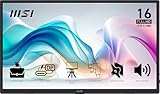
The msi Pro MP165 E6 is a 15.6-inch FHD IPS portable monitor with a USB Type-C port, an HDMI port, built-in speakers and tripod mount support. The listing names PC, Mac, PS5, PS4, Xbox and mobile devices as sources. Having both USB-C and a full HDMI input makes it flexible if you switch between a laptop and a console.
- Size and panel: 15.6 in, FHD IPS
- Ports: USB Type-C and HDMI
- Extras: speakers, tripod mount
- Refresh rate: not listed; check the maker
Best for: a single screen shared by a laptop and a console. Skip if: you want 144 Hz.
Pros: both USB-C and HDMI; speakers; tripod mount. Cons: 1080p; refresh rate not stated in the listing.
8. AOC 16T20: best low-cost travel screen
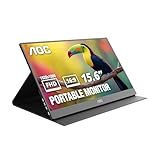
The AOC 16T20 is a 16-inch portable monitor with a 1920 x 1080 IPS panel, 60 Hz refresh rate, USB-C and mini HDMI inputs, and built-in speakers. The listing adds a smart cover, VESA mount support and low blue light. It covers the basics of a travel monitor from a familiar monitor brand without the extras of the higher models.
- Size and panel: 16 in, 1080p IPS
- Refresh rate: 60 Hz
- Ports: USB-C and mini HDMI
- Extras: smart cover, speakers, VESA mount
Best for: light travel and basic second-screen work. Skip if: you want fast gaming or high brightness.
Pros: mini HDMI plus USB-C; smart cover; VESA support. Cons: 60 Hz; mini HDMI needs the right cable.
Also Consider
- ASUS ZenScreen MB16AHV: a 15.6-inch 1080p monitor with a kickstand, mini HDMI, a blue light filter and a protective sleeve. A fit if you want HDMI from ASUS.
- Yxk 16-inch 1200P 144Hz: the listing says 144 Hz over USB-C and 120 Hz over HDMI, a useful reminder to read the HDMI limit.
- MNN 15.6-inch: a low-cost 1080p IPS screen with USB-C one-cable support and a smart case.
How We Chose
We did not use these monitors. We compared store listings, maker specifications and published reviews, then kept models that clearly state size, resolution, refresh rate and inputs. We favored screens that appear to work across laptops and consoles, and we excluded used and renewed units. Each pick is placed by use case, not by a single score, because a work monitor and a gaming monitor solve different problems.
Portable Monitor Buying Guide
Size: 15.6 versus 16 inches
The two sizes are close. A 15.6-inch screen is usually 16:9 and slightly lighter. A 16-inch screen is often 16:10, giving more height. If your bag has a laptop sleeve, either fits. Choose by shape and weight, not by the half inch.
Resolution: 1080p, 1200p or QHD
1080p is fine for a second screen. 1920 x 1200 adds vertical room. QHD gives sharper text but needs more graphics power. For consoles, 1080p is a reasonable match because many portable monitors cannot take higher modes anyway.
Refresh rate: do you need 144 Hz?
If you play shooters or fast action games and your device can exceed 60 frames per second, 144 Hz looks smoother. For work, video or slow games, 60 Hz is enough. Do not pay for a high refresh rate if your laptop cannot feed it.
USB-C: video support is the catch
Not every USB-C port carries video. The port on your laptop or phone must support DisplayPort Alt Mode, or Thunderbolt or USB4. Check the device specification before you assume one cable will work. If the port does not carry video, use HDMI plus a separate USB power cable.
HDMI, mini HDMI and refresh limits
Some monitors limit the refresh rate over HDMI, as the Yxk listing shows with 120 Hz on HDMI and 144 Hz on USB-C. Read the fine print for the port you will actually use.
Power draw and battery
Portable monitors draw power from the source. A phone or handheld may drain faster when it powers a screen. Pass-through charging, as on the Plugable, helps laptops. For phones, carry a power bank or a charger with a second port.
Brightness and finish
250 nits is acceptable indoors. Anti-glare coatings help near windows. If a listing does not state brightness, check the maker before you buy for outdoor use.
Stand and cover
A built-in kickstand or a folding smart cover saves buying a separate stand. VESA mounting lets you move the screen to an arm at home, and a tripod thread helps in odd spaces.
Speakers and audio
Built-in speakers on portable monitors are usually thin and quiet. They are fine for video calls and system sounds, but headphones or a small speaker do better for games. If your source device has a headphone jack, use that. Some monitors also pass audio through a 3.5 mm output, so check the listing if you need it.
Weight and thickness
Most 15.6 to 16-inch monitors are slim, and the Plugable listing gives 1.85 lb. Weights for the other picks are not listed here, so check the maker if every ounce counts. A thin panel with a cover adds to total bag weight, so factor that in.
Warranty and returns
Portable monitors can arrive with dead pixels or a loose port, and a thin body is easy to damage in transit. Read the maker’s warranty terms and the seller’s return window, and check the screen for dead pixels as soon as it arrives.
Setup Checklist Before You Plug In
Most portable monitor problems come from a mismatch between the screen, the cable and the source device. Work through this short list before you assume the screen is faulty.
- Confirm the source port. On a laptop, look for a USB-C port marked with a DisplayPort or Thunderbolt symbol, or check the spec sheet for “DisplayPort Alt Mode” or “USB4”. A port that only charges will not show an image.
- Use the right cable. A video-capable USB-C cable is not the same as a cheap charge-only cable. The cable that ships with the monitor is the safest starting point.
- Add power if needed. If the monitor goes dark or flickers on a phone or handheld, add power through a second USB-C port, a power bank or a wall charger.
- Set the refresh rate in your operating system. A 144 Hz screen often starts at 60 Hz until you change it in the display settings.
- Check scaling. A 1080p or 1200p panel at 15.6 or 16 inches usually looks best at 100% to 125% scaling. QHD at 16 inches often needs more.
- Update graphics drivers. New drivers can fix flicker and refresh rate options for external screens.
Common Problems and Quick Fixes
The screen shows no image over USB-C
The port probably does not carry video, or the cable is charge-only. Try a different cable, then try HDMI plus a separate power cable.
The picture flickers or drops out
This is usually a power problem. A source that cannot supply enough power may cut out when the screen brightness rises. Reduce brightness or add external power.
The maximum refresh rate is missing
High refresh modes may only appear over USB-C or only over certain HDMI ports. Read the listing note on HDMI limits, then confirm the setting in your display options.
The colors look washed out
HDR modes on small portable panels can look flat. Turn HDR off in the monitor menu and in the operating system, then adjust brightness and color preset by hand.
The console is not detected
Check that the HDMI cable is firmly seated, that the monitor is on the HDMI input, and that the console output resolution is set to 1080p. Some consoles need a restart after the display changes.
Portable Monitor Versus Other Options
A portable monitor is not always the right answer. Here is how it compares with common alternatives.
| Option | Strength | Weakness |
|---|---|---|
| Portable monitor | Light, one-cable, works with laptops, consoles and phones | Smaller panel, lower brightness, modest speakers |
| Desktop monitor | Bigger panel, higher brightness, better stands | Not portable; needs a power outlet |
| Tablet as a second screen | Already owned by many people | Added software, latency and a battery to manage |
| Laptop with a large built-in screen | No extra gear to carry | Heavier, costs more, no extra screen space |
If you spend most of your time at one desk, a desktop monitor is a better value. If you move between rooms, work in shared spaces or game on a console away from the TV, a portable monitor earns its place.
Care and Carry Tips
- Use the supplied cover or sleeve in your bag. Thin panels flex and scratch easily.
- Never pack the screen against sharp objects such as keys or charger prongs.
- Wipe the panel with a soft, dry cloth and avoid pressing on the center.
- Keep the stand extended while you adjust the angle, and support the panel with one hand.
- Pack a short, flexible video cable. A long stiff cable stresses the USB-C port on a thin body.
Portable Monitor FAQ
What is the best portable monitor for gaming?
A 144 Hz 16-inch IPS model such as the Acer Nitro PG161W, ARZOPA Z1FC or VisionOwl 2.5K suits gaming best. Pair it with a device that can produce more than 60 frames per second.
Can a portable monitor work with a PS5 or Xbox?
Yes, if it has an HDMI or mini HDMI input. The msi MP165 E6 and AOC 16T20 list HDMI inputs. Check how the screen gets power, because HDMI does not carry power.
Do I need a special USB-C cable?
You need a cable that supports video and enough power. A charging-only cable will not show an image. Use the cable supplied with the monitor or one rated for video output.
Is 144 Hz worth it on a portable monitor?
Only if your source can output more than 60 frames per second and you play fast games. For work and video, a 60 Hz screen looks the same and usually costs less.
How do I power a portable monitor from a phone or handheld?
Most connect by USB-C and draw power from the source. This drains the battery, so use a power bank or a pass-through charger when you can.
Can I use a portable monitor with a Nintendo Switch?
Often yes, through the dock’s HDMI output with a separate power source. Direct USB-C video from the console is limited, so check the maker’s compatibility notes first.
Is a 16-inch portable monitor better than a 15.6-inch one?
Not always. A 16-inch 16:10 panel gives more vertical space, while a 15.6-inch 16:9 panel is slightly lighter. Choose based on shape, weight and bag fit.
Which One Should You Buy?
- Cheapest route to 144 Hz: ARZOPA Z1FC.
- 144 Hz from a known brand: Acer Nitro PG161W, using USB-C for the full refresh rate.
- Sharpest picture: VisionOwl 16-inch 2.5K QHD.
- Laptop second screen: ASUS ZenScreen MB169CK or Plugable with pass-through charging.
- Office and eye comfort: Lenovo L15.
- Laptop and console in one: msi Pro MP165 E6.
- Low-cost travel: AOC 16T20.
Before you buy, confirm that your device’s USB-C port supports video, and read the fine print on HDMI refresh limits.
Sources
- ARZOPA, Acer, VisionOwl, ASUS, Plugable, Lenovo, msi and AOC product pages and store listings
- VESA DisplayPort Alt Mode over USB-C documentation
- USB Implementers Forum USB-C and cable guidance
- AMD FreeSync technology overview
Last updated: November 2026
Related guides
More from Amazon
Programs that pair well with the guide above. Offers and eligibility are set by Amazon and may change.
Free shipping on eligible items, Prime Video and more. Eligible new members can start with a free trial.
Start a Prime free trialAd-free music streaming. Eligible new subscribers can start with a free trial.
Try Music Unlimited freeA Prime membership for ages 18-24 with a trial period. Eligibility is set by Amazon.
See Prime for Young AdultsAudiobooks and podcasts to listen to on the go. Eligible new members can start with a free trial.
Try Audible freeAs an Amazon Associate we earn from qualifying purchases.


