
The best NVMe SSDs for gaming in 2026 are fast PCIe 4.0 drives such as the Samsung 990 PRO, WD_BLACK SN850X and Lexar NM790, because they load games quickly and cost far less than PCIe 5.0. Choose a PCIe 5.0 drive like the Samsung 9100 PRO only if you also edit large files. Buy 1 TB as a minimum and 2 TB if you can.
This guide starts with the question most buyers ask: do you need Gen5? It then ranks eight drives, covers PS5 rules, heatsinks and capacity, and answers common questions. Picks come from store listings and maker specifications, not from our own use of the drives.
Our Top Picks
Top 3 picks at a glance
Do You Need PCIe 5.0 for Games?
For most players, no. A good PCIe 4.0 NVMe drive already loads games and levels quickly, and the gap to PCIe 5.0 in real game load times is small in most published reviews. The headline speed of a Gen5 drive helps most when you copy very large files, edit video or move big datasets. For gaming, capacity, sustained performance and a sensible price matter more than a peak number on the box.
Technologies like Microsoft DirectStorage can use fast drives more directly, but only a limited number of games support it, so do not buy for that feature alone.
Best NVMe SSDs for Gaming: Picks at a Glance
| Pick | Interface | Listed speed (read) | Capacity shown | Best for |
|---|---|---|---|---|
| Samsung 990 PRO | PCIe 4.0 x4 | Up to 7,450 MB/s | 1 TB | Best overall Gen4 |
| Samsung 9100 PRO | PCIe 5.0 x4 | Up to 14,700 MB/s | 1 TB | Fastest, for creators who game |
| WD_BLACK SN850X | Gen4 NVMe | Up to 7,300 MB/s | 2 TB | Big-library gaming |
| Crucial P310 | PCIe Gen4 | Up to 7,100 MB/s | 1 TB | Value and handhelds |
| Lexar NM790 with heatsink | PCIe Gen 4×4 | 7,400 MB/s | 1 TB | PS5-ready with cooling |
| Sandisk Optimus GX 7100 | PCIe 4.0 | Up to 7,250 MB/s | 1 TB | High write speed |
| Acer Predator GM7 | PCIe Gen 4 x4, NVMe 2.0 | Up to 7,400 MB/s | 1 TB | Laptop, desktop and PS5 |
| Kingston NV3 | PCIe 4.0 Gen 4×4 | Up to 6,000 MB/s | 1 TB | Budget Gen4 |
Speeds are the maker’s “up to” figures as shown in store listings, not our measurements. Real speeds depend on your motherboard, cooling and workload.
The 8 Best NVMe SSDs for Gaming
1. Samsung 990 PRO: best overall PCIe 4.0 drive
As an Amazon Associate we earn from qualifying purchases at no extra cost to you.

The Samsung SSD 990 PRO 1TB is a PCIe 4.0 M.2 2280 NVMe drive with a listed read speed of up to 7,450 MB/s. The listing positions it for high-end computing, gaming and heavy workstation use, and the model number is MZ-V9P1T0B/AM. It sits at the top of the Gen4 range in speed, and it is a common pick for players who want a fast drive without moving to Gen5.
- Interface: PCIe 4.0 x4, M.2 2280, NVMe
- Read speed: up to 7,450 MB/s
- Capacity in this listing: 1 TB
- Heatsink: not included in this listing; a heatsink version exists
Best for: players who want top Gen4 speed and a well-known brand. Skip if: you want the lowest cost or need a PS5 drive with a heatsink already fitted.
Pros: top Gen4 speed; strong brand; wide capacity range. Cons: costs more than mainstream Gen4; check the maker for sustained write behavior.
2. Samsung 9100 PRO: best PCIe 5.0 choice

The Samsung SSD 9100 PRO 1TB moves to PCIe 5.0 x4 in the M.2 2280 format, with a listed read speed of up to 14,700 MB/s. The listing says it suits AI computing, gaming and heavy workstation use. Gen5 drives run hotter and need a motherboard with a Gen5 M.2 slot to reach those speeds, so check your board first.
- Interface: PCIe 5.0 x4, M.2 2280, NVMe
- Read speed: up to 14,700 MB/s
- Capacity in this listing: 1 TB
- Cooling: check the maker; Gen5 drives need good airflow or a heatsink
Best for: creators who edit large files and also game. Skip if: your board has only Gen4 slots or you play mostly and want better value.
Pros: very high peak speed; Gen5 headroom. Cons: costs more; needs cooling and a Gen5 slot; small gain in most game load times.
3. WD_BLACK SN850X 2TB: best for large game libraries
The WD_BLACK SN850X 2TB is a Gen4 NVMe M.2 2280 drive with listed speeds of up to 7,300 MB/s read and 6,300 MB/s write. The listing describes it as a gaming expansion drive, and the model is WDS200T2X0E. At 2 TB it holds a large library of modern games, which are often well over 100 GB each.
- Interface: Gen4 NVMe, M.2 2280
- Speed: up to 7,300 MB/s read, 6,300 MB/s write
- Capacity in this listing: 2 TB
- Heatsink: not in this listing; a heatsink version is sold separately
Best for: big libraries and long-term gaming PCs. Skip if: you only need 1 TB or want the lowest cost.
Pros: strong Gen4 speeds; 2 TB capacity; gaming-focused design. Cons: higher cost for the larger size; check the maker for heat behavior in a PS5.
4. Crucial P310: best value Gen4 for PCs and handhelds

The Crucial P310 1TB is a PCIe Gen4 NVMe M.2 2280 drive with a listed read speed of up to 7,100 MB/s. The listing says it fits laptops, desktops and handheld gaming consoles, and it includes Acronis data recovery software. The model is CT1000P310SSD801. A single-sided style and fast speeds make it a practical upgrade for a handheld PC or a mainstream desktop.
- Interface: PCIe Gen4 NVMe, M.2 2280
- Read speed: up to 7,100 MB/s
- Capacity in this listing: 1 TB
- Extras: Acronis data recovery software
Best for: value-focused upgrades and handheld gaming PCs. Skip if: you want a top-tier sustained write performance.
Pros: fast listed read speed; good value; works in handhelds. Cons: check the maker for DRAM cache and sustained write details.
5. Lexar NM790 with Heatsink: best ready-to-fit PS5 option

The Lexar NM790 1TB comes with a heatsink and lists speeds of 7,400 MB/s read and 6,500 MB/s write on a PCIe Gen 4×4 interface. The listing says it is compatible with PS5, PCs and laptops, with an SLC cache and a single-sided design. The model is LNM790X001T-RN9NU. The included heatsink saves a separate purchase for a console slot.
- Interface: PCIe Gen 4×4, M.2 2280
- Speed: 7,400 MB/s read, 6,500 MB/s write
- Heatsink: included
- Design: single-sided
Best for: PS5 storage expansion and builds that need a heatsink. Skip if: your motherboard already has a heatsink that conflicts with the one fitted.
Pros: fast listed speeds; heatsink included; PS5 compatible. Cons: the heatsink may not fit every laptop or slot; check clearance.
6. Sandisk Optimus GX 7100: strong write speed
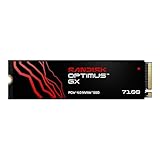
The Sandisk Optimus GX 7100 1TB is a PCIe 4.0 NVMe M.2 2280 drive with listed speeds of up to 7,250 MB/s read and 6,900 MB/s write. The model is SDSP71100TAN. The write figure is notable in this list, which helps when you install large games or save big capture files.
- Interface: PCIe 4.0, M.2 2280
- Speed: up to 7,250 MB/s read, 6,900 MB/s write
- Capacity in this listing: 1 TB
- Heatsink: not listed; check the maker
Best for: players who install and move large games often. Skip if: you want a heatsink included.
Pros: high listed write speed; Gen4; recognizable brand. Cons: newer model with less published history; check the maker for endurance.
7. Acer Predator GM7: Gen4 for laptops, desktops and PS5
The Acer Predator GM7 1TB is an M.2 2280 PCIe Gen 4 x4 drive that follows NVMe 2.0 and lists read speeds of up to 7,400 MB/s. The listing names laptops, desktops and PS5 as supported devices, and the model is BL.9BWWR.118. It is a straightforward Gen4 choice from a gaming brand, aimed at players who want one drive across several devices.
- Interface: PCIe Gen 4 x4, NVMe 2.0, M.2 2280
- Read speed: up to 7,400 MB/s
- Capacity in this listing: 1 TB
- Compatibility: laptop, desktop, PS5 per listing
Best for: upgrading a laptop or PS5 with a known gaming brand. Skip if: you want a drive with a proven sustained-write reputation.
Pros: Gen4 speed; NVMe 2.0; named PS5 support. Cons: a heatsink is not included in this listing; check the maker for write speeds.
8. Kingston NV3: budget Gen4

The Kingston NV3 1TB is a PCIe 4.0 Gen 4×4 M.2 2280 NVMe drive with a listed read speed of up to 6,000 MB/s. The model is SNV3S/1000G. It trades the top speeds for a lower cost, and game load times often stay close to faster drives because most games cannot use the full bandwidth.
- Interface: PCIe 4.0 Gen 4×4, M.2 2280
- Read speed: up to 6,000 MB/s
- Capacity in this listing: 1 TB
- Write speed: not listed here; check the maker
Best for: budget builds and secondary game drives. Skip if: you want top sustained writes or a PS5 drive with a heatsink.
Pros: low cost; Gen4 interface; trusted brand. Cons: slower than the top picks; check the maker for NAND and cache details.
Also Consider
- Samsung 990 EVO Plus 2TB: a Gen4 drive with a listed read speed of up to 7,250 MB/s in a 2 TB size, a good alternative if you want Samsung at a larger capacity.
- Crucial P310 with heatsink for PS5: a version of the P310 sold with a heatsink, listed for PlayStation 5, laptop and desktop use.
- fanxiang S501Q 1TB: a PCIe 3.0 x4 drive for older boards or very tight budgets. It is slower than Gen4, so use it as a secondary drive.
A Note on Cache and Sustained Speed
Most NVMe drives use a fast cache to absorb bursts of writing. When the cache fills, for example while you install several large games in a row, speed can drop to a much lower level until the drive catches up. Higher-end drives usually hold their speed longer, and budget drives drop sooner. For everyday play this rarely matters, since games mostly read data. It matters more if you install many titles at once, record long gameplay clips to the same drive or move whole libraries between disks. If that sounds like you, favor drives with a strong write figure and a clear maker explanation of cache behavior.
How We Chose
We did not use these drives. We compared store listings, maker specifications and published reviews, then kept drives from known brands with clear interface, capacity and speed details. We kept to M.2 2280 NVMe drives, left out used and renewed units, and balanced speed against price tier. The picks are spread across Gen4, Gen5, PS5-ready and budget groups so you can choose by use, not by a single ranking.
NVMe SSD Buying Guide for Gaming
Capacity: 1 TB is the floor, 2 TB is comfortable
Many modern games take well over 100 GB. A 1 TB drive holds the operating system plus a handful of titles. A 2 TB drive gives room for a rotating library without uninstalling constantly. Capacity beats speed for most gamers, so buy the largest drive you can afford at a mainstream speed.
PCIe generation and your motherboard
A Gen4 drive needs a Gen4 M.2 slot, and a Gen5 drive needs a Gen5 slot to reach its top speed. Drives are backward compatible, so a Gen4 drive in a Gen3 slot still works but runs slower. Check your motherboard manual for which M.2 slots support which speeds.
Form factor: M.2 2280
All eight picks are M.2 2280, the common size on desktop boards and in the PS5. Laptops and handhelds may use shorter sizes such as 2230, so check what your device accepts.
Heatsinks and temperature
Fast NVMe drives get hot under long writes and may slow themselves to protect the chip. Many motherboards include M.2 heatsinks. For a PS5, a heatsink is required by Sony’s guidance, so choose a drive with one or add a separate one that fits the slot.
Speed numbers: read versus write
“Up to” numbers are best-case figures. Games read more than they write, so read speed and latency matter most for loading. Write speed matters when you install games, record gameplay or move large files.
DRAM cache and drive type
Some budget drives skip a DRAM cache and rely on the host system or a pseudo-SLC cache. This is fine for gaming in most cases, though sustained writes can slow down. The listings here do not give cache details for every drive, so check the maker.
Endurance and warranty
Look for a clear warranty length and a terabytes-written rating on the maker’s page. Gaming rarely wears out a modern drive, but a strong warranty signals confidence.
PS5 requirements
The PS5 accepts a PCIe Gen4 M.2 NVMe drive in the 2280 size, with a heatsink, and Sony lists a minimum read speed for supported drives. Check the current PlayStation guidance before you buy, because the rules and supported capacities can change with system updates.
Gen4 Versus Gen5 at a Glance
| Factor | PCIe 4.0 drive | PCIe 5.0 drive |
|---|---|---|
| Listed peak read | About 6,000 to 7,450 MB/s in this list | Up to 14,700 MB/s in this list |
| Game load times | Fast, close to Gen5 in most games | Small gains in most games |
| Large file copies and editing | Fast | Fastest |
| Heat | Moderate; a heatsink is wise | Higher; needs a heatsink and airflow |
| Motherboard needs | Gen4 M.2 slot | Gen5 M.2 slot for full speed |
| Cost for the same capacity | Lower | Higher |
The table shows why Gen4 is the sensible default. The extra money for Gen5 is better spent on capacity unless you have a work reason to need the peak speed.
How Much Capacity Fits Your Library?
Game sizes vary a lot, so use this as a planning guide rather than a rule.
| Drive size | Fits | Good for |
|---|---|---|
| 500 GB | Operating system and a few smaller games | Very tight budgets or a boot drive |
| 1 TB | The system plus roughly a handful of large modern games | Casual players with a small rotation |
| 2 TB | The system plus a wide library | Most gaming PCs and console expansions |
| 4 TB | A very large library and capture files | Heavy collectors and streamers |
If your motherboard has two M.2 slots, a 1 TB boot drive plus a second 1 or 2 TB game drive is a flexible way to spread cost over time.
How to Install an M.2 NVMe SSD
- Power off and unplug the PC. Touch a metal part of the case to discharge static.
- Find the M.2 slot. Read the motherboard manual to pick the slot that matches your drive speed and to see whether a heatsink must be removed first.
- Remove the heatsink and standoff screw. Move the standoff to the 2280 position if it is not already there.
- Insert the drive at an angle. Slide the gold contacts into the slot, then press the drive flat and secure it with the screw.
- Refit the heatsink. Peel any plastic film from the thermal pad before you close it.
- Initialize the drive. In Windows Disk Management, create a volume. If the drive is not detected, check the BIOS for the slot setting.
- Move or reinstall games. Most game launchers let you change the install folder or move a game to a new drive.
On a PS5, follow Sony’s own steps for removing the cover and fitting the drive, and make sure the heatsink fits the expansion slot.
Which Drive for Which Device?
Desktop gaming PC
Any of the Gen4 picks works. Use the motherboard’s own heatsink if it has one, and choose the Samsung 990 PRO, WD_BLACK SN850X or Sandisk Optimus GX 7100 if you want the faster end of the range.
Gaming laptop
Laptops often have limited clearance and thermal room. Choose a single-sided drive such as the Lexar NM790 or a drive that the laptop maker lists as compatible, and confirm the slot size before buying. A heatsink fitted to the drive may not fit under the laptop cover.
Handheld gaming PC
Handhelds often use a shorter 2230 drive rather than 2280, so the 2280 picks here will not fit many models. Check your device’s spec sheet. The Crucial P310 listing mentions handheld use, but confirm the size for your exact model.
PS5
Choose a Gen4 M.2 2280 drive with a heatsink, such as the Lexar NM790 with Heatsink or the Crucial P310 heatsink version, and check Sony’s current requirements.
Workstation and creator PC
If you edit video or move large project files, the Samsung 9100 PRO’s Gen5 speed starts to pay off, provided the board supports it and the case has airflow.
Common Mistakes to Avoid
- Buying on peak speed alone. A drive with the biggest number may cost much more for little real-world gain in games.
- Ignoring heatsink clearance. A thick heatsink may not fit under a graphics card or inside a laptop. Check the clearance before buying.
- Forgetting the slot limits. Some motherboards share lanes between M.2 slots and SATA ports. Using one slot can disable a SATA port.
- Skipping firmware updates. Makers publish firmware that fixes bugs and sometimes thermal behavior.
- Filling the drive to the brim. Leaving some free space helps the drive manage writes. Keep a margin.
NVMe SSD FAQ
What is the best NVMe SSD for gaming?
The Samsung 990 PRO and WD_BLACK SN850X are strong all-round Gen4 choices. Pick a Gen5 drive only if you also work with very large files.
Is a PCIe 5.0 SSD worth it for gaming?
For most players, no. Gen5 offers a large speed number but only small gains in game load times. Spend the difference on capacity.
How much storage do I need for gaming?
Start at 1 TB, and choose 2 TB if you keep many large games installed. A bigger drive avoids constant uninstalling and reinstalling.
Does an SSD heatsink matter?
Yes, for fast drives under long writes and always for a PS5. Many motherboards already include an M.2 heatsink, so check before you buy a separate one.
Will an NVMe SSD work in my PS5?
Usually yes if it is a PCIe Gen4 M.2 2280 NVMe drive with a heatsink that fits. Check the current Sony requirements, including the minimum read speed, before buying.
Can I use a Gen4 SSD in a Gen3 slot?
Yes. It works but runs at the slower Gen3 speed. For gaming the difference is small, but you lose some peak speed.
NVMe or SATA SSD for games?
NVMe is faster and often priced close to SATA now, so choose NVMe if your motherboard has a free M.2 slot. SATA still works for secondary storage.
Which One Should You Buy?
- Best overall Gen4: Samsung 990 PRO.
- Large library: WD_BLACK SN850X 2TB.
- Value or handheld PC: Crucial P310.
- PS5 with heatsink included: Lexar NM790 with Heatsink.
- Fast writes: Sandisk Optimus GX 7100.
- Laptop, desktop and PS5 from a gaming brand: Acer Predator GM7.
- Tight budget: Kingston NV3.
- Creator and gamer with a Gen5 board: Samsung 9100 PRO.
Before you buy, check your motherboard’s M.2 slots and heatsink clearance, and confirm any console requirements on the maker’s or console maker’s page.
Sources
- Samsung, Western Digital and Sandisk, Crucial, Lexar, Acer and Kingston product pages
- Sony PlayStation support: M.2 SSD requirements for PS5
- PCI-SIG PCI Express specification overview
- NVM Express specification overview
- Microsoft DirectStorage developer documentation
Last updated: November 2026
Related guides
More from Amazon
Programs that pair well with the guide above. Offers and eligibility are set by Amazon and may change.
Free shipping on eligible items, Prime Video and more. Eligible new members can start with a free trial.
Start a Prime free trialAd-free music streaming. Eligible new subscribers can start with a free trial.
Try Music Unlimited freeA Prime membership for ages 18-24 with a trial period. Eligibility is set by Amazon.
See Prime for Young AdultsAudiobooks and podcasts to listen to on the go. Eligible new members can start with a free trial.
Try Audible freeAs an Amazon Associate we earn from qualifying purchases.


