The best drag clicking mouse is one with light, fast optical or “light strike” switches and a stable shape for your grip, and the Bloody A70x and Bloody W95BR are the two listings built around the technique, with the Logitech G203 and Razer DeathAdder Essential as cheaper general-purpose options.
Our Top Picks
 Razer DeathAdder Essential Ergonomic Wired Gaming Mouse5.01 x 2.86 x 1.69 inches0.3 poundsCheck on Amazon
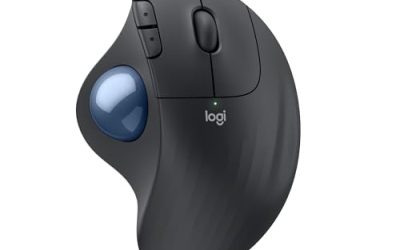
 Logitech Ergo M575S Wireless Bluetooth Trackball MouseOne Size4.13 x 3.94 x 5.28 inchesCheck on Amazon


Top 3 picks at a glance
Read this first: rules, bans and what a mouse can and cannot do
Drag clicking means sliding a finger across the primary button so it registers many clicks in a short burst. It is mainly discussed in Minecraft PvP and bedwars circles. No mouse “does it for you”: the technique is yours, and the mouse only decides how easy the button surface and switch make it.
Many servers, tournaments and anti-cheat plugins cap click speed or ban the technique outright. Check the rules of every server you play on before you buy anything. This guide does not cover ways around click limits or detection, and a mouse sold for drag clicking is no protection against a ban.
Picks at a glance
| Mouse | Type | Switch or mechanism (as listed) | Best for | Tier |
|---|---|---|---|---|
| Bloody A70x Matte Drag Click | Wired optical | Light Strike, 0.2 ms | Dedicated drag clicking | Mid |
| Bloody W95BR Extra Fire | Wired optical | Extra Fire, 12K CPI, 2000 Hz | Fast bedwars play | Mid |
| Logitech G203 Wired | Wired | 6 programmable buttons, 8,000 DPI | Cheap all-round starter | Budget |
| Razer DeathAdder Essential | Wired | Mechanical switches, 6400 DPI | Comfortable ergonomic budget | Budget |
| Redragon M612 | Wired optical | 8000 DPI, remapping keys | Lowest-cost option | Very low |
| Logitech Ergo M575S | Trackball, Bluetooth | Thumb ball | Comfort and best ball mouse for desks | Mid |
| Nulea M501 | Trackball, wireless | Thumb ball, 4 DPI levels | Cheaper trackball alternative | Budget |
| PORLEI Wired Trackball | Rollerball, wired | 34 mm thumb ball, 5 DPI levels | Wired rollerball with RGB | Budget |
| Kensington Orbit | Trackball, wired | Large ball with scroll ring | Classic, no-frills trackball | Budget |
How we chose
This is a research-based guide. We did not use any of these mice. We read maker specifications, compared product listings in the site’s store and looked at how players describe drag clicking and bedwars setups, then ranked mice by switch type, shape and price tier. Where a listing does not state a spec, we say so instead of guessing.
What makes a mouse good for drag clicking?
A good drag clicking mouse has a light, quick-resetting primary switch and a button surface that your finger can slide across without catching. These are the points that matter most:
- Switch type: optical or light-strike switches have no physical contact point to debounce, so they can register a rapid burst more cleanly than some mechanical switches. Mechanical switches can still work for normal clicking.
- Button surface: a smooth, flat, slightly textured main button is easier to drag across than a sharply curved or rubberised one.
- Shape and weight: a symmetrical or slightly arched body lets the finger travel in a straight line. A mouse that is too light can slide while you drag.
- Cable and polling: wired mice avoid battery and latency doubts. A higher polling rate such as 2000 Hz is listed for the W95BR and only matters if your PC can use it.
- Rules compliance: some mice ship with macro or auto-click software. Using it on servers that forbid it can get you banned.
Best drag clicking mouse picks
Bloody A70x Matte Drag Click Mouse
As an Amazon Associate we earn from qualifying purchases at no extra cost to you.

The A70x is marketed directly at drag clicking. Its listing names a Light Strike switch with 0.2 ms response, a Light Strike scroll, full programmability and advanced macros in a matte finish. The matte surface is the key selling point here, since a drier, smoother coating is what many players look for when dragging a finger.
- Switch: Light Strike, 0.2 ms
- Scroll: Light Strike
- Finish: matte
- Software: fully programmable, advanced macros
- Connection: wired
Best for: players who want a mouse sold specifically for drag clicking.
Skip if: you plan to play on servers that ban high click rates, or you do not want macro software on your system.
Pros
- Purpose-built for the technique
- Matte surface is easier to slide a finger over
- Programmable buttons
Cons
- Mid price tier
- Macro features can break server rules if misused
- Bloody software has a learning curve
Bloody W95BR Extra Fire Drag Click Mouse

A newer listing from the same brand, the W95BR advertises an Extra Fire switch, 12K CPI, 2000 Hz polling and adjustable lift-off distance. That makes it a step toward a general gaming mouse while keeping the drag click focus in its name.
- Switch: Extra Fire
- Sensor: 12K CPI
- Polling: 2000 Hz
- Lift-off distance: adjustable
- Connection: wired
Best for: bedwars and PvP players who also want a sensor suited to aiming.
Skip if: you want a wireless mouse or a lightweight esports shell.
Pros
- Adjustable lift-off distance
- High polling rate
- Stronger sensor than most drag click mice
Cons
- Mid price tier
- Less well known than major brands
- Same server-rule caveats as the A70x
Logitech G203 Wired Gaming Mouse

The G203 is the classic cheap starter. The listing shows an 8,000 DPI sensor, six programmable buttons, on-board memory and screen mapping for PC and Mac. It has no drag click branding, but its small, light body suits many bedwars players who just want to click quickly.
- Sensor: 8,000 DPI
- Buttons: 6 programmable
- Memory: on-board
- Connection: wired
- Platforms: PC and Mac
Best for: cheap general bedwars and click-heavy play.
Skip if: you want a mouse designed around drag clicking.
Pros
- Budget price tier
- Small, light, easy to grip
- Settings saved on the mouse
Cons
- Standard mechanical switch
- Not marketed for drag clicking
Razer DeathAdder Essential
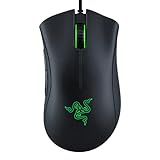
A long-lived shape, the DeathAdder Essential lists a 6400 DPI optical sensor, five programmable buttons, rubber side grips and mechanical switches. It suits players who prefer a larger palm grip and want a recognisable brand at a low tier.
- Sensor: 6400 DPI optical
- Buttons: 5 programmable
- Grips: rubber sides
- Switches: mechanical
- Connection: wired
Best for: palm-grip players on a budget who want a comfortable ergonomic shape.
Skip if: you need an ambidextrous body or many extra buttons.
Pros
- Comfortable ergonomic shape
- Rubber side grips
- Budget price tier
Cons
- Right-hand shape only
- Only five programmable buttons
Redragon M612 Wired RGB Optical Gaming Mouse
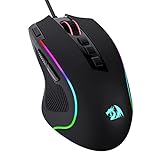
If cost matters more than anything, the M612 is the cheapest pick here. The listing mentions an 8000 DPI optical sensor, remapping keys, macro programming and an ergonomic grip. It is a reasonable first gaming mouse while you work out whether you actually enjoy clicking-focused games.
- Sensor: 8000 DPI optical
- Keys: remappable
- Macros: programmable
- Connection: wired
- Lighting: RGB
Best for: anyone who needs a low-cost mouse for Minecraft or general play.
Skip if: you want long-term durability and polished software.
Pros
- Very low price tier
- Remappable buttons
- Optical sensor
Cons
- Build quality reflects the price
- Software is basic
Best ball mouse and rollerball mouse options
The queries “best ball mouse” and “best rollerball mouse” usually mean a trackball: a mouse that stays still while you move a ball with your thumb or fingers. These are not drag clicking mice, but they are a real alternative if wrist comfort or limited desk space matter.
Logitech Ergo M575S Trackball

The M575S is the best-known thumb trackball in this price range. The listing describes easy thumb control, smooth tracking, Bluetooth and a Logi Bolt USB receiver, with PC and Mac support. It is a comfortable pick for long desk sessions and desk-space-limited setups.
- Type: thumb trackball
- Connection: Bluetooth and Logi Bolt receiver
- Platforms: PC and Mac
Best for: people who want less wrist movement and an easy trackball to start with.
Skip if: you play fast aim-heavy games, where a trackball is a poor fit.
Pros
- Thumb control reduces arm movement
- Two connection options
- Fits small desks
Cons
- Not suited to competitive aiming
- Takes a few days to adapt to
Nulea M501 Wireless Trackball Mouse

A cheaper wireless trackball, the M501 lists thumb control, four DPI levels, a rechargeable design, a Bluetooth plus USB receiver connection and three-device use. It is a sensible budget alternative if you only want to try the trackball format.
- Type: thumb trackball
- DPI: 4 levels
- Connection: Bluetooth plus USB receiver
- Power: rechargeable
- Devices: 3
Best for: trying a trackball at a low price tier.
Skip if: you need precision for gaming or design work.
Pros
- Budget price tier
- Rechargeable
- Multi-device use
Cons
- Less refined than the Logitech
- Smaller brand support
PORLEI Wired Ergonomic Trackball Mouse

For a wired rollerball, the PORLEI offers a 34 mm thumb ball, RGB lighting, USB-C and USB-A plug-and-play connections and five adjustable DPI steps. It suits users who want a cable and RGB while still using a ball mouse.
- Type: wired thumb rollerball, 34 mm ball
- DPI: 5 adjustable levels
- Connection: USB-C and USB-A
- Lighting: RGB
Best for: wired rollerball fans who want RGB and no batteries.
Skip if: you want Bluetooth or a well-known brand.
Pros
- Wired, no pairing needed
- 34 mm ball is easy to control
- Budget price tier
Cons
- Little brand history
- Not a gaming-focused mouse
Kensington Orbit Trackball Mouse
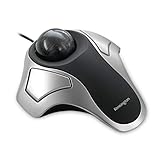
The Kensington Orbit is a long-running trackball. The listing is short and gives no detailed specs, so check the maker page before relying on it. It is included because it is a classic, simple and inexpensive trackball often recommended for office use.
- Type: trackball
- Specs: not listed in the store text
- Connection: check the maker
Best for: people who want a plain, familiar trackball for desk work.
Skip if: you need Bluetooth or customisable buttons.
Pros
- Simple and familiar
- Low price tier
Cons
- Specs not listed in the store text
- Not meant for gaming
Best budget and cheap drag clicking mouse
For a cheap drag clicking mouse, start with the Redragon M612, Logitech G203 or Razer DeathAdder Essential, and move up to a Bloody if you decide the technique is worth a dedicated mouse.
The reason is simple: most of what you feel while drag clicking comes from the shape, the button surface and your finger technique, not the price. A cheap mouse with a comfortable shape and a clean, flat primary button is a better start than an expensive mouse that does not fit your hand.
Good drag clicking mouse checklist
- Primary button is flat or gently curved, not sharply scooped.
- Matte or lightly textured finish, not glossy.
- Weight between roughly 70 and 110 g in your hand, enough to stay put.
- Wired connection to avoid battery or dongle issues.
- Software that lets you set DPI and polling without forcing macros on you.
- A return option if the shape feels wrong.
Best bedwars mouse
For bedwars, a light wired mouse with a comfortable grip beats a heavy feature-packed one. The Logitech G203 and Razer DeathAdder Essential cover small and large hands respectively, while the Bloody W95BR adds a stronger sensor if you also play other shooters.
Bedwars is click-heavy but also needs fast turning and bridging. That means you want a sensor that does not spin out at higher DPI, a shape that lets you hold the mouse for long sessions, and a smooth surface under it. Pair any pick with a decent mouse mat so movement stays consistent.
Buying guide: thresholds to use
Switch and button
Prefer optical switches if you drag click; standard mechanical switches are fine for regular clicking. Always check whether a listing says “optical” or names a switch type.
Size and grip
Measure your hand length. Under about 17 cm suits small mice like the G203; over 19 cm suits larger shapes like the DeathAdder. Claw and fingertip grips favour smaller, lighter bodies.
Price tier
Very low and budget tiers cover nearly all needs. A mid-tier Bloody is only worth it if you actually plan to practise the technique.
Trackball vs standard mouse
Choose a trackball for comfort or a tiny desk, not for competitive aiming. If you game, keep a standard mouse alongside it.
Also consider
- Bloody A70 II and A60L: older Light Strike optical models from the same brand, useful if the A70x is out of stock; check the listing for the finish before buying.
- Logitech G102 2nd Gen: a wired six-button mouse in the same budget class as the G203 with a similar small shape.
- Bloody R36 Ultra: a dual-mode wireless Bloody for players who want a cable-free option, though wired is the safer choice for click-heavy play.
Performance by use
Minecraft PvP and bedwars
These modes reward consistent clicking, quick turning and comfort over long matches. A light wired mouse with a clean button surface is the right base. If you intend to drag click, practise on a private world and learn the rules of the server you play on before relying on it in matches.
FPS and general gaming
For shooters, sensor quality and weight matter more than a click trick. The W95BR’s listed 12K CPI and 2000 Hz polling make it the more flexible of the two Bloody options, while the G203 is a safe, cheap generalist.
Desk work and comfort
If your main goal is comfort, trackballs reduce arm and wrist movement, and the Logitech Ergo M575S is the most refined. We do not make medical claims: if you have pain, speak to a professional rather than relying on any mouse.
Small desks and travel
Trackballs stay put while the ball moves, so they need almost no space. That is their one real advantage over a standard mouse in cramped setups, such as a laptop on a sofa arm.
Grip styles and what they mean for your pick
Palm grip rests the whole hand on the mouse and suits larger, arched shapes like the DeathAdder. Claw grip arches the fingers and suits smaller, shorter mice like the G203. Fingertip grip uses only finger pads and suits light, compact bodies. Drag clicking itself is most comfortable with a claw or fingertip grip because the finger can travel along the button without the palm blocking it. If your hand is large and you prefer palm grip, prioritise a longer button surface.
Looking after a click-heavy mouse
- Wipe the buttons with a slightly damp cloth to remove skin oils that make a surface sticky.
- Do not use harsh solvents on a matte coating, as they can polish it smooth.
- Replace the mouse feet when they wear down so tracking stays consistent.
- Take breaks; repetitive fast clicking can strain the finger and wrist.
Optical, light strike and mechanical switches compared
| Switch family | How it works | Strength | Trade-off |
|---|---|---|---|
| Mechanical | A physical metal contact closes when the button is pressed | Familiar feel, found on nearly every mouse | Contact bounce can double-register on worn switches |
| Optical | A light beam is interrupted by the button | No contact to wear, clean fast registration | Usually costs more |
| Light Strike (Bloody) | An optical design with a very short stated response time | Marketed at 0.2 ms on the A70x listing | Brand-specific; the figure is a maker claim, not independent data |
Treat response time figures as marketing until an independent source confirms them. Your finger, your technique and the game’s own click handling set the real ceiling.
How to choose in five minutes
- Read the rules of the server or game mode you play most.
- Decide whether you want a mouse sold for drag clicking or a general mouse. If general, shortlist the G203, DeathAdder Essential and M612.
- Match size to your hand: small for claw, larger for palm.
- Pick wired unless you have a strong reason not to.
- Choose a trackball only if comfort or space is your priority.
- Keep the receipt or return window in mind; a shape that feels wrong is not fixable by software.
A note on macros and auto-clickers
Several mice in this guide offer macro programming. Macros and auto-clickers can be against the rules on competitive servers and in many games. Using them to gain an unfair edge can lead to a ban, and nothing here is advice on avoiding detection. Use macros only where they are allowed, such as for productivity shortcuts or in single-player games.
Is a Bloody mouse worth the extra over a mainstream budget mouse?
For most players, the honest answer is not necessarily. A Logitech G203 or Razer DeathAdder Essential costs less, has widely available support and replacement parts, and works well for ordinary bedwars clicking. The Bloody models earn their place only if you have already practised the technique, know your servers allow it, and want a button surface and switch designed with it in mind. If you are unsure, buy the cheaper mouse first, play for a few weeks, and upgrade only if you feel the mouse is holding you back.
Wired or wireless for click-heavy play?
Wired is the safer choice. It removes battery worries, avoids pairing drops mid-match and keeps latency predictable. A wireless Bloody such as the R36 Ultra lists a dual-mode connection and 1 ms wireless transmission, which is fine for casual play, but if you are practising a technique that depends on very fast, repeatable clicks, a cable removes one variable.
Frequently asked questions
What is the best drag clicking mouse?
The Bloody A70x Matte Drag Click and the Bloody W95BR Extra Fire are the two listings built for the technique. Cheaper mice like the Logitech G203 also work for general bedwars play.
What is a good drag clicking mouse on a budget?
The Redragon M612, Logitech G203 and Razer DeathAdder Essential are low-cost starting points. Pick the one that fits your hand rather than chasing a spec.
Is there a best cheap drag clicking mouse?
The Redragon M612 is the cheapest pick here, with the G203 close behind. Expect basic software and plain build quality at this tier.
What is the best bedwars mouse?
A light wired mouse that suits your grip. The Logitech G203 suits small hands, the Razer DeathAdder Essential suits palm grips, and the Bloody W95BR adds a stronger sensor.
What is the best ball or rollerball mouse?
The Logitech Ergo M575S is the most refined trackball in this guide. The Nulea M501 and PORLEI are cheaper wireless and wired alternatives.
Can drag clicking get me banned?
Yes, on servers that cap click speed or forbid the technique. Read the rules first, and avoid macro software on servers that prohibit it.
Does a drag click mouse make you click faster by itself?
No. The technique and your finger do the work. The mouse only affects how easy the button surface and switch make rapid clicks.
Which one should you buy?
Buy the Bloody A70x if you want a mouse built around drag clicking and your servers allow it, the Bloody W95BR if you also want a stronger sensor, and the Logitech G203 or Razer DeathAdder Essential if you want an inexpensive all-rounder. Choose the Logitech Ergo M575S only if comfort matters more than speed, and always read your server’s rules first.
In short, buy for comfort and fit first, the technique second. A mouse that suits your hand and your budget will serve you far longer than one chosen on a switch claim alone, and the cheaper picks here leave room to upgrade later once you know what you actually want from a click-focused mouse.
Sources
- Bloody (A4Tech) product pages
- Logitech G and Razer product pages
- Redragon, Nulea, PORLEI and Kensington product listings
- Minecraft community and server rule pages
Last updated: November 2026
Related guides
More from Amazon
Programs that pair well with the guide above. Offers and eligibility are set by Amazon and may change.
Free shipping on eligible items, Prime Video and more. Eligible new members can start with a free trial.
Start a Prime free trialAd-free music streaming. Eligible new subscribers can start with a free trial.
Try Music Unlimited freeA Prime membership for ages 18-24 with a trial period. Eligibility is set by Amazon.
See Prime for Young AdultsAudiobooks and podcasts to listen to on the go. Eligible new members can start with a free trial.
Try Audible freeAs an Amazon Associate we earn from qualifying purchases.