Wireless mice have closed most of the gap on latency, yet a cable still wins on two counts: it never needs charging, and it never drops a signal in the middle of a round. If you play competitive shooters, grind through long strategy sessions or simply refuse to add another battery to your life, a wired gaming mouse remains the sensible default. The real decision is not wired versus wireless, though. It is choosing a shape, weight and button layout that match how you grip, because a spec sheet cannot fix a mouse that cramps your hand after an hour.
This guide is for PC players who want a dependable corded mouse and would like to know which of eight options suits which job. The group spans an entry-level pick with a modest DPI ceiling, ergonomic right-handed shapes, a lightweight esports-style design, and an MMO mouse with extra remappable keys. Everything below is judged from the listed specs, such as sensor DPI, programmable button counts and switch type. For 2026 shoppers, the useful question is how much you will actually use each feature: a 25,600 DPI ceiling matters less than whether the side buttons fall under your thumb.
Our Top Picks
 Razer Basilisk V3 Customizable RGB Wired Ergonomic GamingMouse2.96 x 5.12 x 1.67 inches0.2 poundsCheck on Amazon
 Razer DeathAdder Essential Ergonomic Wired Gaming Mouse5.01 x 2.86 x 1.69 inches0.3 PoundsCheck on Amazon


Top 3 picks at a glance
Quick Picks
As an Amazon Associate we earn from qualifying purchases at no extra cost to you.








| Product | Best for | Key spec from the title |
|---|---|---|
| Logitech G502 Hero | Tweakers who want adjustable weights | 25,600 DPI, 11 programmable buttons, on-board memory |
| Razer Basilisk V3 | Ergonomic all-rounder | 26K DPI optical sensor, Chroma RGB, ergonomic shape |
| Redragon M612 | Entry-level macros and remapping | 8000 DPI optical sensor, remappable keys |
| Razer DeathAdder Essential | Comfortable right-handed grip on a budget | 6400 DPI optical sensor, 5 programmable buttons |
| Logitech G203 | Simple, low-profile everyday gaming | LIGHTSYNC RGB, 6 programmable buttons, on-board memory |
| BENGOO Gaming Mouse | First gaming mouse for light use | Up to 3600 DPI, 6 programmable buttons |
| Redragon M908 | MMO and RPG players | 12400 DPI, MMO layout, remapping keys |
| Razer Cobra | Fast, light esports play | 58g, Gen-3 optical switches, 8500 DPI sensor |
How to Choose
Grip and shape come before sensor numbers
Palm grippers usually do best with a tall, ergonomic shell, while fingertip and claw grippers often prefer something smaller and lighter. Measure your hand from wrist crease to middle fingertip, and compare it to the shape of the mouse rather than assuming a larger body is more comfortable. Right-handed ergonomic shells such as the DeathAdder style help reduce strain, but they are not suitable for left-handed users, so check handedness in the listing before ordering.
DPI, sensor and weight
Most players run between 400 and 1600 DPI, so a headline figure of 8000 or 25,600 is mostly marketing. What matters is that the sensor tracks smoothly without spinning out. Optical sensors, which appear throughout this list, are a safe choice. For weight, esports-focused designs hover near the 60 gram mark, while mice with adjustable weights let you tune up to a heavier feel. If you swipe across a large mousepad, lighter generally means faster flicks.
Buttons and software
Count the programmable buttons you will actually bind. Six is enough for most shooters, 11 helps with strategy games, and MMO players may want a dozen side keys. On-board memory stores your profiles on the mouse itself, which is helpful if you move between computers. Software is optional but useful for remapping, macros and lighting.
What to ignore, and where budget models cut corners
Ignore RGB claims when comparing shape and sensor, and be skeptical of huge DPI figures on cheap mice. Budget models tend to cut corners on the cable, which can be stiff and drag on the desk, on mouse feet that wear quickly, and on switches that develop double-click problems. Look for PTFE feet where listed, braided or flexible cables, and a switch type named in the title.
The 8 Best Options
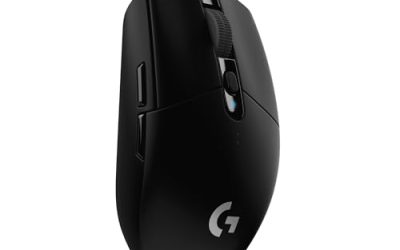
Logitech G502 Hero
A long-standing favorite for players who like to customize. The title lists a 25,600 DPI sensor, RGB lighting, adjustable weights, 11 programmable buttons and on-board memory, with PC and Mac support. It suits those who want to tune the feel and bind many actions, such as a player who switches between a shooter and a crafting game and wants a profile for each saved on the mouse itself.
- Strength: adjustable weights let you change how heavy the mouse feels.
- Strength: 11 programmable buttons and on-board memory give flexible profiles.
- Trade-off: the feature-packed shape and weights add bulk compared with slim esports mice.
Skip it if you want a lightweight, minimalist mouse. The extra bulk and the weight system are aimed at tinkerers, and a player who simply wants to plug in and aim may never touch them.
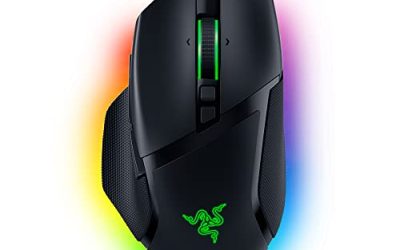
Razer Basilisk V3
An ergonomic wired mouse with a 26K DPI optical sensor, Chroma RGB lighting and what the title calls the fastest gaming mouse switch. It fits players who want a comfortable grip for long sessions and a fast click response. It is a reasonable choice if you split time between gaming and long work days at the same desk, since the shape is built for relaxed hand positions rather than twitch aiming alone.
- Strength: ergonomic shape suits relaxed palm grips.
- Strength: optical switch and high-DPI sensor are listed up front.
- Trade-off: it is a larger mouse, and small hands may find it bulky.
Skip it if you prefer a small, claw-grip friendly body. Players with small hands, or those who lift the mouse often in low-sensitivity play, may find a lighter, more compact shape easier to control.
Redragon M612
An entry-level optical mouse with an 8000 DPI sensor, remappable keys, macro keybinding and a lag-free wired connection. It appeals to newer players who want to experiment with macros without a big spend. Treat it as a learning tool: you find out whether you even like macros and extra buttons before paying for a more expensive model from a larger brand.
- Strength: remapping and macros at a budget tier.
- Strength: ergonomic design with backlight lighting.
- Trade-off: build quality at this tier can lag behind premium brands.
Skip it if you want proven long-term switch durability. Buyers who plan to use one mouse for several years should weigh whether a premium brand with a longer track record is worth the extra spend compared with this budget option.
Razer DeathAdder Essential
An ergonomic right-handed shape with rubber side grips, a 6400 DPI optical sensor and five programmable buttons. It is a straightforward way to get a comfortable grip without chasing features. Because the title keeps the specification list short, it is easy to understand what you are getting: a proven shape, a competent optical sensor and a handful of buttons, with nothing extra to learn.
- Strength: rubber side grips help keep the mouse steady.
- Strength: ergonomic shape suits long sessions.
- Trade-off: only five programmable buttons and a right-handed design.
Skip it if you are left-handed, because the shell is built for the right hand. Also skip it if you want a long list of programmable buttons for macros, since five is on the low side for strategy or role-playing games.
Logitech G203
A compact, everyday gaming mouse with LIGHTSYNC RGB, on-board memory and six programmable buttons. It suits students and casual gamers who want a dependable corded mouse for games and daily work. The PC and Mac support in the same family of mice also helps if the desk is shared with a laptop used for school or office tasks, since the profile follows the mouse.
- Strength: on-board memory keeps settings with the mouse.
- Strength: six programmable buttons cover most shooters.
- Trade-off: it is a basic design with fewer extras than flagship models.
Skip it if you want weights, a thumb cluster or extra controls. Players who like tuning their mouse to a particular feel will outgrow it quickly, while those who prefer a no-fuss shape can happily keep it for years.
BENGOO Gaming Mouse
A basic optical mouse with RGB backlighting, four adjustable DPI levels up to 3600 and six programmable buttons. It suits a first gaming mouse or a secondary desk. It also works as a spare for LAN nights or a younger family member who is just starting out and may drop it more than once.
- Strength: four DPI steps cover typical gaming needs.
- Strength: six programmable buttons at a budget level.
- Trade-off: the lower DPI ceiling and no mention of on-board memory limit advanced use.
Skip it if you want competitive-grade specs. Players who care about sensor details, on-board profile storage or a lightweight shell will get more from the other mice here, and heavy daily users may want a sturdier build.
Redragon M908
This MMO-style mouse offers 12400 DPI, remappable keys and macro keybinding. The extra buttons are the point: bind abilities and shortcuts to the thumb cluster. Raid and dungeon players, or anyone who edits video and wants shortcut keys under the thumb, are the obvious audience for this layout.
- Strength: MMO layout with remappable keys for abilities.
- Strength: wired connection avoids latency worries.
- Trade-off: more buttons mean a bigger body and a learning curve.
Skip it if you play fast shooters where extra buttons are a hindrance. Accidental thumb presses are a real risk in twitch games, and the larger body is harder to flick across a pad than a slim esports shell.
Razer Cobra
A lightweight option at 58 grams, with Gen-3 optical switches, an 8500 DPI optical sensor, Chroma RGB underglow and 100 percent PTFE mouse feet. The low weight and smooth feet make it attractive for fast aim and quick flicks in competitive shooters. It also makes sense for anyone coming from a heavier mouse who wants to see whether a lighter body reduces wrist fatigue over a long ranked session.
- Strength: 58g weight supports fast, low-effort movement.
- Strength: PTFE feet help the mouse glide smoothly.
- Trade-off: the title lists fewer controls than larger mice, so MMO or macro users will want more buttons.
Skip it if you need many programmable buttons. Role-playing and strategy players who bind lots of actions will run out of keys quickly, and anyone with large hands may find a mouse this light and compact less comfortable.
Which One Fits Your Situation
You play competitive shooters
The Razer Cobra is the pick, thanks to its low weight and smooth feet. The Logitech G203 is a quieter alternative if you prefer a classic shape.
You play MMOs or strategy games
Go with the Redragon M908 for its MMO layout, or the Logitech G502 Hero if you want 11 programmable buttons and weights. Both let you spread abilities across thumb buttons so your fingers stay on the main keys.
You want long-session comfort
The Razer Basilisk V3 or the DeathAdder Essential offer ergonomic shapes that suit a palm grip. The Basilisk adds a higher-spec sensor, while the DeathAdder Essential keeps things simpler and easier on the budget.
You are buying your first gaming mouse on a small budget
Choose the BENGOO or the Redragon M612 and upgrade later once you know your grip.
Common Mistakes
- Choosing a mouse by DPI number alone instead of shape and weight.
- Buying an ergonomic right-handed mouse as a left-handed player.
- Ignoring cable flexibility, which can create drag.
- Paying for RGB or extra buttons you will never bind.
- Skipping a mouse pad that matches your sensor and glide style, even though the surface affects tracking as much as the mouse does.
Frequently Asked Questions
Is wired still better than wireless for gaming?
Wired mice avoid battery concerns and signal drops, and they never need a charging break mid-session. Modern wireless is close on latency, but wired remains the simpler choice for anyone who values zero maintenance.
How much DPI do I need?
Most players use 400 to 1600 DPI. Higher numbers are headroom, not a requirement, and a good sensor stays accurate at the lower settings that competitive players prefer.
What is on-board memory?
It stores profiles inside the mouse so settings follow it between computers without the software. That is useful for tournaments, shared computers at a friend’s house or any machine where you cannot install extra programs. Mice without on-board memory depend on the driver software running in the background to apply your settings.
Are lighter mice better?
Lighter mice favor fast flicks, while heavier mice feel more stable and deliberate. Pick based on your grip and play style, and consider adjustable weights if you are unsure.