
Top 3 picks at a glance
The Short Answer
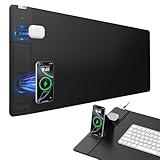
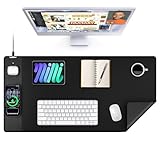
If you are buying a desk mat with built-in wireless charging, buy for the desk first and the charger second. For most standard desks, a wireless charging desk pad that measures 31.5 inches wide by 15.75 inches deep (80 cm x 40 cm) is the sweet spot. It covers the keyboard and mouse zone, leaves room for a laptop, and keeps the 15W charging coil in a fixed, easy-to-find spot without taking over the entire desktop.
For a standalone wireless charging pad that sits on top of your desk rather than covering it, look for a round pad about 3.5 to 4 inches in diameter (9 to 10 cm) or a square pad about 3.9 x 3.9 inches (10 x 10 cm). If you want a true desk mat that doubles as a mouse pad and charger, the XXL size range from 31.5 x 15.75 inches up to 35.4 x 15.7 inches is what you will see most often from major brands in 2026. That XXL footprint is large enough to protect your desk surface while keeping cables managed to one corner.
As an Amazon Associate we earn from qualifying purchases at no extra cost to you. Product prices and availability are accurate as of the date shown and are subject to change.


Standard Sizes
Wireless charging desk pads are not sold by charger size alone. The dimensions describe the entire mat. The charging module itself is typically a 3- to 4-inch circle embedded in the top left or top right corner. When you compare listings, check both the overall mat dimensions and the charging zone location so you know what will actually fit on your desk.
| Category | Overall Dimensions (inches) | Overall Dimensions (cm) | Charging Zone Size | Best For |
|---|---|---|---|---|
| Standalone Charging Pad | 3.5″ diameter / 3.9″ x 3.9″ | 9 cm diameter / 10 x 10 cm | Single coil, 15W max | Minimalist desks, nightstands, add-on charging |
| Large Desk Mat | 27.5″ x 13.7″ | 70 x 35 cm | 3.5″ diameter | Compact desks 42″ to 48″ wide, keyboard + mouse only |
| XL Desk Mat (Most Common) | 31.5″ x 15.75″ | 80 x 40 cm | 3.9″ diameter | Standard desks 48″ to 60″ wide, laptop + full-size keyboard |
| XL Desk Mat – Wide Variant | 31.5″ x 15.8″ | 80 x 40.1 cm | 3.9″ diameter with foldable holder | Same as above, adds phone stand clearance |
| XXL Desk Mat | 35.4″ x 15.7″ | 90 x 40 cm | 3.9″ to 4.3″ diameter | Executive desks 60″ to 72″ wide, dual monitors |
| Executive / Full Desk Cover | 47.2″ x 23.6″ | 120 x 60 cm | 4.3″ diameter | Full desk coverage, covers almost entire desktop |
Most wireless charging desk mats in this category weigh between 1.4 and 2.2 pounds (635 to 1000 grams) and are 0.08 to 0.12 inches (2 to 3 mm) thick. The waterproof polyurethane or leather surface adds minimal height, so your keyboard and wrist position stay neutral. Power delivery is almost always 15W for Android devices, 7.5W for iPhone, and 5W for older Qi devices, supplied via a 3- to 6-foot USB-C or USB-A cable and a QC 3.0 adapter rated at 18W or higher. Current street prices for XL and XXL wireless charging desk mats range from about $38 to $50, with leather-finish models at the higher end of that range.
How to Measure Your Space
Do not rely on the listed desk size from the manufacturer. Measure the usable surface yourself before you order, especially if you have a hutch, drawer pedestal, or monitor arm clamp.
- Measure width and depth of the clear desktop. Use a tape measure across the top from left edge to right edge, then from the back edge (or backsplash) to the front edge. Write both numbers in inches and centimeters. Subtract 2 inches from each direction to leave a breathing border so the mat does not hang over or bunch against a wall.
- Map your fixed items. Place your monitor base, monitor arm clamp, laptop stand, and desktop PC tower where they normally live. Measure the remaining open rectangle. Your charging mat needs to fit inside that rectangle, not the full desk.
- Check charging coil placement. Most mats put the coil in the upper corner. Decide if you are right- or left-handed and whether you want your phone on your dominant or non-dominant side. Measure from the desk edge to where your phone will sit to ensure the cable can reach your power strip without stretching across your workspace. A 4-foot cable is standard, a 6-foot cable gives more flexibility for L-shaped desks.
- Confirm clearance for the cable and adapter. The charging module adds a small rigid section about 0.4 inches (10 mm) thick where the cable connects. Make sure that corner is not pressed against a wall. Leave at least 1.5 inches (3.8 cm) of clearance behind the mat for the connector and strain relief.
- Test depth for keyboard and mouse. Sit in your chair and place your keyboard where your wrists feel neutral. You need at least 6 to 7 inches (15 to 18 cm) of mat depth in front of the keyboard for mousing, and another 8 to 10 inches (20 to 25 cm) behind it if you plan to slide a laptop under a monitor. If your desk is only 20 inches deep, a 15.75-inch deep mat will leave a 4-inch strip of exposed desk at the front, which is ideal.
- Account for phone size with case. Measure your phone with its case on. Standard phones are about 6.1 to 6.7 inches tall and 2.8 to 3.0 inches wide. The charging coil circle is about 3.9 inches, so any phone up to 6.7 inches will fit, but a bulky rugged case thicker than 0.2 inches (5 mm) can interfere with charging. Check that the mat supports case-through charging up to 5 mm.
By Room or Use Case
Home Office Desk (48″ x 24″ to 60″ x 30″)
This is the most common fit for an XL mat at 31.5″ x 15.75″ (80 x 40 cm). Center the mat on the desk so you have about 8 to 14 inches of open desk on either side for notebooks, a desk lamp, or a docking station. Position the charging coil on the side opposite your writing hand to avoid bumping your phone while you write. For a 48-inch desk, this size still leaves room for a 24-inch monitor centered behind it without the mat touching the monitor base.
Gaming Setup (55″ x 28″ to 72″ x 30″)
Gamers should size up to 35.4″ x 15.7″ (90 x 40 cm) or larger if the desk can handle it. The extra width gives you a continuous ultra-smooth surface for low-DPI mouse sweeps, typically 12 to 18 inches of lateral movement, without running off the pad. The non-slip rubber base is critical here to prevent drift during fast movements. Choose a model with a stitched edge and waterproof coating, as spill resistance matters more in long sessions. Keep the charging zone on the far side of your dominant mouse hand so your phone is not in the swipe path.
Small Apartment or Compact Desk (36″ x 20″ to 42″ x 24″)
Skip the XXL. A large mat at 27.5″ x 13.7″ (70 x 35 cm) or a standalone 3.9-inch square pad is a better fit. On a 36-inch desk, a 31.5-inch mat leaves less than 2 inches on each side and can look crowded. Measure depth carefully; if your desk is only 20 inches deep, a 13.7-inch deep mat provides full keyboard and mouse coverage while preserving front edge space for your wrists to rest on the desk itself rather than the mat edge.
Executive Desk or L-Shaped Corner Desk (60″ x 30″ and larger)
For desks 60 inches and wider, you can use an XXL mat or a full cover at 47.2″ x 23.6″ (120 x 60 cm) on the main wing. On an L-shaped desk, do not try to bend the mat around the corner. Place one XL mat on the primary work side and leave the return wing for storage or use a second standalone charger there. This keeps the cable run simple and prevents the mat from lifting at the seam where the two desk sections meet.
Shared or Hot-Desking Workstation
If the desk is not permanently yours, prioritize a 31.5″ x 15.75″ mat that is easy to roll and transport. Look for a weight under 1.8 pounds and a thickness around 0.08 inches so it rolls without creasing. A foldable phone holder integrated into the charging zone can double as a video call stand, which is useful when you do not have a dedicated monitor at eye height.
Common Sizing Mistakes
Buying by desk length alone. A 60-inch desk does not automatically need a 47-inch mat. You need to subtract space for monitor stands, cable trays, and desk clamps. An oversized mat that has to be tucked under a monitor base will bubble and the charging coil may sit unevenly, which breaks alignment with your phone.
Ignoring depth. Width gets all the attention, but depth determines comfort. A mat that is too deep on a shallow desk will hang over the front edge and peel up over time. A mat that is too shallow leaves your wrists on the hard desk edge. Match depth to your keyboard plus mousing distance, not just the desk depth.
Forgetting the adapter requirement. The 15W fast charging speed requires an 18W or higher Quick Charge adapter, which is often not included. Using a standard 5W USB port on a laptop or power strip will charge at 5W, which feels slow and makes buyers think the coil is undersized. Budget for the correct adapter if you do not already own one.
Covering the charging zone. Placing a keyboard, tablet, or notebook over the embedded coil can trap heat and prevent the phone from seating flat. Keep a clear 5 x 5 inch (12.7 x 12.7 cm) square around the coil. If you need every inch for work, choose a smaller mat and a separate standalone pad placed off the mat instead.
Choosing leather thickness for the wrong surface. Leather-finish desk mats at 0.12 inches are durable and wipe clean, but on a glass desk they can slide if the non-slip base is thin. Polyurethane or cloth with a dense rubber base at 0.08 to 0.10 inches grips better on slick surfaces. Check the base material, not just the top finish.
FAQ
What dimensions will fit a standard 55-inch office desk?
A 31.5″ x 15.75″ (80 x 40 cm) XL mat is the standard fit for a 55-inch desk that is 24 to 30 inches deep. It leaves roughly 11 to 12 inches of open space on each side when centered and about 8 to 14 inches of exposed desk in front and behind, depending on desk depth. If you use a large mechanical keyboard and a full-size mouse pad area, move up to 35.4″ x 15.7″ (90 x 40 cm) for extra width without adding depth.
Does the size of the wireless charging area affect charging speed?
No. The physical size of the coil, usually about 3.5 to 4.3 inches in diameter, does not determine wattage. Speed is determined by the power adapter, the phone’s Qi standard, and alignment. A larger coil does not mean faster charging. All of the XL and XXL mats listed here use a single 15W coil limited to 15W for compatible Android phones, 7.5W for iPhones, and 5W for other Qi devices. Proper centering on the coil matters more than coil diameter.
How much desk space should I leave around the pad?
Leave at least 1 to 2 inches (2.5 to 5 cm) between the mat edge and the desk edge on all sides. This prevents overhang, allows the non-slip base to grip fully, and gives room for the charging cable to exit without being pinched. Also leave a 5-inch clear zone above the charging coil so you can pick up and replace your phone without hitting a monitor base or wall.
Can I cut a wireless charging desk mat to fit a smaller desk?
Do not cut it. The charging coil, wiring, and USB cable are embedded near one corner, and cutting will sever the power trace and destroy the charging function. It also exposes the inner rubber layer, which will fray and lose its non-slip grip. If your desk is between sizes, buy the next size down or choose a standalone 3.9-inch charging pad instead of a full desk mat.
