
The Short Answer
It depends on how you charge at your desk, but for most people, is a wireless charging desk mat worth buying now? Yes, if you want to eliminate one daily cable and you use a phone that supports Qi or Qi2 wireless charging. If your phone lives on your desk for 6 to 8 hours a day and you are tired of plugging and unplugging a cable just to top off between meetings, a mat solves that friction completely.
The one condition that makes it worth it: you need to be okay with slower, convenience-first charging. A wireless charging desk mat typically delivers 10W to 15W, which is noticeably slower than a 25W to 45W wired fast charger. If you expect a 0 to 50 percent boost in 30 minutes, you will be disappointed. If you want a clean surface where you can drop your phone down and pick it up at 80 or 90 percent without thinking about it, it is absolutely worth the $45 to $65 most good models cost in 2026.
As an Amazon Associate we earn from qualifying purchases at no extra cost to you. Product prices and availability are accurate as of the date shown and are subject to change.
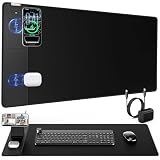

If you rarely work at a desk, already have a fast wired charger you love, or your phone case is thick, metal, or has a non-MagSafe magnetic ring that interferes with alignment, save your money for a different upgrade.
What You Actually Get
A wireless charging desk mat is not just a mouse pad with a charger glued on. The current generation combines three functions into one large, low-profile surface: a desk mat, a smooth mouse pad, and a built-in wireless charging spot, often with a detachable or foldable magnetic stand.
Size is the first thing you will notice. Most popular models now come in two footprints. A full-desk size around 31.5 inches wide by 15.8 inches deep covers most of a standard 48 to 60 inch desk and gives you room for a keyboard, mouse, and phone. A compact size around 27.5 by 13.8 inches or 23.6 by 13.8 inches fits smaller desks and apartment setups. Thickness is typically 0.12 to 0.16 inches, thin enough that your wrists do not notice a ledge, but thick enough to stay flat without curling.
Materials matter for daily feel. The top is usually a low-friction PU leather or micro-woven cloth with a stitched or heat-pressed edge to prevent fraying. The bottom is a natural rubber or suede-like non-slip base that grips the desk and weighs between 1.4 and 2.2 pounds depending on size. You will not be moving it once it is down.
For charging, you get a recessed Qi-compatible coil in one corner, usually the top left or top right, marked by a subtle logo or stitched outline. Standard models support 5W, 7.5W, 10W, and 15W output with Qi2 models supporting magnetic alignment at up to 15W for iPhones and compatible Android phones from the last few years. They are powered by a single USB-C cable and adapter, most require a 18W to 30W QC or PD adapter, which is sometimes included and sometimes sold separately. Many mats now include a modular magnetic phone stand that attaches over the coil. It holds your phone upright at about 60 to 70 degrees for FaceTime or video calls while it charges, then folds flat when not in use. It is a small detail that makes the difference between actually using the charging spot and forgetting about it.
What you do not get is multi-device fast charging. These mats are designed to charge one phone at a time. If you need to charge earbuds and a watch simultaneously, you still need a separate 2-in-1 or 3-in-1 stand.
Pros
- Declutters your desk for real. You replace a mouse pad, a desk pad, and a charging cable with one surface. One USB-C cable runs off the back of the mat instead of a phone cable draped across your work area.
- True drop-and-go convenience. No fumbling for a cable. Set your phone on the marked zone and it starts charging. If you get up for coffee or a call 20 times a day, you top off without thinking about it.
- Better for battery habits. Because it is so easy to top off, many people keep their phone between 40 and 80 percent throughout the day instead of running down to 15 percent and then fast-charging to 100 percent.
- Doubles as a genuinely good mouse pad. The large, smooth surface gives you consistent tracking for both an office mouse and a gaming mouse, and the cushioned PU leather is more comfortable for long typing sessions than a hard desk.
- Magnetic stand adds utility. On models like the Wireless Charging Mouse Pad with Magnetic Phone Stand in the large 31.5 by 15.8 inch size, the detachable stand lets you keep your screen visible for notifications, timers, or video calls while charging, which a flat puck cannot do.
- Price has become reasonable. Second-generation mats with improved coil alignment and thinner profiles now sit between $46.99 and $64.99, down from $80 to $100 for similar sizes two years ago. At that price, it costs about the same as buying a quality leather desk mat and a separate wireless stand.
Cons
- Slower than wired charging. Expect about 30 to 45 percent charge per hour on a 15W Qi2 coil versus 50 to 70 percent per hour on a 25W wired charger, and even slower if your case is thicker than 3mm or has a kickstand.
- Placement is picky. The charging coil is only about 2 inches wide. If your phone is off-center by an inch or your case has misaligned magnets, charging will be slow, intermittent, or will not start at all. You have to learn the sweet spot.
- Heat and case compatibility. Wireless charging generates more heat than wired, especially through thick, rugged, or wallet cases. Some cases over 5mm, PopSockets, metal rings, or credit cards in the case will block charging entirely.
- It is not portable. At over 30 inches wide and nearly 2 pounds, you are not throwing this in a bag for travel. It is a permanent desk fixture.
- One device at a time. Most mats charge only phones. AirPods will often charge on the same spot but at a slow 5W, and most Apple Watches will not charge there at all due to their proprietary coil.
- Cable management caveat. The mat itself still needs power. You will have one USB-C cable running to a wall adapter. If your desk has no cable tray or grommet, that single cable can still be visible.
Who Should Buy It
You should buy a wireless charging desk mat if your desk is your home base. Remote workers, students, office professionals, and anyone who spends four or more hours a day at the same desk will get the most value. It is especially useful if you use your phone for two-factor authentication, Slack or Teams messages, or as a second screen and you are constantly picking it up and putting it down.
It is also a smart buy if you value a minimal, photo-ready desk. Creators, designers, and anyone who films their desk setup will appreciate that the large mat hides scratches, defines the workspace, and removes cable clutter in one step. If you already use a MagSafe-compatible iPhone 12 or newer, or a Qi2-compatible Samsung, Pixel, or other Android phone, and you use a thin MagSafe case under 3mm, the magnetic alignment makes the experience nearly flawless.
Finally, it is worth it if you need wrist comfort and mouse space. If you are currently using a small 10 by 8 inch mouse pad and your keyboard sits directly on a cold or uneven desk, the upgrade to a full-size cushioned mat is noticeable even before you use the charger.
Who Should Skip It
Skip it if you need speed above all else. If you often come home with a dead battery and need a fast 50 percent charge before heading out again, a 30W to 45W wired charger or a dedicated 15W Qi2 stand with active cooling will serve you better.
Skip it if your desk setup is constantly changing. Hot-desking, tiny dorm desks under 36 inches wide, or standing desks where you roll your setup up and down may not have room for a 31-inch mat. A small wireless puck you can toss in a drawer is more flexible.
Also skip it if your phone or case is not compatible. Phones without Qi support, phones in heavy-duty cases with metal plates, battery cases, or cases with built-in wallets over 4mm thick will not charge reliably. And if you need to charge a phone, earbuds, and watch all at once every night, a dedicated 3-in-1 charging station is a better investment than a desk mat with a single coil.
Cheaper Alternatives
If you like the idea but not the price or the commitment to a full desk mat, there are lower-cost ways to get wireless charging at your desk. Here is how they compare:
| Option | Cost | Trade-off |
|---|---|---|
| Small Qi/Qi2 charging puck or pad | $12 – $25 | Cheapest and portable, but adds cable clutter and has no desk mat or mouse pad function. Easy to knock off the desk. |
| MagSafe / Qi2 upright charging stand | $20 – $40 | Holds phone at eye level and charges at full 15W, but takes up desk space and does not protect the desk surface. |
| Standard large desk mat + separate cable | $18 – $35 | Protects desk and gives mouse space for less money, but you still need to plug and unplug a cable every time. |
| 2nd Gen Wireless Charging Desk Mat, 3-in-1 Magnetic Mouse Pad | $46.99 | Most affordable integrated option. Full mat plus 15W charging and magnetic stand, but single charging zone only. |
FAQ
Will a wireless charging desk mat work with any phone case?
Most thin cases under 3mm work fine, including most silicone, TPU, and MagSafe-compatible cases. Thick rugged cases, cases with metal kickstands, PopSocket-style grips, or cases with magnets not aligned for MagSafe or Qi2 can block charging or cause slow, intermittent connection. For best results, use a MagSafe or Qi2 certified case and remove any metal plate or card holder between the phone and the mat.
How fast does it actually charge?
Expect 10W for most Android phones and 7.5W to 15W for iPhones depending on whether the mat and phone both support Qi2. That translates to roughly 25 to 40 percent per hour for a typical phone with a 4000 to 5000 mAh battery. It is designed for slow, steady top-offs throughout the day, not for a quick 20-minute emergency recharge. Wired charging at 25W or higher will always be faster.
Does the mat need a special wall adapter?
Yes. The mat is usually powered by USB-C and requires an adapter that can output 18W to 30W with QC 3.0 or PD. Many listings do not include the adapter in the box to keep the price at $46.99 to $64.99, so check the product details. Using a weak 5W old phone adapter will result in very slow charging or no charging at all, even if the mat lights up.
Can it charge earbuds or a smartwatch too?
Sometimes, but not reliably. Qi-compatible earbud cases like AirPods Pro will often charge if you center them exactly on the coil, but at only 5W and without magnetic alignment they can slip off. Most smartwatches, including Apple Watch, use a different charging standard and will not charge on the mat. If you need nightly charging for all three devices, pair the mat with a small dedicated watch charger or choose a separate 3-in-1 station for your nightstand.
