- Top Pick: Focusrite Scarlett 2i2 4th Gen
- Runner-up: Elgato Wave XLR
- Also consider: Universal Audio Volt 2
A stream sounds only as good as its weakest link, and that link is usually the box between the microphone and the computer. A dedicated audio interface gives an XLR microphone clean gain, low-latency monitoring, and a headphone output no motherboard jack can match, while keeping mic, game, and chat audio on separate paths.
This guide compares five USB interfaces for streamers, from a one-mic desktop box for live shows to a two-input studio unit that also handles instruments. Every pick is a real listing with a confirmed code, and each one fits a different desk, microphone, and budget.
As an Amazon Associate, we earn from qualifying purchases.
Top 3 picks at a glance
Quick Answer
For most streamers, the Focusrite Scarlett 2i2 4th Gen is the safest choice: two clean preamps, automatic gain, and USB-C. If you stream with a single XLR microphone and want tap-to-mute plus mixing, the Elgato Wave XLR is built for that job. The Universal Audio Volt 2 suits creators who also record instruments, while the PreSonus AudioBox USB 96 and Behringer UMC202HD cover tight budgets.
Focusrite Scarlett 2i2 4th Gen

The Scarlett 2i2 4th Gen does the core job with almost no fuss. Two combo inputs take XLR microphones or instruments, the preamps run clean at high gain, and the USB-C connection needs no power brick.
Two features help streamers who set levels alone. Auto Gain listens to a few seconds of speech and sets the input level, while Clip Safe watches for peaks and pulls the gain back before distortion ruins a take. Air mode adds a brighter top end to vocals, and the gain halos show whether the signal is healthy, too quiet, or clipping.
Direct monitoring lets you hear your voice with no delay, and the headphone output has its own volume control. The bundled software suite covers recording and production too. One honest limit: the 2i2 has no built-in stream mixing software, so routing game audio, chat, and music into separate channels is a job for your streaming app. The Studio bundle, which adds a microphone and headphones, is a separate listing with a different code, so confirm the standalone interface when ordering.
Specs
- Inputs: 2 x XLR/TRS combo
- Sample rate: up to 192 kHz, 24-bit
- Phantom power: 48V
- Connection: USB-C, bus-powered
- Model: AMS-SCARLETT-2I2-4G
- UPC: 815301001485
- Dimensions: 7.09 x 3.9 x 1.79 in
- Included: Scarlett 2i2 4th Gen, USB-A to C cable
- Warranty: 3 year manufacturer
- Weight: not stated
Elgato Wave XLR

The Wave XLR is the only pick here built for streaming rather than music production. Its single XLR input feeds a preamp with 75 dB of gain, enough to drive quiet dynamic microphones without a separate booster. The capacitive mute button sits on top, so muting takes one tap and the LED ring shows the mute state at a glance.
The real draw is Wave Link, the free mixing software that ships with the unit. It splits microphone, game, chat, music, and browser audio into separate channels, each with its own level, and sends a clean mix to the stream while you hear a different mix in your headphones. No other interface in this guide offers that separation in the same form.
The trade-off is scope: one XLR input means one microphone, and there is no instrument input and no MIDI. A two-person stream or a guitar session needs a different box. Elgato also sells a newer revision, the Wave XLR MK.2, with 80 dB of gain and onboard effects, under a separate listing and code, first available March 3, 2026. Confirm which listing is ordered, since the two look alike.
Specs
- Inputs: 1 x XLR
- Preamp gain: 75 dB
- Sample rate: 24-bit/96 kHz
- Phantom power: 48V
- Connection: USB-C, bus-powered
- Model: 10MAG9901
- Dimensions: 3.31 x 3.46 x 4.65 in
- First available: July 16, 2021
- Weight: not stated
Universal Audio Volt 2
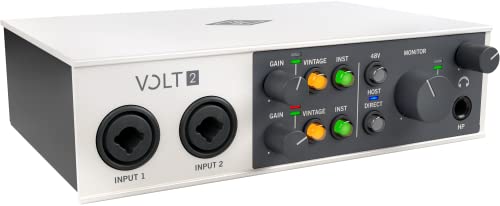
The Volt 2 is the premium pick for creators who stream and record instruments. Two combo inputs feed preamps with a Vintage mode modeled on Universal Audio’s classic tube preamp, flattering vocals and acoustic instruments without any plug-in. Conversion runs at 24-bit and 192 kHz, and the unit includes MIDI in and out, a feature none of the other picks here offers.
The build feels a step above the budget boxes: a solid metal body, large gain knobs, and a headphone amp that drives demanding headphones. It runs bus-powered over USB-C, and the bundled software includes Ableton Live Lite, Melodyne, and virtual instruments, so it covers streaming and music sessions alike.
Two limits matter. The Volt 2 has no loopback mixing software, so stream routing is again a job for the streaming app. Universal Audio also announced the Volt Gen 2 line in October 2026, with 32-bit conversion and a smart display, under separate listings. The original Volt 2 remains the pick here, but buyers who want the newest generation should look for the Gen 2 listing.
Specs
- Inputs: 2 x XLR/TRS combo
- Sample rate: 24-bit/192 kHz
- Phantom power: 48V
- MIDI: in and out
- Connection: USB-C, bus-powered
- Model: VOLT2
- UPC: 819937003240
- Warranty: 1 year manufacturer
- Dimensions: not stated
- Weight: not stated
PreSonus AudioBox USB 96 25th Anniversary Edition
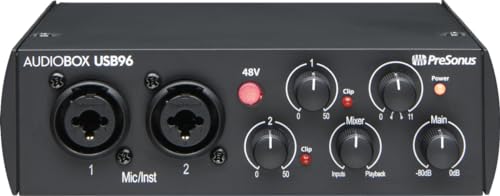
The AudioBox USB 96 is the long-running workhorse of this guide; the 25th Anniversary Edition is the current listing. Two combo inputs, MIDI in and out, and 48V phantom power cover the basics for a two-microphone stream or a mic-plus-instrument setup, and the metal chassis survives desk life better than plastic budget boxes.
Conversion runs at 24-bit and 96 kHz, plenty for voice and streaming, and the unit ships with Studio One Artist. The direct monitor mix knob blends live input with playback. For a streamer on a tight budget who wants two real preamps and MIDI, this is the cheapest honest route in the guide.
The age shows in two places. The connection is USB 2.0 rather than USB-C, so the included cable uses the older rectangular connector, and there is no onboard DSP or loopback mixing. The older plain AudioBox USB is a different listing with a different code, so confirm the 25th Anniversary model when ordering.
Specs
- Inputs: 2 x XLR/TRS combo
- Sample rate: 24-bit/96 kHz
- Phantom power: 48V
- MIDI: in and out
- Connection: USB 2.0
- Model: AUDIOBOX 96K 25TH
- Dimensions: 5.5 x 5.5 x 1.75 in
- Weight: 2.01 lb
- First available: July 20, 2020
- Software: Studio One Artist included
Behringer U-Phoria UMC202HD

The UMC202HD is the cheapest path here to two genuine microphone preamps. Behringer’s Midas-designed preamps deliver clean gain for condenser and dynamic microphones, conversion runs at 24-bit and 192 kHz, and 48V phantom power is switchable for the pair. A direct monitor switch on the front panel lets you hear the microphone with no delay.
The listing has been running since 2015 and the discontinued field reads No, so this is a stable, long-lived product. It works as a simple two-input box for a streamer with a microphone and a spare input for a guest microphone or an instrument. The unit is bus-powered over USB, so the desk stays free of power bricks.
The compromises match the low cost. There is no MIDI, so keyboard players should look at the UMC204HD, which adds MIDI and is a separate listing. There is no loopback mixing and no onboard effects, and Windows users need the driver download while Mac users can plug in without one. The listing dimensions describe the packaged box rather than the unit itself.
Specs
- Inputs: 2 x XLR/TRS combo
- Sample rate: 24-bit/192 kHz
- Phantom power: 48V
- MIDI: none
- Connection: USB 2.0, bus-powered
- Model: UMC202HD
- Is Discontinued By Manufacturer: No
- First available: February 28, 2015
- Dimensions: not stated for the unit itself
- Weight: not stated
How to choose
Count inputs first. One microphone and no guest plans means a single-input box like the Wave XLR is enough; two microphones, or a microphone plus an instrument, needs two preamps. Then check gain: quiet dynamic microphones need a strong preamp, and the Wave XLR’s 75 dB of gain is the standout.
Next, decide how much mixing you want the hardware to do. If your streaming app already handles separate audio channels, any interface here works. If you want the interface to split game, chat, and microphone audio for you, the Wave XLR and its Wave Link software are the only pick built for that job. Finally, match the connection: USB-C boxes suit modern laptops, and MIDI matters for keyboard players.
Who should skip
Skip a dedicated interface entirely if a USB microphone already sounds good on your stream and you have no plans for an XLR microphone. Skip these two-input boxes if you plan to run three or more microphones, a full drum kit, or a multi-person podcast.
Skip the Wave XLR if you need a second microphone input or an instrument input, and skip the UMC202HD if you need MIDI. Skip the Volt 2 if your only use is voice chat, since its instrument features and Vintage preamp mode would sit unused. Finally, all five picks here need a stock check before ordering, since the listing excerpts are months old.
Frequently Asked Questions
Do I need an audio interface to stream?
No, a USB microphone works on its own. An interface earns its place when you move to an XLR microphone, which needs a preamp and phantom power, or when you want separate control of microphone, game, and chat audio. It also gives you a better headphone output and lower monitoring delay.
How much gain does a dynamic microphone need?
Quiet dynamic microphones need a lot of gain, often more than 60 dB. The Wave XLR supplies 75 dB from its own preamp, which covers most dynamic microphones without a booster. The two-input interfaces here have clean preamps but lower maximum gain, so a very quiet dynamic microphone may still need an inline booster.
What is loopback, and do I need it?
Loopback routes audio from one app to another inside the computer, so game sound, chat, and music can reach the stream on separate channels. The Wave XLR handles this through Wave Link software. The other interfaces here rely on the streaming app for routing, which works for a single-microphone stream but gives less control over each source.
Can one interface serve two microphones?
Yes, if it has two preamps. The Scarlett 2i2, Volt 2, AudioBox USB 96, and UMC202HD each take two microphones, which suits a two-person stream. The Wave XLR has one XLR input, so a second microphone needs a second interface or a mixer upstream.
Final verdict
For most streamers, the Focusrite Scarlett 2i2 4th Gen covers the most ground: two clean preamps, automatic gain, and USB-C in a box that sets up fast. Streamers with a single XLR microphone should look at the Elgato Wave XLR first, since its tap-to-mute button and Wave Link mixing are built for live shows. The Universal Audio Volt 2 is the choice for creators who also record instruments and want MIDI, while the PreSonus AudioBox USB 96 and Behringer UMC202HD keep the budget low without dropping to a single input. Match inputs and mixing features to your stream, then confirm the listing and stock before ordering.
Related guides
More from Amazon
Programs that pair well with the guide above. Offers and eligibility are set by Amazon and may change.
Free shipping on eligible items, Prime Video and more. Eligible new members can start with a free trial.
Start a Prime free trialAd-free music streaming. Eligible new subscribers can start with a free trial.
Try Music Unlimited freeA Prime membership for ages 18-24 with a trial period. Eligibility is set by Amazon.
See Prime for Young AdultsAudiobooks and podcasts to listen to on the go. Eligible new members can start with a free trial.
Try Audible freeAs an Amazon Associate we earn from qualifying purchases.