- Top Pick: NETGEAR GS308 8-Port Gigabit Ethernet Switch
- Runner-up: TP-Link TL-SG105 5-Port Gigabit Ethernet Switch
- Also consider: NETGEAR GS316 16-Port Gigabit Ethernet Switch
A wired connection is still the most reliable way to play online. Wireless can drop a frame at the worst moment, while a cable keeps latency steady and downloads moving at full speed. The problem is that most routers only have a few wired ports, and a gaming desk fills them fast: a PC, a console, a streaming box, and a network drive can use up every port before the room is finished.
An Ethernet switch fixes that by turning one router port into several. This guide covers five switches for a gaming desk, from simple plug-and-play boxes to a managed model and a multi-gigabit upgrade.
As an Amazon Associate, we earn from qualifying purchases.
Top 3 picks at a glance
Quick Answer
For most gaming desks, an eight-port unmanaged gigabit switch is the right starting point: it adds room for a PC, two consoles, and a streaming device with no setup. Buyers who want to separate game traffic from other devices should look at a managed switch with VLAN support, while anyone with a multi-gigabit router and a network drive should consider a 2.5-gigabit switch.
NETGEAR GS308 8-Port Gigabit Ethernet Switch

The NETGEAR GS308 is the simplest switch in this guide, and that simplicity is the point. It has eight gigabit ports in a metal case, no fan, and no settings page. Plug the power in, run a cable from the router into any port, plug the PC and consoles into the rest, and the network works. There is nothing to update, nothing to misconfigure, and nothing to forget the password to.
Eight ports is the sweet spot for a typical gaming desk. One port takes the feed from the router, leaving seven for devices. That covers a gaming PC, two consoles, a streaming box, and a network drive, with room to spare. The metal housing runs silent because there is no fan inside, so the switch can sit on the desk without adding noise.
The GS308 also mounts on a wall, which helps when desk space is tight. It is a good fit for buyers who want more wired ports and nothing else, and a poor fit for anyone who wants to shape traffic, because it has no management features at all.
Specs
- Ports: 8 x 10/100/1000 Mbps RJ45
- Switching capacity: 16 Gbps
- Management: Unmanaged
- Case: Metal, fanless
- Mounting: Desktop or wall mount
- Model: GS308-300PAS
- UPC: 606449140132
- ASIN: B07PFYM5MZ
TP-Link TL-SG105 5-Port Gigabit Ethernet Switch
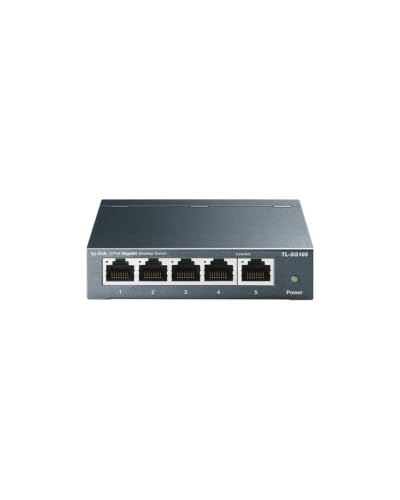
The TP-Link TL-SG105 is the compact pick in this guide. It has five gigabit ports in a small metal case, which is enough when the desk only needs a few extra wired connections. A PC, one console, and a streaming device fit with a port to spare, and the switch itself takes up very little desk space.
Like the NETGEAR GS308, the TL-SG105 is unmanaged and fanless. It uses shielded ports and energy-efficient technology that lowers power draw when a port is idle or a connected device is off. There is no software to install and no settings to change.
The five-port size is the main trade-off. It is the right call for a small desk or a single-player setup, but a household with several consoles and a network drive will run out of ports quickly. Buyers who expect to add devices later should look at an eight-port or sixteen-port model instead.
Specs
- Ports: 5 x 10/100/1000 Mbps RJ45
- Switching capacity: 10 Gbps
- Management: Unmanaged
- Case: Metal, fanless
- Ports: Shielded
- Model: TL-SG105
- GTIN: 00845973021146
- ASIN: B00A128S24
NETGEAR GS316 16-Port Gigabit Ethernet Switch

The NETGEAR GS316 is the roomy pick in this guide. Sixteen gigabit ports cover a full gaming room: several PCs, every console, a streaming box, a network drive, and a smart TV, with ports left over for guests and future gear. It is the switch to buy when the goal is to wire the whole room once and stop thinking about ports.
Despite the port count, the GS316 stays unmanaged and fanless. It plugs in and works, with no settings page and no fan noise. The case is larger than the eight-port models, so it fits better on a shelf or under a desk than on a crowded desktop. It can also mount on a wall, which keeps cables tidy when the switch lives behind the desk.
Specs
- Ports: 16 x 10/100/1000 Mbps RJ45
- Switching capacity: 32 Gbps
- Management: Unmanaged
- Case: Metal, fanless
- Maximum power: 8.1 watts
- Mounting: Desktop or wall mount
- Model: GS316-300NAS
- UPC: 606449164244
- Date first available: April 15, 2025
- ASIN: B0F1GG2DC8
NETGEAR GS308E 8-Port Easy Smart Managed Switch

The NETGEAR GS308E is the managed pick in this guide. It has the same eight gigabit ports as the unmanaged GS308, but it adds a web interface with traffic controls: VLANs to separate game traffic from the rest of the house, QoS to give gaming packets priority, and link aggregation to bond two ports together for a faster link to a network drive.
That control matters in a busy household. When someone else is streaming video or backing up files while a match is running, QoS keeps game traffic moving first. A VLAN can put the gaming PC and consoles on their own segment, away from smart home gadgets and guest devices.
Buyers should read the model number twice before ordering. The GS308E is the managed version; the GS308 without the E is unmanaged and has no settings page. The current hardware revision is v4, model GS308E-400NAS. Older GS308E hardware exists under a different model number, so confirming the v4 model at checkout is worth the extra moment.
Specs
- Ports: 8 x 10/100/1000 Mbps RJ45
- Switching capacity: 16 Gbps
- Management: Easy Smart Managed
- Features: VLAN, QoS, link aggregation, cable health check, loop prevention
- Case: Metal, fanless
- Mounting: Desktop or wall mount
- Model: GS308E-400NAS
- UPC: 606449170054
- Date first available: August 5, 2024
- ASIN: B0D9W9YNWD
TP-Link TL-SG105-M2 5-Port 2.5-Gigabit Switch
The TP-Link TL-SG105-M2 is the speed pick in this guide. Its five ports each run at 2.5 gigabits per second, which is two and a half times the speed of a standard gigabit port. That extra speed matters for large game downloads, local file transfers, and network drives, where a gigabit link is the bottleneck.
A 2.5-gigabit switch only helps when the rest of the chain keeps up. The router or network drive needs a 2.5-gigabit port too, and the cables should be at least Cat5e. With those pieces in place, a game library can move between a PC and a network drive far faster than a gigabit link allows. The switch is unmanaged, so there is nothing to configure, and it runs silent with no fan.
Specs
- Ports: 5 x 100 Mbps / 1 Gbps / 2.5 Gbps RJ45
- Switching capacity: 25 Gbps
- Management: Unmanaged
- Case: Metal, fanless
- Dimensions: 8.2 x 4.9 x 1.0 inches
- Maximum power consumption: 12.11 watts
- Model: TL-SG105-M2
- ASIN:
How to choose
Start with port count. Count every device that needs a cable today, add one for the router feed, and add one or two more for future gear. Five ports suit a small desk, eight ports cover most gaming desks, and sixteen ports fit a shared gaming room.
Next, decide between unmanaged and managed. Unmanaged switches are cheaper and need no setup, which is right for most buyers. A managed switch earns its place when the household network is busy and game traffic needs priority, or when separating devices onto different segments matters.
Speed is the third decision. Gigabit is enough for online play, because game traffic itself uses far less than a gigabit. Multi-gigabit speeds matter for local transfers: moving games to and from a network drive, or backing up a PC at full speed. A 2.5-gigabit switch is worth it when the router and the network drive already have 2.5-gigabit ports.
Finally, check the practical details. A fanless metal case stays silent on a desk. Wall mounting keeps cables out of the way. A switch with shielded ports resists interference in a room full of electronics.
Who should skip
Buyers who only have one or two wired devices do not need a switch at all. A router with a few spare ports already covers a PC and a console, and adding a box adds a cable and a power adapter for no benefit.
Anyone whose internet plan and router are both gigabit should skip the 2.5-gigabit model. The faster ports only help local traffic, so without a multi-gigabit router or network drive, the extra speed goes unused.
A managed switch is also the wrong buy for someone who will never open its settings page. If the plan is to plug it in and forget it, an unmanaged switch costs less and does the same job.
Frequently Asked Questions
Do I need a managed switch for gaming?
No, for most desks an unmanaged switch is enough. Online games use far less bandwidth than a gigabit port provides, so the switch itself is rarely the bottleneck. A managed switch helps when the household network is crowded and game traffic needs priority, or when separating devices onto different segments matters.
How many ports should a gaming switch have?
Count the wired devices, add one port for the router feed, and add one or two spare ports for future gear. Five ports suit a small desk, eight ports cover a typical gaming desk with a PC and two consoles, and sixteen ports fit a shared gaming room.
Is a 2.5-gigabit switch worth it for gaming?
It depends on the rest of the network. A 2.5-gigabit switch speeds up local transfers, such as moving games to a network drive, but it does not make online play faster on its own. It is worth it when the router and the network drive already have 2.5-gigabit ports.
Can I use an Ethernet switch with a console?
Yes. A switch works with any device that has an Ethernet port, including a PlayStation, an Xbox, and a Nintendo Switch dock. Plug a cable from the router into the switch, then run a cable from the switch to each console. The consoles will use the wired connection automatically once the cable is connected.
Final verdict
Most gaming desks are best served by an eight-port unmanaged gigabit switch: it adds room for a PC, two consoles, and a streaming device with nothing to configure. The NETGEAR GS308 is the straightforward choice there, while the TP-Link TL-SG105 suits smaller desks and the NETGEAR GS316 covers a full gaming room. Buyers who want traffic control should step up to the managed NETGEAR GS308E, and anyone with a multi-gigabit router and a fast network drive should consider the TP-Link TL-SG105-M2. Pick the port count first, then decide on management and speed.
Related guides
More from Amazon
Programs that pair well with the guide above. Offers and eligibility are set by Amazon and may change.
Free shipping on eligible items, Prime Video and more. Eligible new members can start with a free trial.
Start a Prime free trialAd-free music streaming. Eligible new subscribers can start with a free trial.
Try Music Unlimited freeA Prime membership for ages 18-24 with a trial period. Eligibility is set by Amazon.
See Prime for Young AdultsAudiobooks and podcasts to listen to on the go. Eligible new members can start with a free trial.
Try Audible freeAs an Amazon Associate we earn from qualifying purchases.