A mouse pad that also charges something sounds like a small luxury until a phone dies mid-session or earbuds give up during a long call. The real decision is what the pad should charge and how much desk it may claim. A wide charging mat keeps a phone and earbuds topped up beside the keyboard, but the charging zone, the adapter it needs and the space it takes are all fixed the moment you lay it down, so the wrong footprint or the wrong power tier stays wrong every single day.
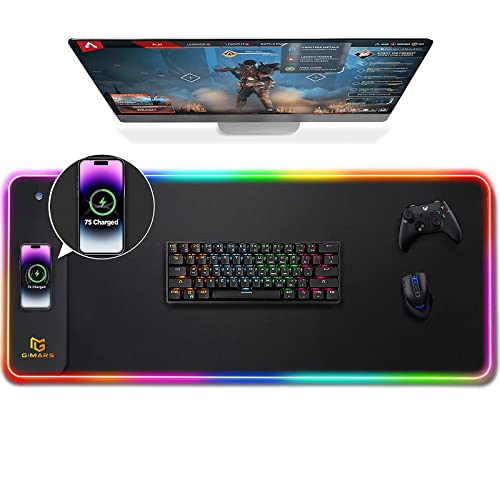

This guide is for gamers who keep a phone within reach, streamers and desk workers who charge earbuds between calls, and anyone tired of a separate charging stand crowding the mouse area. The three pads below all build wireless charging into the surface itself, and every detail comes from the names and specifications printed on their Amazon listings, including charging output, pad dimensions, lighting modes, and what each box does or does not include for power.
Quick Picks
As an Amazon Associate we earn from qualifying purchases
| Product | Best for | Key spec from title |
|---|---|---|
| Gimars RGB Gaming Mouse Pad (G-RGB-W03) | A raised charging platform for phones | 15W wireless charging, 800 x 300 mm |
| GIM Wireless Charging RGB Gaming Mouse Pad (XL0820) | A flat mat under keyboard and mouse | 15W wireless charging, 10 light modes |
| ExtreLife Wireless Charging Mouse Pad | The widest surface for big desks | 15W charging, 31.5 x 15.7 in mat |
How to Choose
Charging Output and Adapter Needs
The headline figure on every pad here is a top tier, not a promise for every setup. The Gimars listing ties its 15W, 10W and 7.5W tiers to matching adapter inputs, the GIM listing gives a 5W standard output before its higher tiers, and the ExtreLife listing asks for a 9V 2A adapter for full speed. None of the three boxes includes that wall adapter, so check the output printed on an adapter you already own before blaming a pad for slow charging, and remember that power only flows inside the marked charging zone.
Pad Size and Desk Layout
Two footprints appear in this guide. The GIM and Gimars mats measure 800 by 300 mm, wide enough to hold a keyboard and a mouse side by side on most desks. The ExtreLife mat stretches to 31.5 by 15.7 inches, swallowing the keyboard, the mouse area and the phone with room to spare. Measure your desk depth before choosing, because a mat that hangs over the front edge curls and annoys. Also note where the charging zone sits, since that spot decides where your phone lives all day.
Surface Texture and Mouse Movement
All three pads use a smooth cloth-style top over a 4 mm rubber base, and all three listings describe a waterproof surface that shrugs off splashes from a drink. The Gimars listing calls its top a premium smooth surface, while the ExtreLife listing stresses an ultra-smooth finish for fast glides. A raised charging platform, like the one on the Gimars pad, keeps the phone parked above the glide area, while a flat charging zone keeps the whole mat level for wide, low mouse sweeps across the surface.
Lighting Modes and Controls
Lighting is the visible difference between these pads. The GIM and Gimars listings each describe 10 light modes, split between static colors and dynamic effects, while the ExtreLife listing describes 15 modes with 11 static looks and 4 dynamic ones. One button or touch point cycles the modes on pads of this kind, so check how the listing says the lights are switched and whether they can be turned fully off for night play. The same USB feed powers both the lights and the charging coil on every pad here.
The 3 Best Options
Gimars RGB Gaming Mouse Pad (G-RGB-W03)
The Gimars pad builds its charging around a raised platform, which gives the phone a fixed home instead of a printed circle you have to hunt for by feel. Its listing describes built-in 15W Qi fast charging, a premium smooth surface and a waterproof top over a full 800 by 300 mm footprint that also carries the keyboard. Ten light modes ring the edges, the pad connects over a Type-C interface with the cable included, and the raised platform doubles as a visual reminder of exactly where charging happens.
Specs
- Built-in 15W Qi wireless charging on a raised charging platform
- Charging tiers of 15W, 10W and 7.5W with matching adapters (adapter not included)
- 10 light modes: 7 static and 3 dynamic
- Surface: 31.5 x 11.8 x 0.16 in (800 x 300 x 4 mm)
- Premium smooth, waterproof surface
- Type-C interface, cable included
- Model: G-RGB-W03
Best for: Players who want the phone parked on a raised platform they can find without looking.
Watch out for: Full charging speed needs a 9V 2A adapter that is not in the box, and the phone must sit on the platform rather than anywhere on the mat.
GIM Wireless Charging RGB Gaming Mouse Pad (XL0820)
The GIM pad keeps its charging zone flush with the rest of the mat, so the whole 800 by 300 mm surface stays level for keyboard and mouse. Its listing describes 15W wireless charging with a 5W standard output, 10 light modes and a waterproof surface over a non-slip rubber base, plus a 1.8 m USB cable in the box. For desks where the phone rests flat beside the keyboard and nothing may stick up into the mouse path, this is the tidy layout of the three, with lighting that runs around the full edge.
Specs
- Built-in 15W wireless charging (5W standard output; higher tiers need a 9V/2A adapter, not included)
- 10 light modes: 7 static and 3 dynamic
- Surface: 800 x 300 x 4 mm
- Non-slip rubber base, waterproof surface
- USB cable (1.8 m) included
- Model: XL0820
Best for: Players who want one flat mat under both keyboard and mouse, with charging built in.
Watch out for: The higher charging tiers depend on an adapter the box does not include, so a plain USB port leaves the pad at its standard output.
ExtreLife Wireless Charging Mouse Pad
The ExtreLife pad is the big one here, a 31.5 by 15.7 inch mat that turns most of the desk into a single surface. Its listing describes built-in 15W fast wireless charging, 15 lighting modes and an ultra-smooth waterproof top over a natural rubber base, and the box adds a 6.56 ft USB-C to USB-C woven cable beside the pad and manual. If your setup spreads a full keyboard, a wide mouse area and a phone across the desk and still feels cramped, this is the footprint that finally covers all of it at once.
Specs
- Built-in 15W fast wireless charging (9V 2A adapter required, not included)
- 15 lighting modes: 11 static and 4 dynamic
- Surface: 31.5 x 15.7 x 0.16 in
- Natural rubber non-slip base, 4 mm thick
- Ultra-smooth, waterproof surface
- In the box: pad, 6.56 ft USB-C to USB-C woven cable, user manual
Best for: Players with a deep desk who want the largest single surface and the longest mode list.
Watch out for: The 15.7 inch depth overwhelms shallow desks, and the 15W tier again depends on an adapter that stays outside the box.
Which One Fits Your Situation
Your Phone Lives on the Desk All Day
Pick the Gimars pad. Its raised charging platform gives the phone a permanent parking spot, so topping up becomes a habit rather than a search for the right circle on a flat mat. The platform also keeps the phone visible for notifications during play, and the 800 mm width still leaves a normal keyboard and mouse layout untouched beside it.
You Want the Whole Desk Covered
Pick the ExtreLife pad. At 31.5 by 15.7 inches it is the only mat here that covers a full keyboard, a generous mouse area and the charging zone without anything hanging off an edge. The woven 6.56 ft cable in the box also reaches a tower or hub sitting well away from the desk, which suits wide, spread-out setups.
You Prefer a Flat, Uniform Surface
Pick the GIM pad. Its charging zone sits flush with the mat, so wide, low mouse sweeps never climb over a raised edge mid-flick. The full 800 by 300 mm footprint keeps the keyboard on the same level surface, and the included 1.8 m USB cable gives enough slack for most desk layouts without extra parts.
You Play in a Dark Room and Like Lighting
Pick the ExtreLife pad for its 15 lighting modes, the longest list here, with 11 static looks for a steady glow and 4 dynamic effects when you want movement around the desk edge. The GIM and Gimars pads still give you 10 modes each, so lighting alone should not push you toward a footprint your desk cannot hold comfortably.
Common Mistakes
- Plugging the pad into a low-output USB port and expecting the top charging tier the headline figure suggests.
- Resting the phone beside the marked charging zone, or half on the raised platform, and assuming it is charging.
- Choosing the 15.7 inch deep mat for a shallow desk where the front edge will curl over the side.
- Assuming a Qi pad will charge a gaming mouse, when most gaming mice carry no Qi receiver and use their own matched charging systems instead.
- Leaving a thick case or a metal plate between the phone and the pad, which weakens or blocks the charging connection.
Frequently Asked Questions
Can one of these pads charge my wireless gaming mouse?
Only a mouse with a Qi receiver inside can take power from pads like these, and most gaming mice do not have one. Mouse-charging mats from the big peripheral brands form matched systems with specific mice instead. Treat the pads in this guide as chargers for phones and earbuds that happen to share your desk, and check your mouse’s own listing before expecting it to charge here.
Why does my phone charge slowly on the pad?
The listings tie the higher tiers to adapter input, so a plain USB port or a weak adapter holds the pad at its lower output. Alignment matters as well: the phone has to sit centered on the charging zone or the raised platform. A thick case between the phone and the surface can also slow things down, so test once with the case removed.
Do the lights need a separate cable?
No. Each pad here runs its lighting and its charging from the same USB feed, and each box includes the cable: a Type-C cable with the Gimars pad, a 1.8 m USB cable with the GIM pad, and a 6.56 ft USB-C to USB-C woven cable with the ExtreLife pad. What none of them includes is the wall adapter needed for the fastest charging tier.
Which size fits a keyboard and mouse together?
All three pads are 800 mm or 31.5 inches wide, which covers a full keyboard and a mouse side by side. The difference is depth: the GIM and Gimars mats are 300 mm deep, while the ExtreLife mat reaches 15.7 inches. Measure from the desk edge to the monitor stand and pick the depth that lies flat.
Related guides
More from Amazon
Programs that pair well with the guide above. Offers and eligibility are set by Amazon and may change.
Free shipping on eligible items, Prime Video and more. Eligible new members can start with a free trial.
Start a Prime free trialAd-free music streaming. Eligible new subscribers can start with a free trial.
Try Music Unlimited freeA Prime membership for ages 18-24 with a trial period. Eligibility is set by Amazon.
See Prime for Young AdultsAudiobooks and podcasts to listen to on the go. Eligible new members can start with a free trial.
Try Audible freeAs an Amazon Associate we earn from qualifying purchases.