Choosing a case for a water-cooled build is really a decision about radiator space, not about looks. A case that only fits a 120mm radiator at the rear will limit the cooler you can use, while a case with a 360mm mount at the front or top leaves room for a larger all-in-one cooler or a custom loop later. Thickness matters too, because a thick radiator plus fans can collide with memory, motherboard heatsinks, or a long graphics card.
This guide is for builders planning a 240mm or 360mm all-in-one cooler, builders moving from air cooling to a first custom loop, and anyone whose current case forces a small radiator into a tight spot. Every case below was selected from its Amazon listing for stated radiator support, with the supported sizes, fan mounts, and clearances taken from that listing.
Quick Picks
As an Amazon Associate we earn from qualifying purchases
| Product | Best for | Key spec from title |
|---|---|---|
| Lian Li O11 Dynamic EVO | A multi-radiator custom loop | Supports up to 3x 360 radiators |
| Corsair 4000D Airflow | A straightforward 360mm AIO build | 360mm radiator in front, 280mm in roof |
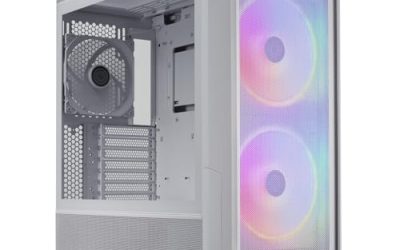
| Lian Li Lancool 216 | Strong out-of-box cooling with a 360mm radiator | Radiators front 360mm, top 360mm |
| Phanteks XT Pro Ultra | A 360mm top radiator with large fans included | Top radiator up to 360mm |
| Fractal Design Meshify 2 | A large radiator at the top of a flexible case | Radiators up to 360mm front, 420mm top |
How to Choose
Match the Radiator to the Mount, Not Just the Case
Start with the cooler you already own or plan to buy, then check where it mounts. A 360mm radiator needs three 120mm fan positions in a straight line, and some cases only offer that at the front, while others offer it at the top as well. Front mounting often gives the radiator cooler intake air, while top mounting keeps the front free for a longer graphics card. Check the listing for each position separately, because a case can support 360mm at the front and only 280mm at the top. Also confirm the maximum radiator thickness, since a thick radiator with fans on both sides can run into memory or the motherboard tray.
Check Clearance Around the Radiator
Radiator support on a specification sheet does not guarantee an easy fit. Tall memory, a large motherboard heatsink, or a thick graphics card can reduce the usable space beside a top-mounted radiator. Front-mounted radiators can shorten the maximum graphics card length, so compare the card length in the listing with the card you plan to install. CPU cooler height matters less in a water-cooled build, but it still tells you how much headroom the case leaves above the motherboard. Measure the radiator and fans together, including fittings, before ordering, and leave room for tubes to bend without pressing against a side panel.
Count Fans and Plan the Airflow Path
A water-cooled build still needs air moving across the motherboard, memory, and storage drives. Look at how many fans the case includes and how many mounts remain free after the radiator is installed. A case that ships with two fans may need several more to fill the remaining positions, while a case with four large fans already covers most of the intake and exhaust. Decide whether the radiator fans will pull in cool air or push warm air out, and make sure the remaining fans balance that flow. Dust filters on the intake positions help, especially when the radiator sits behind a front panel.
Look at the Interior Layout and Cable Space
A roomy interior makes a water-cooled build far easier to assemble and maintain. A dual-chamber layout hides the power supply and cables behind the motherboard tray, which leaves the main chamber clear for tubes and a reservoir. A removable radiator bracket lets you mount the radiator and fans outside the case, then slide the whole assembly into place. Cable routing depth behind the tray matters when thick power cables and fan cables share the same space. Check the number of drive bays as well, because a case with many fixed drive cages can block a front radiator or a pump and reservoir combination.
The 5 Best Options
Lian Li O11 Dynamic EVO
The O11 Dynamic EVO suits builders who want more than one radiator, because its layout spreads radiator mounts across the top, side, and bottom instead of forcing every cooler into a single position. That flexibility helps a dual-radiator custom loop, a 360mm all-in-one cooler plus extra fans, or a build where the graphics card and processor each get their own radiator. Its dual-chamber design keeps the power supply and cables behind the motherboard tray, so the main chamber stays open for tubes, fittings, and a reservoir. Tempered glass panels on the front and side show the loop clearly, which matters when the cooling hardware is part of the build.
Specs
- Supports up to 3x 360 radiators
- Maximum of 10 fans
- Motherboard support: E-ATX (width under 280mm), ATX, Micro-ATX, Mini-ITX
- Graphics card clearance up to 400mm
- CPU cooler clearance up to 170mm
- Tempered glass front and side panels
- Material: 4mm aluminum, 4mm tempered glass, 1mm steel structure
- Dimensions: 465mm x 285mm x 459mm
Best for: Builders planning a multi-radiator custom loop or a 360mm all-in-one cooler with room to expand.
Watch out for: No fans are included, so budget for the fans a multi-radiator layout needs before the build is complete.
Corsair 4000D Airflow
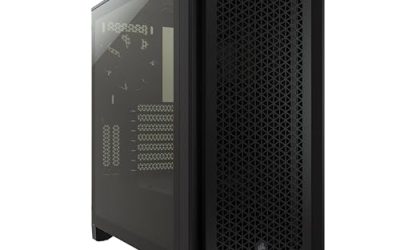
The 4000D Airflow suits builders who want a familiar mid-tower with a clear path for a 360mm radiator at the front. Its high-airflow front panel and two included 120mm AirGuide fans give the build a solid starting point, and the RapidRoute cable management system keeps the space behind the motherboard tray organised. A 280mm radiator fits in the roof, which gives builders a second option when a front-mounted radiator would shorten graphics card clearance. The tempered glass side panel keeps the interior visible without adding a second glass front panel that could restrict intake air.
Specs
- Radiator support front: 360mm, 280mm, 240mm
- Radiator support top: 280mm, 240mm
- Radiator support rear: 120mm
- Includes two 120mm AirGuide fans
- Fits up to 6x 120mm or 4x 140mm cooling fans
- Motherboard support: ATX, Micro-ATX, Mini-ITX, E-ATX
- Graphics card clearance up to 360mm
- CPU cooler clearance up to 170mm
- Tempered glass side panel
- Dimensions: 453mm x 230mm x 466mm
Best for: A first 360mm all-in-one build in a mid-tower that does not need a showcase layout.
Watch out for: A thick front radiator can reduce graphics card clearance, so check the card length against the listing before mounting the radiator at the front.
Lian Li Lancool 216

The Lancool 216 suits builders who want strong cooling straight out of the box, because it ships with two large 160mm front fans and a 140mm rear fan. Both the front and the top accept a 360mm radiator, so a builder can choose the position that leaves the most room for the graphics card and memory. A removable top radiator bracket makes installation easier, and the modular motherboard position can be moved to suit an air-cooled or water-cooled setup. Fine mesh panels at the front, top, and power supply shroud help intake air reach the radiator without trapping heat inside the case.
Specs
- Radiators: front 360mm, 280mm, 240mm; top 360mm, 280mm, 240mm; bottom 240mm
- Includes two 160mm PWM front fans and one 140mm PWM rear fan
- Fits up to 10 fans
- Motherboard support: E-ATX, ATX, Micro-ATX, Mini-ITX
- Graphics card clearance up to 392mm
- CPU cooler clearance up to 180mm
- Tempered glass side panel
- Dimensions: 480.9mm x 235mm x 491.7mm
Best for: Builders who want a 360mm radiator plus large included fans without buying extra fans first.
Watch out for: The two 160mm front fans must be removed or relocated when a front radiator is installed, so plan the fan layout before the build.
Phanteks XT Pro Ultra
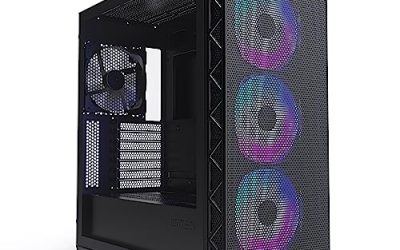
The XT Pro Ultra suits builders who want a 360mm radiator at the top and large fans already installed. It ships with four 140mm D-RGB fans, three at the front and one at the rear, which covers intake and exhaust before any extra fans are added. The top accepts a radiator up to 360mm, the front accepts up to 240mm, and the rear accepts a 120mm radiator, giving the build three separate radiator positions. Its mesh front and top panels support steady intake air, and the case also supports rear-connector motherboards for builders who want cables hidden behind the tray.
Specs
- Radiator support top: up to 360mm
- Radiator support front: up to 240mm
- Radiator support rear: 120mm
- Includes four M25-140 D-RGB fans
- Fits up to 10x 120mm or 6x 140mm fans
- Motherboard support: E-ATX up to 280mm wide, ATX, Micro-ATX, Mini-ITX
- Graphics card clearance up to 415mm
- CPU cooler clearance up to 184mm
- Tempered glass side panel
- Dimensions: 450mm x 230mm x 500mm
Best for: A top-mounted 360mm all-in-one cooler in a case that already includes four large fans.
Watch out for: The front only accepts a radiator up to 240mm, so a 360mm radiator must go at the top, where tall memory can reduce clearance.
Fractal Design Meshify 2
The Meshify 2 suits builders who want the largest top radiator in this group, because its top accepts a radiator up to 420mm while the front accepts up to 360mm. Its adaptable dual-layout interior fits E-ATX motherboards up to 285mm wide, and the layout can be changed to favour storage or open space for a reservoir and tubes. Nine fan mounts give the build room for a radiator plus separate intake and exhaust fans, and the included fan hub connects three PWM fans and six 3-pin fans. The angular mesh front panel filters intake air while keeping the radiator supplied with fresh air.
Specs
- Fits radiators up to 360mm front, 420mm top, and 280mm base
- Total of 9x 120mm or 140mm fan mounts
- Adaptable dual-layout interior fits E-ATX motherboards up to 285mm wide
- Nexus+ 2 fan hub connects 3x PWM fans and 6x 3-pin fans
- Light-tinted tempered glass window
- Motherboard support: E-ATX, ATX, Micro-ATX, Mini-ITX
- Dimensions: 542mm x 240mm x 474mm
Best for: A large top radiator or a custom loop that needs a flexible interior and many fan mounts.
Watch out for: The case is wider and deeper than a typical mid-tower, so check desk and shelf space before ordering.
Which One Fits Your Situation
You Want a Custom Loop With Two or Three Radiators
Choose the Lian Li O11 Dynamic EVO. Its top, side, and bottom mounts each accept a 360mm radiator, and the dual-chamber layout leaves the main chamber clear for a reservoir, pump, and tubes. No other case in this guide offers three separate 360mm positions, which makes it the clearest fit for a loop that cools both the processor and the graphics card.
You Want a Simple First 360mm AIO Build
Choose the Corsair 4000D Airflow. Its front accepts a 360mm radiator, its roof accepts a 280mm radiator, and it ships with two fans to start the build. The mid-tower size and familiar layout keep the assembly straightforward, and the cable management system helps first-time builders keep the interior tidy throughout.
You Want Strong Cooling Without Buying Extra Fans
Choose the Lian Li Lancool 216 or the Phanteks XT Pro Ultra. The Lancool 216 ships with two 160mm front fans and a 140mm rear fan, while the XT Pro Ultra ships with four 140mm fans. Pick the Lancool 216 when a front or top 360mm radiator matters most, and pick the XT Pro Ultra when a top-mounted 360mm radiator and a longer graphics card matter most.
You Want the Largest Possible Top Radiator
Choose the Fractal Design Meshify 2. Its top accepts a radiator up to 420mm, which is larger than the 360mm top limit in the other cases here. Its flexible interior and nine fan mounts also suit a build that pairs a large radiator with separate intake and exhaust fans for steady cooling.
Common Mistakes
- Buying a 360mm radiator before checking whether the case supports that size at the chosen mounting position.
- Mounting a thick radiator at the top without checking clearance against tall memory and motherboard heatsinks.
- Installing a front radiator and then finding that a long graphics card no longer fits.
- Filling every fan mount with radiator fans and leaving no airflow across the motherboard, memory, and drives.
- Forgetting that a case with no included fans needs several fans added before the build can run properly.
Frequently Asked Questions
What radiator size should I choose for a water-cooled gaming PC?
A 240mm radiator suits most single-processor builds with a mid-range all-in-one cooler, while a 360mm radiator gives more headroom for a high-power processor or a quieter fan curve. Check the case listing for each mounting position, because a case can support 360mm at the front and only 280mm at the top. Match the radiator to a position that leaves room for the graphics card and memory.
Can I mount a 360mm radiator at the top of any case in this guide?
No, and the difference matters. The Lian Li O11 Dynamic EVO, Lian Li Lancool 216, Phanteks XT Pro Ultra, and Fractal Design Meshify 2 all accept a 360mm radiator at the top, with the Meshify 2 accepting up to 420mm. The Corsair 4000D Airflow only accepts up to 280mm at the top, so its 360mm radiator must go at the front.
Does a water-cooling case still need case fans?
Yes, because the radiator cools the liquid, while case fans move air across the motherboard, memory, storage, and power supply. A radiator with its own fans can serve as intake or exhaust, but the remaining fan positions still need coverage. Check how many fans the case includes, then add fans for any empty intake or exhaust positions.
Is a front-mounted radiator better than a top-mounted radiator?
Neither position is better for every build. A front-mounted radiator usually receives cooler intake air, which can lower liquid temperatures, but it can shorten graphics card clearance. A top-mounted radiator keeps the front free for a longer card and lets warm air leave through the roof, but tall memory can limit the space available. Choose the position that fits the radiator, card, and memory together.
Related guides
More from Amazon
Programs that pair well with the guide above. Offers and eligibility are set by Amazon and may change.
Free shipping on eligible items, Prime Video and more. Eligible new members can start with a free trial.
Start a Prime free trialAd-free music streaming. Eligible new subscribers can start with a free trial.
Try Music Unlimited freeA Prime membership for ages 18-24 with a trial period. Eligibility is set by Amazon.
See Prime for Young AdultsAudiobooks and podcasts to listen to on the go. Eligible new members can start with a free trial.
Try Audible freeAs an Amazon Associate we earn from qualifying purchases.