Buying a keyboard and mouse as one boxed set sounds simple, yet the real decision hides in the switch type. Many bundles carry the word mechanical in the title while the keyboard underneath uses membrane keys or a mechanical feel design, and the difference shows up every time a key bottoms out during a long match. A true mechanical switch gives a distinct actuation point and a consistent feel across the whole board, while a membrane board feels softer and quieter but less precise when inputs stack up in a fast fight.
This guide covers four combos sold as single Amazon listings, and each one is labelled honestly for what its keyboard actually is. It is written for first-time PC builders who want one purchase to finish a desk, for laptop gamers adding a desktop setup, and for players moving from a membrane office keyboard who want matching lighting and one shared receiver instead of two separate boxes.
Our Top Picks

Top 3 picks at a glance

Quick Picks
As an Amazon Associate we earn from qualifying purchases at no extra cost to you.
| Product | Best for | Key spec from title |
|---|---|---|
| Logitech G413 SE + G502 HERO Bundle | Competitive play on a wired full-size setup | Tactile mechanical switches, PBT keycaps, mouse up to 25,600 DPI |
| Logitech POP Keys + POP Mouse Combo (Cosmos) | A compact wireless desk with personality | Typewriter-style mechanical keys, keys rated for 50 million strokes |
| Redragon S101-3 PRO | A first gaming setup on a tight budget | Full-size RGB keyboard, mouse adjustable from 800 to 7,200 DPI |
| RedThunder K10 Wireless Combo | A cable-free desk with bright RGB lighting | 2.4G wireless with one shared receiver, 7D mouse at 3,200 DPI |
How to Choose
Check the switch type on the listing, not the box title
The single most important check is whether the keyboard uses genuine mechanical switches. The Logitech G413 SE and the POP Keys board both do, and their listings say so directly. The Redragon S101-3 PRO and the RedThunder K10 use membrane or mechanical-feel keys, which the listings describe with phrases such as mechanical feel rather than naming a switch. That does not make them bad boards, but a buyer who specifically wants a mechanical switch should not pay for a bundle that only imitates one. Open the technical details on the listing and look for the switch wording before ordering.
Match the layout to your desk and your games
A full-size board with a number pad suits strategy games, MMOs, and anyone who types a lot between matches, and both the Logitech G413 SE and the Redragon S101-3 PRO offer one. A compact board such as the POP Keys saves desk space and pulls the mouse closer to the body, which helps players with smaller desks or a low sensitivity that needs wide mouse sweeps. Measure the space between the monitor stand and the desk edge before choosing, and remember that a wrist rest adds depth that a shallow desk may not have room for.
Decide wired or wireless before comparing anything else
Wired combos never need charging and never drop a connection mid-match, which is why the G413 SE bundle and the S101-3 PRO appeal to competitive players. Wireless combos such as the POP set and the RedThunder K10 clear cables and suit living-room or shared desks, but they introduce batteries and a receiver to keep track of. The POP Keys board runs for up to three years on its batteries and the POP Mouse for up to two years, while the RedThunder set uses rechargeable batteries in both pieces. Pick the connection style first, then compare the remaining specs.
Weigh the mouse as carefully as the keyboard
A bundle is only as good as its weaker half, and the mice in these sets differ widely. The G502 HERO tracks up to 25,600 DPI with eleven programmable buttons and a dual-mode scroll wheel, which suits players who bind many actions. The POP Mouse is a small, quiet Bluetooth mouse built for portability rather than flick shots. The Redragon mouse adjusts from 800 to 7,200 DPI with a weight tuning set, and the RedThunder mouse is a seven-button design at 3,200 DPI. Hold your current mouse, note its weight and button count, and check that the bundled mouse is close enough to feel familiar.
The 4 Best Options
Logitech G413 SE + G502 HERO Bundle

This is the only bundle here that pairs a genuinely mechanical full-size keyboard with a proven gaming mouse in one listing, and that is why it leads the list. The G413 SE uses tactile mechanical switches under PBT keycaps with a brushed aluminum top, so keys feel consistent and the board resists flex during heavy typing. The G502 HERO brings a HERO 25K sensor, eleven programmable buttons, and a dual-mode hyper-fast scroll wheel, which together cover shooters, MOBAs, and MMOs without asking the buyer to shop for a second device.
Specs
- Keyboard: full-size mechanical with tactile mechanical switches, PBT keycaps, brushed aluminum top, anti-ghosting, white backlighting
- Keyboard connection: wired USB
- Mouse: HERO 25K sensor, tracking up to 25,600 DPI, 11 programmable buttons, dual-mode hyper-fast scroll wheel
- Mouse: adjustable weights, RGB lighting, on-board memory, compatible with Windows and macOS
- Bundle contains two items: the G413 SE keyboard and the G502 HERO mouse
Best for: Players who want a true mechanical keyboard and a high-end wired mouse in a single purchase.
Watch out for: Both pieces are wired, so check that the desk has two spare USB ports and a cable route that keeps cords away from the mouse pad.
Logitech POP Keys + POP Mouse Combo (Cosmos)
The POP combo trades raw gaming performance for portability, colour, and a typing feel that stands out from every other set here. POP Keys is a compact mechanical keyboard with round, typewriter-style keys and customizable emoji keys, and it connects over Bluetooth or the included Logi Bolt USB receiver while switching between up to three devices. The POP Mouse matches it in colour and size, with SilentTouch technology for quiet clicks and a customizable top button that opens emoji and shortcuts.
Specs
- Keyboard: typewriter-style mechanical keys, customizable emoji keys, compact layout
- Keyboard connection: Bluetooth or Logi Bolt USB receiver, multi-device switching for up to three devices
- Keyboard battery life: up to three years; keys rated for up to 50 million strokes
- Mouse: compact wireless Bluetooth mouse with SilentTouch technology and a customizable top button
- Mouse battery life: up to two years; fits in a palm, handbag, or laptop case
Best for: Gamers who also work or study at the same desk and want a small, quiet, colourful wireless set.
Watch out for: The compact layout has no number pad, and the small mouse can feel cramped for large hands or low-sensitivity aiming.
Redragon S101-3 PRO
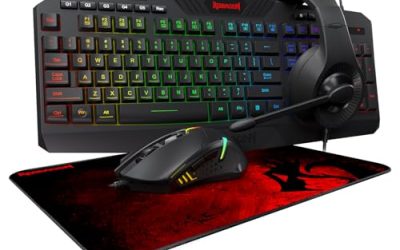
The S101-3 PRO is the long-running budget entry in this category, and it earns its place by giving first-time buyers a complete wired setup in one box. The full-size keyboard carries RGB backlighting with seven lighting modes, four brightness levels, five macro keys, multimedia keys, and a wrist rest. The bundled mouse adjusts from 800 to 7,200 DPI and includes a weight tuning set, so a new player can experiment with sensitivity and heft without buying extra gear.
Specs
- Keyboard: full-size RGB backlit keyboard, seven RGB lighting modes, four brightness levels
- Keyboard: five macro keys, multimedia keys, wrist rest, membrane keys
- Mouse: adjustable from 800 to 7,200 DPI, five programmable buttons, weight tuning set
- Connection: wired USB for keyboard and mouse
- Software support for macro recording and lighting control
Best for: First-time PC gamers who want a complete, ready-to-play wired set and are happy with membrane keys.
Watch out for: The keyboard uses membrane keys rather than mechanical switches, so buyers who specifically want a mechanical feel should choose the Logitech G413 SE bundle instead.
RedThunder K10 Wireless Combo

The RedThunder K10 is the wireless pick for buyers who want bright RGB lighting and no cables at a modest outlay. Both pieces share one 2.4G USB receiver, and the keyboard uses mechanical-feel anti-ghosting keys with RGB backlighting and pudding keycaps that spread the light across the board. The seven-button mouse tracks at 3,200 DPI, and both pieces run on rechargeable batteries, so there are no disposable batteries to replace.
Specs
- Keyboard: 2.4G wireless, mechanical-feel anti-ghosting keys, RGB backlighting, pudding keycaps
- Keyboard battery: rechargeable, with a 3,000 mAh keyboard battery and an 800 mAh mouse battery
- Mouse: 7D mouse at 3,200 DPI with seven buttons
- Connection: one shared 2.4G USB receiver for keyboard and mouse
- Layout: full-size keyboard with number pad
Best for: Players who want a wireless RGB setup with a full-size board and no disposable batteries.
Watch out for: The keyboard is mechanical feel, not a true mechanical switch board, and the 3,200 DPI mouse ceiling is lower than the other picks here.
Which One Fits Your Situation
You play ranked shooters and want the most responsive setup
Choose the Logitech G413 SE + G502 HERO Bundle. The tactile mechanical switches, the HERO 25K sensor, and the wired connection remove the variables that cost fights, and the eleven programmable buttons cover lean, ping, and ability binds without reaching for the keyboard. The full-size layout also keeps the number pad within reach for games that use it.
Your desk is small or shared with work and study
Choose the Logitech POP Keys + POP Mouse Combo. The compact board and small mouse leave room for notebooks, and the quiet clicks and multi-device switching suit a desk that changes roles between gaming sessions and school or office work. The long battery life also means the set can sit untouched for weeks without needing attention.
You are building a first gaming PC and watching every cost
Choose the Redragon S101-3 PRO. It puts a full-size backlit keyboard, a wrist rest, macro keys, and an adjustable-DPI mouse on the desk in one purchase, and the wired connection means nothing needs charging while learning the setup. The weight tuning set in the mouse also lets a new player experiment with heft before settling on a preferred feel.
You want a wireless desk that looks good on camera
Choose the RedThunder K10 Wireless Combo. The RGB lighting, pudding keycaps, and single shared receiver keep the desk tidy and colourful, and the rechargeable batteries mean the set is ready again after an overnight charge. The full-size layout keeps the number pad available, and the wireless design suits a desk that appears in streams or video calls.
Common Mistakes
- Assuming every bundle labelled mechanical has mechanical switches: check the listing for the switch wording, since the Redragon and RedThunder boards here use membrane or mechanical-feel keys.
- Picking a compact keyboard and then missing the number pad in strategy games or spreadsheet work.
- Ignoring the bundled mouse: a great keyboard cannot fix a mouse that is too small, too light, or short on buttons for your games.
- Forgetting to count USB ports and receiver slots before ordering a wired bundle or a wireless set.
- Choosing a wireless combo without checking how its batteries charge, since disposable and rechargeable designs need very different habits.
Frequently Asked Questions
Is the keyboard in every combo here a true mechanical keyboard?
No. The Logitech G413 SE and the Logitech POP Keys use genuine mechanical switches, while the Redragon S101-3 PRO uses membrane keys and the RedThunder K10 uses mechanical-feel keys. The listings describe each one differently, so read the switch wording on the product page before ordering if a mechanical switch is a must-have.
Can a keyboard and mouse combo work for competitive gaming?
Yes, when the bundle matches the game. The G413 SE + G502 HERO bundle is built for competitive play with a wired connection, a high-DPI sensor, and programmable buttons. Wireless combos can also work well for casual and ranked play, but players who chase the lowest input delay usually prefer a wired set.
Do wireless keyboard and mouse combos share one receiver?
It depends on the set. The RedThunder K10 uses one shared 2.4G receiver for both pieces, while the Logitech POP combo connects over Bluetooth or the Logi Bolt receiver and can switch between up to three devices. Check the listing to see whether one receiver or two connections are involved before ordering.
What should I check first when a combo arrives?
Confirm that the listing matches what arrived, including the keyboard layout, the switch type, and the mouse model, then test every key and mouse button in a game. Check the cable length on wired sets and the receiver slot on wireless sets, and confirm the software installs if macro keys or lighting control matter to the setup.
Related guides
More from Amazon
Programs that pair well with the guide above. Offers and eligibility are set by Amazon and may change.
Free shipping on eligible items, Prime Video and more. Eligible new members can start with a free trial.
Start a Prime free trialAd-free music streaming. Eligible new subscribers can start with a free trial.
Try Music Unlimited freeA Prime membership for ages 18-24 with a trial period. Eligibility is set by Amazon.
See Prime for Young AdultsAudiobooks and podcasts to listen to on the go. Eligible new members can start with a free trial.
Try Audible freeAs an Amazon Associate we earn from qualifying purchases.