- Top Pick: Kensington MagPro 27 Inch Magnetic Privacy Screen
- Runner-up: Magicmoon 2-Pack 24 Inch Computer Privacy Screen Filter
- Also consider: Pozlle 2-Pack 24 Inch Hanging Privacy Screen
A monitor privacy screen is a thin filter that narrows the viewing angle, so the person in front sees a clear image while anyone off to the side sees a dark screen. It is the simplest upgrade for an open office or a shared desk, and it also cuts glare and adds scratch protection.
The catch is sizing. Privacy screens are size specific, and the size that matters is the visible area of your display, not the bezel. Measure the lit width and height and pick a mounting style that suits your monitor.
As an Amazon Associate, we earn from qualifying purchases.
Top 3 picks at a glance
Quick Answer
For most desks, the Kensington MagPro 27 inch magnetic filter is the easiest to live with, because it snaps on and off in seconds. Two 24 inch monitors are covered by the Magicmoon 2-pack in one order. The Pozlle hanging 2-pack suits monitors with a top edge, the ZYY 2-pack fits 27 inch and curved displays, and the Amazon Basics filter covers 21.5 inch screens.
Kensington MagPro 27 Inch Magnetic Privacy Screen

The Kensington MagPro 27 inch filter is the premium pick here for its mounting. Slim magnetic strips attach to the monitor bezel, and the filter snaps onto them, so you can pull it off for a shared session and snap it back on when you need privacy again.
Kensington limits the viewing angle to plus or minus 30 degrees from center, so the image stays clear head-on while a viewer to the side sees a dark screen. The filter is reversible, with a matte side that cuts reflections and a glossy side that keeps colors vivid, and it reduces blue light by up to 22 percent. It is built for slim-bezel 27 inch monitors with a 16:9 aspect ratio, so check that your monitor has a bezel the magnetic strips can sit on.
Specs
- Screen size: 27 inches, 16:9 aspect ratio
- Viewing angle: plus or minus 30 degrees
- Mounting: magnetic strips
- Finish: reversible, matte or glossy
- Blue light reduction: up to 22 percent
- Item model number: K55419WW
- Package dimensions: 27.8 x 17.2 x 0.2 inches
- Item weight: 1.2 pounds
- In the box: cleaning cloth and protective case
- Compliance: TAA-compliant
- Warranty: not stated
Magicmoon 2-Pack 24 Inch Computer Privacy Screen Filter

The Magicmoon 2-pack is the practical pick for a dual-monitor desk. Two 24 inch filters arrive in one order, so both screens get the same treatment. Each filter measures 20.9 by 11.8 inches, matching the visible area of a standard 24 inch 16:9 monitor.
This is a film-style filter rather than a rigid panel, so it sits flat against the display and adds almost no bulk. The product information states the filter is not discontinued, with a first available date of September 19, 2023. Measure your screen before ordering: the 24 inch size refers to the diagonal of the visible area, and the filter only fits a 24 inch 16:9 panel.
Specs
- Screen size: 24 inches, 16:9 aspect ratio
- Filter size: 20.9 x 11.8 x 0.5 inches (531 x 298 mm)
- Pack: 2 filters
- Mounting: not stated
- Finish: anti-glare film
- Item weight: 16 ounces
- Is Discontinued By Manufacturer: No
- Date First Available: September 19, 2023
- Item model number: 24 inch 16:9 Aspect Ratio
Pozlle 2-Pack 24 Inch Hanging Privacy Screen

The Pozlle 2-pack takes a different approach to mounting. Instead of adhesive strips or slide tabs, these filters hang over the top edge of the monitor, so they go on and come off in seconds with no sticking and no bubbles. That suits a monitor you sometimes share.
The filters are acrylic with a 9H hardness rating, harder than the film filters in this roundup and more resistant to scratches from daily cleaning. The listing states the pair filters up to 92 percent of blue light, and the hanging design fits common monitor brands.
One detail needs care. The product information lists the dimensions as 21.5 by 13.5 inches, larger than the standard 24 inch 16:9 visible area of about 20.9 by 11.8 inches. Measure your own screen before ordering. The hanging design needs a top edge to hook over, so it suits monitors with a top bezel lip.
Specs
- Screen size: 24 inches, 16:9 aspect ratio
- Filter size: 21.5 x 13.5 inches
- Pack: 2 filters
- Mounting: hanging design
- Material: acrylic
- Item hardness: 9H
- Blue light filtering: up to 92 percent
- Finish: glossy
- Ships from: Amazon
- Sold by: Pozlle Shop
ZYY 2-Pack 27 Inch Privacy Screen Filter
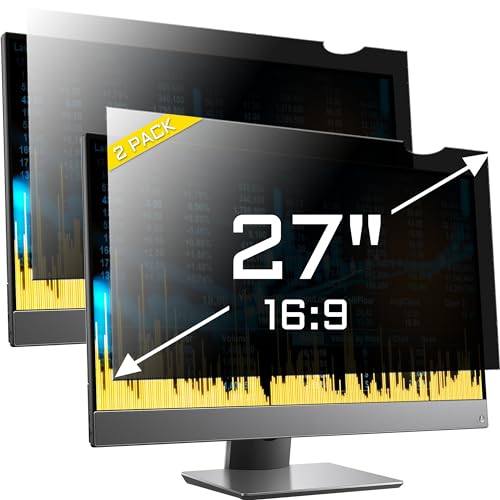
The ZYY 2-pack is the budget pick for large screens, and the only filter here that states curved-monitor compatibility in its series name. Each filter measures 23.54 by 13.27 inches, matching the visible area of a standard 27 inch 16:9 display, and the pair covers a dual-monitor desk. The listing dates to April 18, 2021, the longest-running listing in this roundup.
Privacy works from 30 degrees to 180 degrees off center, so content stays visible head-on and darkens sharply from the side. The filter is double sided, with a matte finish for glare control and a glossy finish for color, and it blocks 96 percent of UV light and 65 percent of blue light. The listing warns to raise monitor brightness after install.
The listing states this is not a touchscreen filter, so touch will not work through it. It also notes that if the groove between the screen and the frame is deep, the fixed adhesive installation is recommended, so check your bezel shape before you mount it.
Specs
- Screen size: 27 inches, 16:9 aspect ratio
- Filter size: 23.54 x 13.27 x 0.5 inches
- Pack: 2 filters
- Mounting: adhesive strips or slide-mount tabs
- Finish: reversible, matte or glossy
- UV blocking: 96 percent
- Blue light blocking: 65 percent
- Item weight: 10.6 ounces
- Touchscreen compatible: No
- Date First Available: April 18, 2021
- Curved monitor compatible: Yes
Amazon Basics 21.5 Inch Privacy Screen Filter

The Amazon Basics 21.5 inch filter is the pick for smaller screens, and the only 21.5 inch filter in this roundup. It measures 18.77 by 10.56 inches with a thickness of 0.02 inches, matching the visible area of a 21.5 inch 16:9 display, and it uses the standard 60-degree viewing window, so only viewers directly in front see the full image. The listing states it filters 40 percent of blue light and blocks 99 percent of UV rays.
Mounting gives you two options. Adhesive strips attach the filter directly to the screen for a fixed fit, while slide-mount tabs suit screens with a raised bezel and let you slide the filter on and off. That choice matters on a small monitor.
One note on sourcing: the specification fields for this pick come from a price-history record for the amazon.com listing, which showed the item in stock in November 2026. The model number is PFS440GH-215W9. The listing text also names laptop brands in its compatibility line, a catalog quirk, so trust your own measurement over the brand list.
Specs
- Screen size: 21.5 inches, 16:9 aspect ratio
- Filter size: 18.77 x 10.56 x 0.02 inches
- Viewing angle: 60 degrees
- Mounting: adhesive strips or slide-mount tabs
- Finish: anti-glare
- Blue light filtering: 40 percent
- UV blocking: 99 percent
- Item model number: PFS440GH-215W9
How to choose
Start with the visible area, not the diagonal on the box. Measure the width and height of the lit part of your screen, and match those figures to the filter size. A 24 inch 16:9 display has a visible area of about 20.9 by 11.8 inches, a 27 inch panel about 23.5 by 13.3 inches, and a 21.5 inch panel about 18.8 by 10.6 inches. A 23.6 or 23.8 inch monitor will not take a standard 16:9 filter.
Next, pick the mounting style. Magnetic filters are the fastest to remove and suit slim-bezel monitors, hanging filters hook over the top edge, and adhesive strips with slide-mount tabs suit raised-bezel monitors. Slide tabs only work where the bezel is raised enough to hold them.
Then weigh the trade-offs. Every privacy filter dims the screen, so plan to raise brightness after install. A reversible matte and glossy finish lets you pick glare control or color. Finally, confirm the aspect ratio: a 16:9 filter will not sit correctly on a 16:10 monitor.
Who should skip
Skip a privacy screen if you share your monitor often, because the filter darkens the image for anyone not sitting directly in front of it. A magnetic or hanging filter is the workaround, since you can remove it in seconds, but a fixed adhesive filter is the wrong choice for a shared display.
Skip it too if you work on a touchscreen monitor, because most privacy filters block touch input, and the ZYY pick states that plainly. Ultrawide owners should also sit this round out, since every pick here is a 16:9 filter. If your monitor is curved and the filter does not state curved compatibility, do not force a rigid filter onto the curve.
Frequently Asked Questions
What size privacy screen do I need for my monitor?
Measure the visible area of your display, the lit width and height, and match those figures to the filter size. A 24 inch 16:9 monitor needs a filter of about 20.9 by 11.8 inches, a 27 inch panel needs about 23.5 by 13.3 inches, and a 21.5 inch panel needs about 18.8 by 10.6 inches. Do not measure the bezel.
Do privacy screens work on curved monitors?
Most rigid privacy filters are made for flat monitors, and a stiff filter will not follow a curve. The ZYY 27 inch pick states curved compatibility in its series name, making it the safer choice for a curved display. For any other filter, check the listing for curved support.
Will a privacy screen make my monitor darker?
Yes, every privacy filter dims the image, because the micro-louver layer that blocks side views also cuts some of the light reaching your eyes. The fix is to raise the monitor brightness after install. A glossy finish keeps more color and brightness, while the matte side is better at cutting reflections in a bright room.
Can I remove a privacy screen and put it back on?
It depends on the mounting. Magnetic filters like the Kensington MagPro snap off and on in seconds, hanging filters like the Pozlle lift off the top edge just as fast, and slide-mount tabs let you slide a filter out of its tabs. Adhesive strips are the fixed option, so pick a removable style if you share your screen.
Final verdict
If you want the easiest daily experience, buy the Kensington MagPro 27 inch filter for its magnetic mounting. For a dual 24 inch desk, the Magicmoon 2-pack or the Pozlle hanging 2-pack covers both screens in one order, with the Pozlle winning if you remove the filter often. Large curved displays belong with the ZYY 27 inch 2-pack, and 21.5 inch screens belong with the Amazon Basics filter. Whatever you pick, measure the visible area first.
Related guides
More from Amazon
Programs that pair well with the guide above. Offers and eligibility are set by Amazon and may change.
Free shipping on eligible items, Prime Video and more. Eligible new members can start with a free trial.
Start a Prime free trialAd-free music streaming. Eligible new subscribers can start with a free trial.
Try Music Unlimited freeA Prime membership for ages 18-24 with a trial period. Eligibility is set by Amazon.
See Prime for Young AdultsAudiobooks and podcasts to listen to on the go. Eligible new members can start with a free trial.
Try Audible freeAs an Amazon Associate we earn from qualifying purchases.