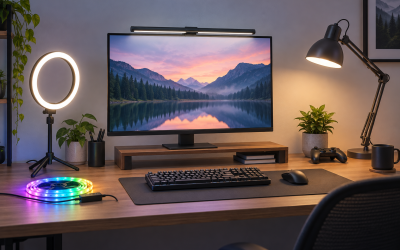
Short answer: for most gaming desks, the Govee Gaming Light Strip G1 is the best monitor backlight because it is sized for PC monitors, hugs curved screens, and matches its colors to what is on your display. If you prefer light bars over adhesive strips, the Philips Hue Play Light Bar 2-Pack is the premium pick. If all you want is honest bias lighting that softens the contrast between a bright screen and a dark room, the Power Practical Luminoodle True White does that job for the least fuss. The Luminoodle Color Pro adds color options to the same simple USB formula, and the Hamlite RGBW kit covers very large displays with a dedicated white channel for proper bias light.
As an Amazon Associate, we earn from qualifying purchases.
Table of Contents
- Why Put a Light Behind Your Monitor
-
- Govee Gaming Light Strip G1 — Best for Screen-Sync Gaming
-
- Philips Hue Play Light Bar 2-Pack — Best Light Bars
-
- Power Practical Luminoodle Color Pro — Best Color Strip on USB Power
-
- Hamlite RGBW LED Backlight — Best for Large Displays
-
- Power Practical Luminoodle True White — Best Pure Bias Light
- How to Choose a Monitor Backlight
- FAQ
- Conclusion
- Product and ASIN Reference
Why Put a Light Behind Your Monitor
A monitor backlight throws a soft halo onto the wall behind your screen. That halo does two useful things. First, it raises the ambient light level around the display, so your eyes stop working so hard to jump between a bright panel and a dark room, the main source of end-of-session eye fatigue. Second, it makes the picture look better: with a mid-level glow behind the screen, blacks read as deeper and contrast looks stronger, especially on IPS panels that can look washed out in a pitch-black room.
There are two families of products here. Bias lighting kits are simple strips, usually a fixed 6500K white that matches the daylight white point most displays are calibrated to. Ambient and gaming kits add color, app control, and live color matching that mirrors your game on the wall. Which family suits you depends on whether your priority is eye comfort, immersion, or both.
1. Govee Gaming Light Strip G1 — Best for Screen-Sync Gaming
The Govee Gaming Light Strip G1 is one of the few backlights designed from the start for PC monitors rather than adapted from TV kits. It comes in sizes for 27 to 34 inch monitors, including curved models, and the strip uses a double-bead layout with 108 light sources, so the glow stays even as it bends around a curved back panel.
Its headline feature is VibraMatch color matching. Through the Govee Desktop software, the strip reads pixel points from your screen and reproduces them as RGBIC light on the wall, so explosions, sunsets, and neon city scenes spill past the bezels. RGBIC means different segments of the strip can show different colors at once, which is what makes the matching effect convincing. There are also 123 scene modes and a music sync mode for times when you just want ambient effects. Control runs through the Govee Home app and voice assistants, it works with Razer Chroma, and it can sync with up to ten other Govee lights through DreamView for a full-room setup. One caveat from the product notes: copy-protected streaming content cannot be read by the color-matching software, so screen sync is aimed at games and desktop use.
Specs
- Model: H6609
- Monitor size: 27–34 inches, including curved monitors
- Light type: RGBIC LED strip with double light beads
- Light sources: 108
- Strip length: 5.9 ft for the 27–34 inch size
- Color features: VibraMatch screen color matching, 123 scene modes, music sync
- Control: Govee Home app, Govee Desktop software, voice control, Razer Chroma support
- Power: Wall adapter (included)
- Tier: Premium
2. Philips Hue Play Light Bar 2-Pack — Best Light Bars
If you do not want to stick anything to your monitor, the Philips Hue Play takes the other approach: two compact light bars that sit or mount behind your display and wash the wall with light. The base kit includes two White & Color Ambiance bars and one power supply, and the bars can stand upright on their feet, lie flat, or attach behind a screen with the included mounting hardware.
Because these are full Hue lights, each bar can produce the complete Hue range of whites and 16 million colors, with scenes, schedules, and voice control through Alexa, Google Assistant, and Apple HomeKit. On a PC, the Hue Sync desktop app can mirror your screen, games, and music onto the bars, making them a genuine gaming backlight as well as smart room lighting. The trade-off is ecosystem lock-in: a Hue Bridge is required for the full feature set and is sold separately, which keeps this kit firmly in the premium tier.
Specs
- Model: 7820230U7 (black 2-pack base kit)
- Light type: Two LED light bars, White & Color Ambiance
- Colors: 16 million colors plus adjustable white
- Included: 2 light bars, 1 power supply, mounting hardware
- Control: Philips Hue app, voice control with Alexa, Google Assistant, and Apple HomeKit
- Screen sync: Via the Hue Sync desktop app on PC
- Requirement: Philips Hue Bridge for full smart features (sold separately)
- Placement: Upright, flat, or mounted behind the display
- Tier: Premium
3. Power Practical Luminoodle Color Pro — Best Color Strip on USB Power
The Luminoodle Color Pro is the middle path between a strict bias light and a smart gaming strip. It is a 118 inch adhesive strip sized for 30 to 40 inch screens, powered entirely from a USB port, and controlled with a simple wireless remote. No apps, no accounts, no bridge.
What sets it apart from generic color strips is that one of its 15 color options is a proper 6500K true white, the reference shade for bias lighting. That means the same strip can run as a neutral bias light for work or movies, then switch to color for a gaming session. Ten brightness levels and three fade modes are handled from the remote, and the 3M adhesive backing plus flexible corners make installation a peel-and-stick job that takes minutes. Power draw is modest at 5 watts over a 5 volt USB connection, so it can run from a monitor or PC USB port and switch on and off with the screen in many setups. It will not sync to your gameplay, and the remote is the only control you get, but as a self-contained color backlight it covers the essentials well. This is a mid-range pick.
Specs
- Model: CR-XQ52-0JOS
- Strip length: 118 inches
- Screen size: 30–40 inches
- Colors: 15 color options plus 6500K true white
- Brightness: 10 brightness levels, 3 fade modes
- Light sources: 90
- Power: USB, 5 volts, 5 watts
- Control: Wireless remote
- Mounting: 3M adhesive backing
- Tier: Mid-range
4. Hamlite RGBW LED Backlight — Best for Large Displays
Most monitor backlights top out around 34 inches. The Hamlite RGBW kit is the option for oversized setups: its 14.8 foot strip is laid out in a W pattern to cover all four sides of a 60 to 65 inch display, which makes it a fit for big gaming TVs used as monitors and multi-panel walls.
The important detail is the RGBW design. Instead of faking white by mixing red, green, and blue, this strip has dedicated white LEDs that produce a clean 6500K, so it works as a legitimate bias light for eye comfort, and it still offers 20 color options when you want atmosphere. An RF remote handles switching and dimming, and RF works without line of sight to a receiver. The strip runs on 5 volt USB power, needs a port that can supply 1 amp, and can turn on and off with the display on most screens. Check that USB requirement before ordering, since an underpowered port can cause flicker. Hamlite sells the same RGBW design in shorter lengths for smaller screens as well. This kit sits in the mid-range tier.
Specs
- Model: RGBW-45M
- Strip length: 14.8 ft, W-type layout covering 4 sides
- Screen size: 60–65 inches
- Light type: RGBW strip with dedicated 6500K white LEDs
- Colors: 20 color options plus true white
- Power: USB, 5 volts, 1 amp required
- Control: RF remote
- Tier: Mid-range
5. Power Practical Luminoodle True White — Best Pure Bias Light
The original Luminoodle is the simplest product in this roundup, and for pure bias lighting it is arguably the most correct. This version produces only 6500K true white, the daylight reference point that display calibration targets, so the glow behind your screen stays neutral and does not tint your perception of on-screen color. It is the budget pick here, and the one to choose if eye strain is the problem you are solving.
The kit is a 78 inch strip sized for 24 to 29 inch screens, which covers most single desktop monitors. It plugs into a USB port, draws 5 watts, and uses 3M adhesive to attach to the back of the panel. A remote adjusts brightness, and because it is USB powered it can wake and sleep with your monitor or PC. There are no colors, no app, and no sync features, and that is the point: nothing to configure and nothing to distract. If you later decide you want color from the same style of kit, the Color Pro above is the step up. For a straightforward, calibration-friendly halo behind a work or gaming monitor, this remains the reference budget option.
Specs
- Strip length: 78 inches (2 m)
- Screen size: 24–29 inches
- Color temperature: 6500K true white only
- Power: USB, 5 volts, 5 watts
- Control: Remote control for brightness
- Mounting: 3M adhesive backing
- Included: LED strip, 3M adhesive, USB cable
- Tier: Budget
How to Choose a Monitor Backlight
Match the length to the screen. A strip should run along at least the top and sides of the panel. Too short and the halo pools in the middle; too long and you will be doubling back excess strip. Every kit here is sold by screen size, so buy for your diagonal and check whether the strip covers three sides or all four.
Decide between white accuracy and color. For eye comfort and accurate perceived contrast, a fixed 6500K white is the technically correct bias light, and high color rendering matters more than features. RGB and RGBIC kits trade a little of that purity for immersion and style. RGBW strips and the Luminoodle Color Pro sit in between, offering a true white mode alongside color.
Pick a sync method, or none. Screen-matching kits use software that reads your display (Govee VibraMatch, Hue Sync on PC) or a camera or HDMI box on TV-focused setups. Software sync is the cleanest option for a PC desk. If you do not game with ambient effects, a remote-controlled strip is simpler and cheaper to live with.
Check the power source. USB-powered strips are tidy and switch with the screen, but they need a port with enough output, typically 5 volts at 1 amp for longer runs. Wall-powered kits like the Govee G1 and Hue Play are brighter and independent of your ports, at the cost of one more cable and adapter.
Think about mounting. Adhesive strips disappear behind the monitor but are semi-permanent. Light bars like the Hue Play can be repositioned freely and moved between screens, which suits renters and anyone who changes setups often.
FAQ
What does a monitor backlight actually do?
It lights the wall behind your screen, which reduces the contrast between the bright display and a dark room. That lowers eye strain during long sessions and makes blacks and shadow detail look deeper, because your eyes judge the screen against a mid-level background instead of darkness.
Is 6500K white or RGB better for bias lighting?
For pure bias lighting, 6500K white is the reference standard because it matches the white point displays are calibrated to and does not shift how colors look. RGB is better for gaming atmosphere and room style. If you want both, choose an RGBW strip or a color strip with a true white mode.
How long a strip do I need for my monitor?
Buy by the screen-size rating on the kit rather than measuring the strip alone. A 24 to 29 inch monitor typically uses a strip of about 78 inches, mid-size 30 to 40 inch screens use around 118 inches, and very large displays need 14 feet or more to cover all four sides evenly.
Can these kits run from a monitor USB port?
The USB-powered kits here can, provided the port supplies enough current, usually 5 volts at 1 amp for longer strips. USB power also lets the light switch on and off with the screen. Wall-powered kits like the Govee G1 and Philips Hue Play do not use USB and need their included adapters instead.
Conclusion
For a gaming PC, the Govee Gaming Light Strip G1 is the most complete monitor backlight: correct sizing for 27 to 34 inch screens, curved-panel fit, and real screen color matching. The Philips Hue Play Light Bar 2-Pack is the better buy if you prefer movable bars and already live in the Hue ecosystem. On a simpler track, the Luminoodle Color Pro adds color to a painless USB strip, the Hamlite RGBW scales the same idea up to very large displays with a proper white channel, and the Luminoodle True White remains the budget benchmark for neutral, eye-friendly bias light. Match the kit to your screen size and to how much smart control you actually want, and any of the five will make a dark-room desk setup easier on your eyes.
Related guides
More from Amazon
Programs that pair well with the guide above. Offers and eligibility are set by Amazon and may change.
Free shipping on eligible items, Prime Video and more. Eligible new members can start with a free trial.
Start a Prime free trialAd-free music streaming. Eligible new subscribers can start with a free trial.
Try Music Unlimited freeA Prime membership for ages 18-24 with a trial period. Eligibility is set by Amazon.
See Prime for Young AdultsAudiobooks and podcasts to listen to on the go. Eligible new members can start with a free trial.
Try Audible freeAs an Amazon Associate we earn from qualifying purchases.