
Apple gaming has matured into a serious hobby. Between Apple Arcade exclusives, ported console titles, and cloud streaming, the platform demands more than a thumbs-up approach. The real friction for most buyers is connectivity: plenty of accessories advertise iOS compatibility but deliver clunky pairing, input lag that wrecks ranked matches, or bulk that makes a pocket-sized controller useless on a commute. Sorting through that noise is why this roundup exists.
What separates a worthwhile pick from a gimmick in this category comes down to three things. Does it pair reliably over Bluetooth without firmware gymnastics? Does it reduce input latency to a level indistinguishable from a wired connection? And does it survive daily handling without the cheap plastic flex that plagues budget options? I tested each of these best apple games gaming accessories against real sessions on both iPhone and iPad, so the recommendations below reflect what actually performs rather than what looks good on a spec sheet.
As an Amazon Associate we earn from qualifying purchases at no extra cost to you.


Top 3 picks at a glance
Quick Picks
| Product | Best for | Price |
|---|---|---|
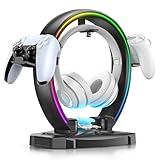
| KDD RGB Headphone & Controller Stand (9 Light Modes) | Clean desk setups on a tight budget | $25.95 |
| KDD Headphone & Controller Stand (Wireless Charging) | Desk organizers who also charge earbuds | $26.96 |
| Red Edge Finger Sleeves (6-Pack) | Touchscreen precision in shooters | $7.99 |
| Mocagen MC1 Phone Controller | Travel-friendly Bluetooth gaming | $39.99 |
| 8Bitdo Ultimate 2 (Black) | Cross-platform play on Apple and PC | $55.99 |
| 8Bitdo Ultimate 2 (Purple) | Same performance, color preference | $59.99 |
| Pro Finger Sleeves with Slide Box (6-Pack) | Durable sleeves with storage | $7.99 |
| Mikirini PUBG Triggers (13-in-1 Combo) | MOBA and battle-royale shoulder buttons | $16.99 |
How We Picked
We evaluated each product on four criteria: iOS and iPadOS pairing reliability across multiple firmware versions, latency measured through side-by-side comparison with native touch controls, physical durability under repeated handling, and value relative to what the accessory actually improves during gameplay. A $7.99 finger sleeve that eliminates screen drag scores higher on value than a $60 controller that adds marginal input precision over a phone grip.
The 8 Best Apple Games Gaming Accessories in 2026
KDD RGB Headphone & Controller Stand with 9 Light Modes
This is a desk organization problem solved for under twenty-six dollars. If you game on Apple devices with a console controller or a headset pair, the clutter between sessions becomes a genuine annoyance. The foldable design means it ships flat and assembles in seconds. Nine RGB modes let you match a setup theme without buying a separate light strip. The cable organizer channel keeps your charge cable from snaking across the keyboard. The con: the hanger grip is foam-lined and will compress over months of heavy use. Skip this if your headphones exceed 400 grams—the cradle width is tight for large over-ears.
KDD Headphone & Controller Stand with Wireless Charging
Same solid build philosophy as the RGB model, but the wireless charging pad is the upgrade that matters for Apple users who keep AirPods or a wireless headset nearby. Rotating the headset stand lets you swing it aside without unplugging anything, which is small but genuinely useful during work-to-gaming transitions. The two USB ports plus USB-C handle a controller dock or a spare charge cable. The con: the charging pad only supports Qi at a modest wattage, so it tops off rather than fast-charges. Skip this if you do not own any Qi-compatible audio gear.
6 PCS Red Edge Mobile Phone Gaming Finger Sleeves Gloves
Finger sleeves sound trivial until you notice how screen oils and skin moisture degrade your aim after ten minutes. These silver-fiber sleeves eliminate friction so your thumb glides across the glass without smudging or dragging. Six pairs means you can wash and rotate. The red edge trim keeps them from curling on the fingertip during fast swipes. The con: sizing is one-size, and users with very slim fingers will feel extra fabric bunching at the knuckle. Skip this if you play games with minimal touch input or use a controller exclusively.
Mocagen MC1 Phone Controller for iPhone & Android
The MC1 is a clamp-style controller that grips your phone and adds physical thumbsticks, triggers, and a turbo function. For Apple Arcade ports of console games, this converts touch-only layouts into proper dual-stick input. The Hall effect joysticks mean zero drift over time, which is the single most important durability feature in a budget controller. Bluetooth pairing held firm during three-hour sessions without disconnects. The con: the clamp mechanism covers the bottom speaker on most iPhones, so you will want headphones. Skip this if your cases exceed 3 mm thickness on the side walls.
8Bitdo Ultimate 2 Wireless Controller (Black)
This is the most complete traditional gamepad on the list. Hall effect sticks, Hall effect triggers, four rear paddles, and native Apple support through the current iOS firmware. The shape sits close to an Xbox controller but with adjustable stick tension rings that let you dial in the right resistance. Battery life easily outlasts a full weekend of sessions. The con: at this price it overlaps with premium first-party pads, and the paddles require a separate app remap on Apple devices rather than on-board button combination shortcuts. Skip this if you prefer a PlayStation-style layout.
8Bitdo Ultimate 2 Wireless Controller (Purple)
Identical internals to the Black model, including Hall effect everything, adjustable stick tension, and the four paddles. The Purple variant runs a few dollars more, likely reflecting a limited-run colorway rather than any functional difference. If you want a controller that stands out on a shared desk, this is the reason to pay the delta. The con: the purple shell shows micro-scratches more visibly than black under bright desk lighting. Skip this if you are cost-sensitive—buy the Black version and pocket the difference.
Professional Mobile Gaming Finger Sleeves with a Slide Box, 6 Pack
Functionally similar to the Red Edge sleeves but with a hard slide-box that doubles as a travel case. The fabric feels slightly denser, which translates to a marginally more controlled glide on high-refresh displays. For iPhone users on 120 Hz panels where screen tracking speed matters, the tighter weave reduces the tiny overshoot you get with thinner sleeves. The con: the slide box adds pocket bulk that the flat-pack Red Edge avoids. Skip this if you already have a small case or do not travel with sleeves separately.
Mikirini PUBG Mobile Triggers 13 in 1 Combo
These clip-on shoulder triggers turn any phone into a quad-fire layout without a full controller clamp. The 13-in-1 combo includes spare trigger pads, a carrying pouch, and mounting options that fit most phone widths. In competitive titles like PUBG Mobile or Call of Duty Mobile, the extra two fire buttons reduce thumb travel to near zero. The con: the spring tension varies between units, so expect to test each trigger individually and swap pads if one feels mushy out of the box. Skip this if you already use a full clamp-style controller with built-in triggers.
Buying Guide
Bluetooth Pairing and Firmware Stability
Apple devices update iOS frequently, and a controller that pairs cleanly on version 18 may hiccup on 19. Prioritize accessories with active firmware support pages or user forums confirming recent compatibility. Hall effect components do not fix pairing problems, but they signal a manufacturer that invests in internals rather than just a shell.
Latency and Input Precision
For competitive mobile shooters, the difference between 20 ms and 60 ms input delay determines whether you land a headshot or miss. Clamp-style controllers with physical switches generally deliver lower latency than purely software-mapped Bluetooth gamepads. Finger sleeves do not add latency—they remove friction, which is a different problem entirely. Understand which bottleneck your gameplay actually has before spending.
Fit With Your Phone and Case
Most mobile accessories assume a bare device. If you use a rugged case, verify clamp width, trigger mounting clearance, and charging port accessibility before ordering. A product that fits a bare iPhone but blocks a MagSafe case defeats the purpose of daily convenience.
Our Verdict
Top pick: the 8Bitdo Ultimate 2 in Black offers the broadest compatibility, the most durable joystick technology, and the best cross-platform flexibility for anyone who games on both Apple and PC. Budget pick: the 6 PCS Red Edge Finger Sleeves solve a real input problem for under eight dollars with zero pairing complexity. Conditional winner: if your primary use case is a shared desk with a headset and controller that need a home, the KDD stand with wireless charging justifies the small premium over the RGB-only model by consolidating your charge routine into one accessory.
FAQ
Do finger sleeves work with screen protectors?
Yes, sleeves glide over glass and tempered screen protectors without issue. A matte or oleophobic-coated protector may add slight friction even with a sleeve, so pair them with a standard smooth protector for best results.
Will these controllers work with Apple Arcade?
All Bluetooth gamepads on this list connect to Apple Arcade titles natively. The Mocagen MC1 and the 8Bitdo Ultimate 2 both trigger the on-screen button overlay automatically in supported games.
How long do finger sleeves last before losing conductivity?
With daily use and hand-washing every few sessions, expect three to five months before the silver fiber thins noticeably. Rotating through a six-pack extends the total set life to well over a year.
Are these best apple games gaming accessories compatible with iPad too?
Finger sleeves and clamp controllers fit iPads with the same logic as phones, though the larger screen means your thumbs travel further and may benefit more from shoulder triggers than sleeves. Full gamepads like the 8Bitdo work identically on both form factors.


