
The best gaming mouse for Splitgate 2 is the HyperX Pulsefire Haste 2 Wired for players who want the clearest competitive advantage: a 53 g body, an 8,000 Hz polling-rate mode, and a shape aimed at fast FPS movement without wireless battery management. It is the strongest overall choice when your priorities are low weight, responsive aim, and consistent wired performance. If you want a lower-cost option, the Redragon M730 is a practical lightweight pick, while the Redragon M602 is the better budget choice for players who need extra programmable buttons. The Redragon M725 is the most interesting wireless lightweight alternative, and the Redragon Large Wireless Gaming Mouse is better for big hands than the compact FPS-focused designs.
Splitgate 2 rewards rapid target switching, controlled tracking, quick 180-degree turns, and reliable movement while you are using keyboard inputs, portals, and abilities at the same time. That makes sensor consistency, weight, grip comfort, cable or wireless behavior, and button placement more important than an enormous DPI number. This roundup compares all twelve listed mice by those practical factors rather than treating maximum DPI as a measure of aim quality. The right answer depends on your grip, hand size, sensitivity, desk space, tolerance for cables, and whether you also play MMO, strategy, or productivity software.
Top 3 picks at a glance

Quick Comparison
| Product | Best for | Key specs or design points | Price tier |
|---|---|---|---|
| HyperX Pulsefire Haste 2 | Competitive FPS and overall performance | Wired; 53 g; up to 8,000 Hz polling; precision sensor class | Premium |
| Redragon M612 | Budget players wanting remappable buttons | Wired; optical sensor; up to 8,000 DPI; programmable controls; RGB | Budget |
| Redragon M908 | MMO and ability-heavy layouts | Wired; up to 12,400 DPI; many remappable buttons; RGB | Mid-range |
| Redragon M725 | Lightweight wireless FPS play | Wireless; 49 g; honeycomb shell; black finish | Mid-range |
| Redragon M602 | Low-cost ergonomic versatility | Wired; up to 7,200 adjustable DPI; 9 programmable buttons; RGB | Budget |
| Redragon Large Wireless Gaming Mouse | Large hands and flexible connectivity | Large ergonomic shell; 2.4 GHz, Bluetooth, and wired modes; rechargeable; RGB | Budget |
| Redragon M730 | Budget lightweight FPS play | Wired; lightweight design; up to 10,000 DPI; remappable controls; RGB | Budget |
| Glorious Model O 2 | Ultralight competitive FPS use | Wired; 59 g; up to 26,000 DPI; Motion Sync; 80-million-click-rated switches | Premium |
| Corsair Harpoon v2 Wireless | Wireless everyday gaming | Wireless gaming mouse; black finish; established gaming peripheral software ecosystem | Premium |
| TRELC Wired Vertical Mouse | Vertical ergonomics on a budget | Wired; 5D rocker; up to 10,000 DPI; 11 programmable buttons; vertical design | Mid-range |
| TRELC Wireless Vertical Mouse | Wireless vertical-mouse comfort | Wireless; 5D rocker; up to 24,000 DPI; vertical design; black finish | Premium |
| Redragon M602 Griffin | Tri-mode general-purpose gaming | 2.4 GHz, USB-C, and Bluetooth modes; ergonomic shape; RGB; rechargeable | Mid-range |
How We Chose
The main criterion is whether a mouse helps with the actions Splitgate 2 asks from an FPS peripheral: repeatable low-sensitivity movement, quick corrections, rapid target changes, and uninterrupted access to the primary buttons. Weight and shape therefore receive more emphasis than headline DPI. A sensor capable of far more DPI than most players use is not automatically more accurate, and a high polling-rate setting is useful only when the computer, game, and connection can sustain it without unnecessary power or processing overhead.
We also separated products by category. Lightweight wired mice are judged as competitive FPS tools; multi-button mice are judged for ability binds and mixed genres; vertical models are judged primarily for posture and comfort rather than maximum aim speed; and wireless models are judged by connection flexibility and freedom from cable drag. The recommendations use the specifications stated in the product names and established category characteristics, while avoiding claims of personal testing or invented benchmark results. Upgrade path matters too: a cheaper mouse can be the right purchase if it solves your grip or button problem without paying for features you will not use.
1. HyperX Pulsefire Haste 2 – Best for competitive FPS
As an Amazon Associate we earn from qualifying purchases at no extra cost to you.

The HyperX Pulsefire Haste 2 Wired is the safest overall recommendation for Splitgate 2 because its stated design priorities line up closely with competitive arena-shooter play. Its 53 g weight reduces the effort required for broad swipes, while the wired connection removes battery charging and wireless-state variables. The listed 8,000 Hz polling-rate capability gives it a high report-rate ceiling, although you should treat that as an optional mode rather than a requirement for good aim.
This mouse suits claw and fingertip players especially well, along with palm-grip users whose hands fit its shell. Low weight is useful when your sensitivity is low enough that turning requires substantial arm movement. It can also help players who repeatedly lift and reposition the mouse during portal fights. The trade-off is that a lightweight FPS shape is not the ideal choice for someone who wants a large, heavily sculpted palm rest or a large grid of side buttons.
- Connection: wired USB gaming connection.
- Weight: 53 g according to the listed model description.
- Polling: up to 8,000 Hz according to the listed description.
- Sensor class: precision gaming sensor designed for FPS tracking.
- Best grip: claw, fingertip, or a relaxed palm grip depending on hand size.
The important practical point is not that 8,000 Hz magically makes a player accurate. At 1,000 Hz, the maximum report interval is about 1 millisecond; at 8,000 Hz, it is about 0.125 milliseconds. That difference is small compared with human reaction time, but a high report rate can make cursor updates more frequent on a high-refresh display. It also increases USB and CPU activity, so 1,000 or 2,000 Hz may be the sensible starting point if you notice higher system load.
Compared with the Glorious Model O 2, the Haste 2 gives up some stated sensor resolution and switch-rating headline numbers but remains extremely light and has a high polling-rate mode. Compared with the Redragon M730, it is the more performance-oriented purchase, but the Redragon can offer better value if your budget is tight. Compared with the M725, it avoids charging and wireless interference at the cost of cable management.
Pros
- Very low 53 g weight for fast FPS movement.
- 8,000 Hz polling-rate option for compatible systems.
- Wired operation provides continuous power and predictable connectivity.
- Strong fit for low-sensitivity aiming and frequent repositioning.
Cons
- A cable can create drag if it is not routed or supported well.
- Fewer extra controls than MMO-oriented mice.
- High polling modes are not necessary for every computer or display.
- The lightweight shape may feel too small or minimal for large-hand palm users.
2. Redragon M612 – Best for a budget with remappable buttons

The Redragon M612 is a budget wired mouse for players who want more controls than a basic two-side-button FPS mouse without moving into an MMO grid. Its listing specifies an optical gaming sensor, up to 8,000 DPI, RGB lighting, and remapping keys. That combination makes it a sensible entry point for Splitgate 2 players who need convenient access to abilities, melee, ping, reload, or a push-to-talk command.
The M612 is particularly useful when your keyboard is crowded or when you dislike moving your left hand away from movement keys. A side button can hold an ability or weapon command, but avoid assigning essential actions to buttons that you can accidentally press during a tense fight. The best remapping arrangement is one that reduces hand travel without increasing misclicks. Start with one or two non-critical commands, then add more only after the layout feels natural.
- Connection: wired.
- Sensor: optical gaming sensor.
- Maximum listed sensitivity: 8,000 DPI.
- Controls: remapping keys for additional commands.
- Lighting: RGB gaming-mouse lighting.
For Splitgate 2, do not begin at 8,000 DPI merely because it is the maximum. A practical starting range for many players is 800 to 1,600 DPI with an in-game sensitivity adjusted to produce controlled turns. If that feels too slow, increase gradually. The actual useful setting is the one that lets you track a strafing opponent while still turning quickly enough to react to a portal exit.
Compared with the Redragon M602, the M612 offers a similar budget-oriented approach but is the more natural pick if the stated 8,000 DPI ceiling and remapping focus appeal to you. The M602 advertises nine programmable buttons and a more explicitly ergonomic format, so it may be preferable for mixed use. Compared with the M908, the M612 is less specialized for MMO-style control clusters and should be easier to keep tidy for FPS play. Compared with the M730, it is less focused on lightweight movement.
Pros
- Budget-friendly route to extra programmable controls.
- Optical sensor and 8,000 DPI class are suitable for normal FPS settings.
- Wired connection avoids charging.
- Useful for players who also play games requiring more than two side buttons.
Cons
- Not the lightest mouse in this roundup.
- More buttons can increase accidental presses if badly mapped.
- Maximum DPI is not a substitute for a good sensitivity setting.
- Wired cable management remains necessary.
3. Redragon M908 – Best for MMO-style ability layouts
The Redragon M908 is the most obvious choice in this list for players who want Splitgate 2 controls alongside MMO, action-RPG, or productivity shortcuts. Its listing identifies a wired MMO RGB design, up to 12,400 DPI, and remapping keys. The central advantage is not the maximum DPI; it is having a larger control surface for commands that would otherwise require awkward keyboard reaches.
For a portal shooter, an MMO mouse can work well if you use abilities, communication, weapon selection, or utility commands frequently. It can also make sense for a player who plays several genres and wants one mouse rather than a separate FPS model and MMO model. The compromise is mass and side-button density. If you are trying to make broad low-sensitivity sweeps, a heavier multi-button shell may require more effort than the Haste 2, M725, M730, or Model O 2.
- Connection: wired.
- Sensor class: gaming optical sensor.
- Maximum listed sensitivity: 12,400 DPI.
- Controls: multiple remappable controls in an MMO-oriented layout.
- Lighting: RGB.
A useful setup is to reserve the easiest side buttons for commands that are safe to press during movement. Put push-to-talk, ping, or a frequently used ability close to the thumb, while leaving less accessible controls for menus or non-critical actions. Spend time checking whether the thumb can distinguish each button without looking. A cluster that is technically powerful but difficult to identify by touch can slow decisions rather than improve them.
Compared with the M612 and M602, the M908 offers a more specialized high-button layout. Compared with the TRELC vertical mice, it preserves a conventional gaming posture and is more appropriate for quick competitive aiming, although it may not offer the same posture benefits. Compared with the Haste 2, it is the opposite design philosophy: control density and versatility instead of minimum weight. Choose it for its buttons, not because 12,400 DPI is inherently better than 8,000 DPI.
Pros
- Strong choice for ability-heavy and multi-genre control schemes.
- High listed DPI ceiling with a wired connection.
- Remapping can reduce keyboard hand movement.
- More versatile than a minimalist FPS mouse outside shooters.
Cons
- Button density can cause accidental presses.
- Likely less suitable for players who want the lightest possible aim feel.
- Wired design requires cable routing.
- Extra controls are unnecessary if you only play competitive FPS.
4. Redragon M725 – Best for lightweight wireless FPS play

The Redragon M725 is the most direct wireless lightweight alternative to the wired FPS mice in this roundup. Its listing describes a 49 g honeycomb-shell gaming mouse, which places it below the Haste 2 and Model O 2 in stated weight. That makes it attractive to players who want quick swipes and a cable-free desk without choosing a large ergonomic or multi-button design.
The honeycomb shell is a weight-reduction approach that removes material from the outer body. It can feel airy and agile, but the openings may not suit everyone. Players who eat or drink at the desk should keep the mouse area clean, and people who strongly prefer a solid, sealed surface may find a conventional shell more comfortable. The right choice depends on whether 49 g and wireless freedom are worth those design compromises.
- Connection: wireless gaming mouse design.
- Weight: 49 g according to the listed description.
- Shell: honeycomb construction.
- Best use: fast FPS movement without a cable.
- Finish: black.
Wireless performance is most useful when a cable is the limiting factor. If your current cable catches on the monitor stand, desk edge, or keyboard, removing it can produce a larger practical improvement than moving from one high polling mode to another. Position the wireless receiver where it has a clear, short path to the mouse when the design uses a 2.4 GHz connection. Bluetooth is not the first choice for competitive play when a dedicated gaming connection is available.
Compared with the HyperX Haste 2, the M725 is lighter on paper and removes cable drag, but the Haste 2 has a clearly stated high polling-rate wired capability. Compared with the Redragon M730, the M725 is the wireless-oriented option, while the M730 is simpler if you prefer continuous USB power. Compared with the M602 Griffin, the M725 is more focused on low weight than on tri-mode flexibility or an ergonomic general-purpose shape.
Pros
- 49 g stated weight is excellent for fast arm movement.
- Wireless design eliminates cable drag.
- Honeycomb body supports a lightweight FPS setup.
- Good fit for claw and fingertip users who want a minimal mouse.
Cons
- Honeycomb openings may be less comfortable for some users.
- Wireless mice require charging or battery management.
- Less obviously suited to large hands and palm grip.
- Exact battery and polling details should be checked before purchase.
5. Redragon M602 – Best budget ergonomic all-rounder
![Redragon M602 Gaming Mouse, Ergonomic RGB Gaming Mouse Wired with 7200 Adjustable DPI, 9 Programmable Buttons, Professional Software for Gamer Office [Black]](https://m.media-amazon.com/images/I/4189L2UBl9L._SL160_.jpg)
The Redragon M602 is a budget wired gaming mouse aimed at players who want an ergonomic shape and a broader set of controls. Its listed features include RGB lighting, up to 7,200 adjustable DPI, and nine programmable buttons. That makes it a practical option for someone who plays Splitgate 2 but also wants shortcuts for other games, creative applications, or desktop work.
An ergonomic shell can reduce the feeling that your fingers are suspended over a flat surface, particularly for palm or relaxed claw grips. It may not be as quick to reposition as a compact ultralight mouse, but comfort over a long session is part of competitive performance. A tense hand produces inconsistent aim, and a mouse that is too small can encourage finger curling or excessive grip pressure.
- Connection: wired.
- Maximum listed sensitivity: 7,200 adjustable DPI.
- Controls: nine programmable buttons.
- Shape: ergonomic gaming-mouse design.
- Lighting: RGB.
To configure it for Splitgate 2, assign only the commands that genuinely benefit from the mouse. A useful starting layout is one button for melee or a secondary action, one for ping or communication, and one for an ability. Keep the primary fire, aim, and movement relationship simple. If you find yourself hitting side buttons during recoil control or turning, remove the least useful assignment rather than trying to memorize a crowded layout.
Compared with the Redragon M612, the M602 emphasizes its nine programmable buttons and ergonomic use while the M612 is a more direct optical, 8,000 DPI budget alternative. Compared with the M908, it is less MMO-specialized and may be easier to use in FPS games. Compared with the lightweight M730, it sacrifices minimal mass for a more comfort-oriented feature set. It is a better fit for mixed-use buyers than for esports-style ultralight seekers.
Pros
- Low-cost access to an ergonomic design.
- Nine programmable buttons provide useful flexibility.
- Adjustable DPI supports different games and desktop tasks.
- Wired power is simple and dependable.
Cons
- Not the obvious choice for minimum-weight competitive aiming.
- Nine buttons can be excessive for a pure FPS player.
- 7,200 DPI is more than enough for normal use but not a meaningful aim advantage by itself.
- Cable drag can matter on small or crowded desks.
6. Redragon Large Wireless Gaming Mouse – Best for big hands
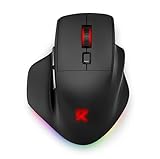
The Redragon Large Wireless Gaming Mouse is the most appropriate choice here for players whose hands feel cramped on lightweight FPS shapes. Its listing specifically identifies it as a large mouse for big hands, with an ergonomic form and three connection modes: 2.4 GHz, Bluetooth, and wired. It is also rechargeable and includes RGB lighting. The result is a flexible general-purpose design rather than a specialist low-weight tournament mouse.
Hand size changes how a mouse feels more than a high DPI number does. If your palm hangs off the rear, your fingers overlap the front buttons awkwardly, or your thumb presses against the side edge, a larger body can improve control. The cost is more physical movement and usually a less nimble feel than a 49 g or 53 g mouse. For a large-handed player, however, a correctly sized heavier mouse can be more accurate and less tiring than an ultralight that forces a cramped grip.
- Shape: large ergonomic gaming mouse.
- Connections: 2.4 GHz wireless, Bluetooth, and wired.
- Power: rechargeable.
- Lighting: RGB.
- Best fit: large hands and mixed gaming or work use.
Use the 2.4 GHz mode for competitive play when available, wired mode when charging is needed, and Bluetooth for compatible non-gaming devices or lower-priority use. A tri-mode mouse can serve as both a desktop mouse and a gaming peripheral, but switching modes adds another setting to remember. Keep the receiver near the mouse and charge before a long session rather than waiting for a low-battery warning during a match.
Compared with the M725, this mouse is the better hand-size choice but is not presented as an ultralight 49 g FPS design. Compared with the M602 Griffin, it shares a flexible wireless-oriented purpose, but its defining advantage is the large ergonomic shape. Compared with the Haste 2, it gives up a competitive lightweight profile and high polling-rate emphasis in exchange for comfort and connection options.
Pros
- Large shape can relieve cramped grips for big hands.
- Three connection modes cover gaming, work, and charging needs.
- Rechargeable wireless design removes routine disposable-battery use.
- Ergonomic profile suits long general-purpose sessions.
Cons
- Large ergonomic construction may feel slow for low-sensitivity FPS swipes.
- Wireless charging still needs planning.
- Bluetooth is not the preferred competitive connection when 2.4 GHz or wired mode is available.
- May feel oversized for small or medium hands.
7. Redragon M730 – Best budget lightweight wired mouse

The Redragon M730 is a budget-oriented wired gaming mouse with a lightweight design, RGB lighting, up to 10,000 DPI, and remapping keys. It is a strong value choice for a Splitgate 2 player who wants the basic advantages of a lighter FPS mouse but does not need to pay for the premium positioning of the Haste 2 or Model O 2.
Its combination of low-mass positioning and programmable controls gives it broader usefulness than a strictly minimal mouse. You can keep the competitive setup simple for Splitgate 2, then assign extra controls for another game or for desktop shortcuts. The wired connection is also a benefit for buyers who want to avoid battery questions. Cable routing remains important: a loose cable dragging across a rough desk can erase much of the benefit of a lightweight body.
- Connection: wired.
- Design: lightweight gaming mouse.
- Maximum listed sensitivity: 10,000 DPI.
- Controls: remapping keys.
- Lighting: RGB.
A sensible first setup is 800 or 1,000 DPI with a moderate in-game sensitivity, then adjustment in small steps. The 10,000 DPI ceiling is useful as flexibility, not as a target. Higher mouse DPI combined with lower game sensitivity can offer finer input granularity, but it does not fix an uncomfortable shape, poor mouse control, or an unsuitable desk surface.
Compared with the HyperX Pulsefire Haste 2, the M730 is the value alternative: it aims at a similar lightweight wired use case but does not carry the same clearly stated 8,000 Hz polling-rate feature. Compared with the M725, it trades wireless freedom for simpler power and potentially lower ongoing fuss. Compared with the Model O 2, it gives up the latter’s 26,000 DPI and Motion Sync specifications, but those features are unnecessary for most Splitgate 2 players.
Pros
- Budget access to a lightweight FPS-oriented design.
- 10,000 DPI ceiling provides plenty of adjustment range.
- Remapping keys add versatility without requiring an MMO grid.
- Wired power is consistent and easy to maintain.
Cons
- Does not offer the same stated polling-rate headline as the Haste 2.
- Cable friction can affect broad swipes.
- Exact shape suitability depends on hand size and grip.
- RGB and high DPI do not directly improve aim.
8. Glorious Model O 2 – Best for ultralight competitive play

The Glorious Model O 2 Wired is a premium wired FPS mouse built around a 59 g ultralight design. Its listing also specifies up to 26,000 DPI, Motion Sync, and switches rated for 80 million clicks. For a Splitgate 2 player who wants a refined lightweight competitive category rather than a budget option, it is one of the strongest alternatives to the HyperX Pulsefire Haste 2.
The 59 g weight is low enough for fast arm movement and repeated lifting. Motion Sync is a sensor feature intended to coordinate sensor data with the mouse’s report timing; it should be viewed as a consistency-oriented feature, not a guarantee of better aim. The 26,000 DPI ceiling is far beyond what most players require. A normal setting between roughly 800 and 1,600 DPI will be more relevant to many FPS players, with game sensitivity determining the final turning speed.
- Connection: wired.
- Weight: 59 g according to the listed description.
- Maximum listed sensitivity: 26,000 DPI.
- Sensor feature: Motion Sync.
- Switch rating: 80 million clicks according to the listed description.
Model O 2 is best when your priorities are low weight, a conventional FPS layout, and long-term switch durability on paper. It is not the right purchase if you need a large palm-filling shape, a wireless connection, or numerous side buttons. It also makes less sense to pay premium money for its headline sensor resolution if your monitor is modest, your sensitivity is high, or your main concern is hand comfort.
Compared with the Haste 2, the Model O 2 is slightly heavier at the stated weights but offers a much higher DPI ceiling, Motion Sync, and an 80-million-click-rated switch specification. The Haste 2 has the higher stated polling-rate capability. Compared with the M730, the Model O 2 is the more feature-forward premium choice; the M730 is more compelling when budget matters. Compared with the M725, it avoids wireless charging and honeycomb-specific concerns.
Pros
- 59 g ultralight body suits fast competitive FPS movement.
- 26,000 DPI ceiling provides extensive sensitivity flexibility.
- Motion Sync is a useful sensor-feature differentiator.
- 80-million-click-rated switches provide a strong durability specification.
Cons
- Premium pricing is difficult to justify if you only need basic FPS operation.
- Wired cable management remains necessary.
- Very high DPI is rarely needed in normal play.
- Lightweight shape may not suit large-hand palm grips.
9. Corsair Harpoon v2 Wireless – Best for wireless everyday gaming

The Corsair Harpoon v2 Wireless is the sensible choice for players who want an established wireless gaming-mouse format for both Splitgate 2 and everyday desktop use. The listed model is black and wireless, while Corsair’s gaming-peripheral ecosystem is a familiar reason for buyers to prefer it when they already use compatible software or other Corsair hardware. It is not the most obviously ultralight or button-dense product in this roundup, so its appeal is balanced wireless convenience.
A wireless mouse can improve aim indirectly by removing cable drag. This matters most when the cable catches on the desk edge or creates tension during a low-sensitivity swipe. Place the receiver close to the mouse, keep the wireless path unobstructed, and use a wired mode for charging if the model supports it. Exact battery duration and connection details can vary by configuration, so check the current product documentation rather than assuming a fixed runtime.
- Connection: wireless gaming mouse.
- Color: black.
- Category: everyday wireless gaming peripheral.
- Best use: players who want cable-free play and a recognized gaming software ecosystem.
Compared with the Redragon M725, the Harpoon v2 Wireless is less defined by an extremely low 49 g weight and honeycomb shell. Compared with the Redragon Large Wireless Gaming Mouse, it is a more conventional gaming choice rather than a product specifically described as large and tri-mode. Compared with the M602 Griffin, it may appeal more to buyers already invested in Corsair’s ecosystem, while the Griffin emphasizes 2.4 GHz, USB-C, and Bluetooth flexibility.
For competitive Splitgate 2, choose the Harpoon when the wireless experience and general-purpose reliability matter more than the absolute lightest body. If your hand is small or you use fingertip grip, compare the dimensions carefully. A wireless mouse that is too large or too heavy can be less suitable than a lighter wired model, even though it removes the cable.
Pros
- Cable-free play can reduce desk friction.
- Suitable for gaming and everyday computer use.
- Established gaming-brand ecosystem may simplify peripheral management.
- Black finish is easy to match with most setups.
Cons
- Not positioned as the lightest mouse in this roundup.
- Wireless charging and battery planning remain necessary.
- Fewer listed control details than the MMO-oriented alternatives.
- Exact wireless specifications should be checked for the current revision.
10. TRELC Wired Vertical Mouse – Best for wired vertical ergonomics

The TRELC Wired Gaming Mouse is a specialist option for players who want a vertical ergonomic posture and more controls. Its listing specifies a vertical design, a 5D rocker, up to 10,000 DPI, and 11 programmable buttons. That makes it fundamentally different from the low, symmetrical FPS shapes elsewhere in this guide. It should be chosen because your wrist or forearm benefits from a vertical grip, not because 10,000 DPI promises higher accuracy.
A vertical mouse rotates the hand into a more handshake-like position. Some users find this reduces the urge to twist the forearm inward, while others find it slower for rapid competitive movement. Splitgate 2 requires quick horizontal sweeps and repeated target corrections, so a vertical mouse is a comfort-first decision. If pain, fatigue, or posture is the issue, comfort may outweigh a small aiming disadvantage. If you are purely optimizing ranked FPS performance, a conventional lightweight mouse is the safer category.
- Connection: wired.
- Shape: vertical ergonomic design.
- Control feature: 5D rocker.
- Maximum listed sensitivity: 10,000 DPI.
- Controls: 11 programmable buttons.
Start with a moderate DPI and use the vertical shape for a few short sessions before changing in-game sensitivity. The goal is to determine whether your wrist stays relaxed while you can still reach the primary buttons reliably. Assign only essential commands to the easiest buttons. A vertical mouse with eleven programmable controls can be useful for applications and strategy games, but a crowded FPS layout may make accidental presses more likely.
Compared with the TRELC Wireless Vertical Mouse, this model prioritizes a wired connection and has a lower listed maximum DPI. The wireless model is more convenient, but the wired version avoids charging. Compared with the M602, the TRELC offers a much more pronounced ergonomic posture and more listed buttons. Compared with every lightweight conventional mouse, it offers a different solution to comfort rather than competing directly on weight.
Pros
- Vertical shape may help users who dislike a rotated forearm posture.
- 11 programmable buttons offer broad versatility.
- 5D rocker adds another control method.
- Wired power avoids battery management.
Cons
- Vertical geometry may feel slower for rapid FPS corrections.
- Not the natural choice for competitive ultralight aiming.
- Many controls can create accidental inputs.
- Requires an adaptation period for users of conventional mice.
11. TRELC Wireless Vertical Mouse – Best for wireless ergonomic comfort

The TRELC Wireless Gaming Mouse combines a vertical shape with wireless operation and a listed maximum of 24,000 DPI. It is aimed at players who want to reduce cable clutter while retaining the upright hand position of a vertical mouse. The black model is a niche choice for Splitgate 2, but it can be sensible when wrist comfort is the primary constraint and the mouse will also be used for work.
Its 24,000 DPI figure should be interpreted as range, not performance proof. Most players will use a much lower setting. A vertical mouse’s shape changes the mechanical path of movement, so it is more important to find a sensitivity that allows controlled tracking than to use the top DPI step. Begin with a moderate setting, test slow tracking and a 180-degree turn, and adjust in small increments.
- Connection: wireless.
- Shape: vertical ergonomic mouse.
- Maximum listed sensitivity: 24,000 DPI.
- Control feature: 5D rocker.
- Finish: black.
Wireless placement matters more on a desk with a metal PC case, monitor arm, or other possible obstructions. Keep the receiver close to the mouse if a dedicated wireless receiver is included, and maintain a charging routine. For competitive play, use the lowest-latency wireless mode available rather than Bluetooth when the model offers another gaming connection.
Compared with the wired TRELC model, this version adds convenience but also introduces charging and wireless-management considerations. Compared with the Redragon Large Wireless Gaming Mouse, both can serve comfort-focused buyers, but the TRELC is specifically vertical while the Redragon is described as large and ergonomic rather than vertical. Compared with the Harpoon v2 Wireless, the TRELC is more posture-specialized and less conventional for fast FPS play.
Pros
- Combines wireless freedom with a vertical hand position.
- 24,000 DPI provides a broad adjustment range.
- 5D rocker and vertical controls suit shortcut-heavy users.
- Can serve both gaming and work comfort needs.
Cons
- Vertical shape is a major adaptation from standard FPS mice.
- Wireless charging is part of ownership.
- High DPI does not compensate for slower adaptation or unfamiliar geometry.
- Not the safest choice for a player focused only on competitive aim.
12. Redragon M602 Griffin – Best for tri-mode versatility

The Redragon M602 Griffin is a mid-range ergonomic gaming mouse with three connection methods: 2.4 GHz wireless, USB-C, and Bluetooth. Its listing also identifies RGB spectrum backlighting and an ergonomic design. This makes it one of the most flexible options in the roundup for a player who wants one mouse for Splitgate 2, a laptop, and general desktop work.
The 2.4 GHz mode is the natural choice for gaming when available because it is designed for a dedicated wireless connection. USB-C is useful when charging or when you want a direct wired link. Bluetooth is convenient for compatible devices and casual use. These modes give the Griffin a practical upgrade path from a basic wired mouse, although they do not make it a specialist ultralight FPS product.
- Connections: 2.4 GHz wireless, USB-C, and Bluetooth.
- Shape: ergonomic gaming mouse.
- Lighting: RGB spectrum backlighting.
- Power: rechargeable wireless design.
- Best use: mixed gaming, laptop, and desktop setups.
For Splitgate 2, start in 2.4 GHz mode and use a moderate DPI. If you notice the mouse feeling less agile than an ultralight, reduce unnecessary grip pressure before increasing sensitivity. An ergonomic shape can be more stable for palm users, but it may not suit fingertip players who want a very low front profile. The right decision depends on whether flexibility and comfort matter more than minimum mass.
Compared with the Redragon Large Wireless Gaming Mouse, the Griffin is the more explicitly tri-mode model in the listed description, while the large mouse emphasizes big-hand sizing. Compared with the M725, the Griffin is more ergonomic and connectivity-focused rather than a 49 g honeycomb FPS design. Compared with the Corsair Harpoon v2 Wireless, the Griffin’s stated connection options make it attractive to people who regularly switch between devices.
Pros
- 2.4 GHz, USB-C, and Bluetooth cover multiple use cases.
- Ergonomic design suits general-purpose sessions.
- Rechargeable wireless operation reduces cable dependence.
- RGB spectrum lighting adds setup customization.
Cons
- Not positioned as an ultralight competitive FPS mouse.
- Wireless charging requires planning.
- Bluetooth should not be the first choice for competitive play when 2.4 GHz is available.
- Extra connection modes may be unnecessary for a single gaming PC.
How to Choose
Choosing the best gaming mouse for Splitgate 2 starts with identifying the limitation you are trying to remove. If your current mouse feels slow during a 180-degree turn, weight, glide, cable friction, and desk space are more relevant than maximum DPI. If you miss ability commands because your left hand is busy with movement, programmable buttons matter. If your wrist becomes uncomfortable after an hour, shape and grip stability matter more than a sensor headline. Use the following criteria in order rather than buying the mouse with the largest number on its box.
1. Decide whether you need FPS speed or control density
A competitive FPS mouse usually has a simple button layout and a low weight. The Haste 2, M725, M730, and Model O 2 occupy that side of the list. They are appropriate when your main actions are aiming, firing, movement, jumping, crouching, reloading, and perhaps one or two side-button commands. A multi-button mouse such as the M908, M602, or TRELC models is better when you want several abilities or shortcuts available without moving your keyboard hand.
More buttons are not automatically better. Every additional control requires a mental association and creates another surface that can be pressed accidentally. In Splitgate 2, accidental ability activation can be more damaging than reaching a nearby keyboard key. Map the two or three most time-sensitive commands first, play several sessions, and add controls only if you can identify them by touch.
2. Match the mouse to your hand and grip
Measure hand length from the wrist crease to the tip of the middle finger, then compare that measurement with the manufacturer’s current dimensions where available. As a broad practical guide, smaller hands often feel better with a compact shell and fingertip or claw grip, while larger hands may benefit from a longer, taller body that supports the palm. These are tendencies rather than rules. Finger length, thumb position, and preferred posture can matter more than hand length alone.
Palm grip spreads contact across the shell and usually benefits from a fuller ergonomic body. Claw grip uses the rear palm and bent fingers, making a medium-sized FPS shape attractive. Fingertip grip keeps the palm largely off the mouse and often benefits from low weight and a shorter body. The M725’s 49 g listing and the Haste 2’s 53 g listing are appealing for users who lift and reposition often, while the Large Wireless Gaming Mouse is the obvious category choice when small mice cause cramped fingers.
Vertical mice are a separate decision. The TRELC wired and wireless models may help someone who dislikes rotating the forearm inward, but their posture changes the way fast horizontal movement feels. Buy one for comfort or ergonomic need, not merely because its DPI maximum is high.
3. Understand DPI, sensitivity, and effective movement
DPI describes how many counts the sensor reports for each inch of physical movement. It does not directly describe accuracy. Your effective in-game sensitivity is determined by DPI multiplied by the game’s sensitivity value. For example, changing from 800 DPI at a sensitivity of 1.0 to 1,600 DPI at a sensitivity of 0.5 preserves the same basic turn scale, assuming the game processes the values proportionally.
This is why 7,200, 8,000, 10,000, 12,400, 24,000, or 26,000 DPI should be treated as available range rather than a ranking. A useful starting point for many FPS players is 800 to 1,600 DPI, followed by an in-game sensitivity that allows a comfortable 180-degree turn across the available mouse area. Players with a small desk may need a faster setting; players with a large mat may prefer slower arm aiming.
Use a simple calibration exercise. Place the mouse at the center of the mat, move it to one edge, and see how far your character turns. If you cannot complete a practical emergency turn without lifting the mouse repeatedly, lower the physical movement required by raising sensitivity slightly. If small wrist movements make the crosshair jump past targets, reduce sensitivity or use a lower DPI. Change one variable at a time.
4. Choose polling rate based on the whole system
Polling rate is how often the mouse reports its position. The report interval is approximately 1,000 divided by the polling rate in milliseconds: 1,000 Hz is about 1 ms, 2,000 Hz about 0.5 ms, 4,000 Hz about 0.25 ms, and 8,000 Hz about 0.125 ms. The Haste 2 specifically lists up to 8,000 Hz, while not every mouse in this roundup states a comparable figure.
Higher reporting can be most meaningful on high-refresh displays and during fast movement, but it can increase USB traffic and CPU work. As a worked example, suppose a mouse reports 8,000 times per second and each report is treated as a small input packet of roughly 16 bytes before protocol overhead. That is about 128,000 bytes per second, or approximately 125 KiB per second of raw report payload. The bandwidth is tiny compared with USB’s capacity; the more relevant concern is processing and game-engine handling, not saturating the connection.
Start at 1,000 Hz, confirm the game feels stable, and then try 2,000 or 4,000 Hz if the mouse supports it. Use 8,000 Hz when your game, system, and display behave well at that setting. A stable 1,000 Hz connection is preferable to a high mode that causes stutter, excessive CPU use, or inconsistent frame pacing.
5. Decide between wired and wireless
Wired mice such as the Haste 2, M612, M908, M602, M730, Model O 2, and TRELC wired model do not require battery planning. Their main weakness is cable drag. Route the cable through a bungee or a raised point near the back of the desk, leaving enough slack for a full swipe but not enough to catch on the monitor stand. A cable that bends sharply at the mouse can also create unwanted pull.
Wireless mice remove that physical resistance, which can be a major benefit for low-sensitivity players. The M725, Large Wireless Gaming Mouse, Harpoon v2 Wireless, TRELC wireless model, and M602 Griffin all serve different wireless priorities. Use a dedicated 2.4 GHz gaming connection for competitive play when available. Use Bluetooth for convenience on compatible devices, not as the default assumption for the lowest-latency competitive setup. Use wired mode when charging or when wireless conditions are uncertain.
Battery runtime is not just a number; it is a routine. If you play two hours per day and a mouse provides a claimed 60 hours under a particular lighting and polling configuration, the theoretical interval is 60 divided by 2, or 30 days. Real use varies with lighting, polling rate, sleep settings, battery age, and radio mode, so charge weekly rather than waiting for the final percentage.
6. Consider shell design and maintenance
Honeycomb mice such as the M725 remove shell material to reduce weight. This can improve the quick, airy feel that FPS players like, but it creates more openings for dust and crumbs. Keep food away from the mouse area and use air rather than pushing debris deeper into the shell. A solid shell is easier for users who want a sealed surface and may be preferable in a dusty environment.
RGB lighting is mainly a visual feature. It can help indicate a profile or simply match a setup, but it should not outweigh shape, weight, or connection quality. If lighting drains a wireless battery faster, turn it down or off during competitive sessions. The same principle applies to maximum DPI and switch life: they are useful specifications, but they do not replace physical fit.
7. Make the budget decision by feature priority
Budget buyers should first decide whether they need lightweight FPS movement, extra buttons, or wireless flexibility. The M730 is the clearest low-cost lightweight wired direction. The M612 and M602 make more sense when remapping is important, with the M602 emphasizing an ergonomic shape and nine programmable buttons. The Large Wireless Gaming Mouse is a budget-oriented path for big hands and multi-mode use.
Mid-range buyers can choose specialization: the M725 for low-weight wireless play, the M908 for an MMO-style control cluster, the M602 Griffin for tri-mode flexibility, or the TRELC wired model for vertical ergonomics. Premium buyers should still avoid paying for irrelevant features. The Haste 2 and Model O 2 are the strongest performance-category choices, while the Harpoon v2 Wireless is for someone who values wireless everyday use and brand ecosystem more than ultralight specifications.
8. Use a situation-to-choice matrix
| Your situation | Best starting choice | Why | What to accept |
|---|---|---|---|
| Competitive FPS, wired preferred | HyperX Pulsefire Haste 2 | 53 g and up to 8,000 Hz listed | Must manage cable routing |
| Competitive FPS, premium ultralight | Glorious Model O 2 | 59 g, Motion Sync, 26,000 DPI listed | Premium cost and wired use |
| Competitive FPS, low budget | Redragon M730 | Lightweight wired design and remapping | Fewer premium headline features |
| Competitive FPS, wireless and very light | Redragon M725 | 49 g honeycomb wireless design | Charging and open-shell maintenance |
| Many abilities or MMO play | Redragon M908 | MMO layout and remappable keys | More mass and possible button confusion |
| Large hands | Redragon Large Wireless Gaming Mouse | Large ergonomic shape and three modes | Less nimble than ultralight designs |
| Ergonomic wrist priority | TRELC Wired or Wireless Vertical | Vertical posture and rocker control | Adaptation for fast FPS movement |
| One mouse for several devices | Redragon M602 Griffin | 2.4 GHz, USB-C, and Bluetooth | Not an ultralight specialist |
| Budget ergonomic buttons | Redragon M602 | Ergonomic shape and nine programmable buttons | More weight than FPS-focused mice |
| Wireless everyday gaming ecosystem | Corsair Harpoon v2 Wireless | Conventional wireless gaming category | Check current wireless and battery details |
Frequently Asked Questions
Is the HyperX Pulsefire Haste 2 the best gaming mouse for Splitgate 2?
It is the best overall choice in this list for players who want a lightweight wired FPS mouse. Its 53 g body and listed 8,000 Hz polling capability suit fast movement, but hand size, grip, and cable tolerance can make another model better for you.
What DPI should I use in Splitgate 2?
Start around 800 to 1,600 DPI and adjust the game’s sensitivity so a comfortable swipe allows a useful turn. The correct setting depends on desk space, grip, display, and preference; maximum DPI is not a target that improves aim by itself.
Is 8,000 Hz polling rate worth using?
It can be worthwhile on a compatible high-refresh system, especially if you value frequent cursor updates during fast movement. Begin at 1,000 Hz and increase gradually, because a stable frame-time experience matters more than selecting the highest available mode.
Is a wireless mouse good for competitive Splitgate 2?
Yes, provided you use a suitable dedicated gaming connection and keep the receiver close to the mouse. Wireless can reduce cable drag, but charging, receiver placement, and battery management become part of your routine.
Are MMO mice too heavy for Splitgate 2?
Not necessarily, but they prioritize button access over minimum weight. The Redragon M908 is useful if you need many ability or utility commands; if you only need fast aiming and one or two side buttons, a lighter mouse is usually the simpler choice.
Should I choose a vertical mouse for Splitgate 2 wrist comfort?
Choose a vertical model when posture or discomfort is the main problem. The TRELC vertical mice may reduce the forearm rotation some users dislike, but they require adaptation and are not the safest first choice when maximum competitive FPS speed is the only goal.
Does a higher DPI sensor make a mouse more accurate?
No. A higher DPI ceiling gives you more adjustment range, but accuracy also depends on sensor behavior, game sensitivity, grip control, surface, and consistency. Most players will use only a small fraction of the maximum DPI listed by these mice.
Which mouse is best for large hands?
The Redragon Large Wireless Gaming Mouse is the clearest match because its listing specifically describes a large ergonomic design for big hands. Confirm the current dimensions before buying, since a large shape may feel slow or awkward for small hands and fingertip grips.
Final Recommendations
Choose the HyperX Pulsefire Haste 2 if you want the best overall wired FPS package, especially for competitive Splitgate 2 and low-sensitivity arm movement. Choose the Glorious Model O 2 if you want premium ultralight specifications and Motion Sync. Choose the Redragon M730 for the budget lightweight route, or the Redragon M725 when wireless freedom matters more than avoiding charging.
For extra abilities and MMO-style controls, choose the Redragon M908; for a lower-cost ergonomic button layout, choose the Redragon M602. Large-handed players should start with the Redragon Large Wireless Gaming Mouse, while posture-focused users should consider one of the TRELC vertical mice. If you need one mouse to move between a gaming PC, laptop, and work setup, the Redragon M602 Griffin is the most flexible choice.


