
A dual-monitor workflow can make a small home office feel far more capable—until the desk becomes a crowded stack of screens, a laptop, cables, and improvised risers. The common problem is especially noticeable in bedrooms, apartment work nooks, shared offices, and compact study spaces where the laptop has to serve as a third display without consuming the entire worksurface.
The best adjustable laptop stand for dual monitor workflow is usually not a simple laptop riser. It is a desk-mounted system that positions a notebook beside—or below—two external displays, keeps the viewing area flexible, and matches the monitor sizes and laptop dimensions you actually use. For 2026, these eight picks cover everything from budget-friendly monitor-and-laptop mounts to premium options for larger screens and a freestanding solution for desks that cannot accept a clamp.
As an Amazon Associate we earn from qualifying purchases at no extra cost to you.

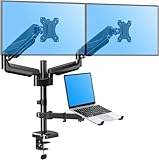




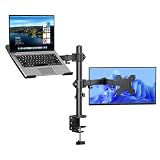
Top 3 picks at a glance
MOUNTUP Dual Monitor and Laptop Mount, Adjustable Monitor Stand for 2 Max...Check priceQuick Picks
| Product | Best for | Price |
|---|---|---|
| IMtKotW Dual Monitor Stand and Laptop Mount | Large-monitor dual-screen setups on a budget | $59.99 |
| MOUNTUP Dual Monitor and Laptop Mount | Buyers who need stated arm-weight guidance | $79.99 |
| HUANUO Dual Monitor and Laptop Mount | Premium flexibility for up to 32-inch monitors | $129.99 |
| HUANUO FlowLift™ Dual Monitor Stand | Two-monitor desks without a laptop tray requirement | $59.99 |
| VIVO Universal Adjustable Monitor and Laptop Desk Mount | Mechanical-arm adjustment with clamp or grommet mounting | $59.99 |
| HUANUO Adjustable Monitor Arm with Laptop Tray | A single external monitor plus laptop workstation | $39.98 |
| VIVO Free Standing Single Computer Monitor and Laptop Combo Desk Stand | Clamp-free desks and glass-base stability | $69.99 |
| Afaloona Dual Monitor and Laptop Stand | Lowest-price support for large monitors and laptops | $39.99 |
How We Picked
We ranked these stands around the details that matter most in a dual-monitor-plus-laptop layout: stated monitor compatibility, laptop fit, arm movement or mounting method, VESA support where listed, and price. A stand that accommodates a 32-inch monitor may be a better match for a wide home-office display than one capped at 27 inches, while a laptop tray designed for 10- to 17-inch notebooks gives more room for larger work machines.
We also separated true monitor-and-laptop combinations from monitor-only arms. A monitor-only mount can still be useful in a dual-monitor workflow, but it does not replace a dedicated laptop tray. Rankings reflect the listed specifications rather than unverified performance claims. Before ordering, confirm your monitor’s VESA pattern, your laptop’s dimensions, your desk’s mounting suitability, and the fully assembled weight of each display.
The 8 Best Picks
1. IMtKotW Dual Monitor Stand and Laptop Mount, Fits 32" Monitor & 15" Laptops — Best Overall Value
The IMtKotW Dual Monitor Stand and Laptop Mount is a sensible starting point for a home-office setup using large external screens and a compact work laptop. Its listed fit for 32-inch monitors gives it more screen-size headroom than models capped at 27 inches, while the laptop mount is intended for 15-inch laptops. At $59.99, it sits in the value tier without forcing buyers into a single-monitor-and-laptop configuration. It is best for people building a practical workstation around a 15-inch notebook and larger displays.
- Pro: Listed compatibility reaches 32-inch monitors.
- Pro: Combines monitor mounting and a dedicated laptop mount for $59.99.
- Con: The listed laptop fit stops at 15 inches.
Skip it if your laptop is larger than 15 inches or if you need specifically stated arm load limits before choosing a mount.
2. MOUNTUP Dual Monitor and Laptop Mount — Best for Clearly Defined Capacity
MOUNTUP’s dual monitor and laptop mount is the choice for shoppers who want more explicit compatibility details before rearranging the desk. It supports two computer screens up to 27 inches, while its laptop tray fits 10- to 17-inch notebooks. Each arm is listed to hold 4.4 to 17.6 pounds, which is useful information when matching the mount to actual display weights. The 3-in-1 adjustable desk-mount design makes this $79.99 option especially appealing for users who prioritize a laptop alongside two moderately sized monitors.
- Pro: Supports 10- to 17-inch notebooks.
- Pro: Each arm has a stated 4.4-to-17.6-pound capacity range.
- Con: Monitor compatibility is limited to 27-inch screens.
Skip it if either of your displays is larger than 27 inches, or if a lower upfront price is your main priority.
3. HUANUO Dual Monitor and Laptop Mount for Max 32" Monitor and 17" Laptop — Best Premium Pick
For a more fully specified adjustable setup, the HUANUO Dual Monitor and Laptop Mount is the premium choice. It is designed for monitors up to 32 inches and laptops up to 17 inches, making it a strong fit for users with larger home-office equipment. The adjustable arm offers tilt, swivel, and rotation, and the listed VESA bracket supports 75/100 mm patterns. At $129.99, it costs substantially more than the budget models, but its stated monitor, laptop, and VESA compatibility makes it a compelling option for a more demanding dual-monitor workflow.
- Pro: Accommodates monitors up to 32 inches and laptops up to 17 inches.
- Pro: Includes listed tilt, swivel, rotation, and VESA 75/100 mm compatibility.
- Con: At $129.99, it is the highest-priced pick here.
Skip it if you have smaller screens and want a straightforward value-focused mount under $80.
4. HUANUO FlowLift™ Dual Monitor Stand — Best for Two External Displays
The HUANUO FlowLift™ Dual Monitor Stand is best understood as a focused two-monitor desk mount rather than a laptop-and-monitor combination. It supports 13- to 32-inch computer screens, uses VESA 75×75/100×100 compatibility, and includes both C-clamp and grommet base options. Each arm is rated for 4.4 to 19.8 pounds, the highest stated per-arm maximum in this group. At $59.99, it is a strong value for a desk where the laptop already has its own separate stand, dock, or storage location.
- Pro: Each arm is listed for 4.4 to 19.8 pounds.
- Pro: Offers C-clamp and grommet mounting options for 13- to 32-inch monitors.
- Con: No laptop tray is listed.
Skip it if your workflow requires the laptop to be mounted directly with the two monitors.
5. VIVO Universal Adjustable Monitor and Laptop Desk Mount — Best Mechanical-Arm Option
The VIVO Universal Adjustable Monitor and Laptop Desk Mount is a versatile choice for users who want a mechanical-arm setup and more than one desk-installation route. It supports 17- to 32-inch monitors and 10- to 15.6-inch laptops, with C-clamp and grommet options listed. That makes it useful for a work surface where clamp placement may be limited but a grommet opening is available. At $59.99, it matches several budget competitors while offering a stated range of mounting options and a laptop platform for a compact-to-mid-size notebook.
- Pro: Supports 17- to 32-inch monitors.
- Pro: Offers both C-clamp and grommet installation options.
- Con: Laptop compatibility tops out at 15.6 inches.
Skip it if you use a 16- or 17-inch laptop, or if you need a freestanding base instead of a desk-mounted solution.
6. HUANUO Adjustable Monitor Arm with Laptop Tray — Best Budget Single-Monitor Setup
The HUANUO Adjustable Monitor Arm with Laptop Tray is the most affordable option for users who need one external monitor paired with a laptop. It supports 13- to 32-inch VESA monitors up to 22 pounds and includes a 14-by-12-inch laptop tray. At $39.98, it is a practical fit for a compact workspace, a secondary desk, or a laptop-first setup where only one additional display is necessary. The tray dimensions are especially helpful for buyers who want to compare their laptop footprint with the platform before committing.
- Pro: Supports VESA monitors from 13 to 32 inches up to 22 pounds.
- Pro: Includes a clearly sized 14-by-12-inch laptop tray.
- Con: It is a single-monitor arm, not a two-monitor mount.
Skip it if your workday depends on two external monitors plus the laptop screen.
7. VIVO Free Standing Single Computer Monitor and Laptop Combo Desk Stand — Best Freestanding Choice
The VIVO Free Standing Single Computer Monitor and Laptop Combo Desk Stand solves a different workspace problem: desks that cannot accept a C-clamp or grommet mount. Its sleek glass base creates a freestanding arrangement for a monitor up to 32 inches and a laptop up to 17 inches. At $69.99, it is a good match for renters, glass-top desks, or furniture pieces where permanent-looking desk mounting is not desirable. It is also an easy category fit for people who need a monitor-and-laptop combo rather than two external displays.
- Pro: Freestanding glass-base design avoids clamp and grommet requirements.
- Pro: Fits monitors up to 32 inches and laptops up to 17 inches.
- Con: It supports one monitor rather than a dual-monitor arrangement.
Skip it if desk-surface space is scarce or if your setup requires two external monitors on the same stand.
8. Afaloona Dual Monitor and Laptop Stand — Best Low-Cost Large-Screen Fit
The Afaloona Dual Monitor and Laptop Stand earns its place as the lowest-priced option listed for buyers who need support for larger monitors and a larger laptop. At $39.99, it is priced the same as many basic single-purpose accessories while listing compatibility for 13- to 32-inch monitors and 11- to 17-inch laptops. That range makes it attractive for shoppers working with a 16- or 17-inch notebook who do not want to step up to the $79.99 or $129.99 options. Confirm the rest of your desk and monitor requirements carefully before buying.
- Pro: Listed monitor range spans 13 to 32 inches.
- Pro: Fits 11- to 17-inch laptops at a $39.99 price.
- Con: Fewer mounting and movement specifications are listed than on some competitors.
Skip it if detailed VESA, arm-capacity, or base-mounting information is essential to your purchase decision.
Buying Guide
Match the Stand to Your Screen Sizes
Start with the monitor maximum, not just the size you own today. A 27-inch monitor fits the MOUNTUP’s stated limit, while 32-inch displays call for options such as IMtKotW, HUANUO, VIVO, Afaloona, or the HUANUO FlowLift™. For the laptop, compare the listed fit range with your notebook’s actual size: some trays stop at 15 or 15.6 inches, while others extend to 17 inches.
Check Weight, VESA, and Desk Mounting
Screen size alone is not enough. Check the monitor’s weight against any stated arm limit. For example, MOUNTUP lists 4.4 to 17.6 pounds per arm, FlowLift™ lists 4.4 to 19.8 pounds per arm, and the single-monitor HUANUO arm supports up to 22 pounds. Also verify VESA compatibility where needed; the HUANUO premium mount lists 75/100 mm, and FlowLift™ lists 75×75/100×100. Finally, choose between clamp, grommet, or freestanding designs based on your desk.
Decide Whether You Need a True Three-Screen Layout
A dual-monitor workflow can mean two external screens, or one external monitor plus the laptop display. If you need two monitors and the notebook all elevated together, choose a dedicated monitor-and-laptop model. If the laptop stays closed in a dock or already sits on a separate riser, a two-monitor-only arm such as FlowLift™ may be the cleaner choice. For a smaller desk, a single-monitor arm with laptop tray can be the more realistic arrangement.
Our Verdict
The IMtKotW Dual Monitor Stand and Laptop Mount is the best overall adjustable laptop stand for dual monitor workflow because it pairs a listed 32-inch monitor fit with a 15-inch laptop mount at $59.99. Choose the MOUNTUP model when stated per-arm weight capacity and 17-inch laptop support matter more than a 32-inch monitor maximum. For buyers with larger equipment who want listed tilt, swivel, rotation, and VESA 75/100 mm support, the HUANUO Dual Monitor and Laptop Mount is the premium upgrade.
FAQ
Can a laptop stand hold two monitors and a laptop at the same time?
Some of these products are designed as monitor-and-laptop combinations, while others are monitor-only. Confirm the exact product configuration before buying. The HUANUO FlowLift™ is listed as a dual monitor stand, but no laptop tray is listed. The MOUNTUP and HUANUO dual monitor-and-laptop models are better suited to a laptop-inclusive arrangement.
What monitor size is best for a dual-monitor mount?
Choose based on the mount’s stated maximum and your monitor’s full weight. Several picks support monitors up to 32 inches, while the MOUNTUP model is listed for two screens up to 27 inches. A larger size rating does not replace checking VESA compatibility and weight limits.
Do I need a C-clamp or grommet mount?
A C-clamp attaches to the desk edge, while a grommet mount uses a desk opening. The VIVO Universal and HUANUO FlowLift™ list both options. If neither works for your furniture, a freestanding model such as the VIVO glass-base stand avoids those installation methods.
Is a 17-inch laptop compatible with every laptop tray?
No. Listed laptop compatibility varies significantly. MOUNTUP, the premium HUANUO dual mount, VIVO’s freestanding stand, and Afaloona list support up to 17 inches. IMtKotW is listed for 15-inch laptops, while the VIVO mechanical-arm model is listed for 10- to 15.6-inch laptops.


