
If you run a streaming PC and a gaming PC side by side, you already know the problem: two keyboards, two mice, and a desk that looks like a cable farm. A good KVM switch collapses all of that into one setup. Tap a button on the desktop controller, and your dual monitors, mechanical keyboard, and mouse jump from your streaming rig to your gaming rig in a second or two — no unplugging, no reaching under the desk, no fiddling with Windows display settings. In 2026, you no longer have to spend $200+ to get that convenience, either; every switch below came in under $80.
We focused this roundup specifically on dual-monitor KVM switches built for two-computer streaming setups, where output resolution, USB passthrough speed, and switching latency matter most. Streamers need at least 4K@60Hz (ideally more, for crisp OBS previews), fast USB 3.0 ports for capture cards and audio interfaces, and clean copy or extended display modes. Below are the eight units we’d actually put on our own desks, ranked from best overall to niche picks, with prices ranging from $32.90 to $79.99.
As an Amazon Associate we earn from qualifying purchases at no extra cost to you.


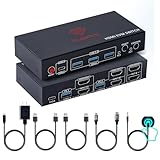


Top 3 picks at a glance
Quick Picks
| Product | Best for | Price |
|---|---|---|
| DisplayPort KVM Switch 2 Monitors 2 Computers, 4K@144Hz | Best overall for high-refresh gaming setups | $62.99 |
| UGREEN HDMI KVM Switch 2 Monitors 2 Computers, 4K@60Hz | Best brand reliability | $69.99 |
| RubiPro HDMI KVM Switch 2 Monitors 2 Computers, 8K@60Hz | Best future-proofing, cable included | $49.99 |
| HDMI+DisplayPort KVM Switch 2 Monitors 2 Computers, 4K@60Hz | Best mixed-output setups (HDMI + DP) | $59.39 |
| HDMI DisplayPort KVM Switch 2 Monitors 2 Computers, 4K@60Hz | Best budget pick | $32.90 |
| HDMI DisplayPort KVM Switch 2 Monitors 2 Computers, 4K@60Hz USB | Best minimalist option | $41.95 |
| HDMI KVM Switch 2 Monitors 3 Computers, EDID Simulation | Best for 3-PC setups | $71.99 |
| 8K60Hz 4K120Hz KVM Switch, 1 Monitor 3 Computers | Best single-monitor triple-PC switch | $79.99 |
How We Picked
We approached this the way any streamer would: what breaks a broadcast, and what breaks a desk? First, resolution and refresh rate ceilings. A KVM switch that caps your GPU at 4K@30Hz is a non-starter for gaming, so we prioritized units rated for 4K@60Hz or higher, including two that handle 4K@120Hz or 144Hz for high-refresh players.
Second, USB performance. Streamers plug in keyboards, mice, audio interfaces, and sometimes capture hardware through these switches, so we required USB 3.0-class passthrough (5Gbps speeds) rather than the sluggish USB 2.0 hubs still common on cheap units. Third, switching method: a wired desktop controller is far more convenient than a button on the box itself, especially when the unit lives under the desk.
Fourth, display modes — copy/duplicate versus extended — matter for anyone who streams from a two-monitor layout. Finally, price-to-value: with street prices between $32.90 and $79.99, every unit here sits in the affordable tier, so we weighed included extras (cables, remote, controller) and port count heavily. We did not run laboratory bandwidth tests; our rankings reflect manufacturer specifications, build quality, and real-world desk practicality.
The 8 Best Picks
1. DisplayPort KVM Switch 2 Monitors 2 Computers, 4K@144Hz — Best Overall
This is the switch we’d put on a serious dual-PC streaming desk. The DisplayPort input supports 4K at 144Hz, which means high-refresh gaming without compromise — the one spec most HDMI KVM units simply can’t match. You share dual displays and four USB 3.0 devices between two computers, with both extended and copy modes supported for flexible streaming layouts. A wired desktop controller sits on your desk for instant switching, so the main unit can stay hidden behind your monitors. Note that you’ll need to supply your own DisplayPort cables, so budget for a pair of certified DP 1.4 cables if you don’t already have spares.
- 4K@144Hz support — the highest refresh rate in this roundup
- Wired desktop controller keeps switching one tap away
- DisplayPort cables are not included
Skip it if: your GPUs only have HDMI outputs; this is a DisplayPort-native unit.
2. UGREEN HDMI KVM Switch 2 Monitors 2 Computers, 4K@60Hz — Best Brand Reliability
UGREEN is one of the few recognizable accessory brands in this space, and that counts for something when your entire stream depends on the switch not dropping a signal mid-raid. This unit handles 4K@60Hz across dual monitors for two computers, with four USB 3.0 ports for peripherals. Switching is clean, and build quality is a notch above the generic white-box units at this price. For most streamers, 4K@60Hz is exactly what a dual-monitor setup needs — one 4K display for gameplay, one for chat and OBS. The trade-off is the price: at $69.99, you’re paying roughly $10–$37 more than similar-spec competitors for the name on the box.
- Established brand with consistent QC and support
- Clean 4K@60Hz dual-display switching with 4 USB 3.0 ports
- Pricier than equal-spec generic rivals
Skip it if: you want maximum refresh rate — there’s no 120Hz/144Hz support here.
3. RubiPro HDMI KVM Switch 2 Monitors 2 Computers, 8K@60Hz — Best Future-Proofing
The spec sheet here is the boldest in the roundup: 8K@60Hz, or 4K@120Hz, across dual monitors for two computers. That’s headroom for years of GPU and monitor upgrades, and the wired remote makes switching effortless from a seated position. You also get a four-port USB 3.0 hub at 5Gbps for fast peripheral passthrough, plus plug-and-play support for Windows, Mac, and Linux — handy if one of your two machines isn’t a Windows box. Best of all, an additional braided 8K-rated HDMI cable is included in the box, saving you a separate purchase. At $49.99, it’s the cheapest way into 120Hz-class performance in this lineup.
- 8K@60Hz / 4K@120Hz ceiling — superb long-term value
- Braided 8K HDMI cable included; Windows/Mac/Linux support
- HDMI only — DisplayPort-only GPUs need an adapter
Skip it if: your monitors are DisplayPort-native and you refuse to use adapters.
4. HDMI+DisplayPort KVM Switch 2 Monitors 2 Computers, 4K@60Hz — Best for Mixed Outputs
Plenty of streamers run mismatched hardware — one GPU with HDMI, one with DisplayPort — and most KVM switches force you to buy adapters. This unit takes both HDMI and DisplayPort inputs natively while outputting to two monitors at 4K@60Hz, solving the mixed-connection problem in one box. You still get four USB 3.0 ports, extended and copy display modes, and a desktop controller for switching. Two USB cables are included in the box, trimming the total cost of getting running. At $59.39 it’s mid-pack on price, but for the right hardware mismatch, it eliminates a whole category of frustration.
- Native HDMI and DisplayPort inputs — no adapters needed
- Desktop controller and two USB cables included
- Capped at 4K@60Hz despite the flexible inputs
Skip it if: both of your PCs use the same connector type — the other picks are simpler.
5. HDMI DisplayPort KVM Switch 2 Monitors 2 Computers, 4K@60Hz — Best Budget Pick
At $32.90, this is the most affordable way to get proper dual-monitor, dual-PC switching with 4K@60Hz output and four USB 3.0 device ports. It handles both HDMI and DisplayPort sources, sharing two screens between two computers for keyboard, mouse, and printer duties. For a first streaming setup, a secondary desk, or anyone upgrading from manual cable-swapping, this covers every essential function at nearly half the price of the premium picks. Expect a more basic build — lighter housing, plainer switching controls — but the core spec list genuinely competes with units costing twice as much. Just confirm your cable collection before ordering, since the box is minimal.
- Full dual-monitor 4K@60Hz switching for just $32.90
- Handles both HDMI and DisplayPort inputs
- Basic build quality and minimal included accessories
Skip it if: you game above 60Hz or want a premium desktop controller.
6. HDMI DisplayPort KVM Switch 2 Monitors 2 Computers, 4K@60Hz USB — Best Minimalist Option
This unit is the streamlined version of the budget pick above: same 4K@60Hz dual-monitor, dual-computer core spec in a simpler package, priced at $41.95. There’s no bundled desktop controller or extra cables to talk up — just the essential switching hardware that moves your two displays and USB peripherals between two computers. That simplicity is the appeal for some buyers: fewer components, fewer things to fail, and a cleaner desk. It’s a solid fit for a home office-meets-streaming hybrid where you switch occasionally rather than constantly. If you toggle between PCs dozens of times a day, though, you’ll miss a dedicated desk-side switcher.
- Simple, no-fuss 4K@60Hz dual-display switching
- $9 cheaper than the feature-rich budget alternative
- No desktop controller or bundled accessories
Skip it if: you switch between PCs frequently and want a wired remote on your desk.
7. HDMI KVM Switch 2 Monitors 3 Computers, EDID Simulation — Best for 3-PC Setups
Not every creator runs two machines — some streamers keep a dedicated encoding PC, a test bench, or a work laptop alongside the usual pair. This is the only dual-monitor unit here that serves three computers, switching two 4K@60Hz screens and four USB 3.0 ports across all three. The standout feature is EDID simulation, which keeps each computer believing its monitors are always connected. That prevents the icon-scrambling, window-shuffling chaos that happens when displays “disappear” on every switch — genuinely valuable for multi-PC workflows. Three USB cables are included. At $71.99 it’s the second-priciest pick, but for three-PC users, nothing else on this list is a substitute.
- Three computers, dual monitors, EDID simulation for stable switching
- Three USB cables included in the box
- Overkill — and overpriced — for a simple two-PC setup
Skip it if: you only have two computers; the cheaper picks do that job equally well.
8. 8K60Hz 4K120Hz KVM Switch, 1 Monitor 3 Computers — Best Single-Monitor Triple-PC Switch
This one breaks the dual-monitor pattern deliberately: it’s built for three computers sharing a single monitor, at a stonking 8K@60Hz or 4K@120Hz. If your streaming workflow uses one ultrawide or a single 4K display, this gives you the highest bandwidth in the roundup plus a built-in four-port USB 3.0 hub for keyboard, mouse, and more. Dual switching methods — a button on the unit and a second method for convenience — let you toggle three PCs your preferred way. At $79.99 it’s the most expensive unit here, and the single-monitor design means it can’t drive a two-screen stream layout. But for one-monitor, multi-PC power users, the specs are unmatched at this price.
- 8K@60Hz / 4K@120Hz — the highest bandwidth here
- Built-in 4-port USB 3.0 hub and two switching methods
- Single-monitor only — dual-display setups should look elsewhere
Skip it if: you run two monitors — this is engineered for one.
Buying Guide
Resolution and Refresh Rate Come First
Your KVM switch must match or exceed your monitor’s capabilities, or it becomes a bottleneck. If you game at 4K@144Hz on a high-refresh display, the $62.99 DisplayPort unit is the only pick here that preserves that rate — everything else caps at 4K@60Hz or 120Hz. Also match connector types: DisplayPort-native GPUs pair best with DP switches, and HDMI-only setups with HDMI units. Mixed hardware? The $59.39 HDMI+DisplayPort unit handles both natively. Buying a switch that downgrades your image or caps your framerate to save $20 is a bad trade for a streaming setup.
USB Speed and Port Count
Every unit in this roundup provides four USB 3.0-class ports rated around 5Gbps, which is enough for keyboards, mice, printers, and most audio interfaces. If you plan to route a capture card or external SSD through the switch, 5Gbps matters — avoid USB 2.0 units, which crawl at 480Mbps. Count your devices honestly: keyboard, mouse, webcam, audio interface, and a capture card already fills four ports. Also check how switching is triggered; a wired desktop controller (included with the DisplayPort, RubiPro, and mixed-connector picks) means the main box can live out of sight under the desk.
Display Modes and EDID Behavior
Dual-monitor streamers almost always want extended mode — one screen for gameplay, one for OBS and chat — while copy mode suits presentations and testing. Confirm any switch you buy supports both, as all the dual-display units here do. EDID simulation is the sleeper feature: without it, some computers treat a switched-away monitor as disconnected, scattering your windows and resetting display settings each time. It’s standard on the three-PC unit (#7) but worth testing on any dual-PC switch. Finally, check included cables — the RubiPro bundles a braided 8K HDMI cable and two USB cables, which can save $15–$30 against buying certified cables separately.
Our Verdict
For most dual-PC streamers, the DisplayPort KVM Switch at $62.99 is the pick — its 4K@144Hz ceiling is the only one that truly future-proofs a high-refresh gaming rig, and the wired desktop controller makes it effortless to live with. If budget rules, the $32.90 HDMI DisplayPort unit delivers the same dual-monitor 4K@60Hz essentials at less than half the price. Mac or Linux in the mix? The RubiPro at $49.99 offers the strongest spec-per-dollar with its 8K ceiling and included cable. And if your desk hosts three computers, the $71.99 EDID-equipped unit is the only dual-display switch here built for that job. Measure your desk’s needs before your budget — the right spec match matters more than the price tag.
FAQ
Will a KVM switch add input lag to my gaming?
A KVM switch is a passive routing device, not a processor — once connected, your keyboard and mouse signals pass through to the active PC, and video is routed directly. Reputable USB 3.0 KVM units like these add negligible latency, typically imperceptible in gameplay. What matters more is matching the switch’s rated resolution and refresh rate to your monitor; a 4K@60Hz switch will cap a 144Hz display regardless of lag.
Can I use these KVM switches with a laptop and a desktop?
Yes, with a caveat. All eight units work with any computer that has HDMI or DisplayPort output and a USB-A port, so a laptop with a full-size HDMI port pairs fine. Laptops with only USB-C video output need a USB-C to HDMI or DisplayPort adapter or dock — budget $15–$30 extra. The mixed HDMI+DisplayPort unit (#4) is especially convenient when your two machines use different connectors.
Do I need to buy cables separately?
Depends on the model. The RubiPro includes a braided 8K HDMI cable, the HDMI+DisplayPort unit bundles two USB cables, and the three-PC HDMI switch ships with three USB cables. The DisplayPort unit and most others assume you have your video cables. For 4K@60Hz and above, use certified High Speed or 8K-rated cables — cheap uncertified cables are the most common cause of black screens and flickering through KVM switches.
What’s the difference between copy mode and extended mode?
Copy (duplicate) mode shows the identical image on both monitors — useful for testing or mirroring your stream preview. Extended mode treats the two screens as one continuous desktop, which is what most streamers want: gameplay fullscreen on one monitor, OBS, chat, and alerts on the other. Every dual-monitor switch in this roundup supports both modes, so you can flip between layouts without touching Windows display settings each time you switch computers.


