
If you have ever spent an evening untangling a bird’s nest of charging cords behind your nightstand or crawled under your desk to retrieve a dropped laptop charger, you have likely looked for a permanent fix. Among the sea of velcro wraps, plastic ties, and silicone slots, magnetic organizers have emerged as a premium, highly aesthetic option. But at roughly double or triple the price of basic plastic alternatives, you have to ask: are magnetic cable management clips actually worth buying, or are they just another overhyped desk accessory?
As home editors who have spent years testing workspace organization tools, we put these magnetic systems through their paces. Here is our honest, real-world assessment of whether they deserve a spot on your desk.
As an Amazon Associate we earn from qualifying purchases at no extra cost to you.

The Short Answer
Yes, magnetic cable management clips are absolutely worth buying, but only if you are using them for high-frequency, dynamic cables on your desk surface or nightstand. If you need to organize cords that you plug and unplug daily—such as your phone charger, wireless mouse cable, or laptop USB-C dock—the seamless, one-handed operation of a magnetic clip is unmatched by any other tool on the market.
However, if you are looking to secure static cables that stay permanently plugged in (like your desktop monitor power brick, printer cables, or home theater HDMI cords), magnetic clips are a massive waste of money. For those fixed setups, cheaper, permanent alternatives like simple zip ties or adhesive routing clips are far more practical and cost-effective.
What You Actually Get
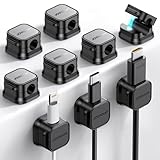
To understand if these organizers are worth your money, it helps to understand exactly what comes in the box. Most standard consumer kits—such as the popular JOYROOM 9-Pack or generic 9-Pack “1s Lock” systems, which typically retail around $8.99—consist of two primary components:
- The Magnetic Base Pedestal: A slim strip of plastic or silicone, usually measuring between 3 and 5 inches in length and about 0.7 inches in width. The underside features a peel-and-stick adhesive (often heavy-duty 3M or acrylic tape) designed to grip wood, glass, metal, or plastic surfaces.
- The Magnetic Cable Clips (Collars): Tiny, individual plastic or silicone shells (roughly 0.5 inches in diameter) that open up to clamp tightly around your cables. Inside each collar is a small neodymium magnet. When you bring the cable near the base pedestal, the magnet snaps it securely into place.
Most of these kits are designed to accommodate standard cable diameters ranging from 2.5mm to 4.0mm. This includes standard phone charging cables, thin mouse cords, and keyboard cables. However, they can struggle with heavy-duty, thick-braided cords (such as 100W to 240W high-speed USB-C laptop chargers or HDMI cables), which often measure 5.0mm or thicker and require specialized, larger magnetic collars.
Pros
- Effortless, One-Handed Operation: Unlike traditional silicone slot organizers where you have to manually pry open a rubber groove and jam the cable inside, magnetic clips allow you to simply drop the cable near the base. The magnet pulls it into place instantly. This makes tidy habits completely frictionless.
- No More Dropped Cables: The primary value of the base station is keeping your cable ends right at the edge of your desk or nightstand. When you unplug your phone, the cable snaps to the magnetic base rather than sliding into the dusty crevice behind your furniture.
- Excellent Aesthetic Appeal: As we move toward ultra-minimalist home office setups in 2026, hiding every single wire has become the gold standard of interior design. Magnetic clips look incredibly clean, intentional, and high-end compared to ugly plastic zip ties or bulky routing trays.
- Reduced Cable Wear and Tear: Because the cables are held loosely by a magnetic collar rather than being bent, crimped, or squeezed into tight plastic channels, the internal copper wiring is subjected to far less physical stress over time.
- Modularity: You can easily pop a cable out of its magnetic base and take it with you to another room, leaving the collar attached to the cord, and then snap it right back onto the base when you return.
Cons
- High Cost-Per-Clip Ratio: At roughly $8.99 for a 9-pack, you are paying about $1.00 per cable managed. Compared to a $5.00 roll of hook-and-loop velcro tape that can organize fifty cables, magnetic clips are a luxury item.
- Struggles with Heavy or Stiff Cables: Standard neodymium magnets in these budget-friendly kits have weight limits. If you have a stiff, thick, nylon-braided cable or a heavy HDMI cable, the natural tension of the cord will often overpower the magnet, causing the clip to pop off the base strip.
- Single-Use Adhesive Bases: The double-sided tape on the bottom of the base pedestal is incredibly strong, which is great for stability. However, if you decide to rearrange your desk layout, removing the base often ruins the adhesive pad, requiring you to scrape off residue and buy replacement mounting tape.
- Added Bulk on the Cable: The small magnetic collar adds a hard plastic “bead” near the connector tip of your cable. If you like to use your phone or tablet while it is plugged in, you may find this extra plastic bump irritating to your fingers.
Who Should Buy It
You should invest in a magnetic cable management system if you fall into any of the following categories:
- The Nightstand Charger Searcher: If you routinely bend over in the dark to fish your phone charger off the floor, mounting a small magnetic base to the side of your nightstand is a life-changing convenience.
- The Hot-Desking Professional: If you work on a laptop and constantly plug and unplug accessories (monitors, webcams, audio interfaces) throughout the day, the quick-release nature of magnets will save you daily frustration.
- The Minimalist Aesthetic Enthusiast: If you have invested in a beautiful solid wood or glass standing desk and want your cable management solution to look like an integrated design feature rather than a messy afterthought.
Who Should Skip It
You are better off avoiding magnetic clips if your desk fits these descriptions:
- The Permanent Desktop setup: If your PC tower, monitors, speakers, and external drives stay plugged in 365 days a year, there is zero benefit to having quick-release magnetic clips.
- The Heavy-Duty AV Specialist: If your workspace is dominated by thick power cords, heavy XLR audio lines, or coaxial cables, the magnets in standard $9 kits will not be strong enough to hold them.
- The Budget-Focused Builder: If you just want to get your cables off the ground as cheaply as possible, stick to under-desk trays and velcro.
Cheaper Alternatives
If you love the idea of organization but cannot justify the cost of magnetic systems for your entire home, consider these common alternatives:
| Alternative Option | Average Cost | Key Trade-off |
|---|---|---|
| Silicone Slot Organizers | $5.00 – $8.00 (Multi-packs) | Requires two hands to push cables into the slots; rubber can degrade and collect dust over time. |
| Hook-and-Loop (Velcro) Straps | $4.00 – $7.00 (50-Pack roll) | Incredibly cheap and strong, but offers no quick-release desk-edge mounting. Strictly for bundling. |
| Under-Desk Cable Trays | $12.00 – $25.00 (Per tray) | Requires clamping or drilling under your desk; keeps cords off the floor but does not organize them on the desktop. |
| Adhesive Cable Clamps | $6.00 – $9.00 (100-Pack) | Permanent plastic loops that lock shut. Perfect for routing static cables, but impossible to adjust quickly. |
FAQ
Do the magnets in these clips damage my phone, laptop, or cables?
No. The tiny neodymium magnets used in cable clips are far too weak to affect modern solid-state electronics, smartphone screens, or flash storage. They do not interfere with the electrical current flowing through your charging cables.
Can these clips hold thick, heavy-duty braided cables?
Generally, standard magnetic clips (like the $8.99 9-packs) are designed for cables under 4mm thick. Heavy-duty braided cables (such as 100W laptop chargers) are often too stiff and heavy, which can cause them to slide off the magnet or fail to fit inside the plastic collar entirely.
How do I remove the adhesive base without damaging my wood desk?
To safely remove the base, blast it with a hairdryer on low heat for 30 to 45 seconds to soften the acrylic adhesive. Then, take a piece of dental floss or a thin plastic card and gently slide it underneath the base to lift it. Clean up any remaining sticky residue with a drop of rubbing alcohol or adhesive remover.
Can I mount the magnetic base vertically or upside down?
Yes, but with caution. While the adhesive base will stick fine to vertical surfaces, gravity will pull down on your cables. If your cables are heavy, vertical or upside-down mounting increases the likelihood that the magnetic connection will fail, causing the cords to drop.


