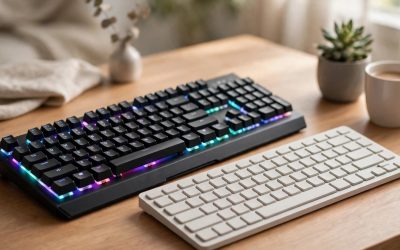
Optical switches are the faster, longer-lasting option: they actuate with a beam of light instead of a metal contact, so there is no debounce delay and fewer parts to wear out. Mechanical switches are the more flexible option: they come in far more feels and sounds, they dominate the hot-swappable keyboard market, and replacement switches are cheap and everywhere. If you play competitive shooters and want every input to register as early as physics allows, go optical. If you care about how your keyboard feels and sounds, or you like the idea of swapping switches later, go mechanical.
As an Amazon Associate, we earn from qualifying purchases.
Our Top Picks
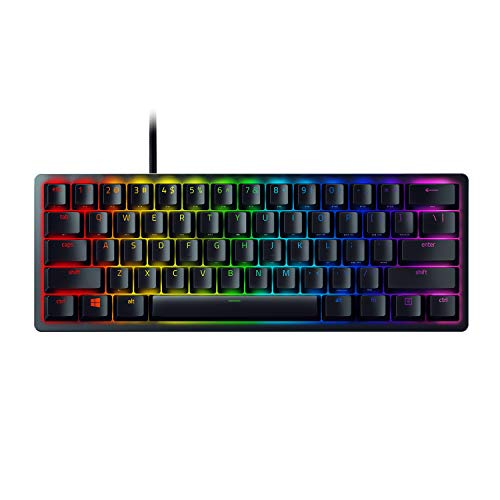 Razer Huntsman Mini 60% Gaming Keyboard11.56x 4.07 x 1.45 inches11.56 x 4.07 x 1.45 inches1.1 poundsCheck on Amazon
 Logitech G PRO Mechanical TKL Tenkeyless Gaming KeyboardTKL - Wired14.9 x 6.5 x 1.9 inches2.16 poundsCheck on Amazon

Table of Contents
- Quick Verdict
- How Optical Switches Work
- How Mechanical Switches Work
- Optical vs Mechanical at a Glance
- The Key Differences Explained
- Optical Switch Keyboards
- Mechanical Switch Keyboards
- Who Should Choose Optical Switches
- Who Should Choose Mechanical Switches
- FAQ
- Conclusion
Quick Verdict
Choose optical switches if input speed is your top priority. A light beam registers the press the instant the stem crosses it, and because there is no metal contact to settle, optical boards skip the debounce delay that mechanical boards have to build in. The trade-off is choice: optical lineups are smaller, most optical switches only work in the keyboard they shipped in, and the feel is usually limited to linear or clicky.
Choose mechanical switches if feel, sound and customization matter more. Mechanical is the default for a reason: hundreds of switch variants cover every combination of weight, tactility and noise, most gaming boards are hot-swappable, and a worn or disliked switch can be replaced in seconds. The speed gap is real but small, and for most genres it will never decide a round.
How Optical Switches Work
An optical switch replaces the metal contact leaves of a mechanical switch with an infrared light beam. When you press the key, the stem drops into the beam’s path and blocks it; the board reads that interruption as a keystroke. Nothing has to touch, bend or bounce, which is why optical switches can actuate as shallow as 1.0 mm and why makers rate them for 100 million keystrokes. Some optical designs go further and measure how far the stem travels, enabling analog input and adjustable actuation points, where the same key can walk or sprint depending on how hard it is pressed.
How Mechanical Switches Work
A mechanical switch closes an electrical circuit. Pressing the key pushes a stem down against a spring until two metal leaves meet, and that contact registers the keystroke. Because metal contacts physically bounce for a fraction of a millisecond, the keyboard’s firmware waits out a short debounce period before trusting the signal. The upside of this older design is variety: springs, stems and housings can be tuned for a smooth linear press, a tactile bump, or a clicky snap, and the standard MX-style footprint means switches from dozens of makers fit the same sockets.
Optical vs Mechanical at a Glance
| Factor | Optical switches | Mechanical switches |
|---|---|---|
| Actuation method | Light beam interrupted by the stem | Metal contacts closing a circuit |
| Debounce delay | None needed | Built in, to filter contact bounce |
| Typical actuation point | 1.0 to 1.5 mm | 1.8 to 2.0 mm |
| Rated lifespan | Up to 100 million keystrokes | 50 to 80 million keystrokes |
| Feel options | Mostly linear or clicky | Linear, tactile and clicky, many weights |
| Sound | Generally quieter, fewer moving parts | Wide range, from silent to loudly clicky |
| Swapping switches | Rarely supported, brand-specific designs | Hot-swap is common, MX-style standard |
| Analog features | Available on some models | Not available |
| Price tiers | Mid-range to premium | Budget to premium |
The Key Differences Explained
Speed and debounce
This is optical’s headline advantage. A mechanical board spends part of every input cycle waiting for its contacts to stop bouncing, while an optical board registers the press as soon as the beam breaks. Optical gaming keyboards also tend to pair their switches with high polling rates, so the signal leaves the keyboard sooner too. In practice the total advantage is measured in small fractions of a match, but in tactical shooters built around counter-strafing and split-second peeks, players chase exactly those fractions.
Feel and sound
Mechanical switches win here by sheer range. There are light linears for rapid repeated presses, heavy tactiles that keep typists honest, clicky switches with an audible snap, and silent variants damped for shared rooms. Optical switches feel good in their own way — the linear versions are notably smooth because there is no contact friction — but each optical keyboard usually offers one or two switch types, and that is the feel you are committing to for the life of the board.
Durability
With no contacts to oxidize, bend or wear, optical switches carry the higher ratings: 100 million keystrokes is the common figure, against 50 to 80 million for mechanical switches. Mechanical switches fail gracefully, though. On a hot-swappable board a dead switch is a thirty-second fix with a switch puller, while a failed optical switch usually means a repair or a new keyboard.
Customization and modding
Mechanical keyboards are the hobbyist platform. Hot-swap sockets, MX-compatible stems, and a huge aftermarket of switches, springs and films make it easy to tune a board over time. Optical switches use brand-specific housings and sensing layouts, so the switch a keyboard ships with is almost always the switch it keeps. If you enjoy tinkering, mechanical is the only real choice.
Analog control and rapid trigger
Some optical keyboards read stem position rather than a simple on/off signal. That enables adjustable actuation, rapid reset the moment you release pressure, and gamepad-style analog movement from a keyboard key. A handful of mechanical boards simulate parts of this with software tricks, but true per-key analog sensing belongs to optical and magnetic designs.
Optical Switch Keyboards
Razer Huntsman V2
The full-size benchmark for optical gaming. Its second-generation linear optical switches pair light-based actuation with sound dampeners and internal foam, so it delivers the speed of optical without the hollow clack older optical boards were known for. A true 8000 Hz polling rate keeps the rest of the input chain as fast as the switches, and the media dial, wrist rest and doubleshot PBT keycaps make it easy to live with outside matches too.
Specs
- Switch: Razer Linear Optical Gen-2
- Actuation: 1.5 mm, rated for 100 million keystrokes
- Polling rate: Up to true 8000 Hz
- Layout: Full-size
- Keycaps: Doubleshot PBT
- Extras: Multi-function digital dial, 4 media keys, ergonomic wrist rest, sound dampening foam
- Lighting: Razer Chroma RGB
- Dimensions: 17.53 x 5.52 x 1.71 inches
- Tier: Premium
Logitech G PRO X 60 LIGHTSPEED
The optical pick for players who want to go wireless and compact. Its GX Optical tactile switches give a defined bump without metal contacts, and LIGHTSPEED wireless keeps the connection tournament-grade while Bluetooth covers a second device. Dual-shot PBT keycaps, a 65-hour published battery life and an included carrying case round out a board built for travel to events.
Specs
- Switch: Logitech GX Optical, tactile
- Layout: 60 percent compact
- Connectivity: LIGHTSPEED wireless, Bluetooth, wired USB-C
- Keycaps: Dual-shot PBT
- Battery life: Up to 65 hours (published figure)
- Lighting: LIGHTSYNC RGB
- Extras: KEYCONTROL remapping in G HUB, carrying case included
- Model: 920-011902
- Tier: Premium
Razer Huntsman Mini
Optical speed in the smallest mainstream package. The linear optical switches actuate at just 1.0 mm, which makes this 60 percent board feel eager in fast games, and the current version adds Rapid Trigger Mode and Snap Tap support for counter-strafing. A detachable USB-C cable and doubleshot PBT keycaps keep it practical, and the aluminum frame keeps flex out of the deck.
Specs
- Switch: Razer Linear Optical
- Actuation: 1.0 mm, rated for 100 million keystrokes
- Layout: 60 percent
- Keycaps: Doubleshot PBT
- Cable: Detachable USB-C
- Lighting: Razer Chroma RGB
- Dimensions: 11.56 x 4.07 x 1.45 inches
- Tier: Mid-range
Mechanical Switch Keyboards
Razer BlackWidow V4 X
The mechanical counterpoint to the Huntsman line. Razer Green switches deliver the classic tactile bump and click that optical switches cannot reproduce, and the board wraps them in a full-size layout with six dedicated macro keys, a media roller and sound dampening foam with lubricated stabilizers to keep big keys quiet and rattle-free.
Specs
- Switch: Razer Green mechanical, tactile and clicky
- Actuation: 1.9 mm at 50 g, rated for 80 million keystrokes
- Layout: Full-size with 6 dedicated macro keys
- Keycaps: Doubleshot ABS
- Extras: Media roller and media keys, sound dampening foam, lubricated stabilizers
- Lighting: Razer Chroma RGB
- Dimensions: 18.36 x 6.01 x 1.71 inches
- Tier: Mid-range
Logitech G PRO Mechanical Gaming Keyboard
The long-running esports tenkeyless in its GX Blue clicky form. It is the straightforward mechanical formula done well: a compact steel-backed deck, a detachable cable for travel, onboard memory for tournament PCs, and clicky mechanical switches with a crisp, audible actuation that many players still prefer for feedback. As the oldest design in this comparison it also sits in the budget tier, which makes it an easy entry point.
Specs
- Switch: Logitech GX Blue mechanical, clicky
- Actuation: 1.9 mm at 50 g, rated for 70 million keystrokes
- Layout: Tenkeyless
- Cable: Detachable micro-USB
- Lighting: LIGHTSYNC RGB
- Extras: Onboard memory, 12 programmable F-keys, three-step angle-adjustable feet
- Model: 920-009388
- Tier: Budget
Who Should Choose Optical Switches
Pick optical if you play competitive FPS or rhythm titles where registration speed is the whole point, if you want the longest rated switch lifespan with no maintenance, or if features like adjustable actuation and rapid trigger genuinely fit your games. The Huntsman V2 is the safe full-size default, the Huntsman Mini covers compact desks, and the PRO X 60 is the one to take on the road.
Who Should Choose Mechanical Switches
Pick mechanical if you type as much as you game and want a switch feel matched to your hands, if you share a room and need silent switches, or if you like the idea of hot-swapping switches and modding your board over time. The BlackWidow V4 X suits players who want macro keys and a clicky flagship feel, while the Logitech G PRO is the budget-friendly esports staple.
FAQ
Are optical switches really faster than mechanical switches?
Yes, by design. Optical switches register the moment the stem blocks the light beam, with no debounce wait, and they often actuate at a shallower 1.0 to 1.5 mm point. Mechanical switches actuate deeper and add a short debounce delay. The difference is small in absolute terms, but it is consistent on every press.
Do optical switches feel worse than mechanical switches?
Not worse, just narrower. Optical linears are very smooth because there is no contact friction, and clicky optical switches exist too. What you give up is range: mechanical switches offer far more combinations of weight, tactility and sound, so players with a specific feel in mind are better served by mechanical.
Can you hot-swap optical switches?
Usually not. Optical switches depend on each brand’s own housing and sensor layout, so they are rarely interchangeable and most optical keyboards are not hot-swappable. Mechanical MX-style switches follow a shared standard, which is why hot-swap sockets and a large switch aftermarket exist on the mechanical side.
Which switch type lasts longer?
On paper, optical. Ratings of 100 million keystrokes are typical for optical switches, against 50 to 80 million for mechanical ones, because there are no metal contacts to wear. In practice, a hot-swappable mechanical board can outlast either figure, since a single failing switch can be replaced in seconds.
Conclusion
Optical vs mechanical switches is a choice between speed and flexibility. Optical switches register faster, skip debounce delay entirely and carry the highest lifespan ratings, which is why they headline competitive keyboards like the Huntsman V2. Mechanical switches answer with feel, sound, hot-swappable customization and options at every tier. Decide what you value on your desk — the last fraction of input speed, or a keyboard that feels exactly the way you want — and the right side of this comparison picks itself.
Related guides
More from Amazon
Programs that pair well with the guide above. Offers and eligibility are set by Amazon and may change.
Free shipping on eligible items, Prime Video and more. Eligible new members can start with a free trial.
Start a Prime free trialAd-free music streaming. Eligible new subscribers can start with a free trial.
Try Music Unlimited freeA Prime membership for ages 18-24 with a trial period. Eligibility is set by Amazon.
See Prime for Young AdultsAudiobooks and podcasts to listen to on the go. Eligible new members can start with a free trial.
Try Audible freeAs an Amazon Associate we earn from qualifying purchases.