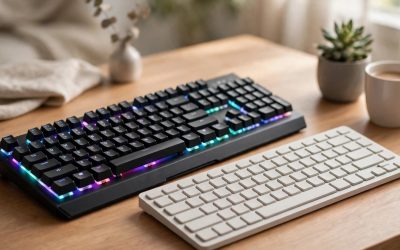
A gaming laptop or a handheld console is built to travel, but a desk setup is built to stay put. A docking station bridges the two. Plug in one cable and the dock wakes your monitor, keyboard, mouse, headset, and wired network at once. Unplug the same cable when you leave and the machine is portable again.
The catch is that not every dock keeps up with gaming: a dock that caps a monitor at a low refresh rate or shares one slow USB link between every peripheral will hold the whole setup back. This guide covers five docks that handle high-refresh displays, fast charging, and a full set of gaming peripherals.
As an Amazon Associate, we earn from qualifying purchases.
Our Top Picks


Quick Answer
The Anker Prime TB5 is the strongest all-around dock, with Thunderbolt 5 speed, 140W charging, and HDMI 2.1 or DisplayPort 2.1 output. The Razer Thunderbolt 4 Dock Chroma suits RGB desks, the WAVLINK WL-UMD323 suits multi-monitor rigs, the Anker Prime 14-in-1 suits mixed laptop and console desks, and the JSAUX HB0603 is the pick for Steam Deck and ROG Ally handhelds.
Anker Prime TB5 Docking Station
The Anker Prime TB5 is the most capable dock in this guide. Its Thunderbolt 5 upstream link moves data far faster than older Thunderbolt 4 or USB-C docks, so a fast external drive, a capture card, and a monitor can all run at once. The dock carries fourteen ports, including two downstream Thunderbolt 5 ports, two USB-C ports, three USB-A ports, SD and TF card readers, a 2.5 gigabit Ethernet port, an audio jack, and either an HDMI 2.1 or a DisplayPort 2.1 video output.
Display output is where this dock pulls ahead. It drives a single display at up to 8K at 60Hz, or dual 8K at 60Hz on a Thunderbolt 5 Windows laptop, and the HDMI 2.1 and DisplayPort 2.1 outputs keep fast monitors running at their native refresh rates instead of capping them at 60Hz. The limits are about host compatibility: laptops with only DisplayPort Alt Mode, MacBooks with standard M1, M2, or M3 chips, Thunderbolt 3 machines, and ChromeOS and Linux systems do not get the full feature set.
Specs
| Feature | Detail |
|---|---|
| Model | A83B5 |
| Ports | 14 |
| Host connection | Thunderbolt 5 |
| Video output | HDMI 2.1 or DisplayPort 2.1 |
| Max display | Single 8K at 60Hz |
| Host charging | Up to 140W |
Razer Thunderbolt 4 Dock Chroma
The Razer Thunderbolt 4 Dock Chroma is the dock for a gaming desk that already runs on Razer gear. Its underglow lighting runs along the base and is controlled through the Razer Synapse app, so the dock can match the lighting pattern of a Razer keyboard, mouse, and headset. Under the lighting, it is a serious Thunderbolt 4 hub with ten ports, including four Thunderbolt 4 ports, three USB-A 3.2 Gen 2 ports, a UHS-II SD card slot, a 3.5 mm audio combo jack, and a 2.5 gigabit Ethernet port.
Display support covers dual 4K monitors or a single 8K display, which is enough for a main gaming monitor plus a second screen for chat, streaming tools, or a game guide. The 2.5 gigabit Ethernet port is a genuine gaming advantage over the gigabit ports on cheaper docks, since it keeps wired latency low and leaves headroom for game downloads running in the background. The biggest thing to understand before buying is that this dock has no native HDMI or DisplayPort output, so standard monitors need a USB-C to HDMI or USB-C to DisplayPort adapter, which adds a small extra purchase and one more cable to the desk.
Specs
| Feature | Detail |
|---|---|
| Model | RC21-01690100-R3U1 |
| Ports | 10 |
| Host connection | Thunderbolt 4 |
| Video output | Through Thunderbolt 4 ports |
| Max display | Dual 4K or single 8K |
| Ethernet | 2.5 gigabit |
WAVLINK WL-UMD323 4-Monitor Docking Station
The WAVLINK WL-UMD323 is the dock for a gaming setup with more than two screens. It carries two DisplayPort outputs rated for 4K at 144Hz and two HDMI outputs rated for 4K at 120Hz, plus a 100W power delivery input, a 5 gigabit Ethernet port, and USB ports for peripherals. Most docks in this range top out at two displays.
For gaming, the 4K at 144Hz DisplayPort output is the headline. It lets a high-refresh monitor run at full speed through the dock, which is exactly what a cheaper USB-C hub cannot do. The other outputs then cover a side monitor for voice chat, a third screen for streaming software, or a fourth display for a game wiki. The 5 gigabit Ethernet port is also faster than the gigabit and 2.5 gigabit ports on most competing docks. The dock is built around a USB 3.2 host connection rather than Thunderbolt, and the listing states plainly that it is for Windows systems only, so Mac and Chromebook users should look elsewhere.
Specs
| Feature | Detail |
|---|---|
| Model | UMD323 |
| DisplayPort output | 4K at 144Hz |
| HDMI output | 4K at 120Hz |
| Host charging | 100W power delivery |
| Ethernet | 5 gigabit |
| Compatibility | Windows systems only |
Anker Prime Docking Station 14-in-1
The Anker Prime Docking Station in its 14-in-1, 160W form is the most desk-friendly pick in this guide. It packs fourteen ports into a compact body, including dual HDMI 2.0 ports, three USB-C ports, USB-A ports, a gigabit Ethernet port, and an audio in and out combo jack. A small smart display on the front face shows the charging rate for each connected device and whether each peripheral is operating properly in real time.
The dock delivers 160W of total output, with the upstream port feeding up to 100W to the host laptop. Two of the USB-C ports can each deliver up to 100W, and one USB-A port delivers up to 12W, so a laptop, a phone, and a tablet can all charge from the same box. The dual HDMI ports each support 4K at 60Hz, which suits a main monitor and a second screen for chat or streaming tools, though it will not drive a high-refresh 4K gaming monitor at its full refresh rate. Two limits are worth knowing: the dock does not support monitors wider than 5120 by 1440, and on macOS the two external monitors show the same image.
Specs
| Feature | Detail |
|---|---|
| Model | A83B6 |
| Ports | 14 |
| Video output | Dual HDMI 2.0 |
| Max display | Dual 4K at 60Hz |
| Total output | 160W |
| Host charging | Up to 100W |
JSAUX HB0603 6-in-1 Docking Station for Steam Deck
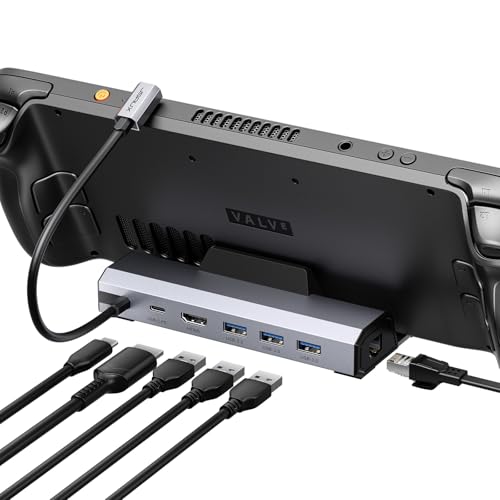
The JSAUX HB0603 is a different kind of dock from the other four picks, because it is built for handheld gaming consoles rather than laptops. It turns a Steam Deck, ROG Ally, Legion Go, or MSI Claw into a desktop machine: set the handheld in the dock, plug in a monitor, keyboard, mouse, and wired network, and the handheld becomes the computer at the center of a full desk setup.
The headline feature is the HDMI 2.1 output, which supports 4K at 120Hz, plus 1080p at 240Hz for high-refresh competitive play on a fast monitor. The dock also carries three USB-A 3.0 ports for peripherals, a gigabit Ethernet port for stable online play, and a USB-C power delivery input rated up to 100W, so the handheld charges while it plays on the big screen. Compatibility has edges: it is not made for the ROG Xbox Ally or Xbox Ally X, or for the Nintendo Switch or Switch 2, and it has no VRR or ALLM support, so players who rely on variable refresh rate should know that in advance.
Specs
| Feature | Detail |
|---|---|
| Model | HB0603 |
| Video output | HDMI 2.1 |
| Max display | 4K at 120Hz |
| Host charging | Up to 100W power delivery |
| Ethernet | Gigabit |
| USB ports | 3x USB-A 3.0 |
How to choose
Start with the host machine, because the dock can only use what the host offers. A Thunderbolt 5 or Thunderbolt 4 laptop gets the most from a Thunderbolt dock. A laptop with a plain USB-C port needs a USB-C dock with DisplayPort Alt Mode, and a handheld console needs a handheld dock like the JSAUX. Buying a Thunderbolt dock for a laptop without Thunderbolt wastes money, since the dock falls back to plain USB-C speeds.
Next, match the display outputs to the monitors already on the desk. Count the monitors, note each resolution and refresh rate, and check the dock can drive all of them at full speed at the same time. Charging power matters too: a dock that delivers 100W or 140W keeps most laptops charged during play, but the most powerful gaming laptops draw far more than any dock can supply through a single USB-C cable, so keep the original charger connected for demanding games.
Who should skip
Skip a docking station entirely if the setup is a desktop PC rather than a laptop or handheld. A desktop already has display outputs, USB ports, and Ethernet on the back of the tower, so a dock adds a link in the chain without adding anything useful. Skip Thunderbolt docks if the laptop has no Thunderbolt port, since the extra cost buys nothing. Skip the multi-monitor docks if the plan is a single monitor, and handheld-only players should skip the laptop docks in this guide, since a laptop dock has no cradle.
Frequently Asked Questions
Can a docking station replace a gaming laptop charger?
No, not for demanding games. A dock delivers up to 100W or 140W through one USB-C cable, which covers most laptops during light use and keeps them charged between sessions. A gaming laptop under full load can draw far more than that, so keep the original charger connected for heavy gaming.
Will a dock slow down a high-refresh gaming monitor?
It can, if the dock output is slower than the monitor. A monitor rated for 144Hz needs a dock output rated for the same refresh rate at the same resolution, plus a cable rated for that speed. Check the dock display figures port by port, because some docks run one port fast and the rest slower.
Do docking stations work with a Steam Deck or ROG Ally?
Some do, and the JSAUX HB0603 in this guide is built for handhelds, with a cradle shape, an HDMI 2.1 output, and charging for the handheld. Laptop docks can also work with handhelds over USB-C, but they lack the cradle and the handheld-focused layout.
Is Thunderbolt 5 worth it over Thunderbolt 4 for gaming?
Thunderbolt 5 moves data much faster, which helps when a fast external drive, a capture card, and multiple monitors share one link. Thunderbolt 4 already handles dual 4K monitors and fast storage well, so a Thunderbolt 4 dock is enough unless the setup pushes several high-bandwidth devices at once.
Final verdict
The right docking station depends on the machine at the center of the desk. The Anker Prime TB5 is the strongest all-around pick for a Thunderbolt gaming laptop, with the fastest link, the strongest charging, and the most flexible display outputs. The Razer Thunderbolt 4 Dock Chroma is the pick for a Razer desk that wants RGB lighting and 2.5 gigabit Ethernet, while the WAVLINK WL-UMD323 is the pick for a Windows rig with three or four monitors. The Anker Prime 14-in-1 is the easiest daily dock for a mixed laptop and console desk, and the JSAUX HB0603 is the pick for handheld consoles.
Related guides
More from Amazon
Programs that pair well with the guide above. Offers and eligibility are set by Amazon and may change.
Free shipping on eligible items, Prime Video and more. Eligible new members can start with a free trial.
Start a Prime free trialAd-free music streaming. Eligible new subscribers can start with a free trial.
Try Music Unlimited freeA Prime membership for ages 18-24 with a trial period. Eligibility is set by Amazon.
See Prime for Young AdultsAudiobooks and podcasts to listen to on the go. Eligible new members can start with a free trial.
Try Audible freeAs an Amazon Associate we earn from qualifying purchases.