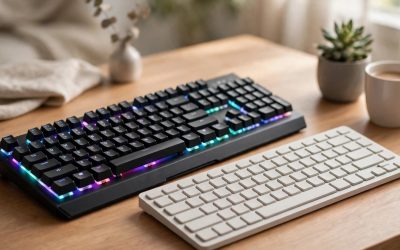
Short on desk space but torn between the two most popular compact layouts? The difference between a 65 percent and a 75 percent keyboard comes down to one row of keys. A 75 percent board keeps a dedicated function row along the top, while a 65 percent board drops that row and folds the F-keys into a layer. Everything else — the letter block, the arrow keys, the editing keys — is present on both, just packed a little tighter on the smaller board.
That single row changes more than the spec sheet suggests. It affects how wide the keyboard sits next to your mouse, how often you reach for a modifier key mid-game, and how the board feels during long work sessions. This guide compares the two layouts head to head, then recommends five real keyboards — three on the 65 percent side and two on the 75 percent side — across budget, mid-range and premium tiers.
As an Amazon Associate, we earn from qualifying purchases.
Table of Contents
- Quick Verdict
- What the Numbers Actually Mean
- Side-by-Side Comparison
- The Key Differences That Matter
- Best 65 Percent Keyboards
- Best 75 Percent Keyboards
- Who Should Choose Which
- FAQ
- Conclusion
Quick Verdict
Choose a 65 percent keyboard if mouse room is your top priority and you rarely touch the function keys outside of layered shortcuts. Choose a 75 percent keyboard if you use F-keys for gaming abilities, streaming controls, work shortcuts or media, and you want them on their own physical row. Neither layout is faster or more accurate than the other; the switches and polling rate decide that. The layout decision is purely about which keys you want under your fingers without holding a modifier.
What the Numbers Actually Mean
Keyboard percentages describe how much of a full-size board survives the cut. A full-size keyboard has roughly 104 keys, including a number pad, a function row and a navigation cluster. A 65 percent keyboard keeps about 67 to 68 keys: the full alphanumeric block, a compact arrow cluster, and a slim column or partial row of editing keys such as Delete. The function row and the number pad are gone, and keys like Home or Page Up usually share space through the Fn layer.
A 75 percent keyboard keeps about 82 to 84 keys. It restores the function row as a compressed strip along the top and squeezes the arrows and editing keys into the right edge of the main block. The result is a board that is noticeably shorter than a tenkeyless but still gives you F1 through F12 as real, single-press keys.
Both layouts drop the number pad, so both free up the same large chunk of desk on the right side. The footprint gap between the two is modest — roughly one key row of height and a small amount of width — but that gap is exactly where your mouse hand lives, which is why gamers argue about it.
Side-by-Side Comparison
| Feature | 65 Percent | 75 Percent |
|---|---|---|
| Typical key count | 67 to 68 keys | 82 to 84 keys |
| Function row | Layered through Fn | Dedicated physical row |
| Arrow keys | Dedicated | Dedicated |
| Number pad | No | No |
| Footprint | Smallest of the two | Slightly taller and wider |
| Mouse room | Maximum | Generous |
| Layer reliance | Frequent for F-keys and some editing keys | Rare, mostly for secondary functions |
| Common extras | Wireless options, compact cases | Knobs, media rollers, screens on some models |
| Best suited to | FPS gaming, small desks, travel | Mixed gaming and work, shortcut-heavy use |
The Key Differences That Matter
The function row is the whole argument
On a 75 percent board, F5 quicksaves, F1 through F4 switch loadouts or camera views, and Alt plus F4 closes a window, all without a second modifier. On a 65 percent board, every one of those actions becomes a two-key chord through the Fn layer. Plenty of players never miss the row. Plenty of others use it constantly in strategy games, MMOs, simulation titles and streaming software, and for them the layered workaround interrupts flow several times a minute.
Mouse room and aiming space
FPS and tactical shooter players sweep the mouse across wide arcs at low sensitivity. A 65 percent board is the narrower option, so it leaves the widest possible lane for those sweeps and lets the mouse sit closer to the keyboard hand, which many players find easier on the shoulder during long sessions. A 75 percent board still leaves far more room than a tenkeyless or full-size layout, so the difference is one of degree rather than kind — but competitive players tend to take every centimetre they can get.
Editing keys and daily work
Both layouts keep dedicated arrow keys, which separates them from 60 percent boards. The difference shows up in the editing cluster. Many 75 percent boards fit Delete, Home, End, Page Up and Page Down along the right edge or the function row. Many 65 percent boards keep Delete and push the rest onto the layer. If your day job involves spreadsheets, documents or code navigation, the 75 percent layout usually asks less of your memory.
Layers, firmware and remapping
Because 65 percent boards depend on layers, they benefit most from programmable firmware. Boards running QMK and VIA let you place the function row exactly where your fingers expect it, add macros, and store the layout on the keyboard itself. Mainstream gaming boards on both sides lean on vendor software instead. Neither approach is wrong, but if you choose 65 percent, strong remapping support is close to a requirement rather than a bonus.
Features follow the bigger layout
The extra row and slightly larger case give 75 percent models room for rotary knobs, media rollers and denser feature sets, and the layout has become the default for enthusiast boards with gasket mounts and hot-swappable sockets. The 65 percent category counters with the smallest wireless gaming boards and the most travel-friendly designs. Whichever side you pick, hot-swappable switches, PBT keycaps and multi-mode wireless are available — they are just distributed differently across price tiers.
Best 65 Percent Keyboards
Keychron V2 — the budget custom starting point
The Keychron V2 is the 65 percent board for buyers who want enthusiast firmware without the enthusiast tier. It runs QMK and VIA, so every key can be remapped and layered shortcuts live on the board rather than in software. The hot-swappable sockets accept both 3-pin and 5-pin MX switches, and the board ships with Mac and Windows keycaps in the box. It is wired only, which keeps the tier down and the connection simple.
Specs:
– Layout: 65 percent, 67 keys
– Switches: Keychron K Pro Brown tactile, hot-swappable
– Firmware: QMK and VIA programmable
– Connectivity: wired USB-C, 1000 Hz polling rate
– Case: ABS plastic with steel plate, tray mount
– Keycaps: OSA PBT double-shot, non-shine-through
– Backlighting: south-facing RGB
– Weight: about 855 g
HyperX Alloy Origins 65 — the solid mid-range gaming pick
The Alloy Origins 65 takes the opposite approach to the V2: no layers of firmware to learn, just a dense aluminum body and gaming-focused basics done well. The full metal frame gives it a planted feel that plastic boards do not match, and the double-shot PBT keycaps resist the shine that develops on ABS sets. HyperX NGENUITY software handles lighting and macros, and the detachable USB-C cable makes it easy to move between setups.
Specs:
– Layout: 65 percent, 68 keys
– Switches: HyperX Aqua tactile mechanical
– Body: full aircraft-grade aluminum frame
– Keycaps: double-shot PBT
– Connectivity: wired, detachable USB-C cable
– Software: HyperX NGENUITY for RGB and macros
– Extras: three adjustable keyboard tilt angles, Game Mode
– Model number: 56R64AA#ABA
Razer BlackWidow V3 Mini HyperSpeed — the premium wireless option
The BlackWidow V3 Mini HyperSpeed is the 65 percent pick for players who want a cable-free desk without giving up a low-latency connection. Razer HyperSpeed wireless handles gaming duty, Bluetooth pairs with up to three devices for everything else, and the rated battery life stretches to 200 hours, so charging is a rare event. The Yellow switches in this version are linear and silent, which suits shared rooms and late sessions.
Specs:
– Layout: 65 percent, 68 keys
– Switches: Razer Yellow mechanical, linear and silent
– Connectivity: HyperSpeed 2.4 GHz wireless, Bluetooth, wired USB-C
– Battery life: up to 200 hours
– Keycaps: doubleshot ABS
– Backlighting: Razer Chroma RGB per key
– Software: Razer Synapse for macros and lighting
– Model number: RZ03-03891900-R3M1
Best 75 Percent Keyboards
Keychron V1 — the budget board with a real function row
The Keychron V1 gives you the defining 75 percent advantage — a physical F-row — at a budget tier, and pairs it with the same QMK and VIA firmware as its smaller sibling. The knob version adds a rotary encoder for volume and zoom, and the silicone acoustic pad inside the case softens the typing sound. Like the V2, it is wired only and hot-swappable, so it doubles as an entry point into switch swapping.
Specs:
– Layout: 75 percent, 82 keys with rotary knob
– Switches: Keychron K Pro Brown tactile, hot-swappable
– Firmware: QMK and VIA programmable
– Connectivity: wired USB-C, 1000 Hz polling rate
– Keycaps: OSA PBT double-shot, non-shine-through
– Sound treatment: silicone acoustic pad inside the case
– Dimensions: 328.5 x 148.7 mm
– Compatibility: macOS and Windows keycaps included
Razer BlackWidow V4 75 Percent — the premium enthusiast-grade pick
The BlackWidow V4 75 Percent was Razer’s first hot-swappable keyboard, and it is built like a custom board: a gasket-mounted plate, an aluminum top case, and factory-lubed Orange tactile switches that can be pulled and replaced with any 3-pin or 5-pin set. The multi-function roller and media keys use the layout’s extra space well, the magnetic plush wrist rest is included rather than sold separately, and polling reaches up to 8000 Hz for players who chase input numbers. This Phantom White version carries the same hardware in the lighter finish.
Specs:
– Layout: 75 percent
– Switches: Razer Orange Tactile mechanical Gen-3, hot-swappable
– Polling rate: up to 8000 Hz
– Case: 5052 aluminum top case, gasket-mounted FR4 plate
– Keycaps: doubleshot ABS
– Controls: multi-function roller and media keys
– Extras: magnetic plush leatherette wrist rest included
– Connectivity: wired, detachable USB-C
– Model number: RZ03-05003600-R3U1
Who Should Choose Which
Choose 65 percent if you play FPS or other aim-heavy titles at low sensitivity, your desk is shallow or shared with a large mousepad, you travel with your board, or your games and work barely touch the function keys. The Keychron V2 covers the budget tier with real remapping, the HyperX Alloy Origins 65 is the sturdy mid-range gaming option, and the Razer BlackWidow V3 Mini HyperSpeed is the premium wireless route.
Choose 75 percent if you use F-keys for gaming abilities, macros, streaming or work shortcuts, you switch between gaming and productivity on the same desk, or you simply do not want to learn a layer system. The Keychron V1 keeps the tier low while adding a knob, and the Razer BlackWidow V4 75 Percent is the premium pick with hot-swappable switches and a metal case.
Skip both if you enter data into a number pad daily — look at full-size or 96 percent layouts instead — or if you are comfortable living entirely on layers and want the absolute smallest footprint, where a 60 percent board goes one step further.
FAQ
Is a 65 percent keyboard good for gaming?
Yes, for most genres it is an excellent gaming layout. It keeps dedicated arrow keys, frees the maximum desk space for mouse movement, and puts every essential gaming key on the main layer. The only friction is function-key actions, which need an Fn combination, so players whose games map abilities to F1 through F12 will feel the trade-off more than shooter players will.
What do you lose moving from 75 percent to 65 percent?
You lose the dedicated function row and, on many models, some always-on editing keys such as Home or Page Up. Key count drops from the low eighties to the high sixties. You do not lose the arrow keys, and with QMK or VIA firmware you can rebuild the missing functions on a layer exactly where you want them.
Does keyboard size affect gaming performance?
Layout size by itself does not change input latency or accuracy. Switch type, polling rate and firmware decide how the board responds. Size affects performance indirectly: a smaller board leaves more mouse room and can improve comfort over long sessions, while a function row can speed up games that use F-key commands. Pick the size around your games, then compare switches and polling within it.
Can you add a function row to a 65 percent keyboard with software?
You can recreate one on a layer, which is what most 65 percent owners do — holding Fn and pressing the number row gives you F1 through F12. QMK and VIA boards such as the Keychron V2 let you design that layer yourself and store it on the keyboard. What software cannot add is the physical feedback of a separate row, so heavy F-key users usually stay happier on a 75 percent board.
Conclusion
The 65 percent vs 75 percent decision is a single question in disguise: do you want a physical function row, or the smallest board that still keeps its arrow keys? If the F-row earns its space in your games and work, the 75 percent layout is the safer long-term buy, with the Keychron V1 at the budget tier and the Razer BlackWidow V4 75 Percent at the premium end. If your mouse hand needs the room more than your left hand needs F-keys, go 65 percent — the Keychron V2 for value and remapping, the HyperX Alloy Origins 65 for build quality, or the Razer BlackWidow V3 Mini HyperSpeed for wireless freedom. Either way, you keep a compact desk and give up nothing that matters for gaming.
Related guides
More from Amazon
Programs that pair well with the guide above. Offers and eligibility are set by Amazon and may change.
Free shipping on eligible items, Prime Video and more. Eligible new members can start with a free trial.
Start a Prime free trialAd-free music streaming. Eligible new subscribers can start with a free trial.
Try Music Unlimited freeA Prime membership for ages 18-24 with a trial period. Eligibility is set by Amazon.
See Prime for Young AdultsAudiobooks and podcasts to listen to on the go. Eligible new members can start with a free trial.
Try Audible freeAs an Amazon Associate we earn from qualifying purchases.