If your wrist aches after long sessions, the shape of the mouse is one thing you can change, and the two main routes are a sculpted ergonomic mouse that keeps a normal orientation, or a vertical mouse that turns the hand sideways. This list covers ten listings across both, with one runner-up that the title never calls ergonomic. For a gentler change, try the Razer Basilisk V3 or Logitech MX Master 4. For a bigger posture change, try a vertical model such as the Logitech Lift or ProtoArc EM11. None of this is medical advice.
Our Top Picks
 Razer Basilisk V3 Customizable RGB Wired Ergonomic GamingMouse2.96 x 5.12 x 1.67 Inches0.2 poundsCheck on Amazon
Top 3 picks at a glance
Quick picks
As an Amazon Associate we earn from qualifying purchases at no extra cost to you.
![Attoe Gaming Mouse with 5 D Rocker, Wireless Vertical Mouse with [24000 DPI] [12 Programmable Buttons], Computer Mouse for Gamer/PC/E-Sports/Laptop (Black)](https://m.media-amazon.com/images/I/41XVdqDE3aL._SL500_.jpg)





- Razer Basilisk V3 – wired sculpted shape with 11 buttons
- Logitech MX Master 4 – productivity-first ergonomic wireless
- Razer Pro Click V2 Vertical – gaming brand vertical with multi-device
- Logitech Lift – quiet vertical for smaller hands
- Logitech MX Vertical – larger vertical with three-computer switching
- ProtoArc EM11 NL – 58 degree vertical, USB-C rechargeable
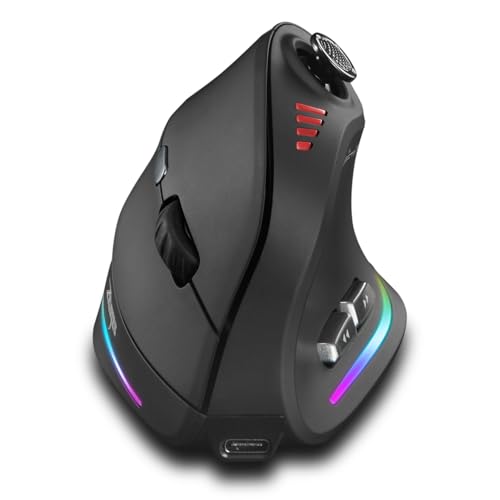
- Attoe – vertical with 12 buttons and a rocker
- TKMARS – vertical with joystick and 12 buttons
- Uineer – low-cost vertical with lighting
- Runner-up: Logitech G502 Hero – not called ergonomic
Comparison table
| Model | Shape | Key specs as stated | Best for |
|---|---|---|---|
| Razer Basilisk V3 | Ergonomic | Wired, 26K DPI, 11 buttons | Gaming with a sculpted shape |
| Logitech MX Master 4 | Ergonomic | Haptics, 8K DPI, USB-C | Mixed work and play |
| Razer Pro Click V2 Vertical | Vertical | 6 buttons, 2.4GHz, Bluetooth, wired | Gaming-brand vertical |
| Logitech Lift | Vertical | Bluetooth or Logi Bolt, 4 of 6 buttons custom | Quiet, small to medium hands |
| Logitech MX Vertical | Vertical | Rechargeable, 3-computer switching | Multi-computer desks |
| ProtoArc EM11 NL | Vertical, 58 degrees | 3 devices, 500mAh USB-C | Budget posture change |
| Attoe | Vertical | 24000 DPI, 12 buttons, 5D rocker | Many binds |
| TKMARS | Vertical | 12 buttons, joystick, 24000 DPI | Many binds |
| Uineer | Vertical | 3 devices, 7-color lighting | Low-cost trial |
| Logitech G502 Hero (runner-up) | Not stated | Wired, 25,600 DPI, 11 buttons, weights | Check the listing |
The ten mice, one by one
Razer Basilisk V3 Wired Ergonomic Gaming Mouse
The Basilisk V3 title calls it an ergonomic wired gaming mouse with Chroma RGB, a 26K DPI optical sensor, 11 programmable buttons, a HyperScroll tilt wheel and what Razer calls the fastest mouse switch (a seller claim). It keeps the normal orientation, so aiming feels familiar. The sculpted body and thumb area are the ergonomic part, though the title does not state weight or dimensions. Wired means no battery, but cable drag is on you. Eleven programmable buttons and a tilt wheel make it useful for MMO and strategy play, and Chroma lighting can be switched off in software. Because it is a larger sculpted shape, small hands should check the dimensions on the manufacturer page first, and compare it with the lighter picks below if you prefer a smaller body.
- Pros: Familiar orientation; 11 buttons; wired
- Cons: Right-hand shape likely (check the listing); weight not in the title
Who it’s for: Gamers who want a gentler ergonomic change. Who should skip it: Left-handers and anyone wanting vertical posture.
Logitech MX Master 4 Ergonomic Wireless Mouse
The MX Master 4 listing mentions haptic feedback, ultra-fast scrolling, 8K DPI any-surface tracking, quiet clicks, USB-C and Windows or macOS support, in graphite. It is a productivity mouse, and the title does not call it a gaming mouse, though many gamers use similar shapes. The sculpted body keeps a conventional posture. It is a comfortable choice for mixed work and play, but not for twitch shooters. The haptic feedback is a feature of the listing that you should check in the product description, since it works through software. Its USB-C port suggests charging by cable, and wireless use means checking for a receiver or Bluetooth. The 8K DPI claim sounds high, but most people will set far lower.
- Pros: Sculpted shape; quiet clicks; wireless with USB-C
- Cons: Not marketed for gaming; large size likely (check the listing)
Who it’s for: People who work and play on one mouse. Who should skip it: Competitive FPS players and small hands.
Razer Pro Click V2 Vertical Wireless Mouse
The title describes a six-button ergonomic vertical wireless mouse with a One Click AI Prompt button, Windows and Mac support, multi-device use over 2.4GHz, Bluetooth or USB-C wired mode, and Chroma RGB. It is a gaming brand product, but the feature list leans toward productivity. The USB-C wired mode helps when the battery is low. Check whether the AI Prompt button requires specific software or an account. Vertical mice reduce forearm rotation, and this one gives you the option of wired play through USB-C if you worry about latency. Because Razer mice normally rely on companion software for button mapping, read the listing for platform support, especially if you use a Mac.
- Pros: Vertical posture; three connection modes; wired fallback
- Cons: Only six buttons; AI prompt feature may not matter to gamers
Who it’s for: Gamers who also work and want vertical posture. Who should skip it: Players needing many binds.
Logitech Lift Vertical Ergonomic Wireless Mouse
The Lift connects over Bluetooth or the included Logi Bolt USB-A receiver, with quiet clicks, four of six buttons customizable, and Windows and Mac support, in graphite. The title does not state handedness; a separate listing is marked left-handed, so check which one you are buying. It is a vertical mouse for relaxed play and office tasks. The listing does not give a weight or tilt angle. Quiet clicks make it good for shared rooms, and Bluetooth lets it pair without a receiver on laptops. Because four of six buttons can be customized, plan your binds before you buy. Anyone with large hands should check the dimensions, because the Lift is generally positioned toward small to medium hands.
- Pros: Quiet clicks; Bluetooth or receiver
- Cons: Limited buttons; handedness not in the title
Who it’s for: Posture-first buyers who play casual games. Who should skip it: Fast-aiming shooter fans.
Logitech MX Vertical Wireless Mouse
The title says it reduces muscle strain (a seller claim), lets you move content between three Windows and Apple computers and is rechargeable, in graphite. It is the older vertical model beside the Lift. Vertical mice of this type are often fairly large, so check the listing dimensions against your hand. The multi-computer switching is its clearest benefit, and the rechargeable battery means no disposables. The title does not give the angle, weight or button count, so check the listing. Because it predates the Lift, you may see more used or renewed units, so confirm condition and warranty if you are buying second-hand. It is sensible for people who move between a work PC and a gaming rig.
- Pros: Three-computer switching; rechargeable
- Cons: Strain claim is marketing; few gaming features stated
Who it’s for: Desks with several computers. Who should skip it: Gamers who want programmable buttons.
ProtoArc EM11 NL Wireless Ergonomic Vertical Mouse
ProtoArc describes a 58 degree vertical design that supports a natural wrist posture, connection to three devices over Bluetooth or a 2.4G USB-A receiver, and a 500mAh USB-C rechargeable battery, in black. The 58 degree figure is the angle stated by the seller. It is a budget-friendly way to try vertical posture. Its title does not mention gaming features, so expect office-style buttons. Three-device pairing helps if you share it with a laptop, and the USB-C rechargeable battery avoids loose cells. The 500mAh figure is a capacity, not a runtime, so check the listing for battery life claims. Give it a few days before judging the posture, because vertical grips feel strange at first.
- Pros: Stated 58 degree angle; three devices; USB-C charging
- Cons: No gaming specs; lesser-known brand
Who it’s for: Trying vertical posture cheaply. Who should skip it: Players wanting many binds.
Attoe Wireless Vertical Gaming Mouse with 5D Rocker
Attoe’s listing says wireless vertical mouse, 24000 DPI, 12 programmable buttons and a 5D rocker, for gamers, PC, e-sports and laptops, in black. The button count is high for a vertical mouse, which makes it attractive for MMO or MOBA binds. DPI is marketing, and a 5D rocker is a lever you press in several directions, so check how it feels. The brand is not well known, so read reviews for sensor behaviour, scroll quality and how the receiver holds up. The rocker could be assigned to scroll, volume or macro functions, depending on the software. A wireless vertical mouse with this many buttons is unusual, so confirm that the battery and charging details are clear on the product page.
- Pros: 12 programmable buttons; vertical; wireless
- Cons: Little-known brand; 24000 DPI is a claim, not a feature to chase
Who it’s for: Vertical fans who need many binds. Who should skip it: Anyone wanting a proven brand.
TKMARS Wireless Ergonomic Vertical Gaming Mouse with Joystick
TKMARS adds a joystick, 12 programmable buttons, adjustable 24000 DPI, Bluetooth and 2.4G, a rechargeable battery and RGB, for PC, MacBook and laptops. It is close to the Attoe in concept. A joystick on a mouse is a niche feature that some players use for movement or camera control, and others find fiddly. Check the listing for the way it is placed. A rechargeable design, Bluetooth and 2.4G options and MacBook support suggest a broad compatibility pitch. As with other little-known brands, buyer reviews about durability matter more than the DPI headline. Because the joystick adds bulk, read photos to see whether your thumb can reach it without stretching.
- Pros: 12 buttons plus joystick; wireless
- Cons: Joystick may feel fiddly; brand little known
Who it’s for: Experimenters who like unusual controls. Who should skip it: Players wanting a simple layout.
Uineer Vertical Ergonomic Mouse
Uineer lists a wireless Bluetooth vertical mouse for three devices, switching between dual Bluetooth and 2.4G, rechargeable, with 7-color ambient lighting. It is the simplest vertical option and looks aimed at casual use. The title gives no DPI, button count or weight, so check the listing before assuming gaming suitability. It is a low-risk way to test vertical posture. The seven-color ambient lighting is cosmetic, and may be switched off or may drain the battery faster, so check the listing. Three-device pairing helps if you want one mouse for a laptop, tablet and PC. If you find that you like vertical posture, you can move to a more featured model later.
- Pros: Three-device switching; rechargeable; lighting
- Cons: Almost no specs in the title; not clearly for gaming
Who it’s for: Casual users trying vertical. Who should skip it: Players needing sensor details.
Runner-up: Logitech G502 Hero Wired Gaming Mouse (not called ergonomic)
The G502 Hero title lists a wired high-performance mouse with 25,600 DPI, RGB, adjustable weights, 11 programmable buttons and on-board memory for PC and Mac. It never uses the word ergonomic. It is here because it is a shaped, button-heavy gaming mouse that many players use, but we cannot say from the title that it suits sore wrists. Use it as a comparison point only. Adjustable weights let you change the mouse mass, which some people find useful for comfort, but the title does not give the weight or the shape details. If you already own one and have wrist discomfort, compare how it feels against the ergonomic options before spending more.
- Pros: Wired; adjustable weights; 11 buttons
- Cons: No ergonomic claim; weights add mass
Who it’s for: Players comparing a standard gaming mouse. Who should skip it: Anyone choosing mainly for comfort.
How we picked these
We kept listings that call themselves ergonomic or vertical and labeled the one that does not. Specs come only from each title. Nobody on the team used or measured these units, and comfort or strain claims are seller wording, not evidence. We split the list into sculpted and vertical designs because they change posture differently, and we left prices out because they change. Where a title leaves out weight, size or handedness, we say so instead of guessing, and the order of the list is not a ranking, since comfort is personal.
What to look for in an ergonomic gaming mouse
Sculpted versus vertical
A sculpted ergonomic mouse keeps your hand mostly flat and adds a thumb rest and curve. A vertical mouse turns the hand toward a handshake angle, which reduces forearm twisting but changes how you aim. Vertical designs have a longer adjustment period, and players often keep a regular mouse for fast games. If your pain is mild, start with the sculpted option, and move to vertical if comfort does not improve. Neither shape is proven to cure anything, and some people find a normal mouse fine once the desk is set up properly.
Grip and hand size
Palm grip works best with larger bodies and vertical designs. Claw grip suits a mid hump. Fingertip grip suits smaller, lighter mice. Measure hand length from wrist crease to middle fingertip and check the maker’s sizing guidance, because a mouse that is too small makes you clutch it, and one that is too big makes your hand stretch.
Buttons and software
Many binds help MMO players, but extra buttons can be pressed by accident, and a loose grip makes it worse. Check whether you can remap buttons and whether the software runs on your system. Gestures, rockers and joysticks are optional extras, and on-board memory lets you keep profiles in the mouse when the app is not installed. For a vertical mouse, thumb buttons sit higher than on a flat mouse, so look at photos to see whether you can reach them without lifting your grip.
Weight and sensitivity
Lowering sensitivity so you move more from the arm and less from the wrist is a common comfort step, and lighter mice reduce effort for some people. A heavier mouse can feel steadier, and adjustable weights, as on the G502 Hero listing, let you tune it. The titles rarely state weight, so check the product page. Big DPI numbers such as 24000 or 26K are not a reason to buy, because most players use far lower settings.
Connection and battery
Wired mice avoid charging, and the cable can tug at the hand if it catches. Wireless mice reduce cable drag but need a charging plan, and a USB-C wired fallback is handy. Bluetooth is fine for work; use 2.4GHz or wired for games. Multi-device switching, as on the ProtoArc and Uineer listings, suits a desk with a laptop and PC.
Desk, chair and posture
The mouse is only one part of the setup. Elbows near 90 degrees, forearms supported, wrists straight and a monitor at eye level all change how your hand feels. Fix those before blaming the mouse, and take regular breaks.
What the listing wording really means
Phrases such as reduces muscle strain, natural wrist posture or pain relief are marketing language. They describe an intent, and they do not promise any result for your hand. Concrete details are more useful: a stated angle, such as 58 degrees, a named connection type, a button count, or an explicit size category. Prefer listings that give numbers, and treat vague comfort claims as nothing more than a hint to look at the photos and reviews.
A two-week trial plan
| Days | What to do |
|---|---|
| 1 to 3 | Use the new mouse for browsing and office tasks only |
| 4 to 7 | Add slow or casual games, lower sensitivity |
| 8 to 14 | Try faster games; compare how your hand feels afterwards |
| Any time | Stop and seek advice if pain increases or you feel numbness |
Mistakes buyers make
- Expecting instant relief. A new shape needs a few days of adjustment, and vertical mice need longer. Aiming accuracy may drop at first, so lower your sensitivity during the trial.
- Treating ergonomic as medical. Titles describe design, not treatment. Pain claims are the seller’s wording, and persistent symptoms deserve professional advice.
- Ignoring desk setup. Chair, desk and monitor height matter; see our workspace ergonomics setup guide.
- Choosing the wrong size. Measure your hand first. A mouse that is too small makes you grip hard, and one that is too big makes you stretch.
- Skipping breaks. No mouse replaces rest, and stretching and short pauses matter at least as much as shape.
- Buying on button count. Twelve buttons are useless if you hit them by accident, and extra controls add bulk.
- Skipping the return policy. Fit is personal, so buy where returns are simple.
Verdict
For a small step, the Basilisk V3 and MX Master 4 are the clearest sculpted picks. For a posture change, the Lift, MX Vertical and ProtoArc EM11 are the most straightforward vertical options, with the Razer Pro Click V2 as the gaming-brand choice. Attoe, TKMARS and Uineer are lower-risk trials with less certain specs, so read buyer reviews before committing. Buy from a seller with an easy return window, because fit is personal and the only real test is wearing the mouse for a week. Programmers can also read our ergonomic mice for programming list.
Frequently asked questions
Can a vertical mouse help with wrist discomfort?
A vertical mouse turns the hand toward a handshake position, which reduces the twisting of the forearm that a flat mouse requires. Some people find that more comfortable, but it is not a medical treatment and results vary. Expect a learning period, and speak to a clinician if pain is persistent, spreading or comes with numbness.
Are vertical mice good for fast shooters?
They can be harder to aim with at first, because the grip and wrist movement differ from a normal mouse. Many players use them for strategy, office work or relaxed games, and keep a regular mouse for fast aiming. If you want to try one for shooters, give yourself a couple of weeks and lower your sensitivity.
Is an ergonomic shape the same as a vertical shape?
No. Vertical mice tilt the hand sharply. Ergonomic mice such as the Basilisk V3 or MX Master 4 keep a more conventional orientation but add a sculpted thumb rest and contoured body. Which suits you depends on grip and hand size, so read the listing and look at photos before choosing.
How important is mouse weight for wrist comfort?
Weight affects how much effort each movement takes, but comfort also depends on shape, grip, sensitivity and desk height. A lighter mouse can reduce effort for some people, while a heavier one feels steadier for others. The titles rarely give weights here, so check the product page and decide with your own hand in mind.
Should you stop gaming if your wrist hurts?
This site cannot give medical advice. Pain that is persistent, worsening or paired with tingling or numbness deserves a professional assessment. In the meantime, taking breaks, lowering mouse sensitivity, adjusting desk and chair height and trying a different mouse shape are common comfort steps that many players try.